
1. Introduction
The VEMER TUO WIFI BATTERIA Thermostat (Model VE788600) is an elegant and user-friendly smart programmable thermostat designed for efficient climate control in your home. It operates on batteries, eliminating the need for electrical wiring, and can be controlled via the free Clima Vemer app (available for Android and iOS), voice commands through Alexa and Google Home, or directly using its integrated touch keyboard. This Made in Italy product combines minimalist design with advanced features for heating and cooling systems.

Figure 1: Front view of the VEMER TUO WIFI BATTERIA Thermostat.
2. Setup and Installation
2.1. Battery Installation
The thermostat operates with 4 x 1.5V AA batteries. For optimal performance, use only alkaline batteries; rechargeable or zinc-carbon batteries are not recommended. Battery operation simplifies installation by removing the need for electrical connections.

Figure 2: Rear view of the thermostat showing the battery compartment.
2.2. Wiring and Wall Mounting
The thermostat is designed for easy wall mounting. Detailed instructions are provided in the user manual included in the package. For wiring, refer to the diagram below. The device is compatible with various boiler types (gas, condensing, pellet), heat pumps, and underfloor heating systems.
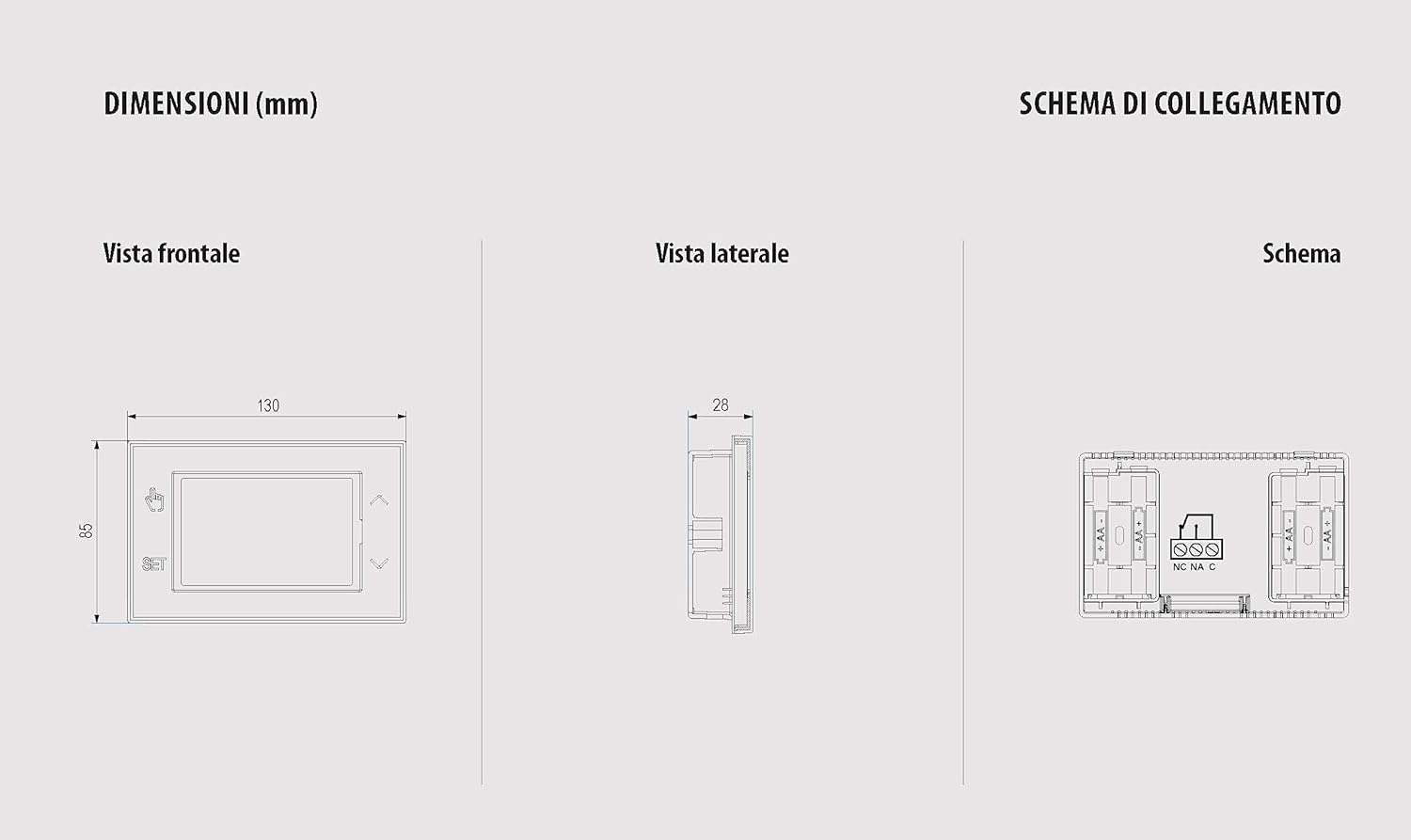
Figure 3: Dimensions and wiring diagram for the thermostat. Consult a qualified technician for electrical connections.
2.3. App Installation and Wi-Fi Configuration
To manage your thermostat remotely, download the free Clima Vemer app for Android or iOS. The thermostat operates exclusively on the 2.4 GHz Wi-Fi frequency band. Ensure this band is enabled on your router and that security settings are configured to WPA/WPA2 or WPA2 for a stable and secure connection. For detailed setup, refer to the app's guided procedure.

Figure 4: Wi-Fi network requirements and app configuration guidance.
Video 1: Demonstrates the Wi-Fi configuration process using the Vemer app for a similar thermostat model.
Video 2: Shows general Wi-Fi thermostat setup, including battery and Type-C power options.
3. Operating Instructions
3.1. Basic Operation and Display
The thermostat features a large, backlit touch screen display that activates upon touch. The backlight can be deactivated if preferred. The display shows the day of the week, time, measured temperature, and a graph of the active program, indicating the temperature level maintained for each hour of the day.

Figure 5: Close-up of the thermostat's touch screen display.
3.2. Weekly Programming
The thermostat offers flexible weekly programming with the ability to set 3 different temperature levels (T1, T2, T3) with a 1-hour resolution. Factory default settings are designed to meet most user needs, but you can customize programs via the app or directly on the device.
Video 3: Demonstrates manual programming of a Vemer Chronos thermostat, which shares similar programming logic.
3.3. App Control
The Clima Vemer app allows for remote control and programming of your thermostat. You can adjust settings, create custom programs, and monitor your home's climate from anywhere. The app also supports voice control via Alexa and Google Home.

Figure 6: Overview of smart control features via the app and voice assistants.
3.4. Heating and Cooling Modes
The thermostat is versatile and can be used for both heating and cooling systems, adapting to various domestic climate control setups.
3.5. Keyboard Lock and Administrator Function
For installations in public places or to prevent unauthorized changes, the thermostat includes a password-protected "keyboard lock" function. Additionally, the "local lock" (administrator function) allows device control exclusively through the app, disabling direct adjustments from the thermostat's keyboard.
3.6. Anti-freeze Function
When the thermostat is turned off for extended periods, it maintains a minimum temperature (anti-freeze temperature) to prevent freezing of the system and premises. This temperature is factory-set to 6°C but can be modified via advanced programming settings.
4. Maintenance
Regularly check the battery level. Replace the 4 x 1.5V AA batteries with new alkaline batteries when the low battery indicator appears on the display to ensure continuous operation and Wi-Fi connectivity.
5. Troubleshooting
If you encounter issues during Wi-Fi configuration or device operation, refer to the following common error codes:
- Err 1 and Err 4: Generic errors. Force close the app and retry the configuration procedure, ensuring correct Wi-Fi password entry and router settings.
- Err 2: Wi-Fi network password error. Re-enter the password carefully, avoiding extra spaces or special characters.
- Err 3: Wi-Fi network name error. Force close the app and retry the configuration, ensuring the correct network name is selected.
For further assistance, consult the tutorials on the Vemer website or contact technical support by emailing assistenza.tecnica@vemer.it. When contacting support, provide the exact device model, MAC address, Vemer app account, and a brief description of the issue.
6. Specifications
| Feature | Description |
|---|---|
| Model Number | VE788600 |
| Brand | VEMER |
| Power Source | Battery (4 AA 1.5V, not included) |
| Voltage | 3 Volts |
| Connectivity | Wi-Fi (2.4 GHz only) |
| Compatibility | Alexa, Google Home, Android, iOS |
| Display Style | LCD with blue backlight (deactivatable) |
| Mounting Type | Wall Mount |
| Product Dimensions | 13 x 9 x 3 cm |
| Item Weight | 248 g |
| Material | Plastic |
| Included Components | Thermostat, User Manual |
7. Warranty and Support
For any technical difficulties or questions regarding your VEMER TUO WIFI BATTERIA Thermostat, please contact Vemer technical assistance by sending an email to assistenza.tecnica@vemer.it. Ensure to include your device model, MAC address, Vemer app account, and a detailed description of the issue for prompt support.


