
1. Introduction
The EF ECOFLOW RIVER mini (wireless) is a compact and portable power station designed to provide reliable power for various devices, whether for outdoor adventures, travel, camping, or as a home backup solution. It features multiple output ports, fast charging capabilities, and can be recharged through various methods including wall outlets, car charging, and solar panels.

Image 1.1: The EF ECOFLOW RIVER mini (wireless) Portable Power Station, showcasing its compact design and various ports.
2. Product Overview and Components
The RIVER mini (wireless) comes with essential accessories to get you started. Familiarize yourself with the components included in the box:
- RIVER mini (wireless) solar power station
- AC Charging Cable
- Car Charging Cable
- Solar Charging Cable
- User Manual

Image 2.1: Visual representation of the EF ECOFLOW RIVER mini (wireless) and its included accessories: AC, Car, and Solar Charging Cables, and the User Manual.
3. Setup
3.1 Initial Charging
Before first use, it is recommended to fully charge your RIVER mini. The unit supports fast charging, reaching 0-80% in under 1 hour using X-Stream charging technology via a wall outlet.
3.2 EcoFlow App Setup
Enhance your experience by connecting your RIVER mini to the EcoFlow app. The app allows you to monitor, control, and access various settings and features, including OTA (Over-The-Air) firmware upgrades.
- Download the EcoFlow app from your device's app store.
- Follow the in-app instructions to pair your RIVER mini (wireless) power station.

Image 3.1: The EcoFlow app displayed on a smartphone, showing its interface for monitoring and controlling the RIVER mini.
4. Operation
4.1 Powering Devices
The RIVER mini (wireless) offers a variety of output ports to power up to 8 devices simultaneously. It can power devices up to 600W with X-Boost technology.
- AC Outlets: Two AC outlets provide 300W of continuous power.
- USB-C Port: One 100W USB-C port for fast charging compatible devices.
- USB-A Ports: Three USB-A ports providing 12W each.
- Car Output Port: One 12V, 126W car output port.
- Wireless Charging Pad: A 15W wireless charging pad on top for compatible smartphones and devices.

Image 4.1: A detailed view of the EF ECOFLOW RIVER mini's multiple output ports, including AC, USB-A, USB-C, Car Output, and the Wireless Charging Pad.
4.2 X-Boost Feature
The X-Boost feature allows the RIVER mini to power devices up to 600W, even though its rated output is 300W. This is achieved by lowering the voltage and current, making it suitable for resistive loads like hair dryers, electric kettles, and some power tools, but not for all 600W devices, especially those with strict voltage requirements.

Image 4.2: An infographic illustrating the X-Boost feature, enabling the RIVER mini to power devices up to 600W.
4.3 Device Compatibility
The RIVER mini is designed to power a wide range of electronics and small appliances. However, it cannot support devices that draw over 600W of power. Examples of devices typically not supported include:
- Microwaves
- High-power hair dryers
- Toaster ovens
- Electric kettles
- Electric fry pans
- High-power electric drills
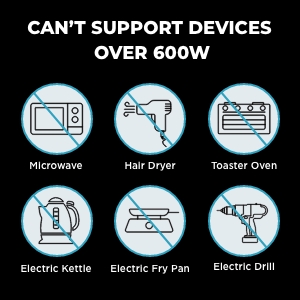
Image 4.3: Visual guide indicating types of high-wattage appliances that the RIVER mini cannot power.
5. Charging the Power Station
The RIVER mini offers multiple convenient ways to recharge its internal battery:
- Wall Outlet (AC Charging): Charges from 0-100% in approximately 1.5 hours.
- Car Charging: Charges from a 12V car outlet in approximately 3.5 hours.
- Solar Charging: Charges using compatible solar panels in 3-6 hours, depending on solar input and conditions.

Image 5.1: Illustration of the three primary charging methods for the RIVER mini: wall outlet, car charging, and solar panel charging.

Image 5.2: A comparison highlighting the faster solar recharging capability of the EcoFlow RIVER mini compared to other portable power stations.
6. Maintenance
Proper maintenance ensures the longevity and optimal performance of your RIVER mini (wireless) power station.
- Storage: Store the unit in a dry, well-ventilated area away from direct sunlight and extreme temperatures. For long-term storage, discharge the battery to about 30% and recharge to 80% every 3 months to prolong battery life.
- Cleaning: Use a dry, soft cloth to clean the exterior of the unit. Do not use harsh chemicals or abrasive materials.
- Temperature: Operate and store the unit within the recommended temperature ranges specified in the specifications section to prevent damage and ensure safety. The unit has built-in protections against extreme temperatures.
- Ventilation: Ensure the ventilation vents are clear of obstructions during operation to prevent overheating.
7. Troubleshooting
If you encounter issues with your RIVER mini, refer to the following common troubleshooting tips:
- Unit Not Turning On: Ensure the battery is charged. Connect the unit to a power source and attempt to turn it on.
- No Output from Ports: Check if the specific output (AC, DC, USB) is enabled. Some outputs may have dedicated power buttons. Ensure the device you are trying to power is within the unit's wattage limits.
- Display Issues: If the display shows incorrect percentages or behaves erratically, try restarting the unit. If the problem persists, contact customer support.
- Fan Noise: The unit's internal fan may activate during charging or heavy load to dissipate heat. This is normal operation. If the fan noise is excessively loud or constant during idle, ensure vents are clear and consider contacting support.
- Overload Protection: If the unit shuts down unexpectedly, it might be due to an overload. Disconnect the high-power device and restart the unit. Ensure the connected devices do not exceed the 300W continuous output or 600W X-Boost limit.
The RIVER mini is equipped with multiple safety features to protect against various conditions:
- Overload Protection
- Low Temperature Protection
- Low Voltage Protection
- Short Circuit Protection
- Over Temperature Protection
- Over Current Protection

Image 7.1: Icons depicting the various safety and reliability features integrated into the EcoFlow RIVER mini.
8. Specifications
| Feature | Specification |
|---|---|
| Brand | EF ECOFLOW |
| Model Name | MR421 |
| Wattage | 210 Watt-hours |
| Output Wattage | 210 Watt Hours |
| Running Wattage | 300 Watts |
| Power Source | AC/DC |
| Voltage | 110 Volts |
| Item Weight | 2.8 Kilograms (6.16 pounds) |
| Product Dimensions | 9.8"L x 5.5"W x 5.2"H |
| Battery Cell Type | Lithium Ion |
| Special Feature | Portable |
| Color | Black |
| Recommended Uses | Camping |

Image 8.1: Diagram illustrating the physical dimensions of the EF ECOFLOW RIVER mini (wireless) power station.
9. Warranty and Support
EF ECOFLOW provides a 24-month guarantee for the RIVER mini (wireless) power station. For any product inquiries, technical assistance, or warranty claims, please contact EF ECOFLOW customer support. Refer to the contact information provided in your product packaging or visit the official EF ECOFLOW website for the most up-to-date support details.
