
XTRONS TIE723L
XTRONS Universal Double Din Car Stereo User Manual
Model: TIE723L
1. Introduction
Thank you for choosing the XTRONS Universal Double Din Car Stereo. This manual provides detailed instructions for the installation, operation, and maintenance of your new car stereo system. Please read this manual thoroughly before using the product to ensure proper functionality and to maximize your user experience.

Figure 1.1: XTRONS Universal Double Din Car Stereo with its main display interface.
2. Key Features
- Operating System: Latest Android 13 OS for enhanced performance.
- Processor: Octa Core CPU (2x Cortex-A75 + 6x Cortex-A55) for fast and smooth operation.
- Memory & Storage: 2GB DDR4 RAM & 32GB SSD ROM.
- Display: 7-inch Touch Screen with 1024x600 resolution, IPS Technology, and Dual-layer G+G Screen for clear and responsive interaction.
- Connectivity: Built-in 4G LTE (supports 99% of carriers worldwide), 5GHz WiFi, and Bluetooth 5.0.
- Smartphone Integration: Built-in Wireless CarPlay and Wireless Android Auto.
- Audio: Built-in DSP (Digital Sound Processor) for cinematic audio quality, Coaxial Audio Output, and TDA7388 Amplifier Chip.
- Navigation: Built-in GPS for reliable navigation.
- Multimedia: 2K Video Playback, Screen Mirroring, Split Screen multitasking, and Picture-in-Picture (PiP) mode.
- Camera Support: Supports AHD Camera Input for clear reversing views.
- Radio: Built-in FM/AM Radio with RDS (Radio Data System).
- Hardware: Automotive Grade Hardware for durability and reliability.

Figure 2.1: Overview of XTRONS PE Series key features including Octa-core processor, Android 12, DSP, CarPlay, Android Auto, RAM, ROM, screen type, and camera support.

Figure 2.2: The car stereo supports dual UI themes for a personalized user experience.
3. Package Contents
Please check the package for the following items:
- 1 × Main Unit (Car Stereo)
- 1 × ISO Wiring Harness
- 1 × RCA Cable
- 1 × GPS Antenna
- 1 × 4G Antenna
- 2 × USB Cable
- 1 × CANbus Cable
- 1 × Camera Cable
- 2 × Fitting Kits
- 8 × Screws
- 1 × User Manual
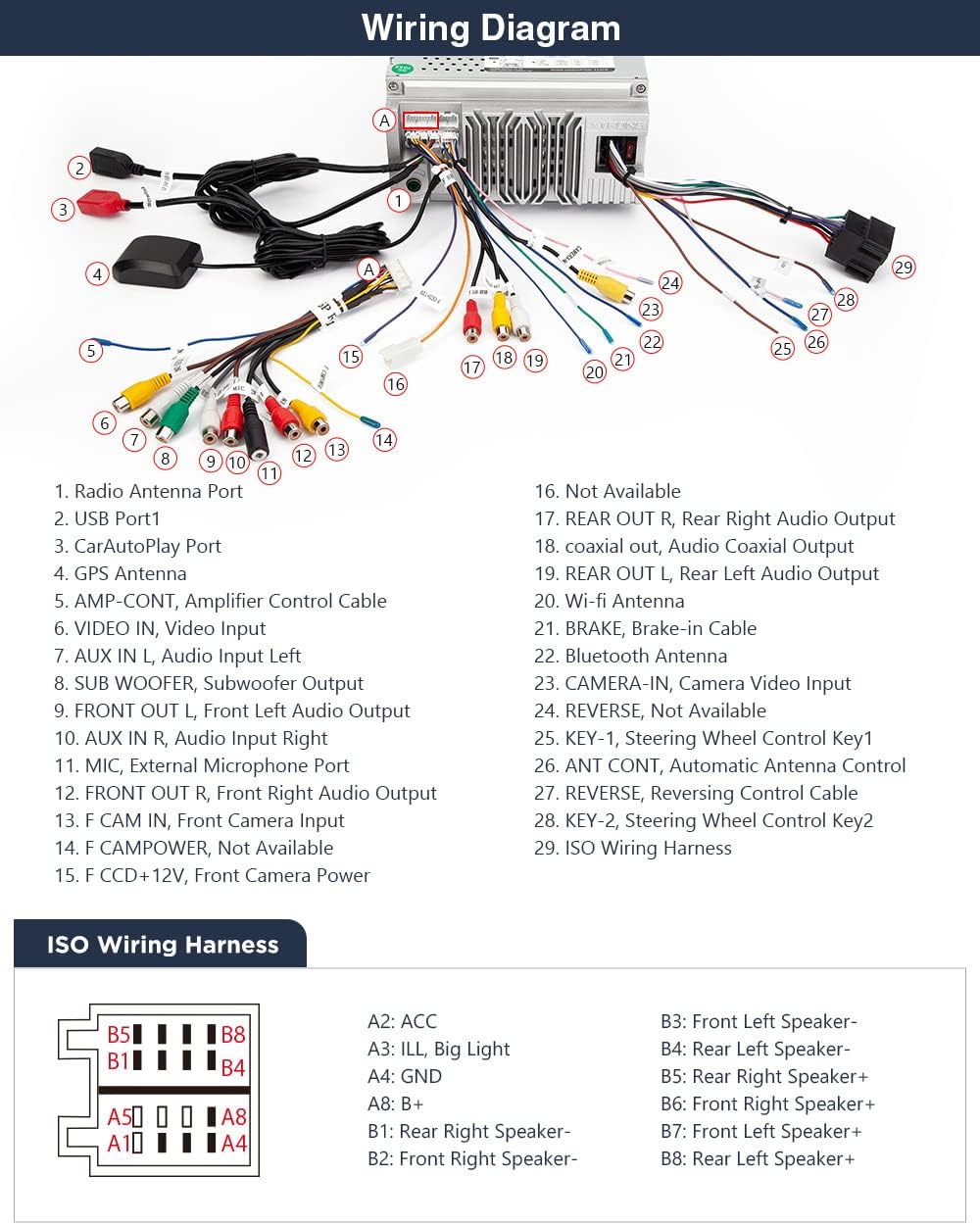
Figure 3.1: All included accessories and the main unit with its dimensions.
4. Setup and Installation
Professional installation is highly recommended for this product. Incorrect wiring can cause damage to the unit or your vehicle. Refer to the wiring diagram provided and consult a qualified technician if you are unsure about any steps.
4.1 Wiring Diagram
The following diagram illustrates the connections for the XTRONS car stereo:

Figure 4.1: Detailed wiring diagram for the XTRONS car stereo, showing all input and output connections.
4.2 Installation Steps (General)
- Preparation: Disconnect the vehicle's battery before starting any electrical work.
- Mounting: Use the provided fitting kits and screws to securely mount the main unit into your vehicle's double DIN slot.
- Wiring: Connect the ISO Wiring Harness, RCA cables, GPS antenna, 4G antenna, USB cables, CANbus cable, and camera cable according to the wiring diagram. Ensure all connections are secure.
- Testing: Reconnect the battery and perform initial tests to ensure the unit powers on and basic functions are working before fully reassembling your dashboard.
5. Operating Instructions
5.1 Power On/Off and Basic Navigation
Press the power button on the front panel to turn the unit on or off. The intuitive touch screen interface allows for easy navigation through menus and applications. The unit features multi-color LED lights on the side buttons for enhanced visibility.
Video 5.1: Demonstration of the XTRONS 7 Inch Android Octa Core Double Din Car Stereo's smart UI, multi-color LED lights, CarPlay, Android Auto, 4G connectivity, advanced EQ, Picture-in-Picture mode, AHD camera input, FM/AM radio with RDS, and built-in GPS.
5.2 Wireless CarPlay & Android Auto
Connect your iPhone or Android smartphone wirelessly via Bluetooth or USB to access CarPlay or Android Auto. This allows you to use supported apps like navigation, music, and messaging directly on the car stereo screen. Voice control (Siri/Google Assistant) is supported for hands-free operation.

Figure 5.1: Wireless CarPlay and Android Auto interfaces shown on the car stereo display, highlighting voice control capabilities.
Video 5.2: This video demonstrates the XTRONS TIE series, highlighting the premium G+G screen, global 4G LTE network access, dual UI themes, wireless CarPlay and Android Auto, screen mirroring, built-in DSP, radio with RDS, and dual band WiFi.
5.3 Digital Sound Processor (DSP)
The built-in DSP allows for precise audio customization. Adjust the 30-band graphic equalizer, balance, delay, and filter settings to optimize your music listening experience.

Figure 5.2: The customized DSP chip interface showing options for smart bass, loudness, equalizer, balance, and delay settings.
5.4 GPS Navigation
The unit comes with built-in GPS. You can install your preferred Android-compatible navigation software to get real-time directions and explore maps.
5.5 4G LTE and WiFi Connectivity
With built-in 4G LTE support, you can insert a SIM card (Micro-SIM, not included) to access the internet directly without an external dongle. The 5GHz WiFi provides fast internet speed and flexibility for online activities.

Figure 5.3: Illustration of the global 4G LTE feature, showing the SIM card slot for direct internet access.
5.6 Split Screen and Picture-in-Picture (PiP)
Multitask efficiently with the split screen feature, allowing you to run two apps side by side. The Picture-in-Picture (PiP) mode enables consistent video watching while browsing other applications.

Figure 5.4: Demonstrates the split screen functionality and video playback in Picture-in-Picture mode.
6. Maintenance
- Cleaning: Use a soft, dry cloth to clean the screen and exterior. Avoid abrasive cleaners or solvents.
- Software Updates: Periodically check the XTRONS website or the unit's settings for available software updates to ensure optimal performance and access to new features.
- Temperature: Avoid exposing the unit to extreme temperatures, direct sunlight for prolonged periods, or excessive humidity.
7. Troubleshooting
| Problem | Possible Cause | Solution |
|---|---|---|
| Unit does not power on. | Incorrect wiring, blown fuse, vehicle battery issue. | Check wiring connections, inspect vehicle fuses, ensure battery is charged. Consult a professional if needed. |
| No sound output. | Volume too low, incorrect audio settings, speaker wiring issues. | Increase volume, check DSP/equalizer settings, verify speaker connections. |
| GPS signal lost or inaccurate. | GPS antenna obstructed or improperly installed. | Ensure GPS antenna has a clear view of the sky and is securely connected. |
| Touch screen unresponsive. | Temporary software glitch. | Perform a soft reset (refer to manual for specific reset procedure if available, or power cycle the unit). |
| CarPlay/Android Auto not connecting. | Bluetooth/USB connection issue, phone settings. | Ensure Bluetooth is on and paired, try a different USB cable, check phone's CarPlay/Android Auto settings. |
8. Specifications
| Feature | Specification |
|---|---|
| Model Number | TIE723L |
| Display Size | 7 Inches |
| Operating System | Android 13 |
| Processor | Octa Core |
| RAM | 2GB DDR4 |
| ROM | 32GB SSD |
| Connectivity | Wi-Fi (5GHz), USB, 4G LTE |
| Special Features | Touchscreen, Bluetooth 5.0, Built-in DSP, CarPlay, Android Auto, Split Screen |
| Audio Output Mode | Stereo |
| Mounting Type | Panel Mount |
9. Warranty and Support
9.1 Warranty Information
This product is covered by the manufacturer's warranty. Please refer to the warranty card included in your package or visit the official XTRONS website for detailed warranty terms and conditions.
9.2 Customer Support
For technical assistance, troubleshooting, or any product-related inquiries, please contact XTRONS customer support through their official website or the contact information provided in your product packaging. Ensure you have your model number (TIE723L) and purchase details ready when contacting support.
Related documentsTIE723L


Ask a question about this manual
Ask about setup, troubleshooting, compatibility, parts, safety, or missing instructions. Manuals+ will review the question and use this page’s manual context to help answer it.