
1. Introduction
Thank you for choosing the MasterChef Digital Food Scale. This high-precision kitchen scale is designed to provide accurate measurements for all your cooking and baking needs. Featuring a durable tempered glass surface and an easy-to-read LCD display, it offers convenience and reliability in your kitchen.

Figure 1: MasterChef Digital Food Scale
2. Product Features
- High Precision: Equipped with high-precision sensors for exact weight measurements down to 0.1oz (1g).
- Multiple Units: Easily switch between 6 digital readings: Grams (G), Kilograms (KG), Liters (L), Milliliters (ML), Ounces (OZ), and Pounds:Ounces (LB:OZ).
- Tempered Glass Surface: Large, durable, and wear-resistant tempered glass measuring surface for maximum safety and easy cleaning.
- LCD Display: Clear and easy-to-read LCD display for quick measurement readings.
- Auto Switch Off: Automatically turns off after 2 minutes of inactivity to preserve battery life.
- Tare Function: Allows you to zero out the weight of a container or previous ingredients.

Figure 2: High precision measurement of ingredients.
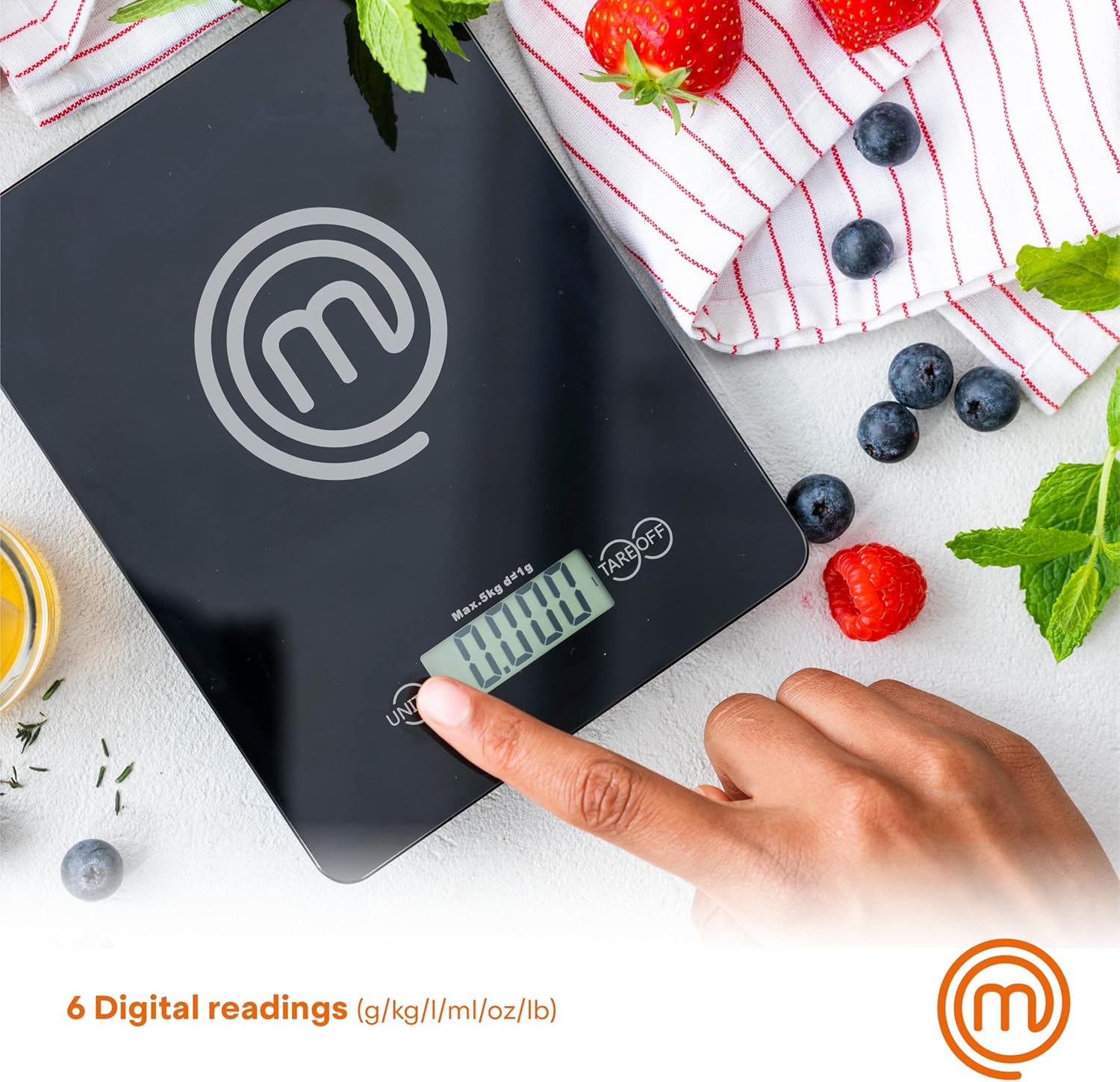
Figure 3: Switching between 6 digital measurement units.
3. Setup
3.1. Battery Installation
- Locate the battery compartment on the underside of the scale.
- Open the battery compartment cover.
- Insert the required batteries (typically AAA, refer to packaging for exact type) ensuring correct polarity (+/-).
- Close the battery compartment cover securely.
3.2. Placement
Place the scale on a hard, flat, and stable surface to ensure accurate readings. Avoid placing it on soft or uneven surfaces, or near strong electromagnetic fields.
4. Operating Instructions
4.1. Turning On/Off
- To turn on the scale, gently press the center of the weighing surface or the 'TARE/OFF' button. The LCD display will show '0' or '0.0'.
- To turn off the scale, press and hold the 'TARE/OFF' button for a few seconds until the display turns off. The scale will also automatically turn off after 2 minutes of inactivity.
4.2. Changing Measurement Units
Press the 'UNIT' button to cycle through the available measurement units: G, KG, L, ML, OZ, LB:OZ. Select the desired unit before weighing.
4.3. Tare Function
The Tare function allows you to subtract the weight of a container or to weigh multiple ingredients consecutively without removing the previous one.
- Place an empty container on the scale. The display will show its weight.
- Press the 'TARE/OFF' button. The display will reset to '0'.
- Add your ingredient to the container. The display will show only the weight of the ingredient.
- Repeat step 2 and 3 for additional ingredients.

Figure 4: Utilizing the Tare function.
4.4. Weighing Ingredients
- Ensure the scale is on and displaying '0'.
- Place the item(s) to be weighed directly onto the tempered glass surface or in a container (using the Tare function).
- Read the weight displayed on the LCD screen.

Figure 5: Large safety glass surface for weighing.
5. Maintenance and Care
- Cleaning: After each use, wipe the scale with a soft, damp cloth and a mild washing liquid. Do not immerse the scale in water or hold it under a running tap, as this can damage the internal electronics.
- Storage: Store the scale in a dry place at room temperature. Avoid extreme temperatures or high humidity.
- Handling: Handle the scale with care. Avoid dropping it or subjecting it to strong impacts, which can affect its accuracy or damage the glass surface.
- Battery Replacement: Replace batteries when the display indicates low power (e.g., 'Lo' message).
6. Troubleshooting
| Problem | Possible Cause | Solution |
|---|---|---|
| Scale does not turn on. | Dead or incorrectly installed batteries. | Check battery polarity or replace batteries. |
| Display shows 'Lo'. | Low battery power. | Replace batteries. |
| Display shows 'Err' or 'O-Ld'. | Overload. Weight exceeds maximum capacity. | Remove item immediately. Do not exceed 11 lbs (5 kg). |
| Inaccurate readings. | Uneven surface, scale not tared, or external interference. | Place on a flat, stable surface. Tare the scale before use. Avoid strong vibrations or air currents. |
7. Specifications
| Feature | Detail |
|---|---|
| Brand | MasterChef |
| Model Number | Digital Food Scale |
| Color | Black |
| Material | Tempered Glass |
| Weight Limit | 11 Pounds (approx. 5 kg) |
| Readout Accuracy | 0.1 oz / 1 g |
| Display Type | LCD |
| Product Dimensions | 7 x 5.5 x 1 inches |
| Item Weight | 14.4 ounces |
| Special Features | Large Display, Non-Slip Platform, Auto Shut Off |

Figure 6: Kitchen Scale Measurements.
8. Warranty and Support
For warranty information and customer support, please refer to the product packaging or visit the official MasterChef website. Keep your purchase receipt as proof of purchase for any warranty claims.
For further assistance, you may contact MasterChef customer service through their official channels.