
Important Safety Instructions
- Read all instructions before installing and using this appliance.
- This appliance is intended for domestic use only.
- Do not immerse the appliance in water or other liquids.
- Ensure the power supply voltage matches the rating label on the appliance.
- Keep children away from the appliance during operation.
- Do not operate the appliance with a damaged cord or plug, or after the appliance malfunctions or has been damaged in any manner.
- Installation should be performed by a qualified electrician, especially for hardwired connections.
- The appliance is IP44 waterproof, but avoid direct water jets or prolonged submersion.
- Do not use the towel warmer to dry items other than towels or clothing suitable for drying on a heated surface.
- Always ensure the appliance is properly mounted to a sturdy wall structure.
Product Overview
The wph Heated Towel Warmer Drying Rack is designed to provide warm, dry towels and help reduce moisture in your bathroom. Constructed from durable aluminum alloy, it features five horizontal bars for hanging towels and a convenient top shelf for additional storage. It offers adjustable temperature and time settings for personalized use.
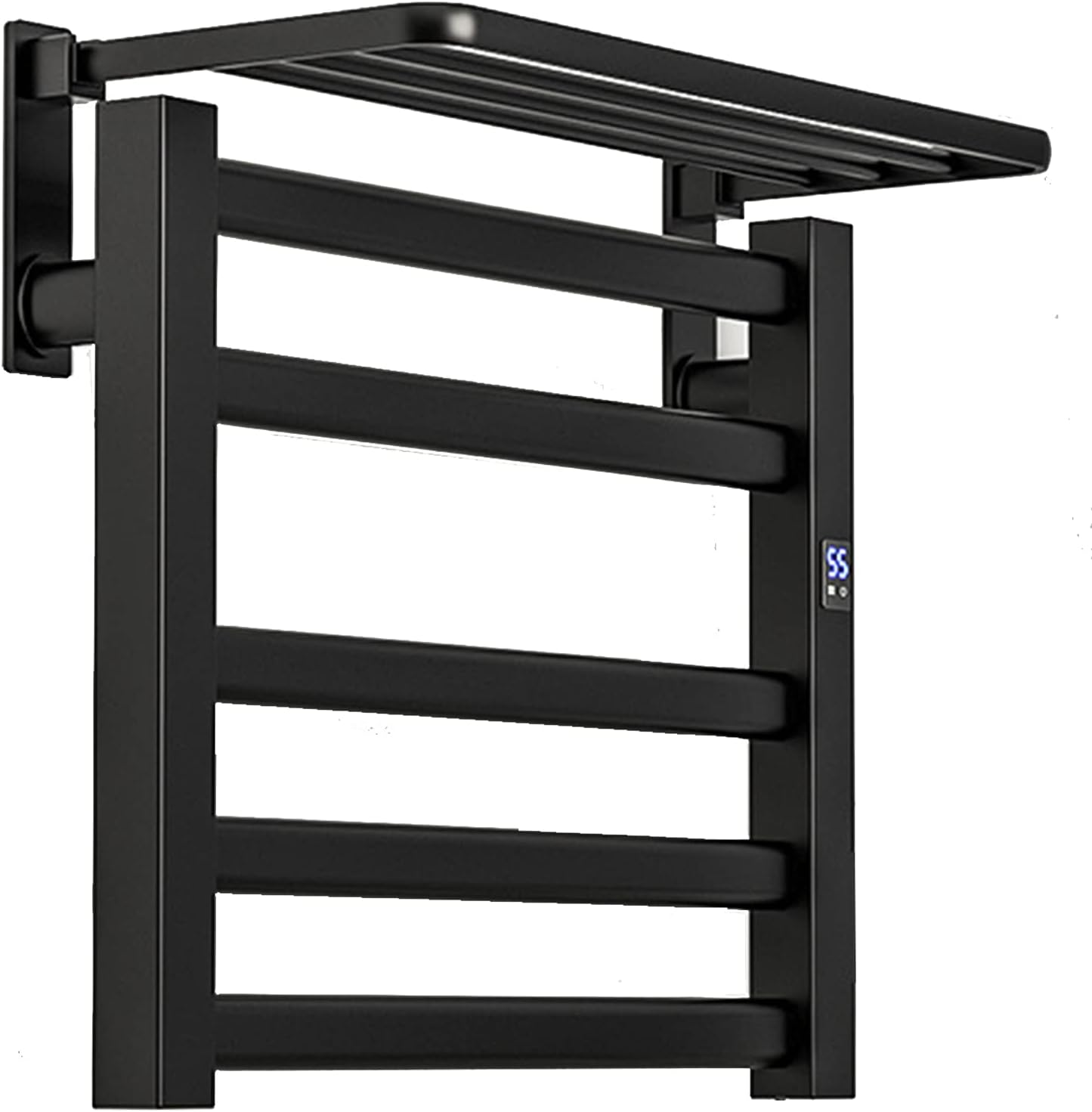
Image: Front view of the wph Heated Towel Warmer Drying Rack, showcasing its black finish, five heating bars, and top shelf.
Package Contents
Please check the package contents upon receipt to ensure all items are present and undamaged.
- 1x wph Heated Towel Warmer Rack
- Installation accessories (screws, wall anchors, etc.)
Specifications
| Product Name | Towel warmer with top shelf |
| Material | Aluminum Alloy |
| Color | Black (also available in White) |
| Product Size | 500mm x 450mm x 220mm (Width x Height x Depth) |
| Bearing Capacity | 38 KG |
| Power | 100W |
| Voltage | 110V / 220V (model dependent, check label) |
| Waterproof Grade | IP44 |
| Temperature Range | 30°C - 70°C (Adjustable) |
| Default Constant Temperature | 55°C ± 5°C (131°F) |
| Heating Time | 5-10 minutes to reach operating temperature |
| Timer Function | 1-8 hours |
| Outgoing Line Direction | Right outgoing line |
| Mount Type | Wall Mounted |
| Power Type | Plug-in or Hardwired |

Image: Diagram illustrating the dimensions of the towel warmer: 50cm width, 45cm height (main body), 16cm bracket height, and 20cm shelf depth.
Installation and Setup
The wph Heated Towel Warmer is designed for wall-mounted installation and offers two power connection options: plug-in or hardwired.

Image: Visual representation of the two installation options: Plug-in, showing the cord connected to a wall outlet, and Hardwired, indicating the power connection routed within the wall for a concealed look.
General Mounting Steps (for both options):
- Choose Location: Select a suitable wall location in your bathroom, ensuring it is away from direct water spray and has access to a power source. Consider the height for easy access to towels.
- Mark Drilling Points: Use the provided mounting template (if included) or measure the distances between the mounting brackets on the unit. Mark the drilling points on the wall.
- Drill Holes: Drill holes at the marked points using an appropriate drill bit for your wall type.
- Insert Wall Anchors: Insert the provided wall anchors into the drilled holes.
- Attach Mounting Brackets: Secure the mounting brackets to the wall using the screws.
- Mount Towel Warmer: Carefully align the towel warmer with the mounted brackets and secure it in place.
Hardwired Installation (Professional Installation Recommended)
For a seamless and concealed appearance, the towel warmer can be hardwired directly into your electrical system. This requires routing the power cable into the wall cavity to an available power source. It is strongly recommended that a qualified electrician performs hardwired installations to ensure safety and compliance with local electrical codes.
- Ensure the main power supply to the installation area is turned off at the circuit breaker.
- Connect the towel warmer's electrical wires to the household wiring according to local electrical codes and the wiring diagram provided in the full installation guide (if applicable).
- Secure all connections within a junction box inside the wall.
- Complete the mounting steps as described above.
- Once installation is complete, restore power at the circuit breaker.
Plug-in Installation
For a simpler setup, the towel warmer can be plugged into a standard electrical outlet.
- Complete the general mounting steps as described above.
- Ensure the towel warmer is securely mounted to the wall.
- Plug the power cord into a grounded electrical outlet.
- Ensure the outlet is not exposed to direct water spray.
Operating Instructions
The wph Heated Towel Warmer features an intuitive touch control panel for easy operation.

Image: Close-up of the towel warmer's touch control panel, showing icons for temperature adjustment (30-70 degrees Celsius) and a timer function (1-8 hours).
Power On/Off
- To turn the unit ON, touch and hold the power button icon on the control panel for 3-5 seconds. The display will illuminate.
- To turn the unit OFF, touch and hold the power button icon again for 3-5 seconds. The display will turn off.
Temperature Adjustment
- Once the unit is on, touch the temperature icon (thermometer symbol) on the control panel.
- Each touch will cycle through the available temperature settings from 30°C to 70°C. Select your desired temperature.
- The built-in smart chip will maintain the set temperature, with a default constant temperature of 55°C (131°F) if no specific setting is chosen.
Timer Function
- With the unit on, touch the timer icon (clock symbol) on the control panel.
- Each touch will cycle through the available timer settings from 1 to 8 hours.
- The unit will operate for the selected duration and then automatically turn off.
Maintenance
Cleaning
To maintain the appearance and functionality of your towel warmer, follow these cleaning guidelines:
- Always ensure the towel warmer is turned off and completely cool before cleaning.
- Use a soft, dry cloth to wipe down the surfaces.
- For stubborn marks, a slightly damp cloth with mild soap can be used, followed by drying with a soft, dry cloth.
- Do not use abrasive cleaners, harsh chemicals, or scouring pads, as these can damage the finish.

Image: Illustration highlighting the IPX4 waterproof rating, indicating protection against splashing water from any direction, suitable for damp bathroom environments.
Troubleshooting
If you encounter any issues with your wph Heated Towel Warmer, please refer to the following common problems and solutions:
- Unit does not turn on:
- Check if the power cord is securely plugged into a working outlet (for plug-in models).
- Verify that the circuit breaker for the outlet or hardwired connection is not tripped.
- Ensure you are pressing and holding the power button for 3-5 seconds to activate the unit.
- Towel warmer is not heating:
- Confirm the unit is powered on and the display is active.
- Check the temperature setting; ensure it is set above the ambient room temperature.
- Allow 5-10 minutes for the unit to reach its operating temperature.
- Temperature display is not working:
- Ensure the unit is powered on.
- If the issue persists, try turning the unit off and on again.
- Unit is making unusual noises:
- The unit is designed for silent heating. If you hear unusual noises, turn off the unit and contact customer support.
Energy Saving Tips
The wph Heated Towel Warmer utilizes carbon fiber heating technology, which is designed to be energy-efficient. To further optimize energy consumption:
- Utilize the timer function to operate the unit only when needed.
- Set the temperature to the lowest comfortable setting.
- Ensure towels are not excessively wet before placing them on the warmer to reduce drying time.

Image: Graphic illustrating the energy efficiency of the towel warmer, indicating that 12 hours of operation consumes approximately 1 kWh of electricity.
Customer Support
For any questions, concerns, or assistance with your wph Heated Towel Warmer, please contact our customer service team. We are committed to helping you resolve any issues within 24 hours.
Please refer to your purchase documentation or the retailer's website for specific contact details.