
Fujifilm X-T30 II Body - Black
Fujifilm X-T30 II Body - Black User Manual
Model: X-T30 II Body - Black
Product Overview
The Fujifilm X-T30 II is a versatile mirrorless digital camera designed for both stills photography and videography. It combines advanced imaging technology with a classic, vintage aesthetic, making it suitable for photographers of all skill levels.
Key features include a 26.1MP back-illuminated X-Trans CMOS 4 sensor and X-Processor 4 imaging engine, delivering exceptional performance, fast autofocusing, and vibrant color reproduction. The camera offers enhanced autofocus tracking for moving subjects and improved low-light focusing down to -7EV. It supports 4K video recording at 30 frames-per-second and 1080p at 240fps for slow-motion effects. Users can also utilize 18 Film Simulation modes and fine-tune in-camera settings for a distinctive visual style. Connectivity options like Wi-Fi and Bluetooth enable easy sharing of images.

Front view of the Fujifilm X-T30 II camera body in black, showcasing the lens mount and main controls.
Setup Guide
1. Unpacking and Initial Inspection
Upon opening the package, ensure all components are present and in good condition. The Fujifilm X-T30 II package typically includes:
- Fujifilm X-T30 II Camera Body
- Battery
- Charging Cord
- Neck Strap
If any items are missing or damaged, please contact your retailer or Fujifilm support.
2. Battery Installation and Charging
The camera uses a Lithium Ion battery. Before first use, fully charge the battery.
- Locate the battery compartment on the bottom of the camera.
- Slide the battery compartment latch to open the cover.
- Insert the battery with the contacts facing the correct direction, as indicated inside the compartment.
- Close the battery compartment cover until it clicks securely.
- Connect the charging cord to the camera and a power source to charge the battery. The charging indicator will show the charging status.

Bottom view of the camera, showing the battery and memory card compartment.
3. Memory Card Insertion
The camera supports SD/SDHC/SDXC (UHS-I) memory cards. A memory card is required to save photos and videos.
- Open the battery/memory card compartment cover.
- Insert the memory card into the slot with the label facing the correct direction until it clicks into place.
- Close the compartment cover securely.
4. Attaching a Lens
The X-T30 II uses the FUJIFILM X-mount. This camera is sold as body-only, so a compatible lens must be attached.
- Remove the body cap from the camera and the rear cap from the lens.
- Align the white mounting marks on the lens and the camera body.
- Mount the lens by rotating it clockwise until it clicks into place.
To remove the lens, press the lens release button on the camera body and rotate the lens counter-clockwise.
5. Initial Power On and Date/Time Setting
After installing the battery and memory card, turn on the camera using the ON/OFF switch. Follow the on-screen prompts to set the date, time, and language.
Operating Instructions
1. Camera Controls and Dials
The X-T30 II features intuitive dial-based controls for quick adjustments to exposure settings.
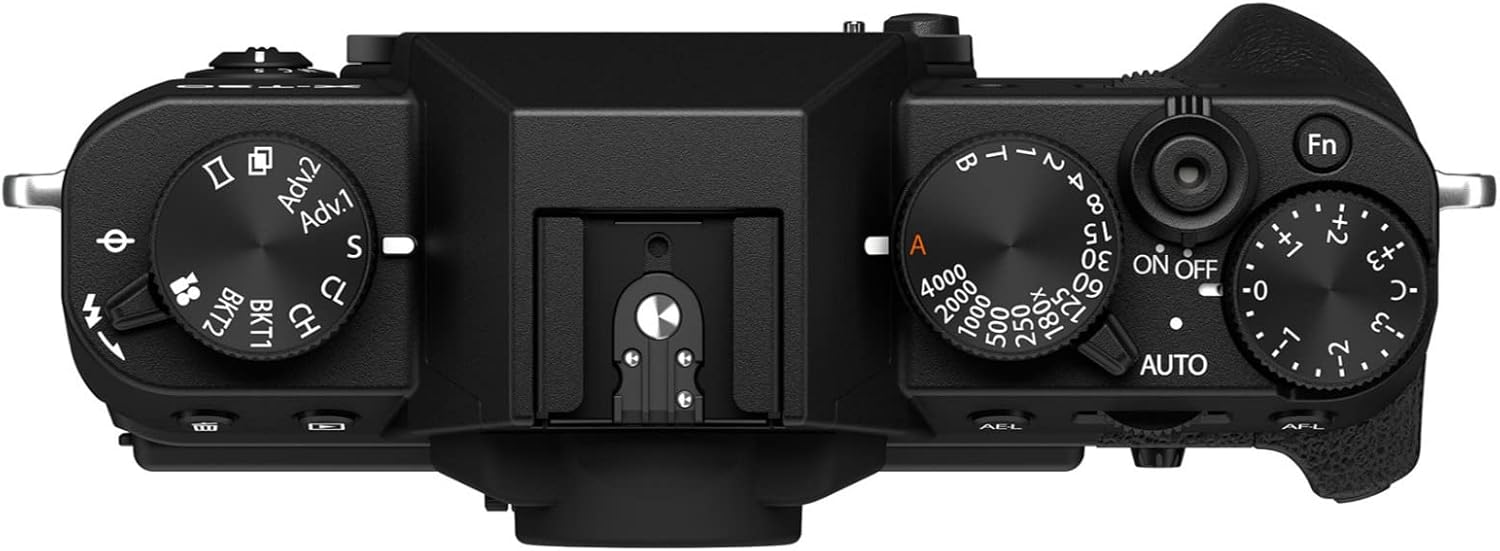
Top view of the camera, highlighting the shutter speed dial, exposure compensation dial, and ON/OFF switch.
- Shutter Speed Dial: Adjusts the shutter speed.
- Exposure Compensation Dial: Allows for quick adjustment of exposure.
- Mode Dial: Selects shooting modes such as Program (P), Aperture Priority (A), Shutter Priority (S), and Manual (M).
- Q Button: Provides quick access to frequently used settings.
- Rear LCD Monitor: A 3-inch tilting touchscreen LCD for framing shots, reviewing images, and navigating menus.

Back view of the camera, showing the tilting LCD screen, viewfinder, and various control buttons.
2. Shooting Modes and Settings
The X-T30 II offers various shooting modes to suit different photographic needs:
- Program (P) Mode: Camera sets aperture and shutter speed for optimal exposure.
- Aperture Priority (A) Mode: You set the aperture, camera sets shutter speed. Ideal for controlling depth of field.
- Shutter Priority (S) Mode: You set the shutter speed, camera sets aperture. Ideal for controlling motion blur.
- Manual (M) Mode: You control both aperture and shutter speed.
- Advanced SR Auto Mode: Automatically selects optimum settings from 58 presets, activated via a lever on the top plate.
- Bulb Mode: Keeps the shutter open for as long as the shutter button is pressed (up to 60 minutes).

Illustration showing the camera's top dial set to AUTO mode for simplified operation.
3. Autofocus System
The X-T30 II features a fast and accurate autofocus system with Contrast Detection and Phase Detection Autofocus. It offers various focus modes:
- Single-Servo AF (AF-S): For stationary subjects. Focus locks once achieved.
- Continuous-Servo AF (AF-C): For moving subjects. Focus continuously adjusts.
- Manual Focus (MF): Allows for precise manual focusing.
Low-light focusing performance is extended down to -7EV, enhancing versatility in challenging lighting conditions.
4. Image Quality and Film Simulations
The 26.1MP X-Trans CMOS 4 sensor minimizes noise and extends sensitivity to ISO 160, ensuring high-quality images with vibrant colors. The camera supports RAW and JPEG file formats.
A unique feature of Fujifilm cameras is the Film Simulation modes, which replicate the look of classic Fujifilm photographic films. The X-T30 II includes 18 such modes, allowing users to achieve distinct visual styles directly in-camera.

Visual examples of different Film Simulation modes, including Sepia, Acros, and Astia, demonstrating their unique color and tone characteristics.
5. Video Recording
The X-T30 II is capable of recording 4K video at 30 frames-per-second (2160p) and 1080p video at 240 frames-per-second for 10x super slow-motion effects. Video can be recorded for up to 30 minutes per clip.
For professional workflows, the camera supports 10-bit, 4:2:2 color recording via its Micro-HDMI port and F-Log internal recording. Video can also be recorded using any of the 18 Film Simulation modes.

An action shot captured with the Fujifilm X-T30 II, showcasing its capability for dynamic photography.
6. Connectivity
The camera features built-in Wi-Fi and Bluetooth connectivity, allowing for easy transfer of images to smartphones or tablets using the FUJIFILM Camera Remote App. This enables quick sharing to social media or printing via compatible FUJIFILM INSTAX Smartphone printers.

Side view of the camera, showing the Micro-HDMI port and USB port for connectivity.
Maintenance
1. Cleaning the Camera
- Use a soft, lint-free cloth to clean the camera body. For stubborn dirt, slightly dampen the cloth with water.
- For the lens and sensor, use specialized cleaning tools such as a blower brush, lens cleaning solution, and microfiber cloths. Avoid touching the sensor directly.
- Keep the LCD screen clean using a soft cloth.
2. Battery Care
- Store batteries in a cool, dry place when not in use.
- Avoid fully discharging the battery frequently to prolong its lifespan.
- If storing the camera for an extended period, remove the battery.
3. Storage
When not in use, store the camera in a dry, dust-free environment, ideally in a camera bag or case to protect it from impacts and environmental elements.
Troubleshooting
This section provides general guidance for common issues. For detailed troubleshooting, refer to the official user manual PDF.
- Camera not powering on: Ensure the battery is fully charged and correctly inserted.
- Cannot take photos: Check if a memory card is inserted and has sufficient free space. Ensure the lens is properly attached.
- Images are blurry: Verify focus settings (AF-S, AF-C, MF) and ensure the lens is clean. Check shutter speed for motion blur.
- No image on LCD: Check if the display is turned off or if the viewfinder is active.
- Connectivity issues: Ensure Wi-Fi/Bluetooth is enabled on both camera and device. Restart both devices if necessary.
Specifications
| Feature | Detail |
|---|---|
| Brand | Fujifilm |
| Model Name | X-T30 II Body - Black |
| Effective Still Resolution | 26.1 MP |
| Photo Sensor Technology | CMOS (X-Trans CMOS 4) |
| Photo Sensor Size | APS-C |
| Image Stabilization | Optical |
| Video Resolution | 2160p (4K) |
| Recording Capacity | 30 minutes (per clip) |
| Display Type | LCD (Tilting Touch Screen) |
| Screen Size | 3 Inches |
| Viewfinder | Built-In Electronic (OLED) |
| Connectivity Technology | Bluetooth, Wi-Fi |
| Supported File Format | RAW, JPEG |
| Flash Memory Type | Single Slot: SD/SDHC/SDXC (UHS-I) |
| Battery Type | Lithium Ion |
| Item Weight | 0.7 Pounds |
| Item Dimensions (D x W x H) | 1.84"D x 4.66"W x 3.26"H |
Warranty Information
The Fujifilm X-T30 II Body - Black comes with a 1 Year Manufacturer Warranty. For warranty claims or service, please contact Fujifilm customer support directly or refer to the warranty card included with your product.
Support and Resources
For further assistance, detailed instructions, or to download the complete user manual, please use the following resources:
- Official User Manual (PDF): Download PDF Manual
- Fujifilm Brand Store: Visit Fujifilm Store on Amazon
For technical support or service inquiries, please visit the official Fujifilm website or contact their customer service department.
Related documentsX-T30 II Body - Black


Ask a question about this manual
Ask about setup, troubleshooting, compatibility, parts, safety, or missing instructions. Manuals+ will review the question and use this page’s manual context to help answer it.