
Nitecore P10iX_2xNL2150HPi
Nitecore P10ix Flashlight User Manual
Model: P10iX_2xNL2150HPi
Introduction
This manual provides detailed instructions for the safe and effective operation of your Nitecore P10ix Type-C Rechargeable Ultra Compact Flashlight. Please read this manual thoroughly before use and retain it for future reference.

Image: The Nitecore P10ix flashlight shown with its included accessories: two extra NL2150HPi batteries, a USB-C charging cable, and a tactical holster.
Package Contents
Upon opening your package, please verify that all items listed below are present and in good condition:
- Nitecore P10ix Flashlight
- 3x NL2150HPi Rechargeable Batteries (including one pre-installed or packaged separately)
- NTH10 Tactical Holster
- Clip
- Lanyard
- Spare O-ring
- USB-C Charging Cable
Setup
Battery Installation
- Unscrew the tail cap of the flashlight counter-clockwise.
- Insert the NL2150HPi 21700 Li-ion battery with the positive (+) terminal facing towards the head of the flashlight.
- Screw the tail cap back on clockwise until it is securely tightened.
Charging the Battery
The Nitecore P10ix features a built-in USB-C charging port for convenient recharging of the 21700 Li-ion battery.
- Locate the USB-C charging port cover on the flashlight body.
- Open the rubber cover to expose the USB-C port.
- Connect one end of the provided USB-C charging cable to the flashlight's port and the other end to a USB power source (e.g., USB adapter, computer, power bank).
- The power indicator light will illuminate to show charging status. Refer to the flashlight's specific indicator behavior for full charge notification (typically solid green or off).
- Once charging is complete, disconnect the cable and securely close the rubber cover to protect the port from dust and water.
Operating Instructions
Switch Functions
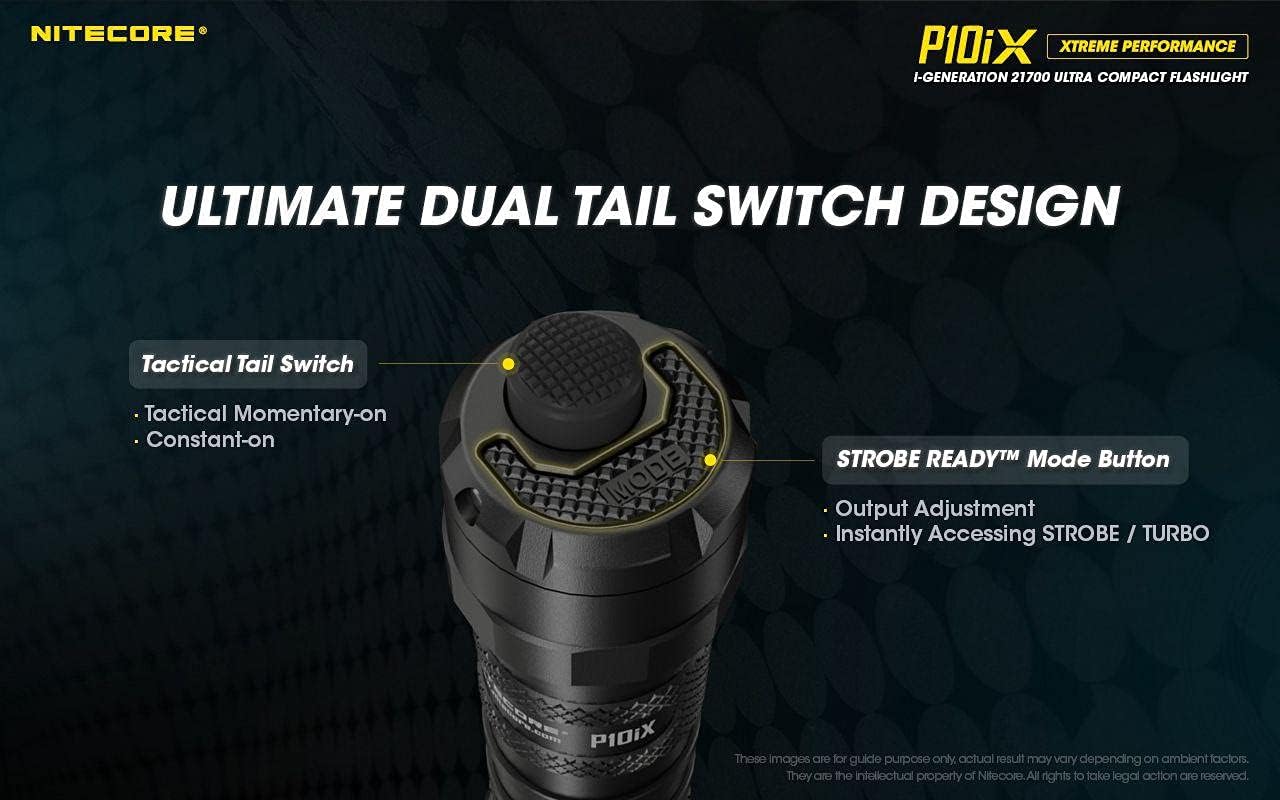
Image: Detailed view of the flashlight's tail cap, highlighting the main Tactical Tail Switch and the smaller STROBE READY Mode Button for output adjustment and instant strobe/turbo access.
- Tactical Tail Switch: This is the primary power button located at the very end of the tail cap.
- Momentary-on: Half-press and hold for momentary illumination. Release to turn off.
- Constant-on: Full-press until a click is heard for constant illumination. Full-press again to turn off.
- STROBE READY™ Mode Button: This smaller, raised button is located next to the Tactical Tail Switch.
- Output Adjustment: When the flashlight is on, press this button to cycle through brightness levels (e.g., Ultra-low, Low, Mid, High, Turbo).
- Instant Strobe/Turbo: When the flashlight is off, half-press or full-press the Tactical Tail Switch to directly access TURBO mode if Strobe is not memorized. This provides an instant dazzling strike, ideal for self-defense and law enforcement.

Image: The Nitecore P10ix flashlight demonstrating its 4000 lumens instant dazzle strike capability, useful for immediate disorientation.
Special Modes
The P10ix features a specialized Strobe mode designed for tactical applications.

Image: An illustration emphasizing the 2nd Generation STROBE READY Technology, which allows instant strobe access from any state and features an inset pedal design to prevent accidental activation.
- Strobe Mode: To activate Strobe mode, ensure the flashlight is off. Half-press and hold the STROBE READY™ Mode Button. Release to turn off. This mode provides randomly changing frequencies (16Hz-20Hz) for stronger dizzying effects.

Image: A visual representation of the randomly changing strobe mode, designed to create a disorienting effect due to its variable frequency.
Maintenance
- Cleaning: Periodically clean the threads of the tail cap and the O-rings with a clean cloth. Apply a thin layer of silicone grease to the threads and O-rings to maintain water resistance.
- Battery Care: If the flashlight is to be stored for an extended period, remove the battery to prevent leakage. Recharge batteries every three months to prolong their lifespan.
- Water Resistance: The P10ix is not water resistant. Avoid exposing the flashlight to water or high humidity. Ensure the USB-C port cover is securely closed at all times when not charging.
Troubleshooting
| Problem | Possible Cause | Solution |
|---|---|---|
| Flashlight does not turn on. | Battery is depleted or incorrectly inserted. | Recharge or replace the battery. Ensure the positive (+) terminal faces the head. |
| Light flickers or is dim. | Loose tail cap or dirty contacts. | Tighten the tail cap. Clean battery contacts and flashlight threads. |
| Charging indicator not working. | USB cable or power source issue. | Try a different USB cable or power adapter. Ensure the cable is fully inserted. |
Specifications

Image: An illustration detailing the quad-core LED setup of the Nitecore P10ix, emphasizing its 4000 lumens maximum output and 158m beam throw.
| Feature | Detail |
|---|---|
| Max Output | 4000 Lumens |
| Max Beam Distance | 158 meters |
| Max Beam Intensity | 6250 cd |
| Max Runtime | 38 hours |
| LED | 4x CREE XP-L2 V6 |
| Special Modes | Strobe |
| Length | 137.2 mm (5.40 in) |
| Head Size | 25.4 mm (1.00 in) |
| Weight | 79.5 g (2.80 oz) |
| Power Source | Battery Powered (3x Lithium Ion batteries required) |
| Material | Aluminum |
| Water Resistance Level | Not Water Resistant |

Image: A comparison chart illustrating the significant lumen output increase of the P10ix (4000 lumens) compared to previous Nitecore P10 series models.
Warranty Information
Specific warranty details are typically provided with the product packaging or on the manufacturer's official website. Please refer to the documentation included with your Nitecore P10ix flashlight for the most accurate and up-to-date warranty policy.
Support and Contact
For technical support, troubleshooting assistance beyond this manual, or inquiries regarding your Nitecore P10ix flashlight, please visit the official Nitecore website or contact their customer service department.
Nitecore Official Website: www.nitecore.com
Please have your product model number (P10iX_2xNL2150HPi) and purchase date ready when contacting support.
Related documentsP10iX_2xNL2150HPi


Ask a question about this manual
Ask about setup, troubleshooting, compatibility, parts, safety, or missing instructions. Manuals+ will review the question and use this page’s manual context to help answer it.