
1. Introduction
This manual provides essential information for the safe and effective use of your Fujifilm GFX50S II digital camera with the GF35-70mm lens kit. The GFX50S II is a high-end medium format digital camera designed for professional-grade photography, featuring a 51.4-megapixel sensor, in-body image stabilization, and a versatile GF35-70mmF4.5-5.6 WR lens.
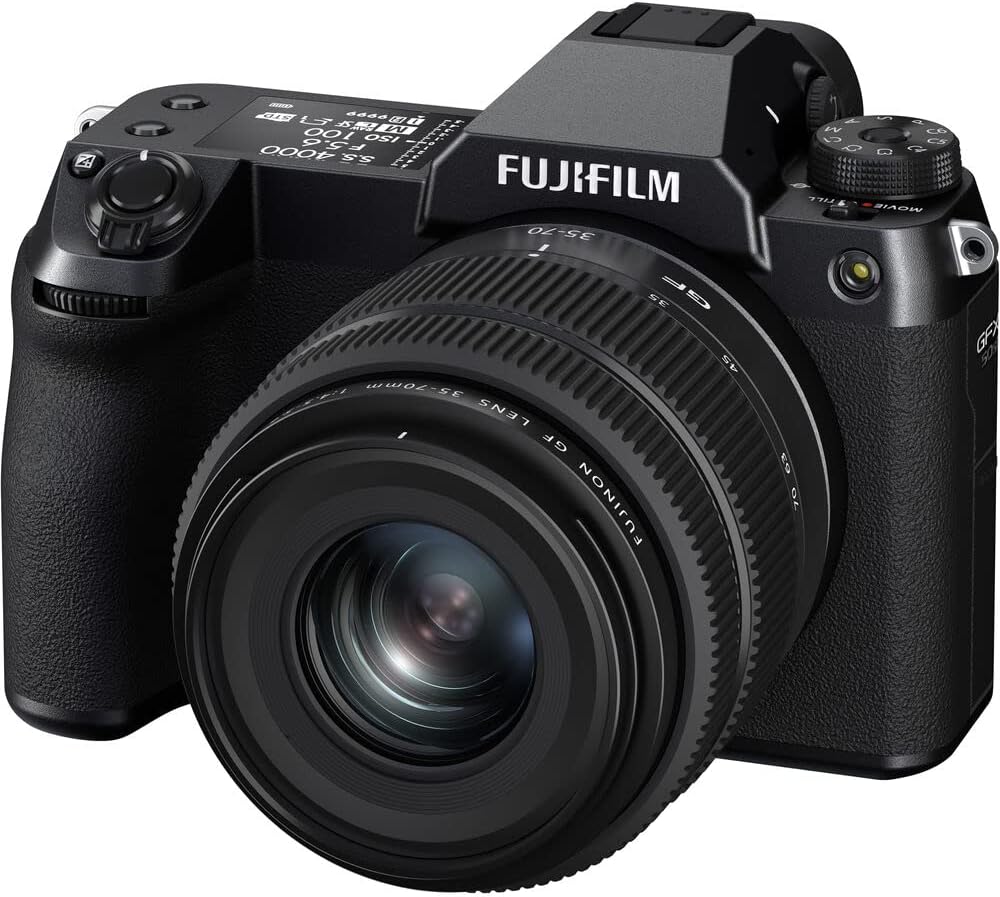
Figure 1.1: Front view of the Fujifilm GFX50S II with GF35-70mm lens.
2. What's Included
Verify that all items are present in the package:
- Fujifilm GFX50S II Camera Body
- Fujinon GF35-70mmF4.5-5.6 WR Lens
- Battery
- Body Cap
- Lens Caps (front and rear)
- Shoulder Strap
- USB Cable
- Power Adapter
- User Manual (this document)
3. Camera Layout
Familiarize yourself with the main components and controls of your camera.
3.1 Rear View
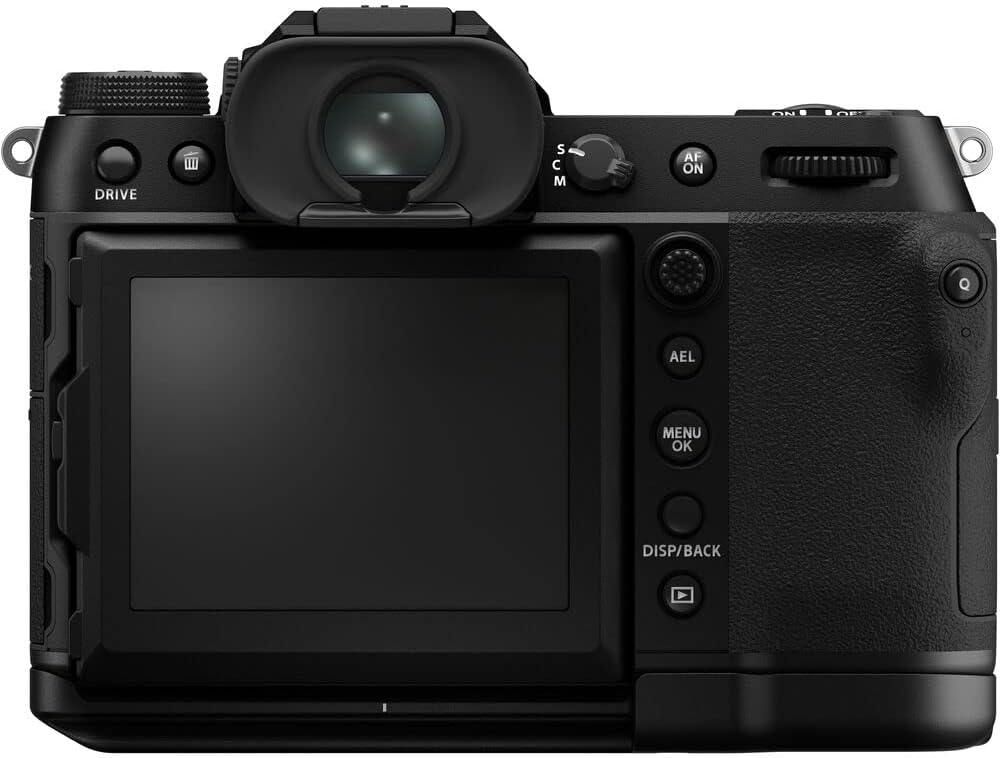
Figure 3.1: Rear view of the camera.
- LCD Monitor: High-resolution, touch-sensitive, and two-way tilting for flexible viewing angles.
- Electronic Viewfinder (EVF): Provides a clear, magnified view for precise composition.
- Control Buttons: Various buttons for menu navigation, playback, and function assignment.
- Focus Lever: Redesigned for intuitive autofocus point selection.
3.2 Top View

Figure 3.2: Top view of the camera.
- Top-Plate LCD: Displays key shooting settings such as shutter speed, aperture, ISO, and battery level.
- PASM Dial: Used to select Program, Aperture-priority, Shutter-priority, and Manual exposure modes.
- Shutter Release Button: Features a feather-touch design for comfortable operation.
3.3 Side View (Ports)

Figure 3.3: Side view of the camera with port covers open.
- Microphone Input: For external microphone connection.
- Headphone Output: For audio monitoring during video recording.
- USB-C Port: For data transfer and in-camera battery charging.
- HDMI Port: For connecting to external displays.
4. Initial Setup
4.1 Charging the Battery
Insert the supplied battery into the camera. Connect the camera to the power adapter using the USB cable. The charging indicator will illuminate. Charging is complete when the indicator turns off.
4.2 Inserting Memory Cards
The GFX50S II features dual SD card slots (UHS-II compatible). Open the memory card slot cover and insert the SD cards with the contacts facing the correct direction until they click into place. Close the cover securely.
4.3 Attaching the Lens
Align the white dot on the GF35-70mm lens with the white dot on the camera body's lens mount. Rotate the lens clockwise until it clicks into place. To remove, press the lens release button and rotate counter-clockwise.
4.4 Powering On/Off
To power on the camera, slide the power switch located near the shutter button to the 'ON' position. To power off, slide it to 'OFF'.
5. Basic Operation
5.1 Shooting Modes
Use the PASM dial on the top of the camera to select your desired shooting mode:
- P (Program AE): Camera sets aperture and shutter speed for optimal exposure.
- A (Aperture-Priority AE): You set the aperture, camera sets shutter speed.
- S (Shutter-Priority AE): You set the shutter speed, camera sets aperture.
- M (Manual): You set both aperture and shutter speed.
5.2 Autofocus System
The GFX50S II features a responsive autofocus system with face and eye detection. Use the focus lever to select your desired autofocus point or area. The camera's X-Processor 4 imaging engine enhances focusing performance across all modes.

Figure 5.1: Face and Eye Detection in action.
5.3 In-Body Image Stabilization (IBIS)
The camera's redesigned IBIS system provides up to 6.5 stops of five-axis stabilization, allowing for sharper handheld shots, especially in low light or with slower shutter speeds. This system is automatically active when enabled in the camera settings.
5.4 Tilting Touchscreen Display
The rear LCD screen can be tilted in multiple directions for comfortable shooting from various angles. It is also touch-sensitive, allowing for intuitive menu navigation, focus point selection, and image review.

Figure 5.2: Tilting LCD screen for flexible shooting.
6. Advanced Features
6.1 Film Simulation Modes
Leveraging Fujifilm's extensive color science, the GFX50S II offers 19 Film Simulation modes. These modes replicate the look and feel of classic photographic films, allowing you to achieve distinct color and tonal characteristics directly in-camera.
6.2 Video Recording
The camera supports 1080p video recording. A dedicated stills/video switch allows for quick transitions between photo and video capture. The in-body image stabilization also benefits video recording, providing smoother footage.
Video 6.1: Overview of the Fujifilm GFX50S II Body with GF35-70mm WR Lens Kit. This video provides a visual guide to the camera's features and capabilities.
7. Connectivity
The GFX50S II offers various connectivity options:
- Wi-Fi: For wireless image transfer to smart devices and remote camera control via the Fujifilm Camera Remote app.
- Bluetooth: For low-power wireless connection to smart devices.
- HDMI: Connect to external monitors or TVs for image and video playback.
- USB-C: For high-speed data transfer and in-camera battery charging.
8. Care and Maintenance
To ensure the longevity and optimal performance of your camera:
- Keep the camera and lens clean and free from dust and moisture.
- Use a soft, lint-free cloth for cleaning the camera body.
- For the lens and sensor, use specialized cleaning tools and solutions.
- Store the camera in a dry, cool place away from direct sunlight.
- Avoid exposing the camera to extreme temperatures or sudden changes in temperature.
9. Troubleshooting
If you encounter any issues with your camera, refer to the following general troubleshooting tips:
- Camera not powering on: Check battery charge and ensure it's correctly inserted.
- Images are blurry: Verify focus settings, check for lens smudges, or ensure IBIS is active if shooting handheld in low light.
- Memory card error: Reinsert the card, try a different card, or format the card (note: formatting will erase all data).
- Connectivity issues: Ensure Wi-Fi/Bluetooth is enabled on both camera and smart device. Check network settings.
For more detailed troubleshooting, consult the full electronic manual available on the Fujifilm support website.
10. Technical Specifications
| Feature | Specification |
|---|---|
| Model Name | GFX50S II GF35-70mm Kit |
| Photo Sensor Resolution | 51.4 MP |
| Photo Sensor Size | Medium Format (>35mm) |
| Image Stabilization | Dual (In-Body) |
| Lens Type | GF35-70mmF4.5-5.6 WR |
| Screen Size | 3.2 Inches |
| Display Type | Tilting LCD, Touch Screen |
| Viewfinder | Electronic |
| Video Resolution | 1080p |
| Connectivity Technology | Bluetooth, Wi-Fi, HDMI, USB-C |
| Memory Card Type | Dual Slot: SD/SDHC/SDXC (UHS-II) |
| Item Weight | 4.9 Pounds |
11. Warranty and Support
11.1 Manufacturer's Warranty
This Fujifilm GFX50S II camera kit is covered by a 1-year manufacturer's warranty from the date of purchase. Please retain your proof of purchase for warranty claims.
11.2 Customer Support
For further assistance, technical support, or warranty inquiries, please visit the official Fujifilm support website or contact their customer service department.


