
Paingone KTR-405UK
Paingone Fllow - User Manual
Model: KTR-405UK
Introduction
The Paingone Fllow is an advanced device designed to help improve blood circulation in the feet and legs, and to relieve pain and discomfort associated with various conditions, including aching muscles and knee arthritis. This manual provides comprehensive instructions for the safe and effective use of your Paingone Fllow device.
Please read this manual thoroughly before first use and keep it for future reference.

Image: The Paingone Fllow device, showcasing its design and interface.
Important Safety Information
Before using the Paingone Fllow, it is crucial to understand and adhere to all safety warnings and precautions. Failure to do so may result in injury or damage to the device.
- Do not use if you have a pacemaker or other implanted medical device.
- Consult your doctor before use if you have any pre-existing medical conditions, including but not limited to, heart conditions, epilepsy, or are pregnant.
- Do not use on broken skin, open wounds, or areas with swelling, infection, or skin eruptions.
- Keep out of reach of children.
- Do not immerse the device in water or other liquids.
- Use only the provided power adapter for charging.
If you experience any discomfort or adverse reactions during use, discontinue immediately and consult a healthcare professional.
Package Contents
Verify that all items are present in your Paingone Fllow package:
- Paingone Fllow Device
- Remote Control
- Power Adapter
- 4 x Free TENS Pads
- 2 x Arthro-Flow Knee Protectors
- Foot Cover
- User Manual (this document)
Setup
Charging the Device
The Paingone Fllow device and its remote control are rechargeable. Ensure both are fully charged before first use.
- Connect the power adapter to the magnetic charging port on the Paingone Fllow device.
- Plug the adapter into a suitable power outlet.
- The charging indicator on the device will illuminate. A full charge typically takes several hours and provides up to 36 hours of usage.
- For the remote control, refer to its specific charging instructions (usually via a micro-USB port).
Positioning the Device
Place the Paingone Fllow device on a flat, stable surface in front of your chair or sofa. Ensure you are seated comfortably with your feet able to rest naturally on the footpads.
Operating Instructions
Basic Operation
- Ensure the device is charged and powered on using the power button.
- Place your bare feet on the designated footpads of the device.
- Use the remote control to select a program and adjust the intensity level (150 intensity levels available). Start with a low intensity and gradually increase until you feel a comfortable, gentle sensation.
- A typical session lasts 30 minutes. The device may have a timer or automatic shut-off feature.

Image: A user operating the Paingone Fllow device while seated comfortably.
Using the Foot Cover
The luxurious woolley foot cover can be placed over the device to keep your feet warm and cozy during use, enhancing comfort.
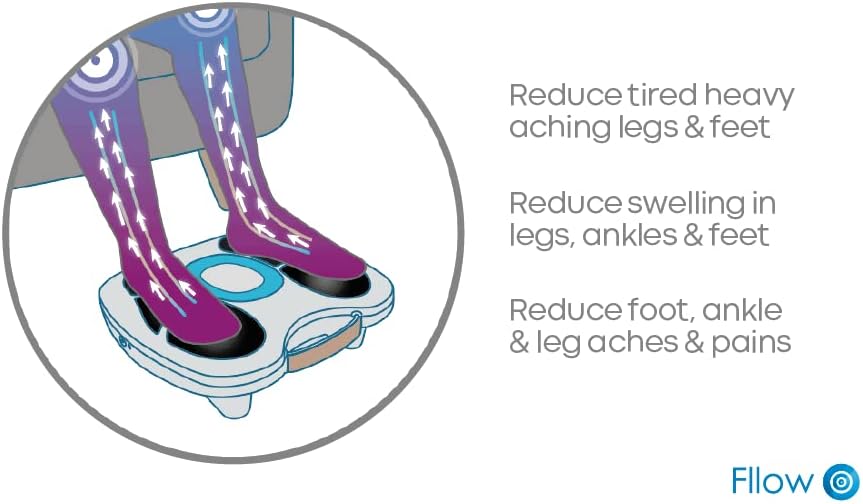
Image: The Paingone Fllow device with its accompanying foot cover.
Relax and Recline Mode
The Paingone Fllow is designed for versatile use. You are not restricted to using it while seated upright. You can lie back on a bed or sofa and still effectively use the device, taking the weight off your legs for optimum comfort.

Image: A user demonstrating the relax and recline mode with the Paingone Fllow.
Using TENS Pads and Knee Protectors
The Paingone Fllow system includes additional accessories for targeted pain relief:
- TENS Pads: Connect the TENS pads to the device and apply them to specific areas of pain, such as the lower back, shoulders, arms, neck, or buttocks. These pads deliver targeted electrical stimulation.
- Arthro-Flow Knee Protectors: These are designed to target knee pain. Connect them to the device and position them around your knees as instructed.
- You can use the footpads, TENS pads, and knee protectors simultaneously for comprehensive relief.

Image: Diagram showing improved circulation in legs.

Image: Diagram showing knee pad application.

Image: Diagram showing TENS pad application on shoulder.
Maintenance
Cleaning the Device
To ensure hygiene and longevity of your Paingone Fllow:
- Always power off and unplug the device before cleaning.
- Wipe the footpads and main unit with a soft, damp cloth. Do not use abrasive cleaners or immerse in water.
- The foot cover can be removed and cleaned according to its fabric care instructions.
Storage
Store the device in a cool, dry place, away from direct sunlight and extreme temperatures. Keep it in its original packaging or a protective case when not in use to prevent dust accumulation and damage.
Troubleshooting
| Problem | Possible Cause | Solution |
|---|---|---|
| Device does not power on. | Battery is depleted. | Charge the device fully using the provided power adapter. |
| No sensation felt during use. | Intensity level is too low; Feet are not making proper contact; Device is not powered on. | Increase intensity gradually; Ensure bare feet are firmly on footpads; Verify device is powered on. |
| Remote control not working. | Remote battery is depleted; Obstruction between remote and device. | Charge the remote control; Ensure clear line of sight to the device's receiver. |
| Discomfort during use. | Intensity too high; Improper pad placement (for TENS/knee pads). | Reduce intensity; Re-position pads according to instructions. Discontinue use if discomfort persists. |
If the problem persists after attempting these solutions, please contact customer support.
Specifications
- Model: KTR-405UK
- Brand: Paingone
- Manufacturer: QHI
- Dimensions (Packaging): 41 x 39.4 x 12.4 cm
- Product Weight: 2.94 Kilograms
- Color: White-Blue
- Special Features: Heat, Rechargeable
- Intensity Levels: 150
- Opti-Wave Programs: 25
- Battery Life: Up to 36 hours (device)
- Water Resistance Level: Non-waterproof
Warranty and Support
For warranty information and customer support, please refer to the documentation included with your purchase or visit the official Paingone website. Keep your proof of purchase for warranty claims.
If you require assistance with your Paingone Fllow device, please contact the manufacturer's customer service department.
Related documentsKTR-405UK


Ask a question about this manual
Ask about setup, troubleshooting, compatibility, parts, safety, or missing instructions. Manuals+ will review the question and use this page’s manual context to help answer it.