
1. Introduction
This manual provides essential information for the proper installation, operation, and maintenance of the Rice Lake 115448 720i Programmable Weight Indicator and Controller. The 720i is designed for industrial weighing applications, offering accurate weight measurement and control capabilities for various processes.
2. Safety Information
Adherence to safety guidelines is crucial for preventing injury and equipment damage. Please read and understand all safety instructions before operating the device.
- Always disconnect power before performing any service or maintenance.
- Ensure the device is properly grounded to prevent electrical hazards.
- Operate the indicator within the specified environmental conditions (temperature, humidity) to ensure optimal performance and longevity.
- Installation and maintenance should only be performed by qualified and authorized personnel.
- Refer to local electrical codes and regulations for proper installation procedures.
3. Product Overview
The Rice Lake 720i is a robust weight indicator and controller. Below is an image illustrating its primary components.
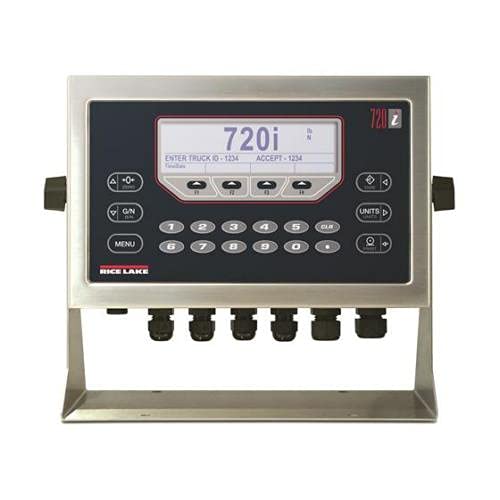
Figure 1: Front view of the Rice Lake 720i Programmable Weight Indicator and Controller. This image displays the device's main interface, including a large digital display showing '720i' and fields for 'ENTER TRUCK ID' and 'ACCEPT'. Below the display is a numeric keypad (0-9) and function buttons such as 'G/N' (Gross/Net), 'MENU', 'UNITS', and 'CLR' (Clear). The unit is housed in a stainless steel enclosure with multiple sealed cable glands visible at the bottom for secure connections.
Key features include:
- Clear digital display for weight readings and operational messages.
- Numeric keypad (0-9) for data entry.
- Dedicated function keys for common operations like zeroing, taring, and unit selection.
- Durable industrial-grade enclosure.
- Multiple input/output ports for load cells and peripheral devices.
4. Setup
Follow these general steps for initial setup of the 720i indicator.
- Mounting: Securely mount the indicator in a location that provides good visibility, easy access to controls, and protection from excessive vibration or environmental extremes.
- Power Connection: Connect the device to a stable power source according to the electrical specifications provided in the full technical manual. Ensure the power supply matches the indicator's requirements.
- Load Cell Connection: Connect the load cells to the designated terminals. Pay close attention to the wiring diagram to ensure correct polarity and signal integrity. Improper wiring can lead to inaccurate readings or damage.
- Peripheral Connections: Connect any required peripheral devices, such as printers, remote displays, or PLCs, to the appropriate communication ports. Configure communication settings as needed.
- Initial Power-Up: Once all connections are secure, power on the device. Observe the initial boot sequence and ensure the display initializes correctly.
5. Operating Instructions
This section outlines basic operational procedures for the 720i indicator.
- Power On/Off: To power on the device, ensure it is connected to a power source. If an external power switch is present, toggle it to the 'ON' position. To power off, disconnect the power or use the designated power-off procedure if available.
- Zeroing: To set the current weight reading to zero, typically when the scale is empty, press the 0 or Zero button.
- Tare Function: To subtract the weight of a container or packaging, place the empty container on the scale and press the G/N (Gross/Net) or Tare button. The display will then show the net weight of the product added.
- Unit Selection: To cycle through available weight units (e.g., pounds (lbs), kilograms (kg)), press the UNITS button.
- Data Entry: Use the numeric keypad (0-9) to enter numerical values, such as truck IDs or setpoints. The CLR (Clear) button can be used to correct entries.
- Menu Navigation: Press the MENU button to access configuration, calibration, and advanced settings. Follow the on-screen prompts and use the arrow keys or numeric keypad for navigation and selection.
6. Maintenance
Regular maintenance ensures the longevity and accuracy of your 720i indicator.
- Cleaning: Clean the exterior of the indicator regularly with a soft, damp cloth. Avoid using abrasive cleaners, solvents, or harsh chemicals that could damage the display or enclosure.
- Inspection: Periodically inspect all cables and connections for signs of wear, damage, or corrosion. Ensure all cable glands are securely tightened.
- Calibration: To maintain measurement accuracy, the indicator should be calibrated periodically. Calibration procedures are complex and should only be performed by a qualified technician using certified test weights. Refer to the detailed calibration section in the complete technical manual.
- Firmware Updates: Check the Rice Lake website for any available firmware updates. Follow the manufacturer's instructions carefully for any update procedures.
7. Troubleshooting
This section provides solutions to common issues you may encounter.
| Problem | Possible Cause | Solution |
|---|---|---|
| No display or power | No power supply, blown fuse, loose connection | Check power cable, verify power outlet, inspect fuse, ensure all connections are secure. |
| Inaccurate weight readings | Load cell issue, calibration required, physical obstruction | Verify load cell connections, remove any obstructions from the scale, perform calibration (by qualified personnel). |
| Error codes displayed | System fault, sensor issue, configuration error | Note the specific error code and consult the comprehensive technical manual for detailed interpretation and troubleshooting steps. |
| No communication with peripherals | Incorrect cable, wrong communication settings | Check communication cables for damage, verify port settings (baud rate, parity, data bits) on both the indicator and the peripheral device. |
If the problem persists after attempting these solutions, contact technical support.
8. Specifications
Key specifications for the Rice Lake 115448 720i Programmable Weight Indicator and Controller:
- Brand: Rice Lake
- Model: 720i
- Manufacturer: Rice Lake
- ASIN: B09DT7JRSK
- UPC: 700358022661
For detailed technical specifications, including environmental ratings, power requirements, and communication protocols, please refer to the official product datasheet or full technical manual.
9. Warranty and Support
For specific warranty terms and conditions applicable to your Rice Lake 115448 720i Programmable Weight Indicator and Controller, please refer to the warranty documentation included with your purchase or visit the official Rice Lake website. Warranty coverage typically addresses manufacturing defects under normal use.
For technical assistance, troubleshooting beyond this manual, or to inquire about service and repairs, please contact Rice Lake technical support directly through their official website or customer service channels. When contacting support, have your model number (720i) and serial number readily available.


