
Introduction
The Amuzik Noise Gate pedal is designed to reduce unwanted noise from your guitar signal chain without compromising the original tone quality. This compact and durable pedal features two distinct modes for noise reduction and true bypass circuitry to ensure signal integrity when the effect is disengaged.
Product Features
- Effective Noise Reduction: Minimizes input signal noise while preserving original tone quality. Adjustable noise reduction range from -70dB to +10dB.
- Two Operating Modes:
- Hard Mode: Provides a strong noise reduction effect.
- Soft Mode: Offers a more subtle noise reduction effect.
- Solid Construction: Housed in a high-quality zinc alloy casing for durability and stability.
- True Bypass: Ensures a transparent tone when the pedal is off, preventing signal degradation.
- Compact Design: Mini-sized pedal saves space on your pedalboard.
- LED Indicator: Clearly shows the pedal's operational status.
Setup
Follow these steps to set up your Amuzik Noise Gate pedal:
- Power Connection: Connect a standard DC 9V power adapter (center negative polarity) to the DC 9V input jack on the pedal. Note: This pedal cannot be powered by batteries. The power adapter is not included and must be purchased separately.
- Input Connection: Connect your guitar or the output of a preceding effects pedal to the INPUT jack on the Noise Gate pedal using a 1/4-inch instrument cable.
- Output Connection: Connect the OUTPUT jack of the Noise Gate pedal to your amplifier or the input of the next effects pedal in your chain using a 1/4-inch instrument cable.
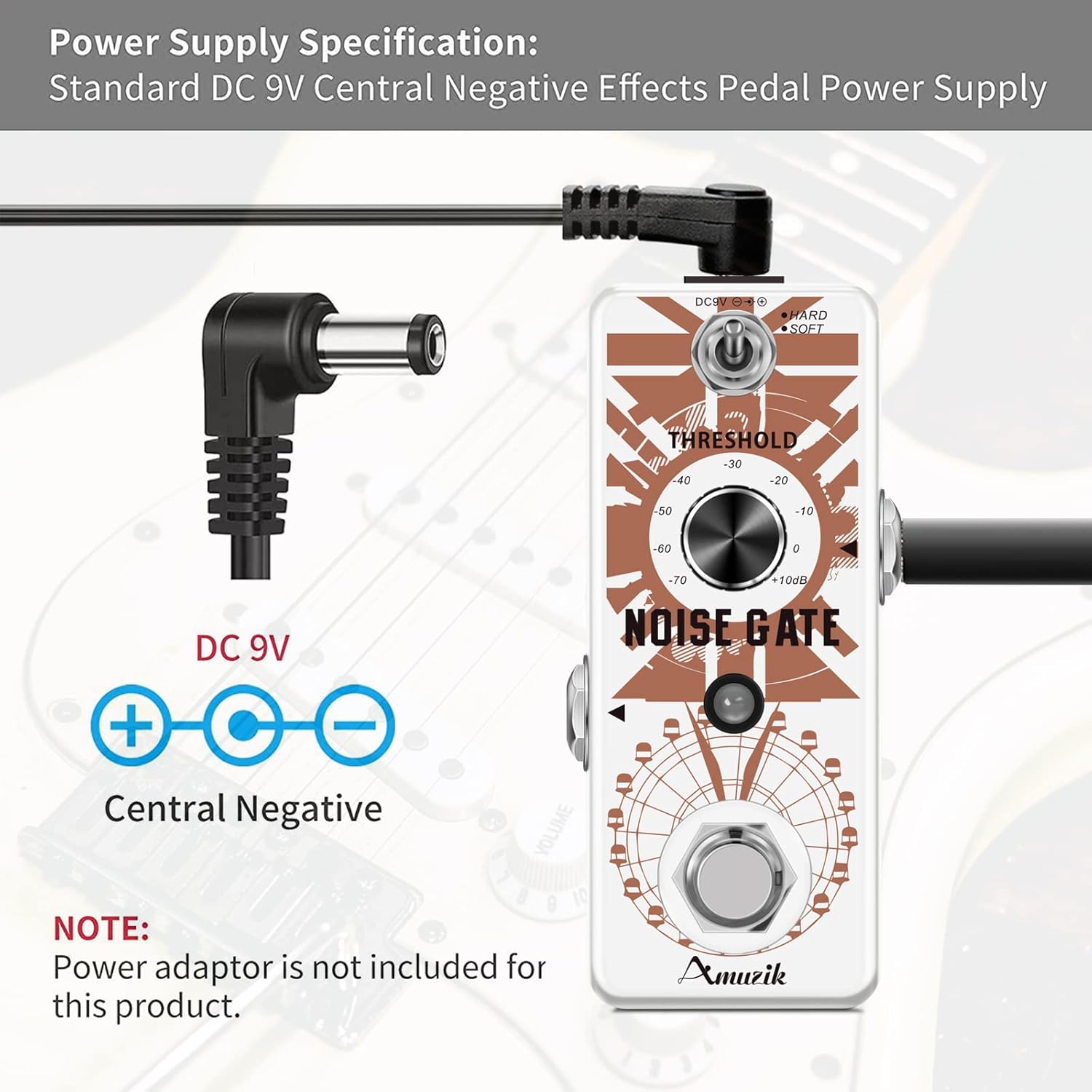
Image: Diagram showing the correct DC 9V center negative power supply connection for the Amuzik Noise Gate pedal. The power adapter is not included.

Image: Front view of the Amuzik Noise Gate pedal, highlighting the THRESHOLD knob, HARD/SOFT switch, and input/output jacks.
Operating Instructions
Once the pedal is connected and powered, you can begin using it to control noise in your signal.
- Power On/Off: The pedal is activated by pressing the footswitch. The LED indicator will illuminate when the effect is active.
- THRESHOLD Knob: This knob controls the noise reduction level.
- Rotate clockwise to increase the noise reduction threshold (more aggressive noise gating).
- Rotate counter-clockwise to decrease the noise reduction threshold (less aggressive noise gating).
- The range is from -70dB to +10dB. Adjust this knob to find the optimal balance between noise suppression and natural sustain.
- HARD/SOFT Switch: This toggle switch selects between the two noise reduction modes.
- HARD Mode: Provides a sharp, immediate noise cut, suitable for high-gain settings or situations requiring very tight gating.
- SOFT Mode: Offers a smoother, more gradual noise reduction, which can be more natural for lower-gain settings or when preserving sustain is critical.
- True Bypass: When the pedal is disengaged (LED off), the signal passes directly through the pedal without any electronic processing, ensuring your original tone remains unaffected.
Maintenance
To ensure the longevity and optimal performance of your Amuzik Noise Gate pedal, follow these maintenance guidelines:
- Cleaning: Use a soft, dry cloth to clean the pedal's exterior. Avoid using abrasive cleaners, solvents, or excessive moisture, as these can damage the finish or internal components.
- Storage: Store the pedal in a dry environment, away from extreme temperatures, direct sunlight, and high humidity.
- Connections: Periodically check all cable connections for wear and tear. Ensure jacks are free of dust and debris.
- Power Supply: Always use a compatible DC 9V center negative power supply. Using an incorrect power supply can damage the unit and void the warranty.
Troubleshooting
If you encounter issues with your Amuzik Noise Gate pedal, refer to the following common troubleshooting steps:
- No Power/LED Not Lighting Up:
- Ensure the DC 9V power adapter is correctly connected and functioning.
- Verify that the power adapter has a center negative polarity.
- Check the power outlet.
- No Sound:
- Check all instrument cables for proper connection and functionality.
- Ensure the guitar and amplifier are working correctly.
- If the pedal is active, try reducing the THRESHOLD setting. A very high threshold can completely cut off the signal if it falls below the set level.
- Noise Still Present:
- Increase the THRESHOLD setting gradually.
- Try switching to HARD mode for a more aggressive noise reduction.
- Ensure the noise is originating from the input signal to the pedal. Noise introduced after the Noise Gate will not be suppressed by it.
- Tone Loss/Unnatural Sound:
- Decrease the THRESHOLD setting.
- Try switching to SOFT mode for a more natural decay.
- Ensure the pedal is in True Bypass mode when not in use to confirm no tone degradation is occurring from the pedal itself.
Specifications
| Input Impedance | 1 M Ohm |
| Output Impedance | 100 K Ohm |
| Power Supply | DC 9V (Center Negative) |
| Working Current | 26 mA |
| Dimensions (L x W x H) | Approximately 95mm x 52mm x 38mm (3.74" x 2.05" x 1.5") |
| Weight | Approximately 260g (8.8 oz) |
| Material | High-quality Zinc Alloy |
| Bypass Mode | True Bypass |

Image: Visual representation of the compact size and weight of the Amuzik Noise Gate pedal.
Warranty and Support
The Amuzik Noise Gate pedal comes with a 1-year warranty from the date of purchase, covering manufacturing defects.
For technical support, warranty claims, or any inquiries regarding your product, please contact Amuzik customer service through the retailer where the product was purchased. Please retain your proof of purchase for warranty validation.