
1. Introduction
This manual provides detailed instructions for the safe and efficient operation, maintenance, and care of your Solis Grind & Infuse Perfetta 1019 Espresso Machine. Please read all instructions carefully before first use and retain this manual for future reference.

Image 1.1: Front view of the Solis Grind & Infuse Perfetta 1019 Espresso Machine. The machine features a stainless steel finish, an integrated bean hopper on top, control buttons, a pressure gauge, a digital display, a portafilter, and a steam wand.
2. Unpacking and Initial Setup
2.1 Included Components
Verify that all components are present in the packaging:
- Solis Grind & Infuse Perfetta 1019 Espresso Machine
- Portafilter
- Filter inserts for 1 and 2 cups
- Water tank including BRITA water filter
- Milk pitcher (350 ml)
- Stainless steel tamper
- Rubber insert for cleaning the brew head
- Water test strip

Image 2.1: Overview of the Solis Grind & Infuse Perfetta 1019 Espresso Machine with its dimensions and included accessories. Accessories shown include the tamper, milk pitcher, various filter inserts, and a BRITA water filter.
2.2 Placement and Power Connection
- Place the machine on a stable, level, and heat-resistant surface. Ensure adequate ventilation around the unit.
- Connect the power cord to a grounded electrical outlet (230V AC).
2.3 Water Tank and Filter Installation
- Remove the water tank from the back of the machine.
- Install the provided BRITA Intenza water filter into the water tank according to the filter's instructions.
- Fill the water tank with fresh, cold water up to the MAX level indicator.
- Reinsert the water tank securely into the machine.

Image 2.2: A hand removing the water tank from the rear of the espresso machine, showing the integrated BRITA water filter.
2.4 Bean Hopper Installation
- Place the bean hopper onto the top of the machine, ensuring it is correctly seated.
- Fill the bean hopper with fresh whole coffee beans. The hopper has a capacity of 200 grams.
3. Operation
3.1 Grinding Coffee
The integrated Zero Static coffee grinder offers 25 different grind settings for optimal extraction.
- Select the desired grind setting using the adjustment lever next to the bean hopper. A finer grind is typically used for espresso.
- Place the portafilter under the grinder outlet.
- Use the digital micro-timer to set the grinding duration. The display shows the grind time.
- Initiate grinding by pressing the grind button or by pushing the portafilter against the activation switch.
- After grinding, tamp the coffee grounds evenly and firmly using the provided tamper.

Image 3.1: Close-up view of freshly ground coffee being dispensed into the portafilter from the integrated grinder.
3.2 Brewing Espresso
The machine features an adaptive PID controller for precise water temperature stabilization and a manometer to monitor brewing pressure.
- Insert the prepared portafilter into the brew group and turn it to lock it securely in place.
- Place your cup(s) under the portafilter spouts.
- Select either a single or double shot using the dedicated buttons. The brew time can be programmed to your preference.
- Monitor the manometer during brewing. The ideal pressure for espresso extraction is between 8 and 12 bar.
- The digital display will show the brewing duration.

Image 3.2: The Solis Perfetta machine actively brewing espresso into a glass cup. The manometer on the front panel indicates the brewing pressure.
3.3 Steam and Hot Water Function
The machine is equipped with a steam wand for frothing milk and a hot water function for other beverages.
- To froth milk, fill the milk pitcher with cold milk.
- Position the steam wand into the milk and activate the steam function. Move the pitcher to create desired milk foam texture.
- To dispense hot water, activate the hot water function and place a cup under the hot water spout.
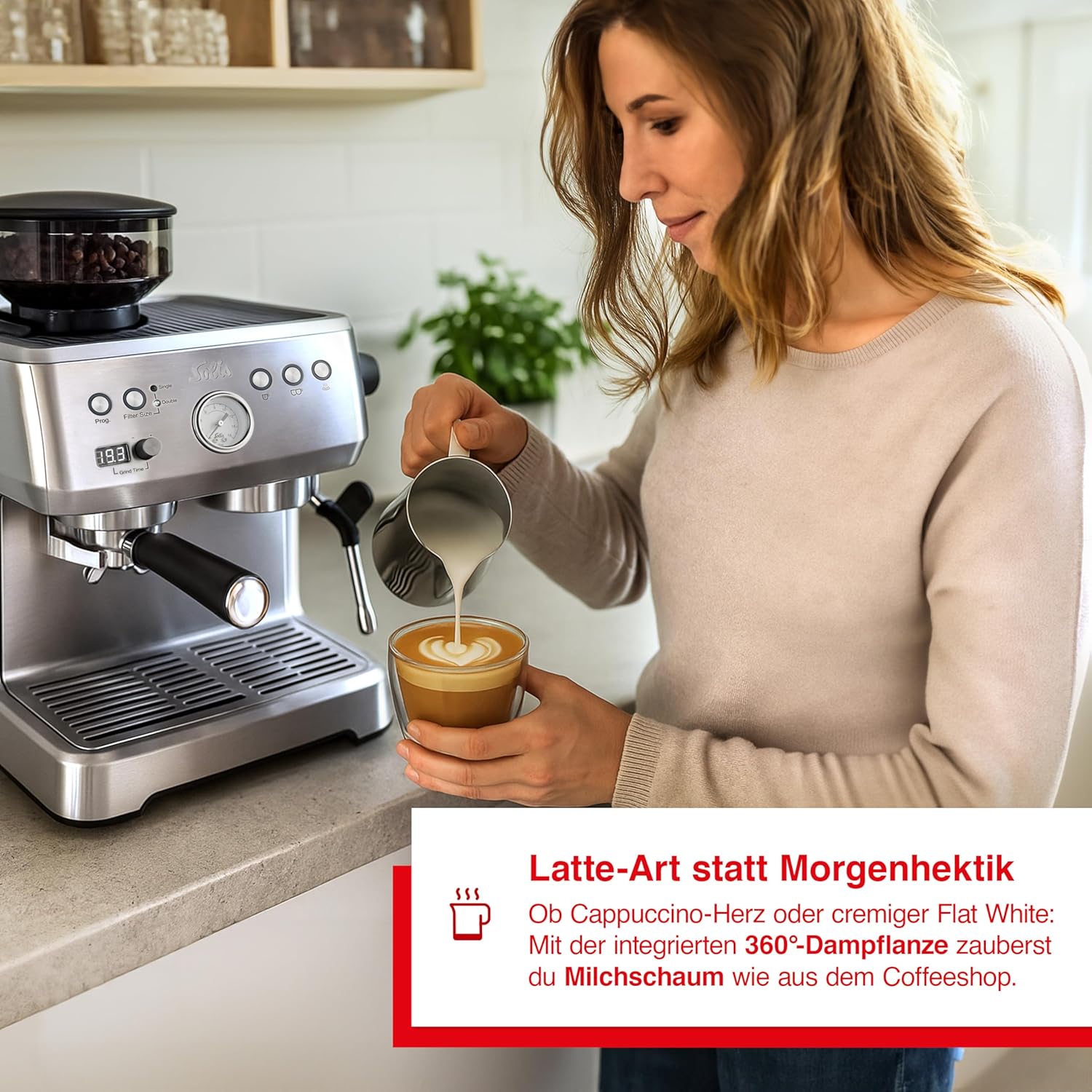
Image 3.3: A person using the steam wand of the Solis Perfetta to froth milk in a stainless steel pitcher, preparing for latte art.
4. Maintenance and Cleaning
Regular cleaning ensures optimal performance and longevity of your espresso machine.
4.1 Daily Cleaning
- Empty and clean the drip tray and grid after each use.
- Rinse the portafilter and filter basket under running water.
- Purge the steam wand after each use to prevent milk residue buildup. Wipe it with a damp cloth.
4.2 Cleaning the Brew Head
Use the provided rubber insert for backflushing the brew head.
- Insert the rubber cleaning disc into the portafilter basket.
- Lock the portafilter into the brew group.
- Activate the brewing cycle for a few seconds, then stop. Repeat several times to flush out coffee residues.
4.3 Water Filter Replacement
Replace the BRITA Intenza water filter regularly as indicated by the filter's instructions or the machine's prompts to maintain water quality and prevent scale buildup.
5. Troubleshooting
This section addresses common issues you might encounter.
| Problem | Possible Cause | Solution |
|---|---|---|
| No coffee or very slow flow | Coffee grind too fine; too much coffee in portafilter; brew pressure too high (above 12 bar). | Adjust grind setting to be coarser; reduce coffee dose; check manometer for ideal pressure. |
| Coffee flows too fast or is weak | Coffee grind too coarse; too little coffee in portafilter; brew pressure too low (below 8 bar). | Adjust grind setting to be finer; increase coffee dose; check manometer for ideal pressure. |
| No steam or weak steam | Steam wand clogged; machine not at steam temperature. | Clean steam wand thoroughly; wait for machine to reach optimal steam temperature. |
| Display shows error code | Specific internal issue. | Refer to the machine's display messages for specific instructions or contact customer support. |
6. Technical Specifications
| Feature | Specification |
|---|---|
| Model Number | 98036 |
| Dimensions (L x W x H) | 37 cm x 29 cm x 33 cm |
| Weight | 10.2 Kilograms |
| Water Tank Volume | 2.6 Liters |
| Voltage | 230 Volts (AC) |
| Integrated Grinder | Yes, with 25 grind settings |
| PID Controller | Yes, for precise temperature control |
| Automatic Shut-off | Yes |
| Special Features | Removable tank, digital micro-timer, manometer |
7. Warranty and Support
For warranty information, technical support, or service inquiries, please contact Solis customer service. Keep your proof of purchase for any warranty claims.
Solis of Switzerland is committed to providing excellent customer support.


