
1. Product Overview
The XSLOER 64 Bit USB PC Handbrake is designed for an enhanced simulation racing experience on PC. This device offers plug-and-play functionality, requiring no additional driver installation. It features an adjustable design for ergonomic comfort and is compatible with a wide range of popular racing wheels and games.

Image 1.1: Overview of the XSLOER USB Handbrake, highlighting its features such as automatic calibration, long spring life, button/linear switch, and flexible design.
Key Features:
- Plug and Play: Connects via USB without requiring driver installation.
- Adjustable Design: Allows for flexible height adjustment to suit user preferences.
- Universal Compatibility: Designed for PC Windows systems and compatible with popular racing wheels like G29, G920, T300, T500, T150.
- Robust Construction: Features a high manganese steel spring for durability and an aluminum structure for stability.
2. Setup Instructions
Follow these steps to set up your XSLOER USB PC Handbrake:
- Unpack Components: Carefully remove all items from the packaging. Ensure you have the handbrake unit, USB cable, and the included clamp (if your model includes one).
- Mounting the Handbrake:
- If your handbrake includes a clamp, attach it to a stable surface such as a desk, racing seat, or bracket. Tighten the clamp securely to prevent movement during use.
- The handbrake is designed for various fixed mounting methods. Ensure the mounting surface is robust enough to support the device during intense gameplay.
- Connect to PC: Plug the USB cable from the handbrake into an available USB port on your PC. The device is plug-and-play and should be automatically detected by your Windows operating system. No specific drivers are required.
- Game Configuration: Once connected, launch your preferred PC simulation racing game. Navigate to the game's controller settings or input mapping menu to assign the handbrake function to the detected USB device.

Image 2.1: The XSLOER USB Handbrake showing the included clamp, USB cable, and the durable aluminum structure.

Image 2.2: A detailed view of the carbon steel clamp, used to fix the handbrake to various flat surfaces.
3. Operating Instructions
The XSLOER USB PC Handbrake is designed for intuitive use in PC simulation racing games. It provides a realistic and responsive experience.
Compatibility:
This handbrake is exclusively designed for PC Windows systems. It is not compatible with PlayStation (PS4/PS5), Xbox, or Mac operating systems.

Image 3.1: Visual representation of system compatibility, confirming support for PC Windows only.
Adjusting Height:
The handbrake features flexible height adjustment. You can modify the height of the lever to find the most comfortable and effective position for your racing setup. Refer to the adjustment bolts on the handbrake for this customization.
Supported Games:
The handbrake is suitable for a variety of PC simulation racing games that offer a high degree of realism. This includes, but is not limited to:
- DiRT Rally
- DiRT Rally 2.0
- DiRT 4
- Assetto Corsa
- Project CARS
- WRC 8
- WRC 9
- Forza Horizon 4

Image 3.2: Examples of universal sim racing games compatible with the XSLOER USB Handbrake.
4. Maintenance
To ensure the longevity and optimal performance of your XSLOER USB PC Handbrake, consider the following maintenance tips:
- Regular Inspection: Periodically check all bolts and fasteners on the handbrake. Over time, due to vibrations and usage, some bolts may loosen. Tighten them as necessary to maintain structural integrity and prevent rattling or instability.
- Spring Mechanism: The handbrake utilizes a high manganese steel spring, designed for strength, wear resistance, and long life. While durable, avoid excessive force beyond normal operating parameters.
- Cleaning: Use a soft, dry cloth to clean the exterior of the handbrake. Avoid using harsh chemicals or abrasive materials that could damage the finish.
- Storage: When not in use for extended periods, store the handbrake in a clean, dry environment away from direct sunlight and extreme temperatures.

Image 4.1: Detail of the bolts on the handbrake, which should be checked periodically for tightness.

Image 4.2: View of the high manganese steel spring, designed for durability and smooth operation without shaking or noise.
5. Troubleshooting
If you encounter issues with your XSLOER USB PC Handbrake, refer to the following common troubleshooting steps:
- Device Not Detected:
- Ensure the USB cable is securely connected to both the handbrake and your PC.
- Try plugging the handbrake into a different USB port on your PC.
- Restart your PC.
- Verify that your operating system is Windows, as the device is not compatible with other systems.
- Handbrake Not Responding in Game:
- Check the game's controller settings or input mapping menu to ensure the handbrake is correctly assigned and calibrated.
- Some games may require specific configuration or may not natively support a separate USB handbrake. Consult your game's documentation.
- Loose Components or Instability:
- Inspect all mounting points and bolts. Tighten any loose fasteners as described in the Maintenance section.
- Ensure the mounting clamp is securely fastened to a stable surface.
- Unexpected Behavior or Malfunction:
- If the device exhibits unusual behavior or stops functioning, and the above steps do not resolve the issue, it may indicate a hardware problem.
6. Specifications
| Feature | Detail |
|---|---|
| Model Name | 64 Bit USB PC Handbrake |
| Brand | XSLOER |
| ASIN | B09DS5Y1DL |
| Compatibility | PC Windows System; G29/G920/T300/T500/T150 racing wheels |
| Connectivity | USB (Plug and Play) |
| Material | Aluminum structure, High manganese steel spring, Carbon steel clamp (if included) |
| Item Weight | 3.56 pounds (approx.) |
| Package Dimensions | 13.5 x 8.5 x 3.58 inches (approx.) |
| Date First Available | June 21, 2021 |
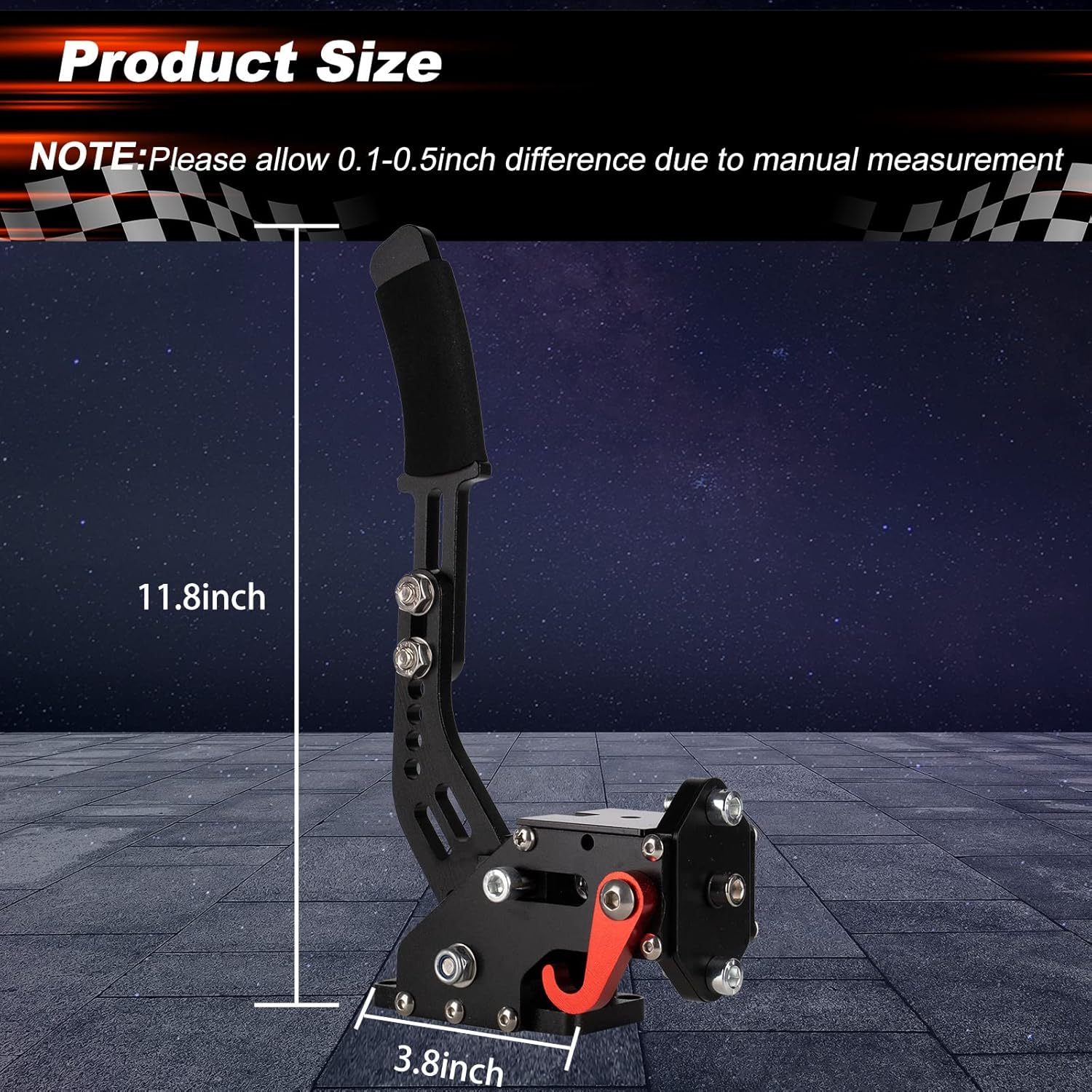
Image 6.1: Product dimensions, indicating a height of approximately 11.8 inches and a base width of 3.8 inches. Note: Allow 0.1-0.5 inch difference due to manual measurement.
7. Customer Support
For any questions, concerns, or assistance with your XSLOER USB PC Handbrake, please contact XSLOER customer service through the Amazon platform. XSLOER is committed to providing reliable service and support for its products.
Please refer to your Amazon order details for specific contact options.