
1. Introduction
Thank you for choosing the Dysaim Gesture RC Stunt Car. This manual provides essential information for the safe operation, setup, and maintenance of your new remote-controlled vehicle. Please read this manual thoroughly before use to ensure optimal performance and longevity of the product.
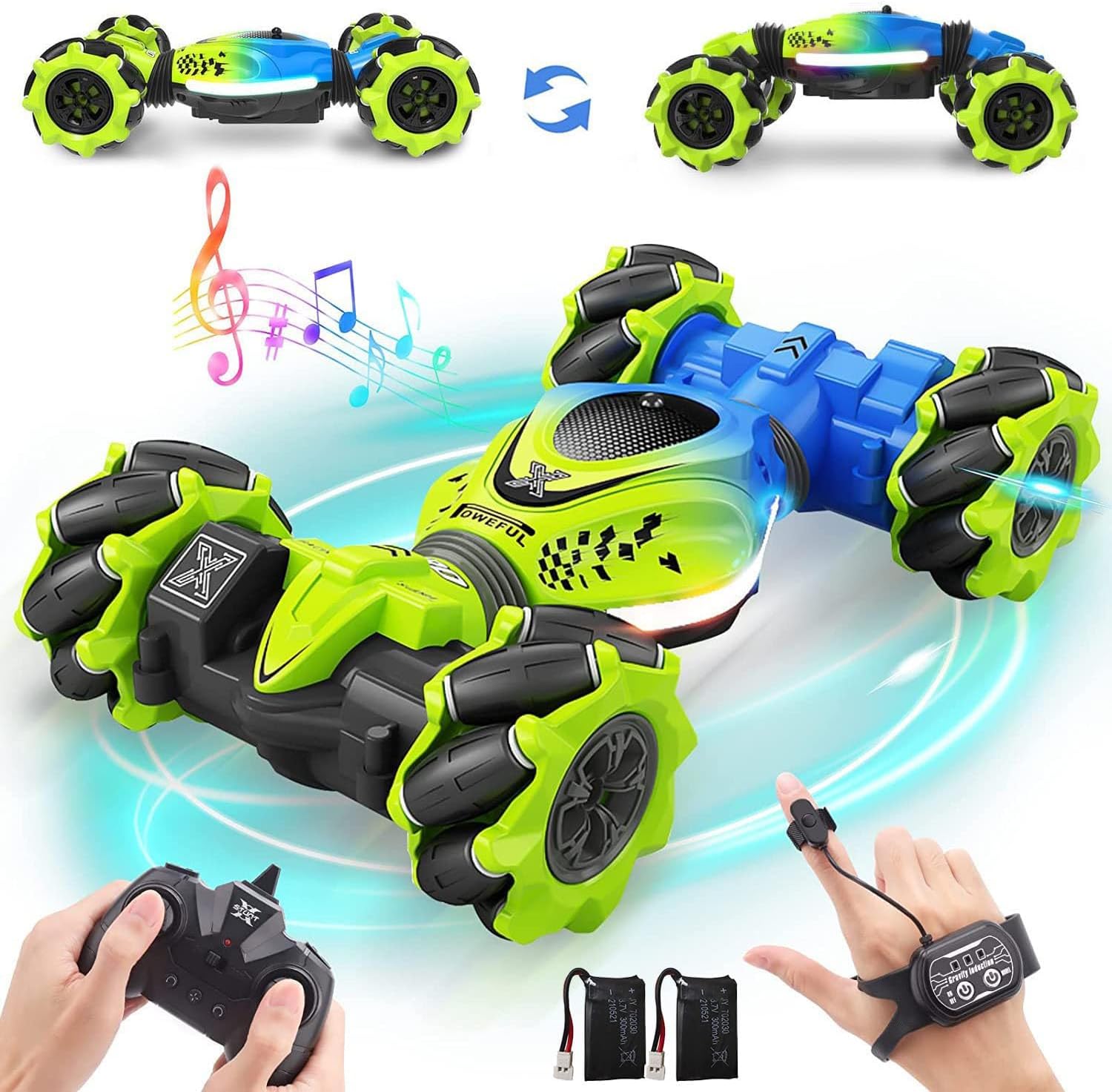
Image: The Dysaim Gesture RC Stunt Car in its primary configuration.
2. What's in the Box
Verify that all components listed below are included in your package:
- 1 x RC Stunt Car
- 2 x Lithium batteries for Gesture RC Car
- 1 x Remote Controller (without battery)
- 1 x Gravity Sensor Watch Controller
- 1 x USB Charge Cable
- 1 x User Manual

Image: Visual representation of all items included in the product packaging.
3. Product Overview
3.1 RC Stunt Car
The Dysaim Gesture RC Stunt Car features a robust design with Mecanum wheels, allowing for multi-directional movement, drifts, and 360-degree rotations. Its bionic spine enables transformation between on-road and off-road modes, adapting to various terrains. The car also includes integrated lights and sound effects for an enhanced experience.
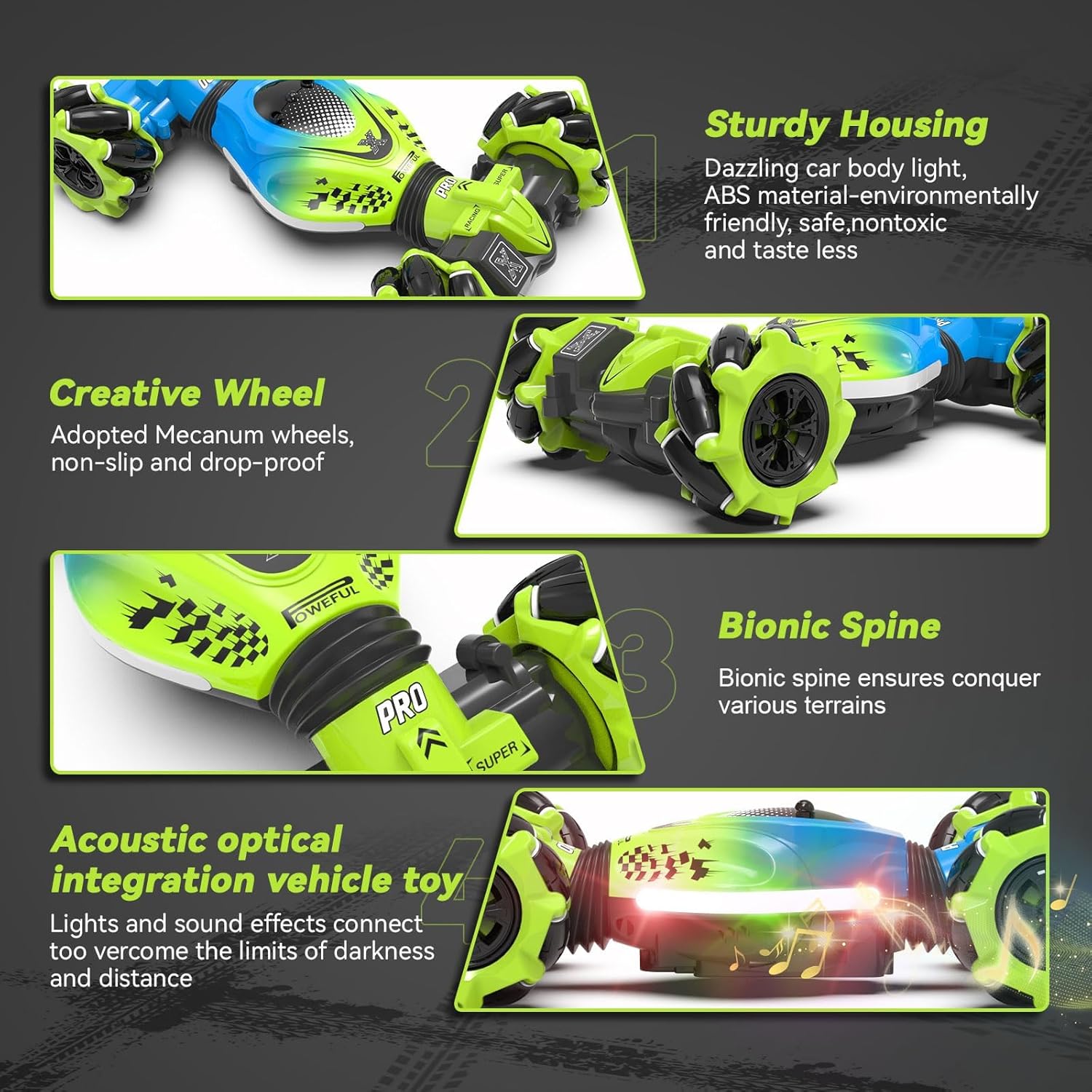
Image: Key features of the RC Stunt Car, including its durable housing, specialized wheels, and flexible design.
3.2 Control Methods Overview
The Dysaim RC Stunt Car offers three distinct control methods:
- Remote Controller: Traditional joystick control for precise movements.
- Gravity Sensor Watch Controller: Wrist-worn controller that uses tilt and motion for basic car movements.
- Gesture Sensor Control: Hand gestures detected by the watch controller to command the car.

Image: An overview of the three available control methods for the RC Stunt Car.
4. Setup and Charging
4.1 Car Battery Installation and Charging
- Locate the battery compartment on the underside of the RC Stunt Car.
- Open the compartment cover.
- Connect one of the provided Lithium batteries to the car's power connector.
- Place the battery inside the compartment and close the cover securely.
- To charge the car battery, connect the USB Charge Cable to the battery and a suitable USB power source (e.g., computer, USB wall adapter). The charging indicator will show charging status. A full charge typically takes approximately 40 minutes.
- The car comes with two rechargeable batteries, providing extended play time.

Image: Rechargeable batteries and charging cable for the RC Stunt Car.
4.2 Remote Controller Battery Installation
- Locate the battery compartment on the back of the Remote Controller.
- Open the compartment cover.
- Insert 2 x 1.5V AA batteries (not included), ensuring correct polarity (+/-).
- Close the compartment cover securely.
4.3 Gravity Sensor Watch Controller Battery Installation
- Locate the battery compartment on the back of the Gravity Sensor Watch Controller.
- Open the compartment cover.
- Insert 2 x 1.5V AA batteries (not included), ensuring correct polarity (+/-).
- Close the compartment cover securely.
5. Operating Instructions
5.1 Power On/Off
- Turn on the power switch on the RC Stunt Car.
- Turn on the power switch on your chosen controller (Remote Controller or Gravity Sensor Watch Controller).
- The car and controller will automatically pair.
5.2 Remote Controller Operations
Use the joysticks and buttons on the traditional remote controller for precise control:
- Forward/Backward Joystick: Controls forward and backward movement.
- Turn Left/Turn Right Joystick: Controls turning.
- Left Drift Button: Initiates a left drift maneuver.
- Right Drift Button: Initiates a right drift maneuver.
- 360° Rotation Buttons: Dedicated buttons for left and right 360-degree rotations.
- Mode Change Button: Transforms the car between on-road and off-road modes.
- Click Auto Demo Mode: Activates an automatic demonstration sequence.
5.3 Gesture Sensor Control Operations
Wear the Gravity Sensor Watch Controller and use specific hand gestures to control the car:
- Hand Forward: Car moves forward.
- Hand Backward: Car moves backward.
- Hand Slides Right: Car slides to the right.
- Hand Slides Left: Car slides to the left.
- Hand Floats (Up/Down): Car switches between folding (on-road) and extending (off-road) modes.

Image: Visual guide for gesture-based control commands.
5.4 Gravity Sensor Watch Control Operations
The watch controller also allows for basic movements by tilting your hand:
- Tilt hand forward/backward to move the car forward/backward.
- Tilt hand left/right to turn the car left/right.
- Use the "Mode Selection Key" on the watch to change car modes.
5.5 Car Modes and Stunts
The RC Stunt Car is designed for versatile performance:
- On-Road Mode: Compact configuration for speed and agility on flat surfaces.
- Off-Road Mode: Extended configuration for enhanced stability and climbing ability on rough terrain.
- Double-Sided Driving: The car can continue driving even when flipped upside down.
- 360° Rotation: Perform rapid spins in place.
- Drifts: Execute controlled slides.
- 45° Incline Climbing: Capable of ascending moderate inclines.

Image: The RC Stunt Car transforming between its on-road and off-road configurations.

Image: Various stunts and capabilities of the RC Stunt Car, including drifts, rotations, and climbing.

Image: The RC Stunt Car demonstrating its ability to operate on diverse terrains such as sand, grass, snow, mud, and rocky surfaces.
6. Maintenance
- Cleaning: Wipe the car with a soft, damp cloth after use. Do not immerse the car or controllers in water.
- Storage: Store the car and controllers in a cool, dry place away from direct sunlight when not in use. Remove batteries from controllers if storing for extended periods.
- Battery Care: Always use the provided USB charging cable for the car batteries. Do not overcharge. Dispose of depleted batteries responsibly.
- Inspection: Regularly check for loose parts, damaged wires, or other signs of wear. Do not operate if damaged.
7. Troubleshooting
| Problem | Possible Cause | Solution |
|---|---|---|
| Car does not respond to controller. |
|
|
| Car moves slowly or inconsistently. |
|
|
| Gesture control is not working. |
|
|
8. Specifications
| Feature | Detail |
|---|---|
| Model Number | WT2020-A / SC001 |
| Product Dimensions | 7.48 x 4.13 x 2.5 inches (On-Road Mode) |
| Item Weight | 14.4 ounces |
| Recommended Age | 6 - 12 years |
| Car Batteries | 2 x Lithium Ion batteries (included) |
| Controller Batteries | 2 x 1.5V AA batteries (not included for each controller) |
| Frequency | 2.4 GHz |
| Manufacturer | Dysaim |

Image: Dimensions of the RC Stunt Car in different modes.
9. Safety Information
- This product is intended for children aged 6-12 years. Adult supervision is recommended.
- Do not operate the RC car near people, pets, or fragile objects to prevent injury or damage.
- Avoid operating in wet conditions or near water to prevent electrical damage.
- Do not touch moving parts of the car during operation.
- Use only the specified batteries and charging cable.
- Never attempt to modify or disassemble the product.
10. Warranty and Support
For warranty information, technical support, or any questions regarding your Dysaim Gesture RC Stunt Car, please refer to the contact information provided on the product packaging or visit the official Dysaim website. Keep your purchase receipt for warranty claims.
Dysaim is committed to providing high-quality products and customer satisfaction. If you encounter any issues, please do not hesitate to contact our customer service team.

