
Dahle PS 100
Dahle PaperSAFE PS 100 Paper Shredder
User Instruction Manual
Product Overview
The Dahle PaperSAFE PS 100 is a compact and efficient deskside paper shredder designed for secure destruction of sensitive documents, staples, paper clips, and credit cards. Engineered in Germany, this oil-free shredder features built-in jam protection and a thermally protected motor for reliable performance.

Figure 1: Dahle PaperSAFE PS 100 Paper Shredder, front view.
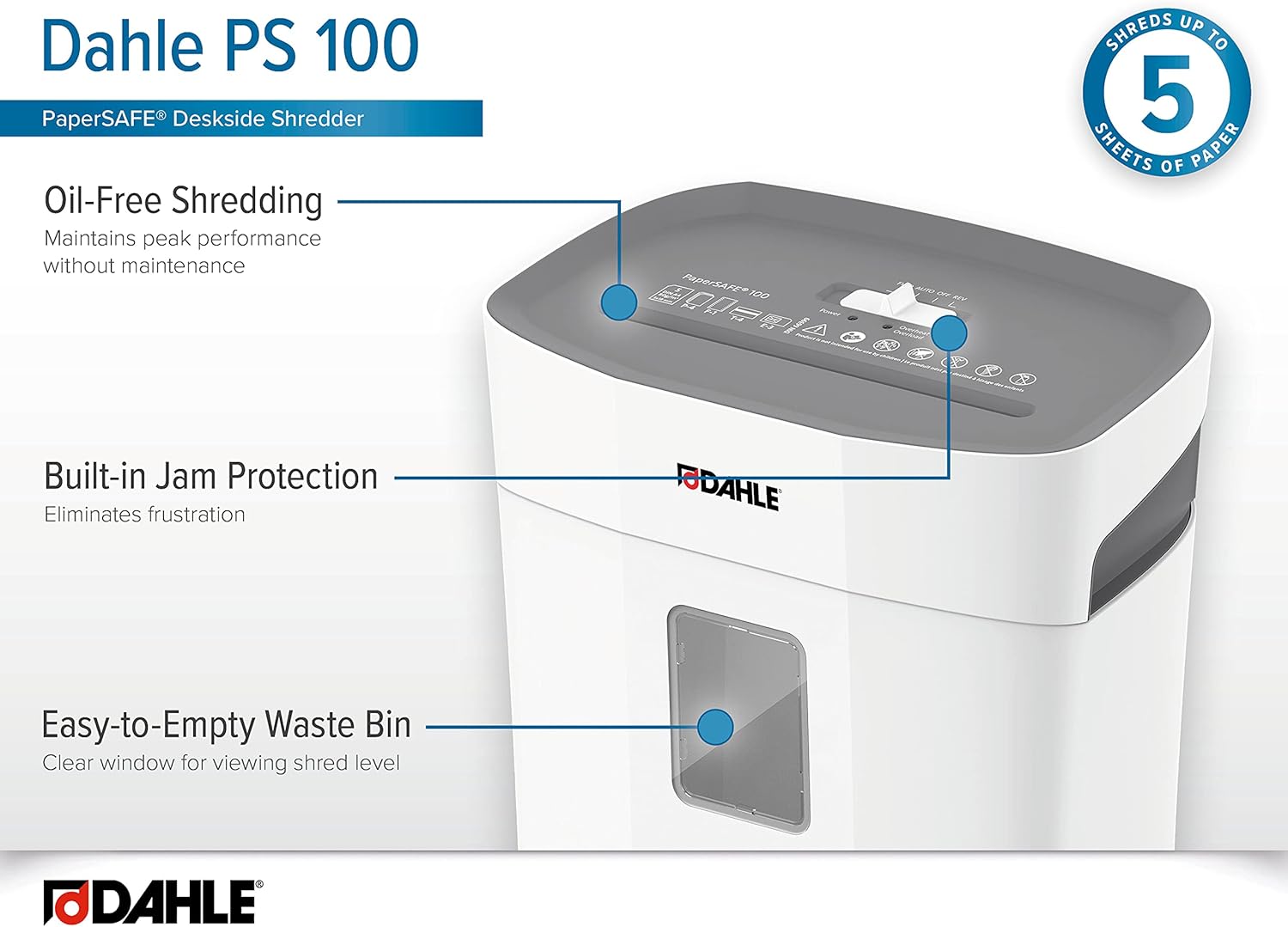
Figure 2: Key features of the Dahle PaperSAFE PS 100, highlighting oil-free operation, built-in jam protection, and easy-to-empty waste bin.

Figure 3: The Dahle PaperSAFE PS 100 shredder positioned in a home office environment.

Figure 4: The Dahle PaperSAFE PS 100 shredder integrated into a professional office workspace.
Important Safety Information
- Read all instructions before using the shredder.
- Keep loose clothing, jewelry, hair, and hands away from the paper entry slot.
- Do not allow children to operate the shredder. Keep children and pets away from the shredder.
- Unplug the shredder when not in use or before moving, cleaning, or emptying the waste bin.
- Do not shred adhesive labels or items with excessive glue, as this can cause residue buildup and jams.
- Do not spray aerosols or lubricants into the shredder. This model is oil-free.
- Do not shred wet or damp paper.
- Ensure the shredder is placed on a stable, level surface.
Setup
- Unpack the Shredder: Carefully remove the shredder from its packaging. Retain packaging for future transport or storage.
- Position the Shredder: Place the shredder on a flat, stable surface near a power outlet. Ensure there is adequate ventilation around the unit.
- Connect Power: Insert the power cord into the shredder's power inlet and then into a standard electrical outlet.
- Verify Waste Bin Placement: Ensure the waste bin is correctly seated within the shredder housing. The shredder will not operate if the bin is not properly in place.

Figure 5: Connecting the power cord to the Dahle PaperSAFE PS 100 shredder.
Operating Instructions
The Dahle PaperSAFE PS 100 features simple controls for efficient shredding.

Figure 6: Top view of the Dahle PaperSAFE PS 100 control switch and indicators.
- Power On: Locate the control switch on top of the shredder. Move the switch to the "AUTO" position. The shredder is now ready for operation.
- Shredding Paper: Insert up to 5 sheets of paper (80g/m²) into the paper entry slot. The shredder will automatically start and stop once the paper has passed through.
- Shredding Staples, Paper Clips, and Credit Cards: The PS 100 can shred small staples, paper clips, and credit cards. Insert these items one at a time into the paper entry slot.
- Reverse Function: In case of a paper jam, move the control switch to the "REV" (Reverse) position to clear the jam. Once cleared, return the switch to "AUTO".
- Power Off: When finished shredding, move the control switch to the "OFF" position. For extended periods of non-use, unplug the shredder from the power outlet.

Figure 7: Inserting paper into the shredder for destruction.

Figure 8: Shredding a credit card using the Dahle PaperSAFE PS 100.
Product Demonstration Video
Video 1: Official product video demonstrating the features and operation of the Dahle PaperSAFE PS 100 Paper Shredder. This video highlights the 5-sheet capacity, built-in jam protection, oil-free operation, and ease of use.
Maintenance
Proper maintenance ensures the longevity and optimal performance of your Dahle PaperSAFE PS 100 shredder.
- Emptying the Waste Bin: Regularly check the waste bin through the clear window. When full, turn off and unplug the shredder. Carefully lift the shredder head off the waste bin and empty the shredded material. Replace the shredder head securely.
- Oil-Free Operation: The Dahle PaperSAFE PS 100 is designed for oil-free operation. Do not apply shredder oil or any other lubricants to the cutting mechanism. This can damage the shredder and void the warranty.
- Cleaning: With the shredder unplugged, wipe the exterior surfaces with a soft, dry cloth. Do not use abrasive cleaners or solvents.
- Overheat Protection: The shredder is equipped with a thermally protected motor. If the shredder overheats due to continuous use, it will automatically shut off. Allow the shredder to cool down for approximately 20-30 minutes before resuming operation.

Figure 9: Demonstrating how to lift the shredder head to empty the waste bin.
Troubleshooting
| Problem | Possible Cause | Solution |
|---|---|---|
| Shredder does not turn on. |
|
|
| Paper jam. |
|
|
| Shredder stops during operation. |
|
|
Specifications
- Model: PS 100
- Cut Type: Cross Cut
- Security Level: P-4 (DIN 66399)
- Sheet Capacity: 5 sheets (80g/m²)
- Waste Bin Capacity: 4 Gallons
- Shreds: Paper, Staples, Paper Clips, Credit Cards
- Oil-Free Operation: Yes
- Jam Protection: Built-in
- Motor Protection: Thermally Protected
- Product Dimensions: 8.5 x 13.75 x 14.5 inches (21.6 x 34.9 x 36.8 cm)
- Item Weight: 7.9 pounds (3.58 kg)
- Manufacturer: Dahle
Warranty and Support
Dahle products are engineered for quality and performance. For specific warranty details and to register your product, please visit the official Dahle website or contact their customer support.
For technical assistance, troubleshooting not covered in this manual, or parts inquiries, please contact Dahle customer service. Have your model number (PS 100) and purchase information ready when contacting support.
Dahle Customer Service:
- Website: www.dahle.com
- Brand Store: Dahle Amazon Store
Related documentsPS 100


Ask a question about this manual
Ask about setup, troubleshooting, compatibility, parts, safety, or missing instructions. Manuals+ will review the question and use this page’s manual context to help answer it.