
EPEVER 149718bc-3205-4f0f-af39-8abfe37a2619
EPEVER 5000W Pure Sine Wave Inverter User Manual
Model: 149718bc-3205-4f0f-af39-8abfe37a2619
1. Product Overview
The EPEVER 5000W Pure Sine Wave Inverter is an advanced off-grid power solution designed to provide uninterruptible power. It integrates an inverter, an 80A MPPT solar charge controller, and a battery charger into a single unit. This hybrid inverter supports both battery and non-battery modes to efficiently charge loads, making it suitable for various applications including household appliances, power tools, and industrial equipment.

Figure 1: EPEVER 5000W Pure Sine Wave Inverter and included accessories.
2. Key Features
- Integrated System: Combines a 5KW off-grid inverter, an 80A MPPT solar charge controller, and a battery charger.
- Flexible Operation: Supports operation with or without a battery, offering versatility for different power setups.
- Pure Sine Wave Output: Provides stable AC 220V-230V output, suitable for sensitive electronics.
- Wide Input Range: Accepts 220-230Vac input and supports up to 4000W solar input with a maximum PV open circuit voltage of 500V.
- Battery Compatibility: Compatible with Lead-Acid (AGM, Flooded, User-defined) and Lithium batteries, with settable charging and discharging currents.
- Multiple Charging Modes: Features three charging modes: Solar Priority, Utility & Solar, and Solar Only.
- Output Modes: Offers two output modes: Utility Priority and Inverter Priority.
- Comprehensive Protections: Includes protection against PV reversal, utility over-voltage/under-voltage, battery over-charge/over-discharge, anti-surge, anti-reverse, output overload, and short circuit.
- Communication: Galvanic isolated RS-485 port for communication, with optional external BMS-link module for battery management system integration.
- Display: Features a 4.2-inch display for real-time status and comprehensive settings.

Figure 2: Overview of the EPEVER 5000W Solar Inverter's capabilities.
3. Package Contents
Please verify that all items listed below are included in your package. If any items are missing or damaged, contact your vendor immediately.
- EPEVER 5000W Pure Sine Wave Inverter Unit
- User Manual
- Mounting Hardware (screws, anchors)
- Connection Terminals and Accessories (e.g., MC4 connectors, screwdriver, wrench)

Figure 3: Contents of the EPEVER Inverter package, including the main unit, user manual, and various connection accessories.
4. Safety Information
Before installation and operation, please read all instructions carefully. Failure to follow these instructions may result in electric shock, fire, or severe injury. Keep this manual for future reference.
- Installation must be performed by qualified personnel.
- Ensure all wiring is correctly sized and properly insulated.
- Do not expose the inverter to rain, snow, spray, or any liquids.
- Ensure adequate ventilation around the inverter to prevent overheating.
- Disconnect all power sources (PV, battery, utility) before performing any maintenance or wiring.
- This inverter is designed for single-phase systems and does not support parallel operation.
5. Installation and Setup
5.1 Mounting the Inverter
Mount the inverter vertically on a solid surface, ensuring sufficient clearance for ventilation. Avoid direct sunlight, high temperatures, and humid environments.
5.2 Wiring Connections
Follow the connection diagram carefully. Ensure all connections are secure and polarity is correct.
- Battery Connection: Connect the 48V DC battery bank to the inverter's battery terminals. Observe correct polarity (+ to + and - to -).
- PV Array Connection: Connect the solar panel array to the MPPT solar input terminals. Ensure the PV open circuit voltage does not exceed 500V.
- AC Input Connection: Connect the utility grid or generator AC input to the inverter's AC input terminals.
- AC Output Connection: Connect your loads (home appliances) to the inverter's AC output terminals.

Figure 4: Typical connection diagram for the EPEVER Inverter, illustrating connections for PV, generator/utility, battery storage, and household appliances. Note: This model does not support parallel stacking.

Figure 5: Rear and bottom views of the inverter, highlighting the connection ports and the product specification label.
6. Operating Modes
The inverter offers various operating modes to optimize power usage based on your specific needs.
6.1 Charging Modes
- Solar Priority: Solar power is the primary source for charging batteries and supplying loads. Utility power is used only when solar power is insufficient.
- Utility & Solar: Both solar and utility power are used to charge batteries and supply loads simultaneously.
- Solar Only: Only solar power is used for charging and supplying loads. Utility power is not utilized.
6.2 Output Modes
- Utility Priority: Utility power is the primary source for loads. The inverter only provides power when utility power is unavailable.
- Inverter Priority: The inverter is the primary source for loads, drawing power from batteries (charged by solar). Utility power is used as a backup.
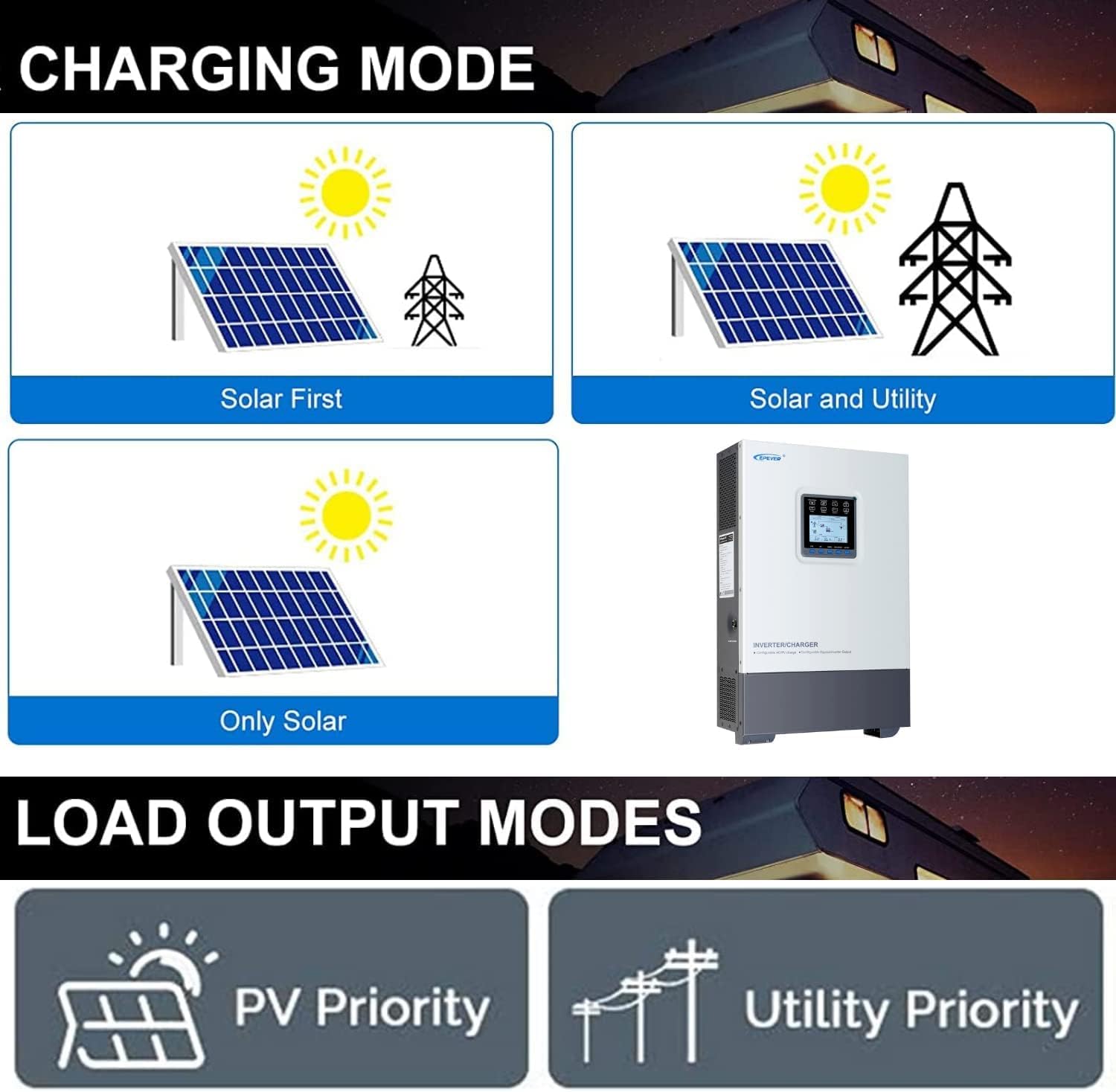
Figure 6: Visual representation of the available charging modes (Solar First, Solar and Utility, Only Solar) and load output modes (PV Priority, Utility Priority).
6.3 Battery vs. Non-Battery Mode
The inverter can operate with or without a connected battery bank.
- Battery Mode: The system utilizes a battery bank for energy storage, providing backup power and enabling off-grid operation. This mode supports various battery types including Lead-Acid (AGM, Flooded, User-defined) and Lithium-ion batteries.
- Non-Battery Mode: The inverter can operate directly from solar and/or utility power to supply loads without a battery. This is useful for direct solar consumption or grid-tied applications without storage.

Figure 7: Diagrams illustrating the power flow in Non-Battery Mode (charging with solar and utility simultaneously) and Battery Mode (utilizing battery storage).

Figure 8: The inverter supports various 48V battery types, including AGM, Flooded, User-defined Lead-Acid, Lithium, and Lithium-ion batteries.
7. Maintenance
Regular maintenance ensures optimal performance and longevity of your inverter.
- Cleaning: Periodically clean the inverter's exterior and ventilation openings to prevent dust buildup. Use a dry, soft cloth.
- Connections: Annually check all electrical connections for tightness and corrosion. Re-tighten if necessary.
- Environment: Ensure the installation environment remains within specified temperature and humidity ranges.
- Firmware: Check the manufacturer's website for any available firmware updates.

Figure 9: Illustration of how to access internal components for inspection or maintenance by removing the bottom cover.

Figure 10: Internal component layout of the inverter, showing key parts such as H-bridge, control circuit, and communication interfaces.
8. Troubleshooting
This section provides solutions to common issues you might encounter.
| Problem | Possible Cause | Solution |
|---|---|---|
| Inverter not turning on | No battery connection, low battery voltage, or power switch off. | Check battery connections and voltage. Ensure the power switch is in the 'ON' position. |
| No AC output | Overload, short circuit, or utility power unavailable (in Utility Priority mode). | Reduce load. Check for short circuits. Verify utility power presence. Check error codes on display. |
| Battery not charging | No PV input, low PV voltage, incorrect charging mode, or battery fault. | Check PV connections and voltage. Select appropriate charging mode. Inspect battery health. |
| Overheating | Insufficient ventilation, blocked vents, or excessive ambient temperature. | Ensure proper airflow around the inverter. Clear any obstructions from vents. Relocate to a cooler area if necessary. |
9. Specifications
Detailed technical specifications for the EPEVER 5000W Pure Sine Wave Inverter.
| Parameter | Value |
|---|---|
| Model Number | 149718bc-3205-4f0f-af39-8abfe37a2619 |
| Rated Power | 5000W |
| Battery Voltage | 48VDC |
| Output Voltage | 220V-230VAC |
| Output Waveform | Pure Sine Wave |
| Output Frequency | 50/60Hz ±0.2% |
| Max. PV Input Power | 4000W |
| Max. PV Open Circuit Voltage | 500V |
| MPPT Charging Current | 80A |
| AC Input Voltage Range | 220-230Vac |
| Product Dimensions | 28.74 x 20.87 x 11.81 inches |
| Item Weight | 48.4 pounds |

Figure 11: Dimensions and summarized electrical specifications of the EPEVER 5000W Solar Inverter.
10. Warranty and Support
For warranty information and technical support, please refer to the official EPEVER website or contact your authorized dealer. Keep your purchase receipt as proof of purchase for warranty claims.
Manufacturer: EPEVER
Website: www.epever.com (Please note: This is a placeholder URL. Refer to your product documentation for the official support website.)
Related documents149718bc-3205-4f0f-af39-8abfe37a2619


Ask a question about this manual
Ask about setup, troubleshooting, compatibility, parts, safety, or missing instructions. Manuals+ will review the question and use this page’s manual context to help answer it.