
1. Introduction
Thank you for choosing the OLEVS Men's Automatic Mechanical Skeleton Moon Phase Watch. This manual provides essential information for the proper setup, operation, and maintenance of your timepiece. Please read it thoroughly to ensure optimal performance and longevity of your watch.
2. Safety Information
- Avoid exposing the watch to extreme temperatures (above 60°C / 140°F or below 0°C / 32°F) or sudden temperature changes.
- Keep the watch away from strong magnetic fields, such as those produced by speakers, refrigerators, or mobile phones, as this can affect timekeeping accuracy.
- Do not expose the watch to chemicals like solvents, detergents, perfumes, or cosmetics, as they may damage the case, band, or seals.
- The watch is 3ATM (30 meters) water resistant. This means it is suitable for daily use, splashes, rain, and hand washing. It is not suitable for showering, bathing, swimming, diving, or any water sports. Do not operate the crown or pushers when the watch is wet or submerged.
- Avoid strong impacts or drops, which can damage the delicate internal mechanism.
3. Product Overview
Your OLEVS watch features a sophisticated automatic mechanical movement with a skeleton dial, allowing you to observe the intricate gears. It also includes a moon phase display and additional sub-dials for day and date tracking.

Figure 3.1: Front view of the OLEVS Automatic Mechanical Skeleton Moon Phase Watch.

Figure 3.2: The OLEVS watch worn on a wrist, showcasing its elegant design.
Key Components:
- Crown: Used for setting time and manual winding.
- Pushers: Buttons on the side of the case used for adjusting the day and date.
- Skeleton Dial: Reveals the inner workings of the mechanical movement.
- Moon Phase Display: Indicates the current phase of the moon.
- Sub-dials: Display the day of the week and the date.
- Luminous Hands and Markers: Glow in the dark after absorbing light, improving readability in low light conditions.
- Stainless Steel Band: Durable and comfortable seven-bead bracelet.
- Sapphire Crystal Dial: High-hardness, scratch-resistant watch face.
4. Setup
4.1 Initial Winding
As an automatic mechanical watch, it is powered by the motion of your wrist. However, for initial setup or if the watch has stopped due to lack of wear, it needs to be manually wound. Rotate the crown clockwise approximately 20-30 times while it is in its normal, pushed-in position. This will build up enough power reserve to start the watch.
4.2 Setting the Time
- Gently pull the crown out to the first click position.
- Rotate the crown to adjust the hour and minute hands to the correct time. Pay attention to AM/PM for the date change.
- Once the time is set, push the crown back into its normal position.
4.3 Setting the Day and Date
The watch features dedicated pushers for adjusting the day and date. Refer to the diagram below for pusher locations:
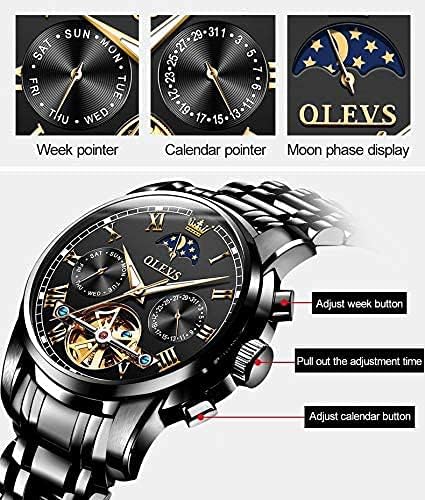
Figure 4.1: Watch function adjustment points.
- Adjust Week Button: Use the top pusher to advance the day of the week.
- Adjust Calendar Button: Use the bottom pusher to advance the date.
- Important: Avoid adjusting the date or day between 9:00 PM and 3:00 AM, as this is when the watch's internal mechanisms are engaged in changing the date, and manual adjustment can cause damage. If you need to adjust the date during this period, first set the time outside this window (e.g., to 6:00 AM), then adjust the date, and finally reset the time to the current time.
4.4 Band Adjustment
Your watch comes with a tool for adjusting the stainless steel band. Instructions for link removal and addition are typically included with the tool. If you are unsure, it is recommended to seek professional assistance for band adjustment to avoid damaging the watch or band.
5. Operating Instructions
5.1 Automatic Winding
The OLEVS watch is an automatic self-winding timepiece. This means it gains power from the natural motion of your arm while you wear it. When fully wound, the watch has a power reserve that allows it to run for a certain period (typically 36-40 hours) even when not worn. To ensure continuous operation, wear the watch regularly or manually wind it if it has been stationary for an extended period.
5.2 Moon Phase Display
The moon phase display automatically cycles to show the current phase of the moon. This feature is synchronized with the time and date settings and does not require separate manual adjustment for its primary function. The moon phase indicator will transition from day (sun icon) to night (moon and stars) as the time progresses.
5.3 Luminous Function
The hands and hour markers of your OLEVS watch are coated with an environmentally friendly luminous material. For optimal glow in the dark, expose the watch to a bright light source (natural or artificial) for a few minutes. The absorbed light energy will then allow the hands and markers to emit a visible glow in low-light conditions.

Figure 5.1: The watch displaying its HD Luminous feature in low light.
6. Maintenance
- Cleaning: Wipe the watch case and band regularly with a soft, dry cloth to remove dust and fingerprints. For the stainless steel band, a slightly damp cloth can be used, followed by a dry one. Avoid using harsh chemicals or abrasive materials.
- Water Resistance: While the watch is 3ATM water resistant, it is crucial to understand its limitations. Avoid direct exposure to high-pressure water jets, hot water, or steam. Always ensure the crown is fully pushed in before any contact with water.
- Storage: When not wearing the watch for extended periods, store it in a cool, dry place away from direct sunlight, extreme temperatures, and magnetic fields. The original gift box is ideal for storage.
- Servicing: Mechanical watches benefit from periodic servicing (every 3-5 years) by a qualified watchmaker to ensure optimal performance and lubrication of moving parts.
7. Troubleshooting
| Problem | Possible Cause | Solution |
|---|---|---|
| Watch stops or runs intermittently. | Insufficient power reserve (not enough wrist movement or manual winding). | Manually wind the watch by rotating the crown clockwise 20-30 times. Wear the watch regularly for at least 8-10 hours a day. |
| Time is inaccurate (runs fast or slow). | Normal deviation for mechanical watches; exposure to magnetic fields; strong impacts. | Minor deviation (e.g., a few minutes per day) is normal for mechanical watches. If deviation is significant, demagnetize the watch or seek professional servicing. Avoid impacts. |
| Condensation inside the watch. | Water ingress due to exceeding water resistance limits or damaged seals. | Immediately take the watch to a professional watchmaker for inspection and repair to prevent further damage. Do not attempt to dry it yourself. |
| Date/Day not changing correctly. | Adjusted during the restricted time (9 PM - 3 AM). | Avoid adjusting date/day during the restricted period. If stuck, try setting the time outside this window, then adjust, and reset time. If issue persists, seek professional help. |
Video Demonstration:
Video 7.1: An official demonstration video showcasing the OLEVS Men's Automatic Mechanical Skeleton Moon Phase watch, including its features, scratch resistance, water resistance, and luminous display.
8. Specifications
| Feature | Detail |
|---|---|
| Model Number | GX-S-G6617GH-H-X |
| Movement Type | Automatic Mechanical |
| Dial Diameter | 41mm / 1.62 inches |
| Case Thickness | 9mm / 0.35 inches |
| Band Width | 20mm / 0.79 inches |
| Band Length | 23cm / 9.06 inches |
| Watch Weight | 42g / 1.48oz |
| Dial Material | Sapphire Crystal |
| Band Material | Stainless Steel |
| Case Material | Alloy |
| Water Resistance | 3 ATM (30 meters) |
| Features | Skeleton Dial, Moon Phase, Luminous Hands/Markers, Day/Date Sub-dials |
9. Warranty and Support
OLEVS offers comprehensive support for your watch:
- Warranty: Your watch comes with a 1-year free warranty from the date of purchase, covering manufacturing defects.
- Return Policy: We provide 7 days service and no reason to return for your convenience.
- Customer Service: For any questions, concerns, or support needs regarding your OLEVS watch, please contact our customer service team.
Contact Email: Gexin_168@yeah.net
Please retain your purchase receipt as proof of purchase for warranty claims.