
Introduction
This manual provides detailed instructions for the setup, operation, and maintenance of your MZEIBO KY-2020D Bluetooth Sound Bar Home Theater Audio System. Please read this manual thoroughly before using the product to ensure proper function and longevity.

Image: The MZEIBO KY-2020D Bluetooth Sound Bar, remote control, and vertical speaker bases.
What's in the Box
Carefully unpack all components and verify that you have received the following items:
- 1 x TV Sound Bar (KY-2020D)
- 1 x Remote Control
- 1 x Power Adapter
- 1 x HDMI Cable
- 1 x Optical Cable
- 1 x RCA Cable
- 1 x AUX Cable
- 1 x User Manual (this document)
- 2 x Bases (left & right, for vertical setup)

Image: All components included in the MZEIBO KY-2020D Sound Bar package.
Setup
1. Assembly (Detachable Design)
The MZEIBO KY-2020D Sound Bar features a detachable design, allowing it to be used as a single horizontal sound bar or two vertical tower speakers. Follow these steps for assembly:
- Align the Notches: Locate the connection points on both halves of the sound bar. Align the shape of the notch on one part with the corresponding connector on the other.
- Insert and Connect: Gently insert the two parts together, ensuring the electrical contacts meet securely.
- Rotate to Lock: Once inserted, rotate one part slightly to lock the two halves together. You should feel a secure connection.
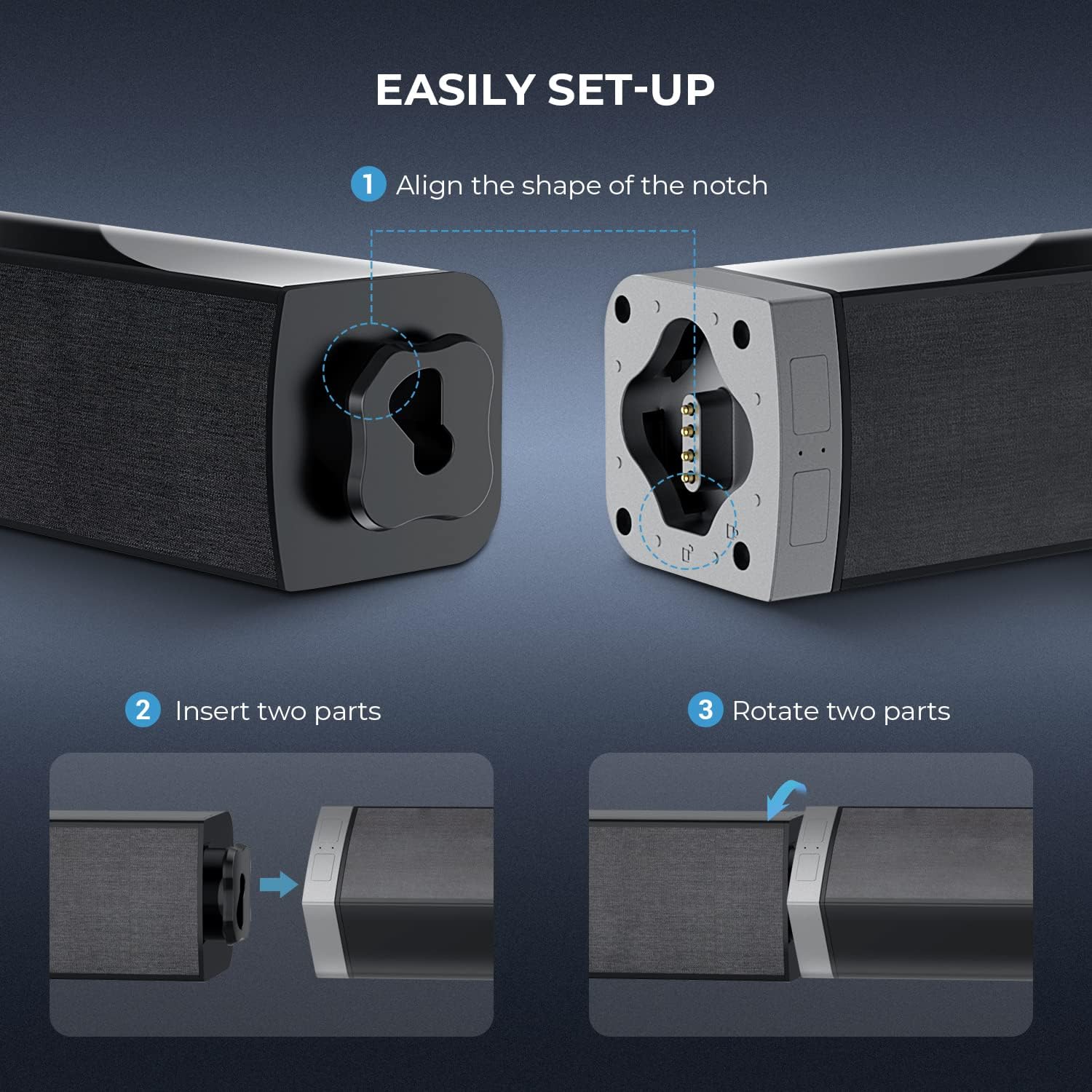
Image: Step-by-step guide for assembling the detachable sound bar.

Image: Illustration of the sound bar assembly process.
2. Placement Options
The sound bar can be placed in two configurations:
- Horizontal Sound Bar: Place the assembled sound bar horizontally below your television.
- Vertical Tower Speakers: Attach the included bases to each half of the sound bar and place them vertically on either side of your television.


Image: Examples of horizontal sound bar placement and vertical tower speaker placement.
3. Connecting to Power
Connect the provided power adapter to the DC IN port on the sound bar and then plug it into a standard electrical outlet.
4. Audio Connections
The MZEIBO KY-2020D Sound Bar offers multiple connectivity options. Choose the method best suited for your device:
- HDMI (ARC): Connect an HDMI cable from the HDMI ARC port on the sound bar to the HDMI ARC port on your TV. This allows for audio return channel functionality.
- Optical: Connect an optical cable from the OPT port on the sound bar to the optical output on your TV or audio source.
- AUX: Use the AUX cable to connect the sound bar's AUX port to the 3.5mm audio output on your device.
- RCA: Connect the RCA cable to the RCA ports on the sound bar and your audio source.
- Bluetooth: For wireless connection, refer to the Bluetooth Pairing section under Operating.

Image: Rear panel connections of the sound bar, highlighting various input options.
Operating Instructions
1. Power On/Off
Press the Power button on the remote control or the sound bar to turn the unit on or off.
2. Input Mode Selection
Press the corresponding input button on the remote control (e.g., HDMI, OPT, AUX, PAIR for Bluetooth) to switch between audio sources. The LED indicator on the sound bar will change color to reflect the active mode.
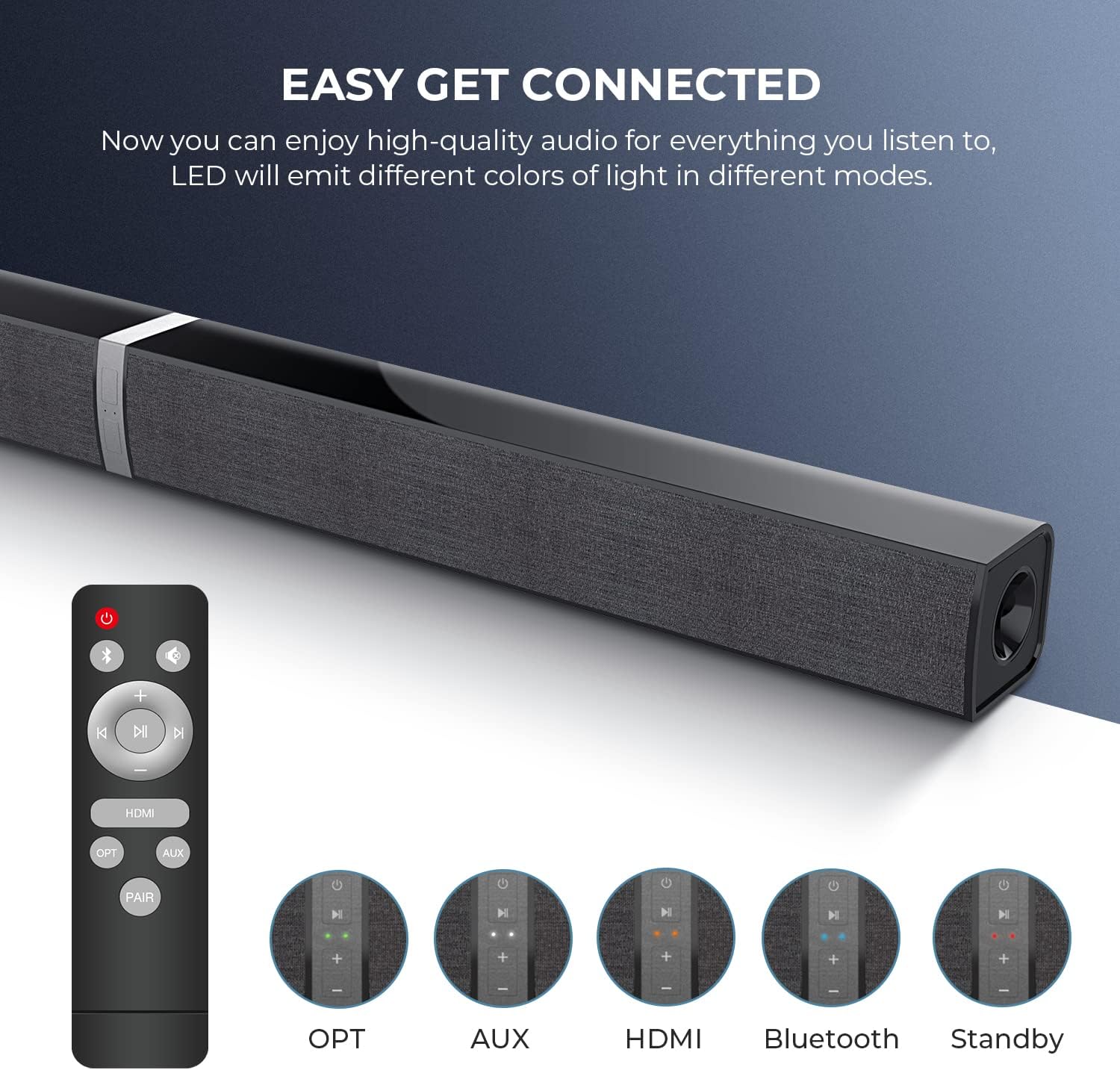
Image: Remote control and visual indicators for selecting audio input modes.
3. Volume Control
Use the + and - buttons on the remote control or the sound bar to adjust the volume. The sound bar has a maximum output power of 50 Watts.
4. Bluetooth Pairing
- Turn on the sound bar.
- Press the PAIR button on the remote control or the Bluetooth button on the sound bar. The LED indicator will flash, indicating it is in pairing mode.
- On your Bluetooth-enabled device (e.g., smartphone, tablet, laptop), search for available Bluetooth devices.
- Select "MZEIBO KY-2020D" from the list.
- Once connected, the LED indicator will stop flashing and remain solid.
The sound bar supports Bluetooth 5.0 for stable wireless audio streaming.
Maintenance
To ensure the longevity and optimal performance of your MZEIBO KY-2020D Sound Bar, follow these maintenance guidelines:
- Cleaning: Use a soft, dry cloth to wipe the surfaces of the sound bar. Avoid using liquid cleaners, aerosols, or abrasive materials, as these can damage the finish or internal components.
- Placement: Place the sound bar on a stable, flat surface. Ensure adequate ventilation around the unit to prevent overheating. Avoid placing it near heat sources or in direct sunlight.
- Storage: If storing the sound bar for an extended period, disconnect it from power and store it in a cool, dry place, preferably in its original packaging.
- Water Exposure: This product is not waterproof. Avoid exposing it to water or excessive moisture.
Troubleshooting
If you encounter issues with your MZEIBO KY-2020D Sound Bar, refer to the following common problems and solutions:
| Problem | Possible Cause | Solution |
|---|---|---|
| No sound from the sound bar. |
|
|
| Bluetooth device cannot pair. |
|
|
| Intermittent sound or sound cutting out. |
|
|
Specifications
| Brand | MZEIBO |
| Model Name | KY-2020D |
| Speaker Type | Soundbar (Detachable) |
| Connectivity Technology | Auxiliary, Bluetooth, HDMI (ARC), Optical, RCA |
| Wireless Communication Technology | Bluetooth 5.0 |
| Audio Output Mode | Stereo, Surround |
| Speaker Maximum Output Power | 50 Watts |
| Surround Sound Channel Configuration | 2.0 |
| Product Dimensions | 2.36"D x 2.36"W x 31.5"H |
| Item Weight | 4.07 pounds |
| Material | Metal, Plastic |
| Color | Black |
| Control Method | Remote |
| Power Source | Corded Electric |
| Special Feature | Bass Boost |
| Recommended Uses For Product | Home Theater |
| Compatible Devices | Laptop, Phones, Tablet, Television |
Warranty Information
The MZEIBO KY-2020D Sound Bar comes with a Limited Warranty. Please refer to the warranty card included in your package for specific terms, conditions, and duration of coverage. Keep your proof of purchase for warranty claims.
Customer Support
For further assistance, technical support, or inquiries regarding your MZEIBO KY-2020D Sound Bar, please contact MZEIBO customer service. Contact details can typically be found on the official MZEIBO website or on the packaging materials.
You can also visit the official MZEIBO store for more product information: MZEIBO Store on Amazon


