
1. Introduction
Thank you for choosing the SHW 40-Inch Electric Height Adjustable Standing Desk (Model OD-91A-W). This manual provides detailed instructions to ensure safe and efficient use of your new desk. Please read this manual thoroughly before assembly and operation, and retain it for future reference.
2. Important Safety Information
WARNING:
- Do not use if the total weight on the desk exceeds 110 pounds (50 kg).
- Always follow assembly instructions carefully to ensure stability and safety.
- Keep children and pets away from the desk during operation.
- Ensure no obstacles are in the path of the desk's movement (up or down).
- Do not sit or stand on the desk.
- Disconnect power before cleaning or maintenance.
3. Package Contents
Verify that all components are present before beginning assembly. If any parts are missing or damaged, please contact customer support.
- Desktop Surface (40" W x 24" D)
- Electric Lifting Columns (Legs)
- Foot Pads
- Control Panel with LED Display and Memory Presets
- Power Adapter and Cables
- Integrated Drawer with Adjustable Compartments
- Cable Management Tray
- Utility Hooks (x2)
- Assembly Hardware (screws, Allen wrench, etc.)
- User Manual (this document)
4. Setup and Assembly
For detailed assembly instructions, please refer to the separate assembly guide included in your product packaging. Ensure you have adequate space and follow all steps carefully. It is recommended to have at least one person for assembly.
Key Assembly Tips:
- Lay out all parts on a soft, clean surface to prevent scratches.
- Do not fully tighten screws until all components are loosely assembled. This allows for easier alignment.
- Connect all electrical cables securely as indicated in the assembly guide.
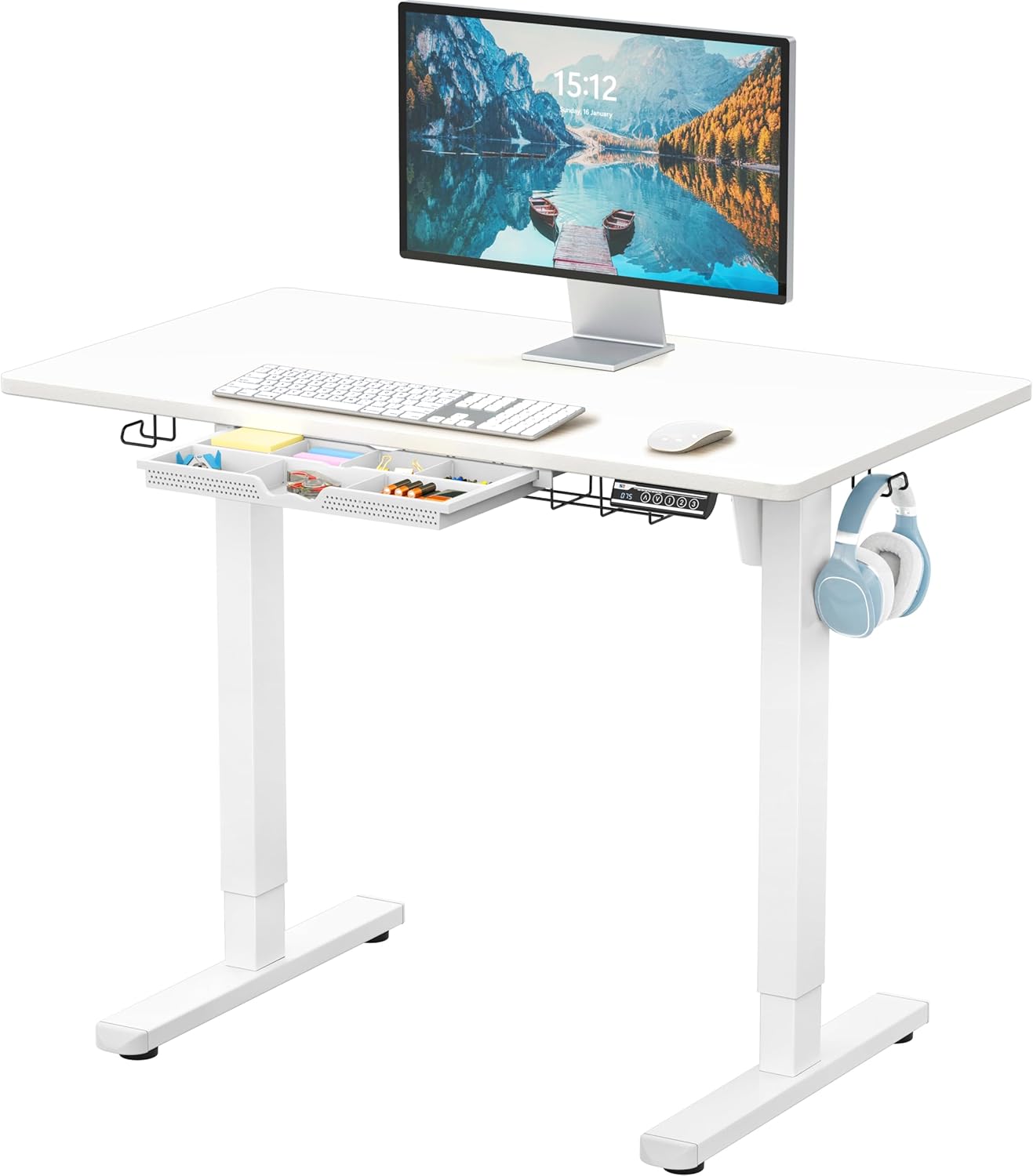
Image: The SHW 40-Inch Electric Height Adjustable Standing Desk, fully assembled in a white finish, featuring a monitor, keyboard, mouse, and the control panel. The integrated drawer and utility hooks are visible.
5. Operating Instructions
5.1. Electric Height Adjustment
The desk features a smooth and quiet motorized lift system. Use the UP (∧) and DOWN (∨) arrow buttons on the control panel to adjust the desk height. The current height will be displayed on the LED screen.

Image: A close-up view of the desk's control panel, showing the LED display, up/down arrows, and memory preset buttons (1, 2, 3).
5.2. Memory Presets
The control panel includes three programmable memory presets (1, 2, 3) for quick access to your preferred sitting and standing heights.
- Adjust the desk to your desired height using the UP (∧) or DOWN (∨) buttons.
- Press and hold one of the preset buttons (1, 2, or 3) until the LED display flashes or beeps, indicating the height has been saved.
- To recall a saved height, simply press the corresponding preset button once. The desk will automatically move to that height.
5.3. Integrated Drawer and Accessories
The desk is equipped with an integrated drawer and utility hooks for enhanced organization.
- Drawer: The pull-out drawer features adjustable compartments, ideal for storing office supplies and reducing desktop clutter.
- Cable Management Tray: A built-in tray helps organize and conceal power cords and cables, maintaining a clean workspace.
- Utility Hooks: Two hooks are provided for hanging headphones, bags, or other items. These can be attached to either side of the desk frame.

Image: The integrated drawer of the SHW desk, showcasing its adjustable compartments filled with various office supplies like sticky notes, pens, and batteries.
6. Maintenance
- Cleaning: Wipe the desktop surface with a soft, damp cloth. Avoid abrasive cleaners or harsh chemicals.
- Inspection: Periodically check all screws and connections to ensure they are tight and secure.
- Motor Care: The electric motor is designed for long-term use. Avoid overloading the desk beyond its specified weight capacity.
7. Troubleshooting
If you encounter any issues with your SHW Electric Standing Desk, please refer to the following common troubleshooting steps:
- Desk Not Moving:
- Check if the power cord is securely plugged into both the desk and a working wall outlet.
- Ensure all cables connecting the control panel to the motor are properly seated.
- If the display shows an error code, consult the full troubleshooting section in the separate assembly guide or contact customer support.
- Uneven Movement/Wobbling:
- Verify that the desk is assembled correctly and all screws are tightened.
- Ensure the desk is placed on a level surface. Adjustable leveling glides on the feet can help compensate for minor unevenness.
- Do not exceed the maximum weight capacity.
- Motor Noise:
- A slight motor hum during operation is normal. Excessive or unusual noise may indicate an issue. Ensure no objects are obstructing the motor mechanism.
8. Specifications
| Brand | SHW |
| Model Number | OD-91A-W |
| Product Dimensions | 24"D x 40"W x 28"H (Minimum Height) |
| Maximum Height | 45"H |
| Color | White |
| Base Material | Metal |
| Top Material Type | Engineered Wood |
| Special Features | Adjustable Height, Ergonomic, Memory Preset, Integrated Drawer, Cable Management Tray, Utility Hooks |
| Maximum Weight Recommendation | 110 Pounds (50 kg) |
| Power Source | Electric |
| UPC | 811244038052 |

Image: Dimensional diagram of the desk, illustrating its 40" width, 24" depth, and adjustable height range from 28" to 45".
9. Warranty and Support
The SHW 40-Inch Electric Height Adjustable Standing Desk comes with a Limited Warranty. For specific warranty details, including coverage and duration, please refer to the warranty card included with your product or visit the official SHW website.
For technical support, replacement parts, or any questions not covered in this manual, please contact SHW customer service. Contact information can typically be found on the product packaging or the brand's official website.
Online Support: Visit the SHW Store on Amazon