
Introduction
This manual provides essential information for the safe and efficient installation, operation, and maintenance of your ELOMILE V35132-16F Fan. This fan is designed for use in AB inverter systems, providing reliable cooling with its 24V DC operation and 0.45A current draw. Its compact 80x80x38mm size makes it suitable for various applications requiring forced air cooling.
Safety Information
Please read and understand all safety instructions before installing or operating the fan. Failure to do so may result in electric shock, fire, or damage to the product or connected equipment.
- Ensure power is disconnected before installation, maintenance, or troubleshooting.
- Verify that the power supply voltage and current match the fan's specifications (24V DC, 0.45A).
- Do not operate the fan if it is damaged or if the wiring is frayed.
- Keep fingers and other objects away from rotating fan blades during operation.
- Install the fan in a well-ventilated area, free from obstructions that could impede airflow.
Setup
1. Unpacking
Carefully remove the fan from its packaging. Inspect the fan for any visible damage that may have occurred during shipping. If damage is found, do not proceed with installation and contact customer support.
2. Mounting
The V35132-16F fan is designed for secure mounting. Use appropriate screws (not included) to fasten the fan to the desired surface through the four mounting holes located at each corner. Ensure the fan is mounted in an orientation that allows for optimal airflow for the cooling application.

Figure 1: ELOMILE V35132-16F Fan showing the model label, 24V DC rating, 0.45A current, and the 4-pin power connector. This view highlights the fan's electrical specifications and connection interface.
3. Wiring
Connect the fan's 4-pin power connector to a compatible 24V DC power source. Ensure correct polarity to prevent damage to the fan or the power supply. Typically, red wire is positive (+) and black wire is negative (-). Refer to your inverter's manual for specific wiring diagrams if connecting to an inverter system.
- Voltage: 24V DC
- Current: 0.45A
- Connector Type: 4-Pin
Operating
Once properly installed and wired, the fan will begin operation when power is supplied to the 24V DC input. The fan is designed for continuous operation to provide forced air cooling for compatible devices, such as inverters.
- Power On: Apply 24V DC power to the connected 4-pin connector. The fan blades should begin to rotate smoothly.
- Power Off: Disconnect the 24V DC power supply. The fan blades will slow down and stop.
- Expected Behavior: The fan should operate with a consistent airflow and minimal noise. Any unusual sounds or vibrations should be investigated (refer to Troubleshooting).
Maintenance
Regular maintenance ensures optimal performance and extends the lifespan of your fan. Always disconnect power before performing any maintenance.
1. Cleaning
Dust and debris can accumulate on the fan blades and housing, reducing cooling efficiency. Periodically clean the fan using a soft brush or compressed air. Avoid using liquids or abrasive cleaners.
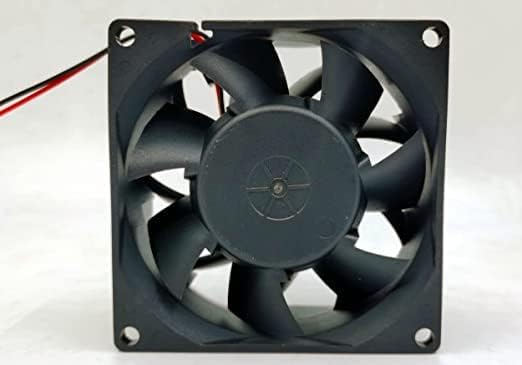
Figure 2: Front view of the ELOMILE V35132-16F Fan, illustrating the fan blades. This view is helpful for identifying areas that may require cleaning to maintain optimal airflow.
2. Inspection
Regularly inspect the fan for any signs of wear, such as loose connections, damaged wires, or unusual vibrations. Address any issues promptly to prevent further damage.
Troubleshooting
If you encounter issues with your ELOMILE V35132-16F Fan, refer to the following common problems and solutions:
| Problem | Possible Cause | Solution |
|---|---|---|
| Fan does not spin | No power, incorrect wiring, fan obstruction, faulty fan. |
|
| Unusual noise or vibration | Loose mounting, debris in fan, worn bearings. |
|
| Reduced airflow | Dust accumulation, obstructed intake/exhaust. |
|
For further assistance with fan model and installation problems, please email us.
Specifications
| Model | V35132-16F |
| Size | 80mm × 80mm × 38mm (3.15"L x 1.5"W x 3.15"H) |
| Voltage | 24V DC |
| Current | 0.45A |
| Wattage | 3.6 watts |
| Power Connector Type | 4-Pin |
| Cooling Method | Forced Air |
| Compatible Devices | Inverter |
| Brand | ELOMILE |
| Manufacturer | Johnson Mars |
Warranty and Support
This ELOMILE product is manufactured to high-quality standards. For specific warranty details, please refer to the documentation provided at the time of purchase or contact your retailer. For technical support, installation questions, or any other inquiries regarding your V35132-16F fan, please email us.
Note: The product description mentions "Fan model and installation problems, if you don’t understand, please email us." This indicates email is the primary support channel.