
Juboos MR-2206
Juboos Kids Digital Watch MR-2206 Instruction Manual
Model: MR-2206
1. Product Overview
The Juboos Kids Digital Watch MR-2206 is designed for children aged 5-18, offering a range of features including time display, date, day of the week, alarm, stopwatch, and a 7-color LED backlight. Its durable and waterproof design makes it suitable for various outdoor activities.
1.1 Watch Components
Familiarize yourself with the watch's buttons and display elements:
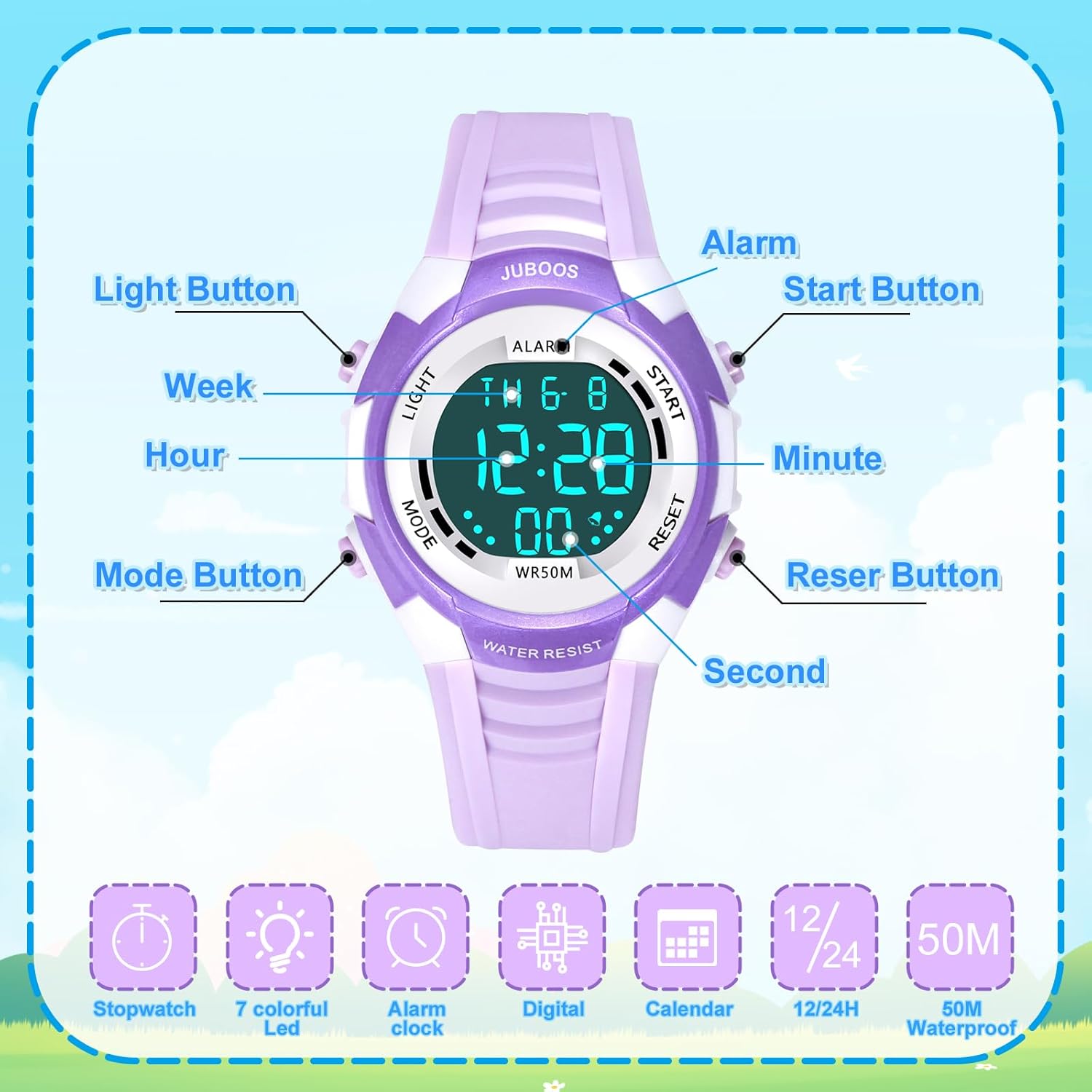
Image: Front view of the watch with labels for Light, Mode, Start, Reset buttons, and display indicators for Week, Hour, Minute, Second, and Alarm.
- LIGHT Button (Top Left): Activates the backlight and changes LED colors.
- MODE Button (Bottom Left): Cycles through display modes (Time, Alarm, Stopwatch).
- START Button (Top Right): Used to start/stop stopwatch, adjust settings.
- RESET Button (Bottom Right): Used to reset stopwatch, adjust settings.
- Display: Shows time, date, day of the week, and alarm status.
2. Setup
2.1 Initial Time and Date Setting
- From the normal time display, press the MODE button three times to enter time setting mode. The seconds will begin to flash.
- Press the RESET button to cycle through the settings: seconds → hour → minute → month → date → day of the week.
- While a value is flashing, press the START button to adjust the value. Hold the START button to increase values quickly.
- Once all settings are correct, press the MODE button to exit the setting mode and return to the normal time display.
2.2 12/24 Hour Format
In the normal time display, press the START button to toggle between 12-hour and 24-hour formats. The 'PM' indicator will appear for afternoon hours in 12-hour format.
3. Operating Instructions
3.1 Alarm Function
- From the normal time display, press the MODE button once to enter alarm setting mode. The hour will flash.
- Press the RESET button to select between hour and minute settings.
- Press the START button to adjust the flashing hour or minute.
- Press the MODE button to exit alarm setting.
- To activate/deactivate the alarm, press and hold the RESET button, then press the START button. The alarm icon will appear/disappear on the display.
3.2 Stopwatch Function
- From the normal time display, press the MODE button twice to enter stopwatch mode.
- Press the START button to begin counting.
- Press the START button again to pause counting.
- Press the RESET button to reset the stopwatch to zero.
- Press the MODE button to exit stopwatch mode.
3.3 LED Backlight
The watch features a 7-color LED backlight. To activate and change colors:
- Press the LIGHT button (top left) once to illuminate the display.
- Press and hold the LIGHT button for approximately 3 seconds to cycle through the 7 different LED colors and flashing modes. Release the button when your desired color or mode is displayed.
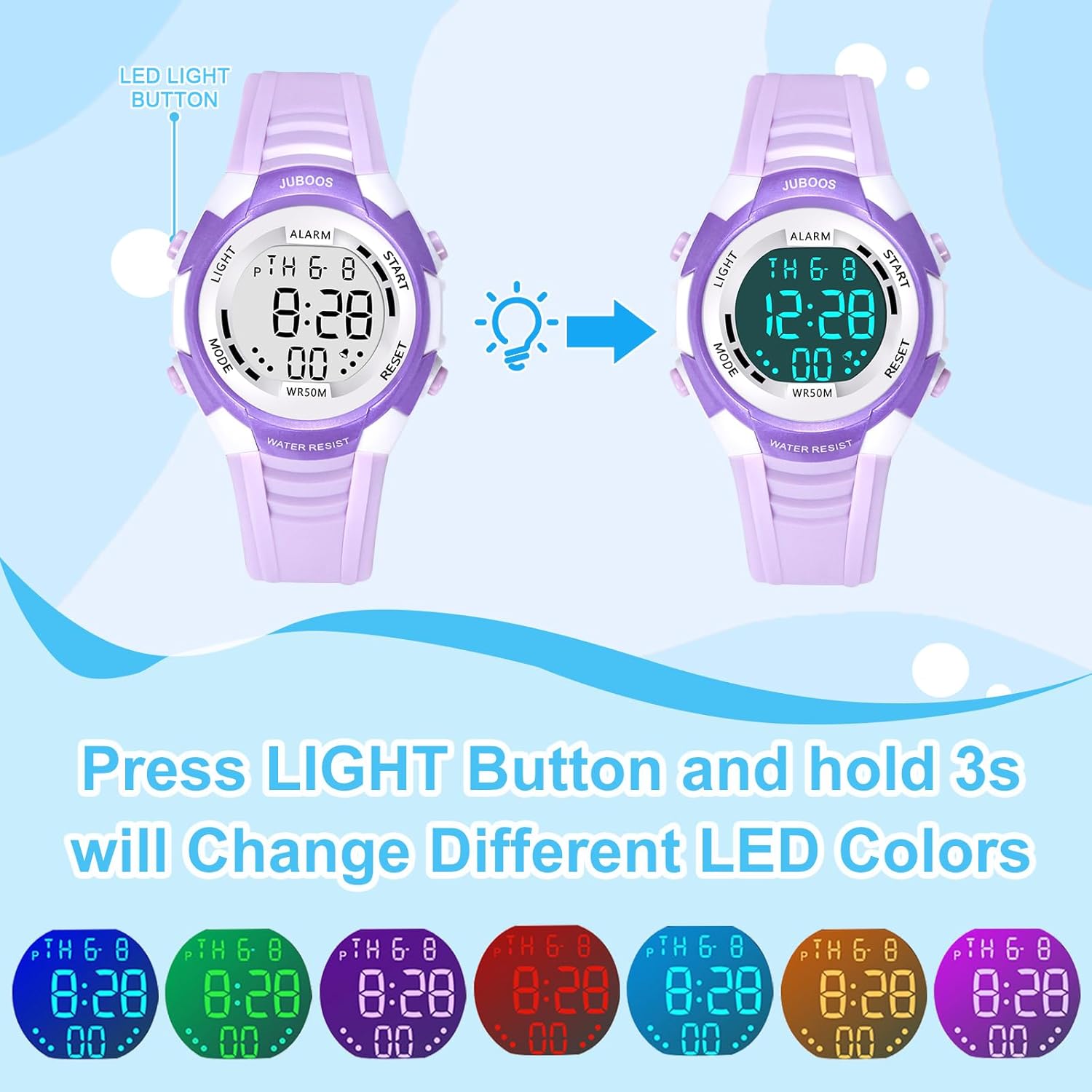
Image: Illustration demonstrating the watch's LED backlight feature, showing the display changing through various colors.
4. Maintenance
4.1 Water Resistance
The Juboos Kids Digital Watch is 5 ATM (50 meters) water resistant, making it suitable for daily use, hand washing, showering, and swimming. However, please observe the following important precautions:
- DO NOT press any buttons while the watch is submerged in water. Pressing buttons underwater can compromise the water resistance seal.
- Avoid wearing the watch during long underwater activities such as diving or snorkeling.
- Avoid exposure to extreme hot or cold temperatures, as this can affect the watch's seals and battery life.

Image: Visual guide to the watch's 50M water resistance, indicating suitability for rain, washing hands, swimming, and sweating, with a critical note against pressing buttons underwater.
4.2 Cleaning
Regularly clean the watch strap and case with a soft, damp cloth. Avoid using harsh chemicals or abrasive materials, as these can damage the watch's finish.
4.3 Battery Information
The watch uses one CR2016 battery (included). When the display dims or functions become unreliable, it may be time to replace the battery. Battery replacement should ideally be performed by a qualified technician to ensure water resistance is maintained.
5. Troubleshooting
If you encounter issues with your Juboos Kids Digital Watch, consider the following:
- Display is blank or dim: The battery may be low or depleted. Replace the CR2016 battery.
- Buttons are unresponsive: Ensure the watch is not in a locked mode (if applicable, though this model does not specify one). Try resetting the watch by removing and reinserting the battery (this will require re-setting the time).
- Time is inaccurate: Re-set the time and date as per section 2.1. If inaccuracy persists, the battery may be weak or the movement may require service.
- Alarm not sounding: Check if the alarm function is activated (alarm icon visible on display). Ensure the alarm time is set correctly.
For persistent issues not resolved by these steps, please contact customer support.
6. Specifications
| Feature | Specification |
|---|---|
| Model Number | MR-2206 |
| Brand | Juboos |
| Case Diameter | 3.3 cm / 1.3 inches |
| Case Thickness | 1.1 cm / 0.43 inches |
| Band Width | 1.6 cm / 0.63 inches |
| Band Length | 22.5 cm / 8.86 inches |
| Minimum Wrist Size | 14 cm / 5.51 inches |
| Maximum Wrist Size | 19.5 cm / 7.68 inches |
| Product Weight | 29g / 0.06 lb |
| Water Resistance | 5 ATM (50 meters) |
| Battery Type | CR2016 (1 included) |
| Clasp Type | Buckle |

Image: Detailed diagram illustrating the physical dimensions of the watch.
7. Warranty and Support
This product is manufactured by Juboos. For any questions, concerns, or support needs regarding your Juboos Kids Digital Watch MR-2206, please refer to the seller's contact information provided at the point of purchase or visit the official Juboos brand store online.
Please retain your proof of purchase for any warranty claims.
Related documentsMR-2206

Ask a question about this manual
Ask about setup, troubleshooting, compatibility, parts, safety, or missing instructions. Manuals+ will review the question and use this page’s manual context to help answer it.