
Introduction
Thank you for purchasing the WIITHINK Portable CD Player Boombox. This device offers versatile audio playback options including CD, FM radio, Bluetooth, USB, and AUX input, designed for both home and outdoor use. Please read this manual carefully before operating the unit to ensure proper use and to maximize its performance.
Safety Instructions
- Do not expose the unit to rain or moisture to prevent fire or electric shock.
- Do not block any ventilation openings. Ensure proper airflow around the unit.
- Do not place the unit near heat sources such as radiators, heat registers, stoves, or other apparatus (including amplifiers) that produce heat.
- Use only attachments/accessories specified by the manufacturer.
- Unplug this apparatus during lightning storms or when unused for long periods of time.
- Refer all servicing to qualified service personnel. Servicing is required when the apparatus has been damaged in any way.
- Keep the unit away from strong magnetic fields.
- Do not attempt to disassemble or modify the unit.
Package Contents
Please check the package contents upon unboxing:
- WIITHINK Portable CD Player Boombox
- AC Power Cord (UK Plug included)
- User Manual
Note: Batteries are not included and must be purchased separately.
Product Overview

Figure 1: Front View of the Boombox. This image displays the main unit from the front, highlighting the two speakers, central control panel with LCD display, volume knob, and various function buttons. The extendable FM antenna is visible at the top.
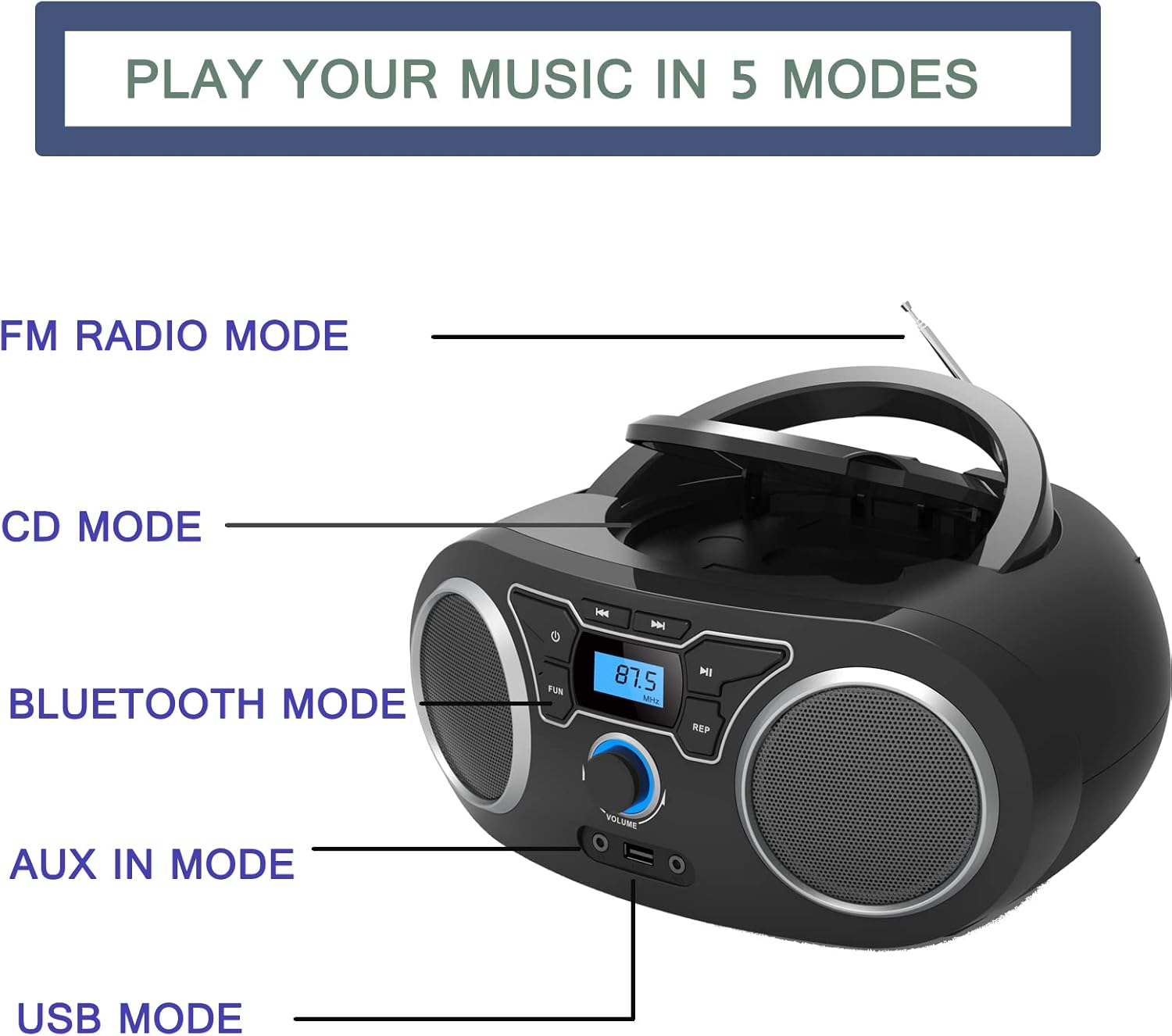
Figure 2: Playback Modes. This diagram illustrates the five primary ways to play music on the device: FM Radio, CD, Bluetooth, AUX In, and USB. Each mode is clearly labeled next to the corresponding part of the boombox.

Figure 3: Dimensions and Power. This image provides the dimensions of the boombox (285mm length, 240mm width, 128mm height) and indicates the AC port for power supply and the compartment for 4 C-cell batteries (not included).
Setup
Powering the Unit
The boombox can be powered by either AC power or batteries.
- AC Power:
- Connect the supplied AC power cord to the AC port on the back of the unit.
- Plug the other end of the power cord into a standard wall outlet.
- Battery Power:
- Open the battery compartment located on the bottom of the unit.
- Insert 4 x 'C' size batteries (not included), ensuring correct polarity (+/-).
- Close the battery compartment cover securely.
Initial Power On
Press the ⏻ button on the front panel to turn on the unit. The LCD display will illuminate.
Operating Instructions
Selecting a Mode
Press the MODE or FUNCTION button repeatedly to cycle through the available modes: CD, FM Radio, Bluetooth, USB, and AUX.
CD Playback
- Press the MODE button until "CD" mode is selected.
- Open the CD compartment lid by gently lifting it.
- Place a CD (Audio CD, CD-R, CD-RW, or MP3 CD) onto the spindle with the label side facing up.
- Close the CD compartment lid. The unit will begin reading the disc.
- Use the PLAY/PAUSE button to start or pause playback.
- Use the SKIP/SEARCH buttons (⏮ / ⏭) to skip tracks or search within a track.
- Press the REPEAT button to repeat the current track (Repeat 1) or all tracks (Repeat All).
FM Radio Operation
- Extend the telescopic FM antenna for optimal reception.
- Press the MODE button until "FM" mode is selected.
- Press and hold the PLAY/PAUSE button (or a dedicated SCAN button if available) to auto-scan and store available FM stations.
- Use the SKIP/SEARCH buttons (⏮ / ⏭) to navigate through stored presets or manually tune frequencies.
Bluetooth Pairing
- Press the MODE button until "Bluetooth" mode is selected. The display will show "BT" or a similar indicator, and the unit will enter pairing mode.
- On your Bluetooth-enabled device (smartphone, tablet, etc.), enable Bluetooth and search for available devices.
- Select "WIITHINK Boombox" (or similar name) from the list of found devices.
- Once paired, you will hear a confirmation sound, and the Bluetooth indicator on the boombox will stop flashing.
- You can now stream audio wirelessly from your device to the boombox.

Figure 4: Bluetooth Connectivity. This image demonstrates the boombox's capability to connect wirelessly via Bluetooth to various devices, allowing for audio streaming from laptops, tablets, and smartphones.
USB Playback
- Insert a USB flash drive containing MP3 files into the USB port on the front of the unit.
- Press the MODE button until "USB" mode is selected.
- The unit will automatically detect and begin playing MP3 files from the USB drive.
- Use the PLAY/PAUSE and SKIP/SEARCH buttons to control playback.
AUX Input
- Connect an external audio device (e.g., MP3 player, smartphone) to the AUX IN port on the front of the unit using a 3.5mm audio cable (not included).
- Press the MODE button until "AUX" mode is selected.
- Audio from the connected device will now play through the boombox speakers. Control playback from your external device.
Headphone Use
Plug 3.5mm headphones into the headphone jack on the front of the unit. The sound will automatically switch from the speakers to the headphones.
Volume Control
Rotate the VOLUME knob on the front panel clockwise to increase volume and counter-clockwise to decrease volume.
Maintenance
- Cleaning: Use a soft, dry cloth to clean the exterior of the unit. Do not use abrasive cleaners or solvents.
- CD Lens Care: If the CD lens gets dirty, use a commercially available CD lens cleaner. Do not touch the lens directly.
- Storage: If the unit will not be used for an extended period, remove the batteries and store it in a cool, dry place away from direct sunlight.
- Antenna: Handle the telescopic antenna gently to avoid damage.
Troubleshooting
| Problem | Possible Cause | Solution |
|---|---|---|
| Unit does not power on. | No power connection / Dead batteries. | Ensure AC cord is securely plugged in or replace batteries. |
| No sound from speakers. | Volume too low / Headphones connected / Incorrect mode. | Increase volume / Disconnect headphones / Select correct mode. |
| CD skips or does not play. | Dirty or scratched CD / CD inserted incorrectly / Dirty CD lens. | Clean or replace CD / Reinsert CD correctly / Clean CD lens. |
| Poor FM radio reception. | Antenna not extended / Weak signal. | Fully extend and adjust the telescopic antenna / Try moving the unit to a different location. |
| Bluetooth device won't pair. | Boombox not in pairing mode / Device too far / Bluetooth disabled on device. | Ensure boombox is in BT mode / Move device closer / Enable Bluetooth on your device. |
| USB drive not recognized. | Incorrect file format / USB drive corrupted / USB drive not fully inserted. | Ensure files are MP3 / Try a different USB drive / Reinsert USB drive firmly. |
Specifications
| Feature | Detail |
|---|---|
| Brand | WIITHINK |
| Model Number | WTB771Black |
| Color | Black |
| Connectivity Technology | Bluetooth, USB, Auxiliary |
| Supported Media | CD (Audio CD, CD-R, CD-RW, MP3 CD), USB (MP3) |
| Radio | Digital FM Radio with 20 Presets |
| Speaker Type | Stereo |
| Output Power | 2 x 2W RMS (4 Watts total) |
| Power Source | AC Power (UK Plug included) or 4 x 'C' Batteries (not included) |
| Item Dimensions (L x W x H) | 25.4 x 22.9 x 10.2 cm (10 x 9 x 4 inches approx.) |
| Item Weight | 1.2 Kilograms (2.65 lbs) |
| Headphone Jack | 3.5mm |
Warranty and Support
For warranty information and technical support, please refer to the documentation provided with your purchase or contact WIITHINK customer service. Details for contacting support are typically found on the product packaging or the official WIITHINK website.
Please retain your proof of purchase for any warranty claims.

