
1. Important Safety Instructions
Please read these instructions carefully before using the product and retain them for future reference. Failure to follow these instructions may result in electric shock, fire, or other hazards.
- Do not expose this appliance to rain or moisture.
- Do not block any ventilation openings. Install in accordance with the manufacturer's instructions.
- Do not install near any heat sources such as radiators, heat registers, stoves, or other apparatus (including amplifiers) that produce heat.
- Protect the power cord from being walked on or pinched, particularly at plugs, convenience receptacles, and the point where they exit from the appliance.
- Only use attachments/accessories specified by the manufacturer.
- Unplug this appliance during lightning storms or when unused for long periods of time.
- Refer all servicing to qualified service personnel. Servicing is required when the apparatus has been damaged in any way, such as power-supply cord or plug is damaged, liquid has been spilled or objects have fallen into the apparatus, the apparatus has been exposed to rain or moisture, does not operate normally, or has been dropped.
- The stylus is delicate; handle with care to avoid damage.
2. Product Overview
The Udreamer UD001 is a belt-driven vinyl record player featuring built-in speakers, Bluetooth connectivity, USB playback, AUX-IN, and RCA line-out. It supports 3 speeds for various record types.

Image: Front view of the Udreamer UD001 Vinyl Record Player with a record on the platter and the dust cover open.
2.1 Components and Controls
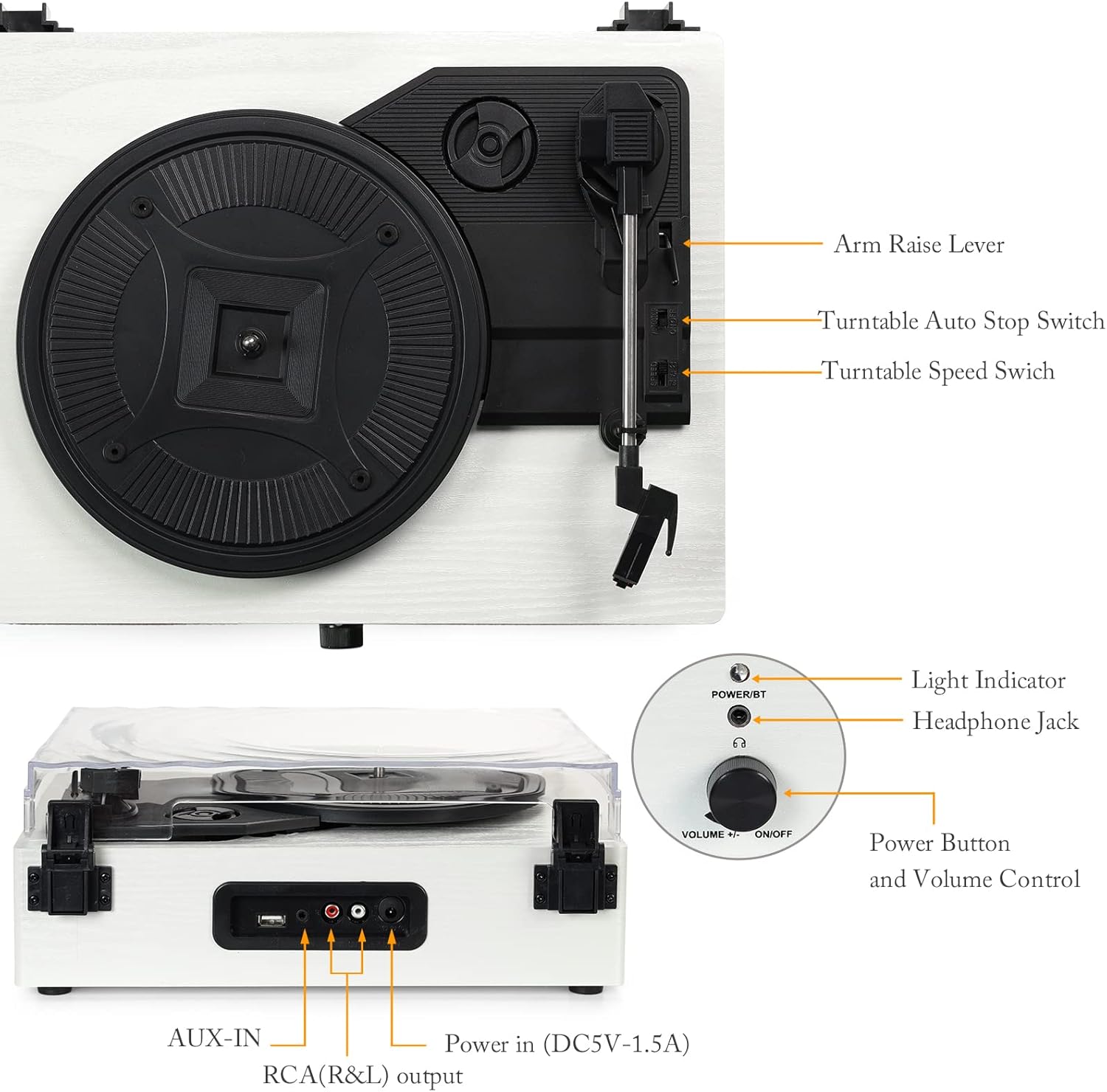
Image: Detailed view of the turntable with labels pointing to key components including the arm raise lever, auto stop switch, speed switch, light indicator, headphone jack, power button, volume control, AUX-IN, RCA(R&L) output, and power input.
- Platter: Supports the record during playback.
- Dust Cover: Protects the turntable from dust.
- Tonearm: Holds the stylus and cartridge.
- Stylus: The needle that reads the record grooves.
- Arm Raise Lever: Lifts and lowers the tonearm.
- Turntable Auto Stop Switch: Enables or disables automatic stopping of the platter at the end of a record.
- Turntable Speed Switch: Selects playback speed (33, 45, or 78 RPM).
- Power Button/Volume Control: Turns the unit on/off and adjusts volume.
- Light Indicator: Shows power and Bluetooth status.
- Headphone Jack: For private listening.
- USB Port: For playing audio from a USB flash drive.
- AUX-IN: For connecting external audio devices.
- RCA (R&L) Output: For connecting to external amplifiers or powered speakers.
- Power In (DC5V-1.5A): Connects to the power adapter.

Image: Close-up views illustrating the stylus, the belt-driven platter mechanism, and the three supported record speeds (33, 45, 78 RPM) for 7-inch, 10-inch, and 12-inch records.
3. Setup
3.1 Unpacking
Carefully remove the turntable from its packaging. Ensure all components are present and undamaged. The package should include the UD001 turntable unit and an operation manual.

Image: The Udreamer UD001 turntable, its packaging box, power adapter, and instruction manual.
3.2 Power Connection
- Connect the power adapter to the 'Power In (DC5V-1.5A)' port on the rear of the turntable.
- Plug the power adapter into a suitable wall outlet.
3.3 Initial Platter and Belt Setup
The turntable platter and drive belt may require minor setup. Ensure the drive belt is correctly positioned around the motor pulley and the inner rim of the platter. Refer to the diagram in the 'Product Overview' section for visual guidance.
4. Operating Instructions
4.1 Playing a Vinyl Record
- Place a record on the turntable platter.
- Select the appropriate speed (33, 45, or 78 RPM) using the Turntable Speed Switch, matching the record's speed.
- If playing a 45 RPM single, place the included 45 RPM adapter on the center spindle.
- Turn the Power Button/Volume Control knob clockwise to power on the unit. The light indicator will illuminate.
- Lift the tonearm using the Arm Raise Lever.
- Carefully move the tonearm over the desired starting groove of the record.
- Gently lower the tonearm onto the record using the Arm Raise Lever. The record will begin to play.
- Adjust the volume using the Power Button/Volume Control knob.
- To stop playback, lift the tonearm using the Arm Raise Lever and return it to its rest. Turn the Power Button/Volume Control knob counter-clockwise to power off.

Image: Close-up of the Turntable Auto Stop Switch and Turntable Speed Switch, located near the tonearm base.
Auto Stop Function: The Turntable Auto Stop Switch controls whether the platter stops automatically at the end of a record. Set to 'ON' for automatic stop, 'OFF' for continuous rotation.
4.2 Bluetooth Pairing
The UD001 can connect wirelessly to Bluetooth-enabled devices for audio playback through its built-in speakers.
- Turn on the turntable by rotating the Power Button/Volume Control knob clockwise. The light indicator will flash blue, indicating Bluetooth pairing mode.
- Enable Bluetooth on your external device (e.g., smartphone, tablet).
- Search for 'Turntable' in your device's Bluetooth settings and select it to pair.
- Once paired, the light indicator will turn solid blue. You can now play audio from your device through the turntable's speakers.
- Adjust volume using the turntable's volume knob or your external device.

Image: A smartphone displaying a Bluetooth pairing menu with 'Turntable' selected, next to the Udreamer UD001 turntable, indicating a successful wireless connection.
4.3 USB Playback
The USB port allows playback of digital audio files from a USB flash drive.
- Insert a USB flash drive into the USB port on the rear of the turntable.
- The unit will automatically switch to USB mode and begin playing compatible audio files.
- Use the turntable's volume control to adjust the audio output.

Image: Close-up of the rear panel connections, clearly labeling the USB port, AUX-IN port, RCA (R&L) output ports, and DC power input.
4.4 AUX-IN Connection
Connect external audio sources (e.g., MP3 players, CD players) using the AUX-IN port.
- Connect a 3.5mm audio cable (not included) from your external audio device's headphone or line-out jack to the AUX-IN port on the rear of the turntable.
- The turntable will automatically switch to AUX-IN mode.
- Play audio from your external device. Adjust volume using both the external device and the turntable's volume control.
4.5 RCA Line Out
For enhanced audio, connect the turntable to external powered speakers or an amplifier using the RCA output ports.
- Connect an RCA cable (not included) from the RCA (R&L) output ports on the rear of the turntable to the corresponding input jacks on your external amplifier or powered speakers.
- Ensure the external audio system is powered on and set to the correct input.
- Audio will now play through your external system. Adjust volume using the external system's controls.
4.6 Headphone Use
For private listening, connect headphones to the headphone jack on the front panel.
- Plug your headphones into the 3.5mm Headphone Jack on the front of the turntable.
- Audio will automatically be routed to the headphones, muting the built-in speakers.
- Adjust volume using the turntable's volume control.

Image: A woman wearing red headphones, holding a vinyl record, and listening to music, illustrating the use of the headphone jack for private listening.
5. Maintenance
5.1 Cleaning the Unit
- Wipe the exterior of the turntable with a soft, dry cloth. Do not use abrasive cleaners or solvents.
- Keep the dust cover closed when not in use to prevent dust accumulation.
5.2 Stylus Care
- Gently clean the stylus periodically using a soft brush, brushing from back to front.
- Avoid touching the stylus with your fingers.
- Replace the stylus when sound quality deteriorates or if the stylus is visibly damaged. Consult the manufacturer for compatible replacement styli.
6. Troubleshooting
- No Power:
- Ensure the power adapter is securely connected to the turntable and a working power outlet.
- Confirm the Power Button/Volume Control knob is turned clockwise to the 'ON' position.
- No Sound:
- Adjust the volume control on the turntable and any connected external devices.
- If using headphones, ensure they are fully plugged in.
- If using RCA output, verify the external amplifier/speakers are on and set to the correct input.
- Check that the stylus is properly seated and not damaged.
- Record Skipping:
- Ensure the record is clean and free of dust or debris.
- Place the turntable on a stable, level surface to minimize vibrations.
- Check the stylus for damage or excessive wear.
- Bluetooth Connection Issues:
- Ensure the turntable is in Bluetooth pairing mode (flashing blue light).
- Make sure your external device's Bluetooth is enabled and within range.
- Try unpairing and re-pairing the device.
7. Specifications
| Feature | Detail |
|---|---|
| Model Number | UD001 |
| Product Dimensions | 12.8 x 9.8 x 4.7 inches |
| Item Weight | 5.02 pounds |
| Playback Speeds | 33 1/3, 45, 78 RPM |
| Drive Type | Belt-Driven |
| Connectivity | Bluetooth, USB, AUX-IN, RCA Line Out, Headphone Jack |
| Built-in Speakers | Yes |
| Power Source | Corded Electric |
| Voltage | 2.4E+2 Volts (240V) |
| Compatible Devices | Headphone, Speaker |
8. Warranty and Support
For warranty information or technical support, please refer to the contact details provided with your purchase documentation or visit the official Udreamer website. Keep your proof of purchase for warranty claims.


