
1. Introduction
Thank you for choosing the TOWODE Wireless PIR Motion Detector. This device is designed to enhance security and convenience in various environments, functioning as a motion alarm, welcome chime, or smart alert system. Please read this manual carefully to ensure proper installation and operation.
2. Safety Information
- Do not expose the device to extreme temperatures, direct sunlight, or moisture.
- Keep the device away from strong magnetic fields.
- Ensure batteries are inserted with correct polarity.
- Do not attempt to disassemble or repair the device yourself. Contact support if issues arise.
- Dispose of batteries according to local regulations.
3. Package Contents
Verify that all items are present in your package:
- 1 x PIR Motion Detector Alarm
- 1 x Infrared Remote Control
- Adhesive patches and screws for mounting
4. Product Components
Familiarize yourself with the main parts of your motion detector and remote control.

Image Description: This image displays the TOWODE PIR Motion Detector and its remote control. The motion detector is a white, oval-shaped device with a red sensing window at the top and a speaker grille at the bottom. It is shown on a white stand. Labels point to the 'Melody Button', 'Switch/Mode Button', 'Volume Adjustment', 'Micro USB port', 'Speaker', and 'Infrared Sensing Window' on the detector. The blue remote control is also labeled with 'Power on/off', 'Welcome/Smart mode', 'Volume +', 'Ring tone choose', 'Volume -', and 'Alarm mode' buttons.
- PIR Motion Detector: Detects movement within its range.
- Infrared Sensing Window: The area through which the PIR sensor detects motion.
- Speaker: Emits alarms, welcome chimes, and other sounds.
- Melody Button: Used to cycle through available melodies/voices.
- Switch/Mode Button: Changes between the three operating modes.
- Volume Adjustment: Controls the sound output level.
- Micro USB Port: For power (optional, batteries are primary).
- Remote Control: Used to arm/disarm, change modes, adjust volume, and select melodies.
5. Setup
5.1 Battery Installation
The PIR motion detector requires 3 x AAA batteries (not included). Open the battery compartment on the back of the device and insert the batteries, ensuring correct polarity. Close the compartment securely.
5.2 Mounting the Device
The device can be mounted using the provided adhesive patches or screws, allowing for flexible placement on walls, doors, or other surfaces. The adjustable angle feature allows you to direct the detection area.

Image Description: This image illustrates the adjustable angle of the motion detector and its mounting options. It shows the device being rotated on its stand, and two methods of attachment: using double-sided adhesive tape and using screws for a more permanent wall mount. Examples of the device mounted on a wall, under a shelf, and on a flat surface are also shown.
- Adhesive Mounting: Clean the desired surface. Peel off the protective film from the adhesive patch and firmly press the device onto the surface.
- Screw Mounting: Use the provided screws to secure the mounting bracket to a wall or ceiling. Then, attach the motion detector to the bracket.
- Placement: Position the detector to cover the desired area. The optimal detection range is 6-8 meters. Avoid placing it near heat sources or in direct airflow from vents, which can cause false alarms.
6. Operating Instructions
6.1 Power On/Off
Press the power button on the remote control to turn the device on or off. The device will indicate its status with a sound or light.
6.2 Remote Control Usage
The infrared remote control has a range of up to 8 meters. For optimal performance, point the remote control directly at the infrared sensing window of the motion detector.

Image Description: A hand holds the blue remote control, pointing it towards a white motion detector mounted above a doorway in a home setting. Blue radio waves emanate from the remote, indicating its wireless function. This illustrates the use of the remote control to operate the device from a distance.
6.3 Volume Adjustment
The device offers 4 levels of volume. Use the 'Volume +' and 'Volume -' buttons on the remote control to adjust the sound output to your preference.

Image Description: This image highlights the 24 chimes, 11 languages, and 4 adjustable volume levels of the motion detector. A graphic shows volume levels from 0dB to 100dB, with icons representing different environments (Sleep, Library, Office, Road, Rock Band). The motion detector is shown with speech bubbles indicating 'Hello, welcome' in various languages, including English, French, Spanish, Portuguese, Russian, Thai, Japanese, Korean, Malay, and Arabic.
6.4 Melody Selection
The device features 24 different voices and melodies. In Welcome Mode and Smart Mode, you can choose from 11 national languages for the 'Welcome' message and 13 other melodies. Use the 'Ring tone choose' button on the remote control to cycle through the available options.
7. Operating Modes
The TOWODE motion detector offers three distinct operating modes:
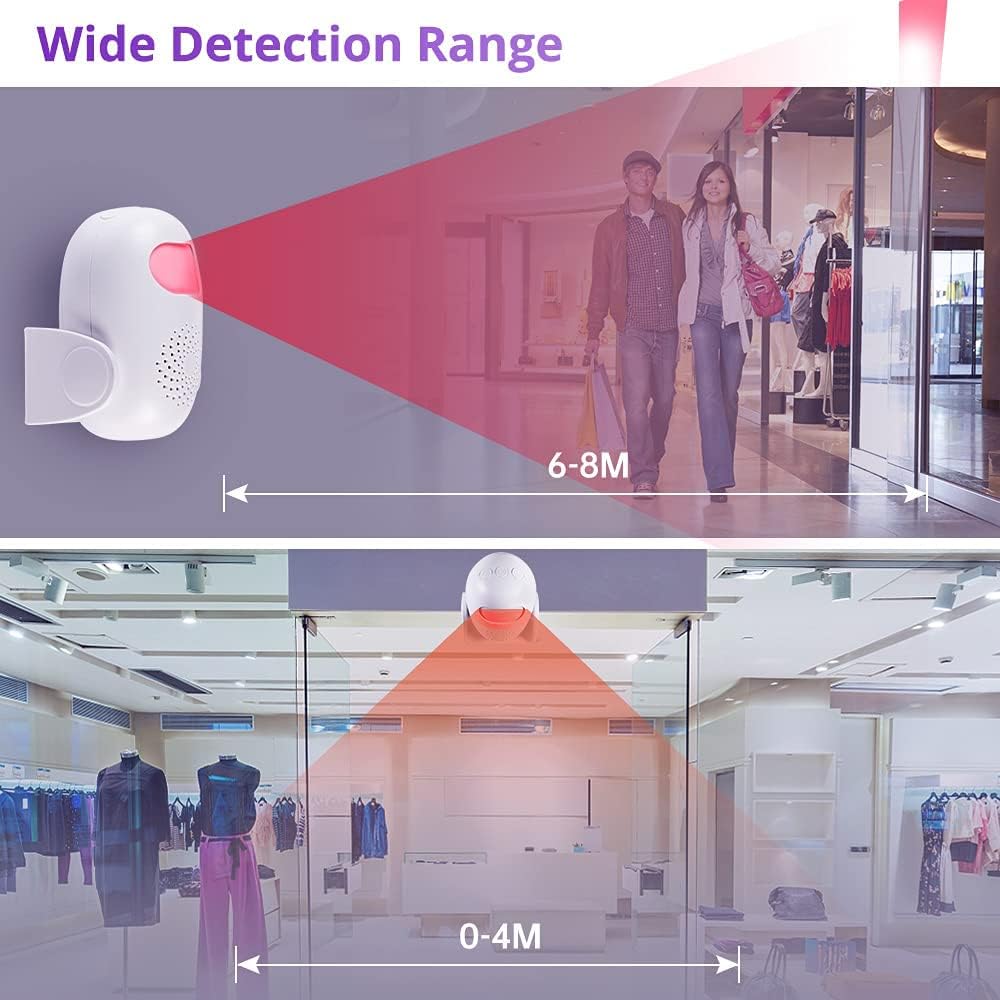
Image Description: This image visually explains the three operating modes of the motion detector. The top panel shows 'Alarm Mode' with a red detection beam highlighting a masked figure attempting to enter through a window, indicating a 100dB alarm. The bottom-left panel shows 'Smart mode' with the detector playing musical notes, indicating 13 different melodies. The bottom-right panel shows 'Welcome mode' with the detector emitting a red beam towards two people entering a room, indicating 'Welcome' in 11 national languages.
- Alarm Mode: When motion is detected, the device will emit a loud alarm sound (up to 100 dB) and a visual flash for approximately 20 seconds. This mode is suitable for security purposes.
- Welcome Mode: Upon detecting motion, the device will play the selected sound (e.g., a 'Welcome' message in one of 11 languages or a melody). It will play the sound every time motion is detected. This mode is ideal for storefronts or entryways.
- Smart Mode: In this mode, the device plays the selected sound when motion is detected. However, subsequent detection sounds will only play after the LED indicator light has turned off, preventing continuous sound output in busy areas. This mode offers a balance between alert and discretion.
To switch between modes, use the 'Switch/Mode' button on the device or the 'Welcome/Smart mode' button on the remote control.
8. Detection Range
The PIR motion detector has an effective detection range of 6-8 meters. The detection angle is wide, covering a significant area. For optimal performance, ensure the sensing window is unobstructed.

Image Description: This image illustrates the wide detection range of the motion detector. The top panel shows the detector mounted on a wall, emitting a red detection beam that covers a range of 6-8 meters, with two people walking within this range. The bottom panel shows the detector mounted overhead, covering a wider area with a detection range of 0-4 meters directly below, suitable for overhead mounting in a retail store setting.
9. Specifications
| Feature | Specification |
|---|---|
| Brand | TOWODE |
| Model Number | Sensore di Movimento |
| Dimensions (L x W x H) | 10.1 x 8.2 x 6 cm |
| Weight | 130 grams |
| Color | White |
| Power Source | Battery Powered (3 x AAA, not included) |
| Max Detection Range | 6-8 meters |
| Remote Control Range | Up to 8 meters |
| Alarm Volume | Up to 100 dB |
| Volume Levels | 4 adjustable levels |
| Melodies/Voices | 24 (including 11 'Welcome' languages) |
| Mounting Type | Wall Mount (adhesive or screws) |
| Compatible Devices | Light control, security system |
10. Troubleshooting
- Device not responding: Check battery levels in both the detector and remote control. Ensure the remote is pointed directly at the detector's sensing window.
- False alarms: Ensure the detector is not placed near heat sources, direct sunlight, or areas with significant air movement (e.g., near air conditioning vents). Adjust the angle to avoid detecting pets if not desired.
- Low sound output: Adjust the volume using the remote control. Replace batteries if they are low.
- Remote control not working: Replace the remote control battery. Ensure there are no obstructions between the remote and the detector.
11. Maintenance
- Cleaning: Wipe the device with a soft, dry cloth. Do not use abrasive cleaners or solvents.
- Battery Replacement: Replace batteries promptly when the device indicates low power or stops functioning correctly.
- Storage: If storing the device for an extended period, remove the batteries to prevent leakage.
12. Warranty and Support
For warranty information or technical support, please refer to the product packaging or contact TOWODE customer service through your retailer. Keep your purchase receipt for warranty claims.
