
Introduction
The Fosi Audio BOX X4 is a versatile audio device designed to enhance your listening experience. It functions as an MM phono preamplifier, converting phono signals from your turntable to line-level signals, and also as a headphone amplifier. This unit features 6J1 vacuum tubes and offers independent control over volume, bass, and treble.
This manual provides essential information for the proper setup, operation, and maintenance of your BOX X4. Please read it thoroughly before use.
Product Overview
Key Features:
- MM Phono Preamplifier: Converts phono signal to line-level signal for connection to modern audio devices.
- Headphone Amplifier: Features a 3.5mm AUX headphone output.
- Vacuum Tube Design: Utilizes 6J1 vacuum tubes for enhanced audio quality.
- Tone Controls: Independent bass and treble adjustment knobs.
- Volume Control: Integrated volume knob with power switch.
- Ground Terminal: Equipped with an earth terminal to protect your turntable.
Package Contents:
- Fosi Audio BOX X4 Phono Preamplifier x1
- DC 12V Power Adapter x1
- User Manual x1

Image: Contents of the Fosi Audio BOX X4 package, showing the main unit, vacuum tubes, power adapter, and user manual.
Setup
Component Identification:

Image: Front panel of the BOX X4, highlighting the 3.5mm headphone output, treble control, bass control, and volume/power knob.

Image: Rear panel of the BOX X4, showing the RCA input, RCA output, ground terminal (GND), and DC 12V power input.
Installation Steps:
- Insert Vacuum Tubes: Carefully insert the provided 6J1 vacuum tubes into their sockets on the top of the unit. Ensure they are seated firmly.
- Connect Turntable: Connect your MM turntable's RCA output cables to the "MM INPUT" RCA jacks on the rear of the BOX X4. If your turntable has a ground wire, connect it to the "GND" terminal on the BOX X4. Note: The BOX X4 is not suitable for MM turntables with a built-in preamplifier circuit.
- Connect to Amplifier/Speakers: Connect the "LINE OUT" RCA jacks on the rear of the BOX X4 to the line-level input (e.g., AUX, CD, Tuner) of your main amplifier or powered speakers.
- Connect Headphones (Optional): For headphone listening, plug your 3.5mm headphones into the headphone jack on the front panel.
- Connect Power: Connect the DC 12V power adapter to the "DC 12V" input on the rear of the BOX X4, then plug the adapter into a power outlet.
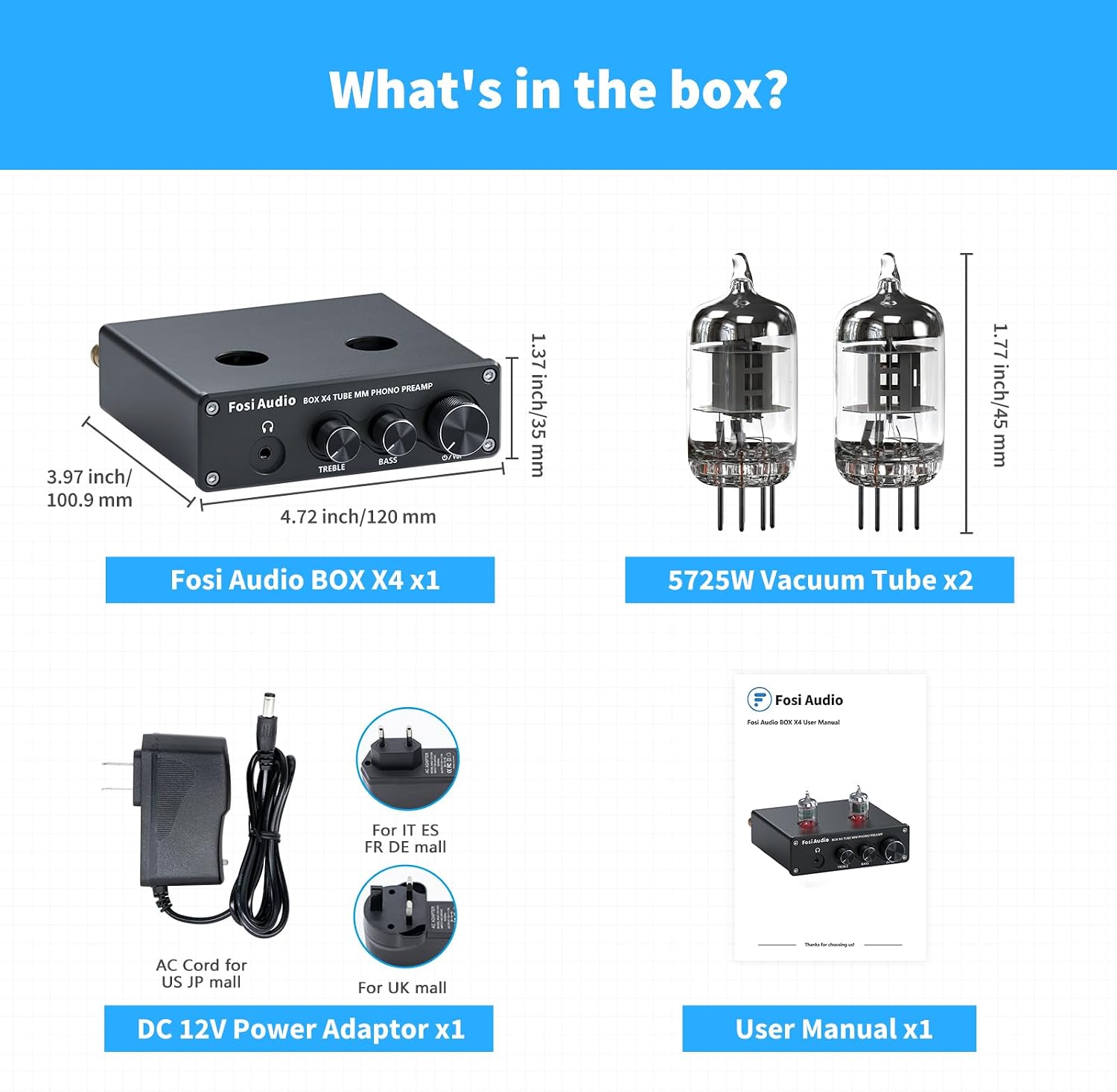
Image: Connection diagram illustrating how to connect the BOX X4 to an MM turntable, headphones, and active or passive speakers via a power amplifier.
Operating Instructions
- Power On/Off: Rotate the volume knob clockwise to turn on the unit. Rotate it counter-clockwise until it clicks to turn off.
- Volume Adjustment: Adjust the main volume using the large knob on the front panel.
- Tone Control: Use the "TREBLE" and "BASS" knobs to adjust the high and low frequencies according to your preference.
- Listening Modes:
- Speaker Output: When no headphones are connected, audio will be sent to the RCA "LINE OUT" for your amplifier/speakers.
- Headphone Output: Plugging headphones into the 3.5mm jack will automatically mute the RCA "LINE OUT" and direct audio to your headphones.

Image: The Fosi Audio BOX X4 in an operational setup, connected to a turntable and headphones, demonstrating its use.
Maintenance
- Cleaning: Use a soft, dry cloth to clean the unit. Avoid using harsh chemicals or abrasive materials.
- Vacuum Tube Replacement: The 6J1 vacuum tubes are replaceable. Compatible models include 6K4, 6J1, 6J4, GE5654, 6AK5, and 66. Ensure the unit is powered off and unplugged before replacing tubes. Carefully pull out the old tubes and insert new ones, aligning the pins correctly.
- Storage: Store the unit in a cool, dry place away from direct sunlight and extreme temperatures when not in use for extended periods.

Image: A detailed view of a vacuum tube, indicating the types of tubes compatible with the BOX X4 for replacement or customization. Note: The unit ships with 6J1 tubes.
Troubleshooting
| Problem | Possible Cause | Solution |
|---|---|---|
| No sound output. |
|
|
| Humming or buzzing noise. |
|
|
| Distorted sound. |
|
|
Specifications
- Model: BOX X4
- Input: MM Turntable (RCA), 3.5mm AUX
- Output: RCA Line Out, 3.5mm Headphone Out
- Vacuum Tubes: 6J1 (replaceable with 6K4, 6J1, 6J4, GE5654, 6AK5, 66)
- Power Supply: DC 12V
- Dimensions: Approximately 120mm (W) x 100.9mm (D) x 35mm (H) (excluding tubes)
- Weight: Approximately 590g
Warranty and Support
Fosi Audio provides a 24-month warranty for the BOX X4, ensuring reliable performance and customer satisfaction.
For technical support, troubleshooting assistance, or warranty claims, please contact Fosi Audio customer service through their official website or the retailer where you purchased the product.
You can find more information and contact details on the Fosi Audio Brand Store.


