
GODOX KAMF12K2
Godox MF12 Macro Flash 2-Light Kit User Manual
Model: KAMF12K2 | Brand: GODOX
Product Overview
The Godox MF12 Macro Flash 2-Light Kit is designed for close-up photography, offering precise lighting control for small subjects. It features 2.4 GHz wireless technology for flexible positioning, a built-in rechargeable lithium battery, and includes color effects and color temperature adjustment sets for creative lighting. This compact flash system is compatible with various camera brands when used with a Godox Xpro, X1, or X2 trigger.

Image: The Godox MF12 Macro Flash 2-Light Kit, showing two flash units, a carrying case, adapter rings, and color gel sets.
What's in the Box
The Godox MF12 Macro Flash 2-Light Kit includes the following components:
- MF12 Macro Flash Unit (x2)
- Flash Stand (x2)
- Color Filter Holder (x2)
- Color Effects Set MF-11C (x2)
- Color Temperature Adjustment Set MF-11T (x2)
- Extreme Close-Up Positioning Adapter (x2)
- Mounting Ring MF-AR (x1)
- Adapter Rings Kit AR-R (x1) - Includes 49mm, 52mm, 55mm, 58mm, 62mm, 67mm, 72mm, 77mm rings
- Type-C USB Cable (x2)
- Carry Case CB31 (x1)

Image: A visual representation of all components included in the MF12 2-Light Kit, neatly arranged.
Setup
Follow these steps to set up your Godox MF12 Macro Flash system:
- Attach Adapter Ring: Select the appropriate adapter ring from the AR-R kit (49mm, 52mm, 55mm, 58mm, 62mm, 67mm, 72mm, 77mm) that matches your camera lens filter thread. Screw it onto the front of your lens.
- Install Mounting Ring: Attach the MF-AR mounting ring to the adapter ring on your lens. Ensure it is securely fastened.
- Mount MF12 Flashes: The MF12 flashes can be mounted directly onto the MF-AR mounting ring. Align the arrow on the flash's adjustable bracket with the arrow on the mounting ring. Press the push buttons on the flash bracket to position and secure the flash onto the mounting ring. You can attach one or multiple flashes for various lighting effects.
- Mount Trigger (Optional): For wireless control, mount a compatible Godox Xpro, X1, or X2 trigger onto your camera's hot shoe.
- Attach Extreme Close-Up Positioning Adapter (Optional): For extremely close-up shots, attach the extreme close-up positioning adapters to the flashes. These diffuse the light and allow for closer subject proximity.

Image: A set of various sized adapter rings and color gels, used for mounting the flash system to different lenses.
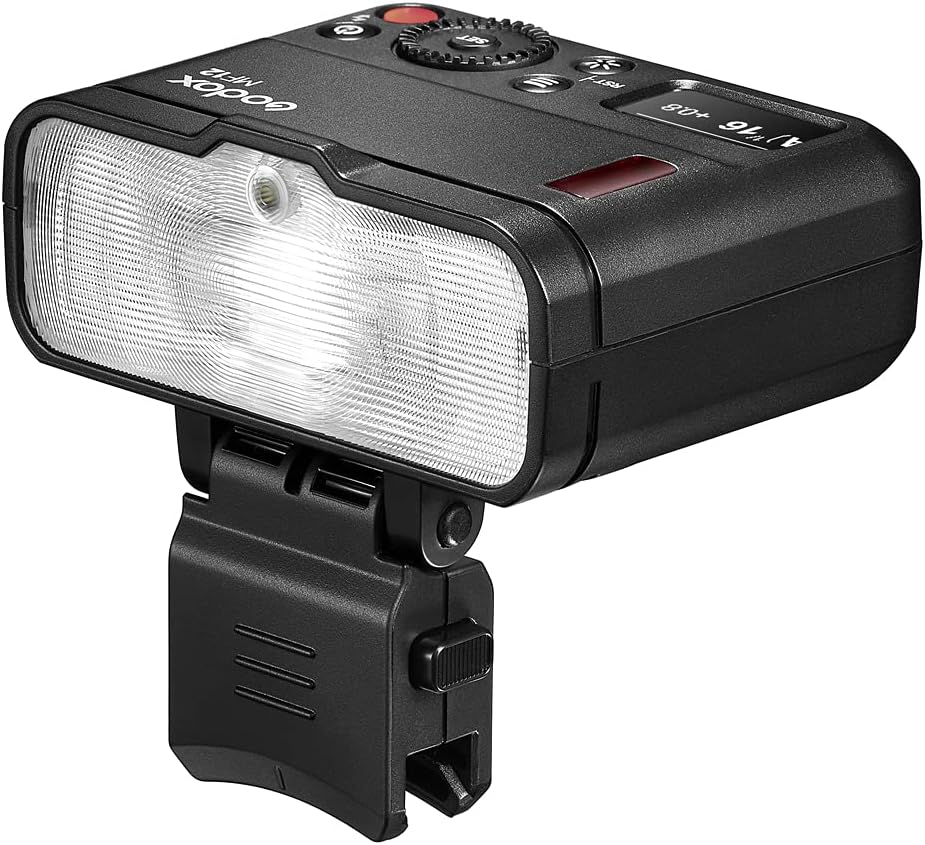
Image: A single Godox MF12 flash unit attached to a mounting ring on a camera lens, demonstrating its compact size and direct attachment capability.
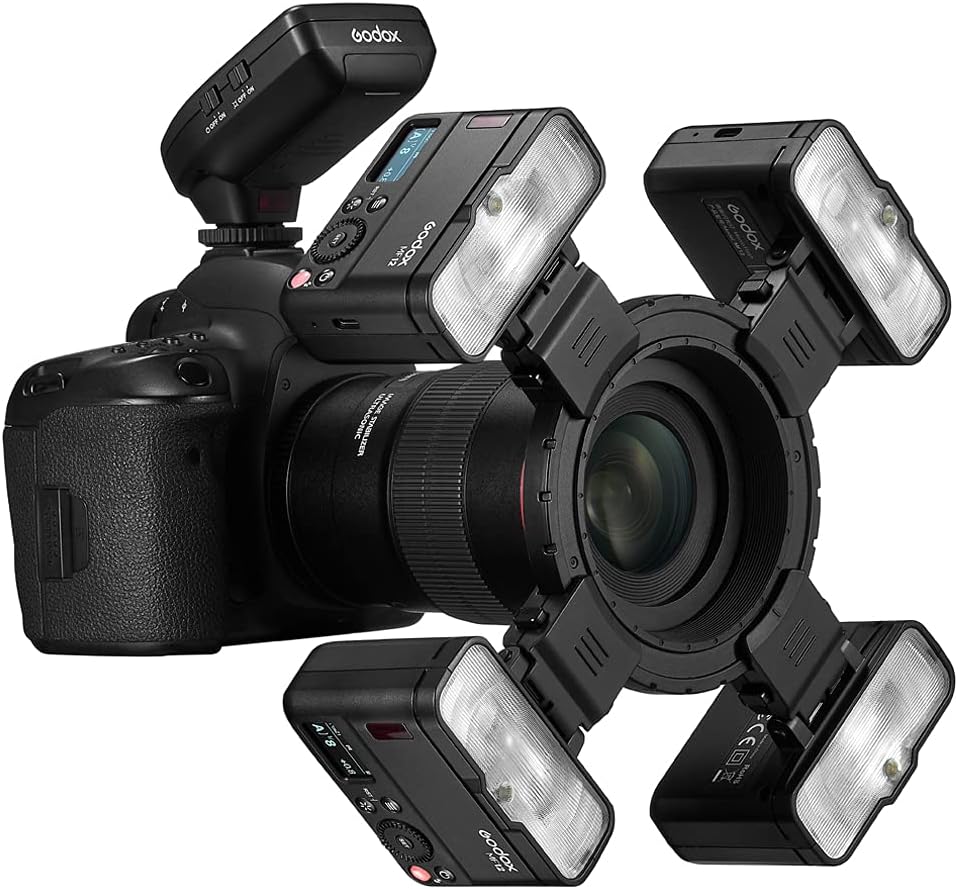
Image: A camera setup with multiple Godox MF12 flashes attached to a circular mounting ring around the lens, illustrating a multi-flash configuration for macro photography.
Video: This video demonstrates the setup process for the Godox MF12 Macro Flash, including attaching the flashes to the mounting ring and setting up the system on a camera. It also shows the multi-flash setup and the use of the extreme close-up positioning adapter.
Operating Instructions
The Godox MF12 Macro Flash offers versatile operation modes and features:
- Power On/Off: Press and hold the power button (ⓘ) to turn the flash on or off.
- Mode Selection: Use the mode button to switch between TTL (Through-The-Lens) and Manual (M) modes.
- Adjusting Settings: Use the dial and SET button to navigate menus and adjust flash power, zoom, and other parameters.
- 2.4 GHz Wireless Control: The MF12 features 2.4 GHz wireless technology for remote control. When paired with a compatible Godox X-series trigger, you can control flash power, group, and channel settings from your camera. This allows for flexible off-camera lighting setups.
- Rechargeable Lithium Battery: The built-in lithium battery provides approximately 500 full-power flashes. Recharge the battery using the included USB Type-C cable. The charging port is located on the side of the flash unit.
- Color Effects and Temperature Adjustment: Use the included MF-11C Color Effects Set to add creative colored lighting to your shots. The MF-11T Color Temperature Adjustment Set allows you to match the flash's color temperature to ambient light conditions for natural-looking results. Simply insert the desired gel filter into the color filter holder and attach it to the flash.
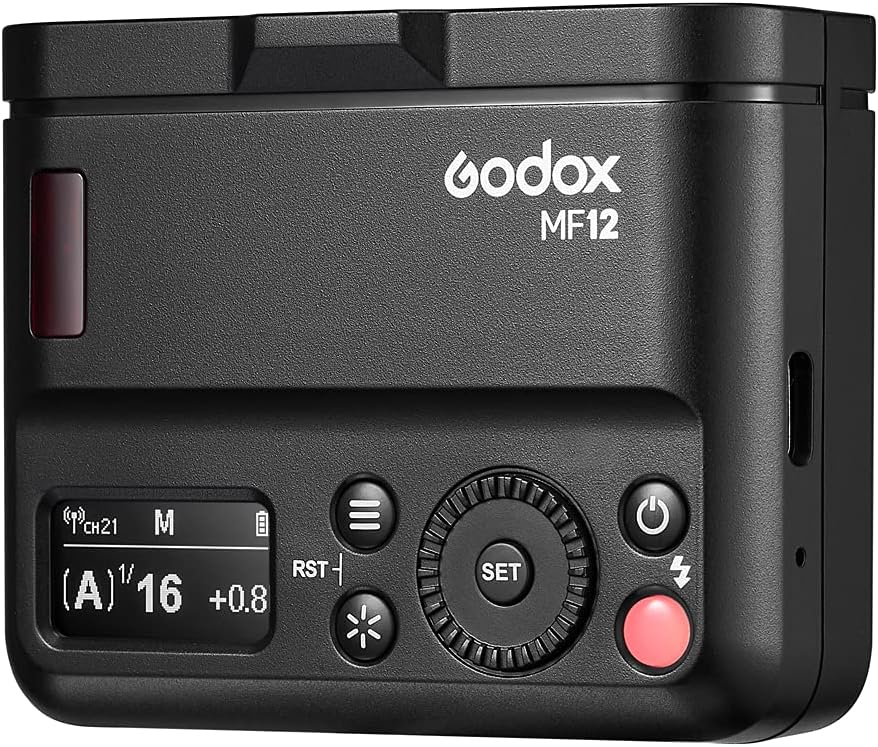
Image: A close-up view of the Godox MF12 flash control panel, showing the LCD screen, buttons for mode, reset, power, and the SET dial for adjustments.
Maintenance
To ensure the longevity and optimal performance of your Godox MF12 Macro Flash:
- Keep the flash units and accessories clean and free from dust and moisture. Use a soft, dry cloth for cleaning.
- Avoid exposing the units to extreme temperatures or direct sunlight for prolonged periods.
- When not in use, store the kit in its provided carry case to protect it from damage.
- Regularly charge the lithium battery to maintain its health, even if not frequently used.
Troubleshooting
If you encounter issues with your Godox MF12 Macro Flash, consider the following common solutions:
- Flash not firing:
- Check if the flash unit is powered on.
- Ensure the battery is charged.
- Verify that the flash is securely mounted or properly connected to the trigger.
- Confirm that the trigger and flash are set to the same channel and group.
- Check camera settings for flash compatibility and activation.
- Inconsistent flash output:
- Ensure the flash mode (TTL/Manual) is appropriate for your shooting conditions.
- Check for obstructions between the trigger and flash units in wireless mode.
- Verify battery level; low battery can affect output consistency.
- Flash not connecting wirelessly:
- Confirm both the flash and trigger are in wireless mode.
- Double-check that the channel and group settings match on both devices.
- Ensure no other wireless devices are causing interference on the same frequency.
If problems persist, refer to the full product manual or contact Godox customer support.
Specifications
| Feature | Detail |
|---|---|
| Model Number | KAMF12K2 |
| Product Dimensions | 2.5 x 3.2 x 3 inches |
| Item Weight | 2.2 pounds |
| Batteries | 1 Lithium Polymer batteries required (included) |
| Compatible Mountings | Nikon (compatible with Godox Xpro, X1, X2 triggers for various brands) |
| Camera Flash Type | Macro |
| Flash Sync Speed | 1/250s |
| Included Components | Cable (USB Type-C) and other kit components listed above |
Warranty and Support
For warranty information and technical support, please refer to the official Godox website or contact the retailer from whom you purchased the product. Keep your proof of purchase for warranty claims.
Related Documents - KAMF12K2
 |
Godox MF12 Macro Flash Instruction Manual Comprehensive guide for the Godox MF12 Macro Flash, detailing its TTL and manual flash modes, S1/S2 triggering, 2.4G wireless transmission, LED modeling light, and custom functions for macro photography. |
 |
Godox MF12-DK1 Dental Flash System Instruction Manual This manual provides detailed instructions for the Godox MF12-DK1 Dental Flash System, covering its features, operation, installation, and maintenance. It includes information on flash modes, wireless transmission, custom functions, and technical specifications. |
 |
Godox V100 Lithium Round TTL Flash Dome User Manual This user manual provides detailed instructions for the Godox V100 Lithium Round TTL Flash Dome, covering its features, operation, settings, and troubleshooting. It includes information on master/slave modes, wireless flash, TTL and manual flash modes, and compatibility with various camera models. |
 |
Godox MF-R76N TTL Macro Ring Flash Instruction Manual Comprehensive user manual for the Godox MF-R76N TTL Macro Ring Flash, covering features, operation, setup, troubleshooting, and technical specifications for Nikon cameras. Includes details on i-TTL and Manual flash modes, 2.4G wireless transmission, and advanced functions. |
 |
Godox MF-R76 Macro Ring Flash - User Manual & Guide Comprehensive user manual for the Godox MF-R76 Macro Ring Flash. Learn about features, operation, installation, specifications, and maintenance for this advanced photography accessory. |
 |
Godox AD400 Pro All-in-One Outdoor Flash User Manual Explore the capabilities of the Godox AD400 Pro, an all-in-one outdoor flash designed for professional and enthusiast photographers. This manual details its advanced features, including TTL, HSS, 2.4G wireless control, and multiple flash modes, ensuring optimal use for various shooting scenarios. |