
Cangaroo 108670
Cangaroo Hype Baby Monitor Instruction Manual
Model: 108670
Introduction
Thank you for choosing the Cangaroo Hype Baby Monitor. This device allows you to keep a close eye on your sleeping baby using a Wi-Fi or LAN connection. With features like two-way communication, infrared night vision, and 360-degree rotation, you can monitor your child effectively. This manual provides detailed instructions for setup, operation, and maintenance to ensure optimal performance and safety.
Product Overview
Key Features:
- Wi-Fi or LAN connectivity for flexible placement.
- 3.0 Megapixel resolution (1984 x 1488) for clear video.
- 360-degree pan and tilt remote control for comprehensive room coverage.
- Integrated microphone and speaker for two-way communication.
- Automatic motion tracking to follow your baby's movements.
- Infrared LED night vision mode for clear viewing in low light.
- Supports up to 3 users simultaneously.
- Compatible with Android, iOS, and Windows devices via a free application.
- Wall-mountable design for versatile installation.
- SD card slot (max. 128 GB, card not included) for local storage.
Package Contents:
Please check the package for the following items:
- Cangaroo Hype Baby Monitor Camera
- AC Power Adapter (Input: 100-240V, 50-60Hz; Output: DC5V 1.5A)
- USB Power Cable
- Mounting Bracket and Screws
- User Manual (this document)
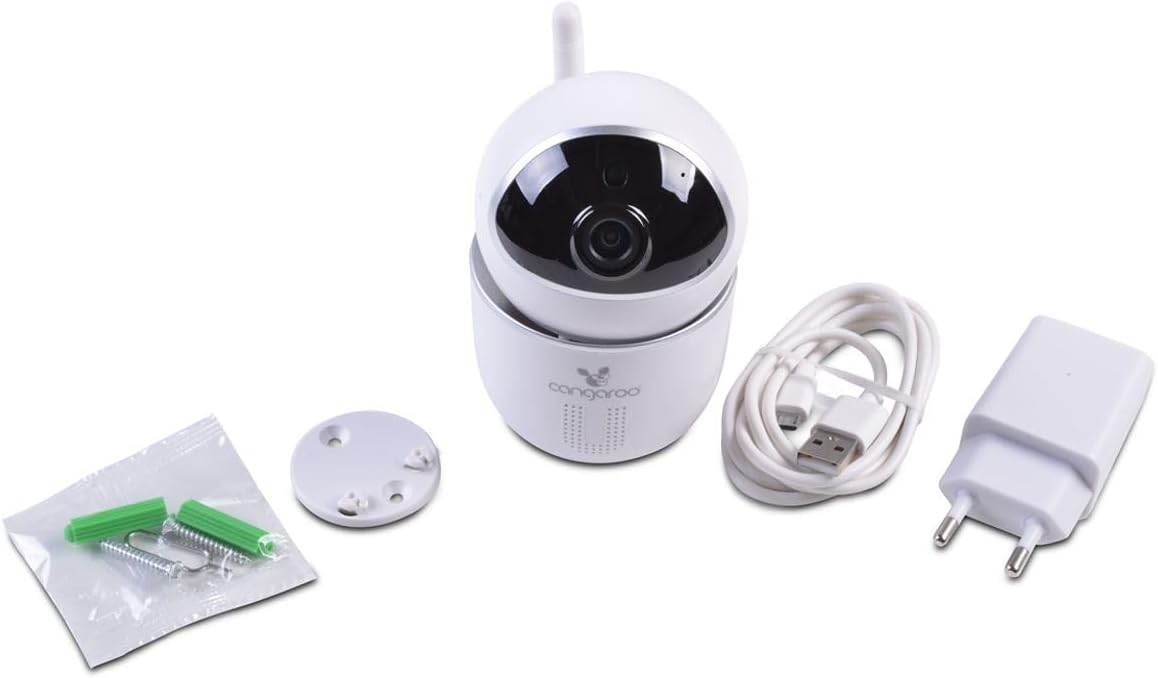
Image: The Cangaroo Hype Baby Monitor camera, power adapter, USB cable, and mounting hardware.
Setup
1. Powering On the Device:
- Connect the USB power cable to the camera's power input port.
- Plug the AC power adapter into a standard electrical outlet.
- The camera will power on and initiate its startup sequence.
2. Installing the Mobile Application:
- Download the free Cangaroo monitoring application from your smartphone's app store (available for Android and iOS).
- Follow the on-screen instructions to create an account or log in.
3. Connecting the Camera to Your Network:
The camera supports both Wi-Fi and LAN connections.
Wi-Fi Connection:
- Open the Cangaroo application on your smartphone.
- Select "Add Device" or a similar option.
- Choose the Wi-Fi setup method (e.g., QR code scan, sound wave pairing).
- Follow the in-app instructions to connect the camera to your home Wi-Fi network. Ensure your Wi-Fi network is 2.4GHz.
LAN Connection (Optional):
- Connect an Ethernet cable from your router to the LAN port on the back of the camera.
- Open the Cangaroo application on your smartphone.
- Select "Add Device" and choose the LAN setup method. The camera should be automatically detected.

Image: Detailed views of the camera's rear ports (LAN, power), antenna, and the detachable mounting base.
4. SD Card Installation (Optional):
To enable local video recording, install a Micro SD card (up to 128 GB, not included).
- Locate the SD card slot on the camera (usually on the side or back, often under a small cover).
- Gently insert the Micro SD card into the slot until it clicks into place.
- Format the SD card through the application settings after installation for proper function.

Image: The camera body with an arrow indicating the location of the Micro SD card slot.
5. Mounting the Camera (Optional):
The camera can be placed on a flat surface or mounted on a wall or ceiling.
- Attach the mounting bracket to the desired location using the provided screws.
- Securely attach the camera to the mounting bracket.
- Adjust the camera angle as needed.
Operating Instructions
1. Live View:
- Open the Cangaroo application and select your camera from the device list to view the live feed.
2. Pan and Tilt Control:
- Use the directional controls within the app to remotely rotate the camera 360 degrees horizontally and adjust its vertical tilt.
3. Two-Way Communication:
- Tap the microphone icon in the app to speak through the camera's speaker to your baby.
- The camera's integrated microphone will transmit audio from the baby's room to your device.
4. Night Vision:
- The camera automatically switches to infrared LED night vision mode in low-light conditions.
- This provides clear black and white video feed without disturbing your baby.
5. Motion Detection and Tracking:
- Enable motion detection in the app settings to receive alerts when movement is detected.
- The automatic motion tracking feature will cause the camera to follow detected movement within its field of view.
6. Video Recording and Playback:
- If an SD card is installed, the camera can record video continuously or upon motion detection.
- Access recorded footage through the playback function in the Cangaroo application.
Maintenance
Cleaning:
- Ensure the camera is powered off and unplugged before cleaning.
- Wipe the camera body with a soft, dry cloth.
- For the lens, use a specialized lens cleaning cloth to avoid scratches.
- Do not use liquid cleaners or aerosols directly on the camera.
Storage:
- Store the camera in a cool, dry place away from direct sunlight when not in use for extended periods.
Firmware Updates:
- Periodically check the Cangaroo application for available firmware updates to ensure optimal performance and security.
- Follow the in-app instructions for any update procedures.
Troubleshooting
Camera Not Connecting to Wi-Fi:
- Ensure your Wi-Fi network is 2.4GHz. The camera may not support 5GHz networks.
- Check that the Wi-Fi password is entered correctly in the app.
- Move the camera closer to your Wi-Fi router.
- Restart both the camera and your router.
- Perform a factory reset on the camera (refer to the app for reset button location, often a small pinhole).
No Video Feed:
- Verify the camera is powered on and connected to the network.
- Check your internet connection on your smartphone.
- Restart the Cangaroo application.
Two-Way Audio Not Working:
- Ensure microphone and speaker permissions are granted to the Cangaroo app on your smartphone.
- Check the volume settings on both your smartphone and within the app.
- Ensure there are no obstructions blocking the camera's microphone or speaker.
Motion Detection Not Triggering:
- Verify that motion detection is enabled in the app settings.
- Adjust the motion detection sensitivity if necessary.
- Ensure the camera's view is not obstructed.
Specifications
| Feature | Detail |
|---|---|
| Model Number | 108670 |
| Brand | Cangaroo |
| Connectivity Technology | Wireless (Wi-Fi), Wired (LAN) |
| Video Resolution | 3 MP (1984 x 1488), 1536p recording |
| Viewing Angle | 360 Degrees (Pan/Tilt) |
| Night Vision | Infrared LED |
| Audio | Two-way communication (integrated microphone and speaker) |
| Motion Tracking | Automatic motion tracking |
| Storage | Micro SD card slot (max. 128 GB, card not included) |
| Power Input | DC5V 1.5A |
| Voltage | 5 Volts |
| Material | Plastic |
| Dimensions (L x W x H) | 9 x 9 x 15 cm |
| Compatible Devices | Smartphone (Android, iOS), Windows |
| Mounting Type | Wall Mountable |
Warranty and Support
For technical support, troubleshooting assistance, or warranty inquiries, please contact Cangaroo customer service through their official website or the contact information provided in the product packaging.
Spare parts availability information is currently unavailable.