
arkrocket AR-WB01
arkrocket 200 Wall-O-Matic Table Jukebox
Model: AR-WB01 User Manual
Introduction
This manual provides comprehensive instructions for the setup, operation, and maintenance of your arkrocket 200 Wall-O-Matic Table Jukebox. Please read this manual thoroughly before using the product to ensure proper function and longevity.

Figure 1: The arkrocket 200 Wall-O-Matic Table Jukebox, designed to complement retro American diner aesthetics.
Safety Information
- Do not expose the unit to rain or moisture.
- Do not disassemble the unit. Refer all servicing to qualified personnel.
- Ensure the power adapter is correctly connected to a suitable power source.
- Keep the unit away from direct sunlight, heat sources, and excessive dust.
- Avoid placing heavy objects on top of the unit.
What's in the Box
Upon unpacking, please verify that all the following items are included:
- arkrocket 200 Wall-O-Matic Table Jukebox Unit
- Power Adapter
- User Manual (this document)
- Song List Cards
Setup
- Placement: Place the jukebox on a stable, flat surface. Ensure adequate ventilation around the unit. The unit can also be wall-mounted using the mounting points on the back.
- Power Connection: Connect the provided power adapter to the 'DC IN' port on the side of the jukebox and then plug it into a standard electrical outlet.
- Initial Power On: Locate the power switch, typically on the side or back, and switch it to the 'ON' position. The display on top should illuminate.
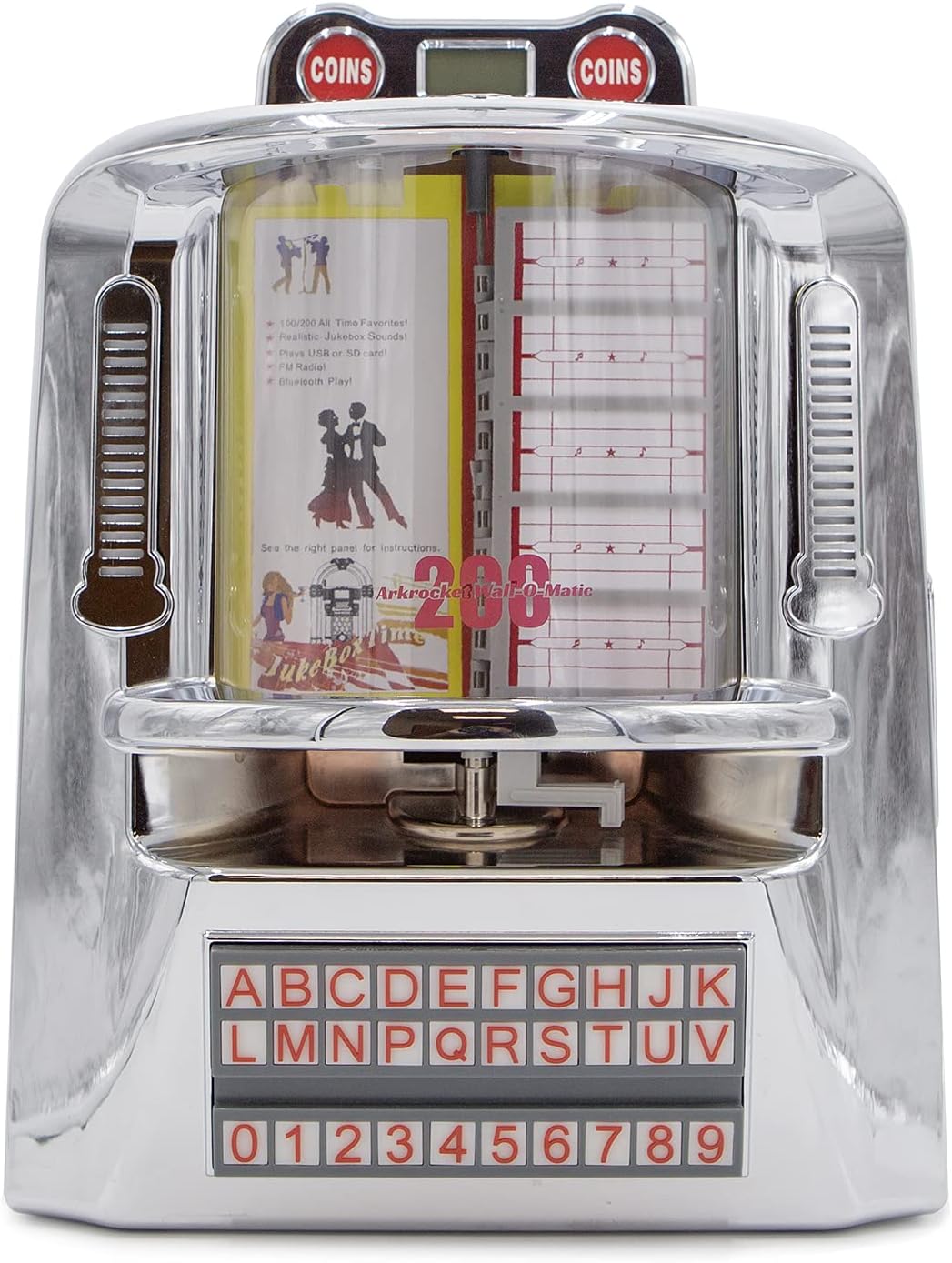
Figure 2: Front view of the jukebox, highlighting its classic design.

Figure 3: Dimensions of the jukebox for proper placement and fitting.
Operating Instructions
Control Panel Overview
The main control panel is located on the right side of the unit. It features various buttons and ports for different functions.

Figure 4: Side control panel with various input and control options.
Mode Selection
Press the 'MODE' button on the control panel to cycle through available input modes: Bluetooth (BT), FM Radio, USB, and SD Card. The top LED display will indicate the currently selected mode.
Bluetooth Pairing
- Switch the jukebox to 'BT' mode using the 'MODE' button. The LED display will show 'BLUE'.
- On your mobile device, enable Bluetooth and search for available devices.
- Select 'arkrocket 200' from the list. Once paired, the jukebox will emit an audible confirmation.
- You can now play audio from your device through the jukebox speakers.
FM Radio Operation
- Switch the jukebox to 'FM' mode using the 'MODE' button. The LED display will show the frequency.
- Use the 'PREV' and 'NEXT' buttons (left and right arrows) to tune to different radio stations.
USB/SD Card Playback
- Insert a USB drive into the 'USB' port or an SD card into the 'SD' slot on the control panel.
- Ensure your music files are in MP3 format. The jukebox supports up to 199 songs.
- The unit will automatically switch to USB or SD mode and begin playback.
- Use the 'PLAY/PAUSE', 'PREV', and 'NEXT' buttons to control playback. The 'RPT' button allows for repeat playback.

Figure 5: USB drive and SD card slots for playing digital music files.
Jukebox Song Selection (Physical Cards)
The jukebox features a classic song selection interface with physical cards.
- To access the song list cards, gently lift the top chrome cover near the 'COINS' display.
- Carefully pull out the transparent sleeves containing the song list cards.
- Write your desired song titles and artists on the provided cards, corresponding to the track numbers on your USB/SD media.
- Slide the sleeves back into place and close the chrome cover.
- Use the alphabet and number buttons on the front panel to select a song (e.g., A1, B2). The selected song will begin playing immediately if in USB/SD mode.

Figure 6: Top section of the jukebox where song list cards are housed.

Figure 7: The illuminated alphabet and number buttons for song selection.
Ambient Lighting
The jukebox features ambient lighting that enhances its retro aesthetic. To control the lighting:
- Locate the 'LIGHT' switch on the side control panel.
- Toggle the switch to 'ON' to activate the lights.
- The side lights are designed to react to the music, creating a dynamic visual effect.

Figure 8: The jukebox with its ambient lighting activated, adding to the retro atmosphere.
Aux In / Line Out
- AUX IN: Connect external audio devices (e.g., smartphones, MP3 players) to the 'AUX IN' port using a 3.5mm audio cable. Switch the jukebox to 'AUX' mode.
- LINE OUT: Connect the 'LINE OUT' port to an external amplifier or speaker system for enhanced audio output.
Maintenance
- Cleaning: Use a soft, dry cloth to clean the exterior of the jukebox. For stubborn marks on the chrome, a slightly damp cloth followed by immediate drying is recommended. Do not use abrasive cleaners or solvents.
- Storage: If storing the unit for an extended period, disconnect it from power and store it in a cool, dry place away from direct sunlight and extreme temperatures.
Troubleshooting
| Problem | Possible Cause | Solution |
|---|---|---|
| No power | Power adapter not connected; outlet not active. | Ensure power adapter is securely plugged into the unit and a working electrical outlet. |
| No sound | Volume too low; incorrect mode selected; external device issue. | Increase volume using VOL+ button. Verify correct mode (BT, USB, SD, FM, AUX). Check external device connection/volume. |
| Bluetooth not pairing | Jukebox not in BT mode; device too far; previous connection active. | Ensure jukebox is in 'BT' mode. Move device closer. Disconnect from other Bluetooth devices. |
| USB/SD card not playing | Incorrect file format; card/drive not inserted correctly; corrupted files. | Ensure files are MP3. Reinsert USB/SD card. Try a different USB/SD card or reformat. |
| Lights not working | Light switch off. | Toggle the 'LIGHT' switch to 'ON'. |
Specifications
| Feature | Detail |
|---|---|
| Brand | arkrocket |
| Model Name | 200 Wall-O-Matic |
| Model Number | AR-WB01 |
| Material | Chrome |
| Color | Silver Chrome |
| Product Dimensions | 6"D x 11"W x 16"H |
| Item Weight | 7 Pounds |
| Speaker Type | Component |
| Speaker Size | 5 Inches |
| Speaker Max Output Power | 40 Watts |
| Audio Output Mode | Stereo |
| Connectivity Technology | Auxiliary, Bluetooth, USB |
| Wireless Communication Technology | Bluetooth |
| Bluetooth Range | 10 Meters |
| Special Features | Bluetooth, FM Radio, SD card, USB Port, Ambient Lighting |
| Power Source | Corded Electric |
| Warranty Type | 1 YEAR |
Warranty & Support
Your arkrocket 200 Wall-O-Matic Table Jukebox comes with a 1-Year Limited Warranty from the date of purchase. This warranty covers manufacturing defects and workmanship under normal use.
For warranty claims, technical support, or any inquiries regarding your product, please visit the official arkrocket website or contact their customer service directly. Please have your model number (AR-WB01) and proof of purchase ready when seeking support.
Ask a question about this manual
Ask about setup, troubleshooting, compatibility, parts, safety, or missing instructions. Manuals+ will review the question and use this page’s manual context to help answer it.