
Lenoxx PE520
Lenoxx Hacienda Under Desk Bike Pedal Exerciser User Manual
Model: PE520
Introduction
This manual provides essential information for the safe and effective operation, maintenance, and troubleshooting of your Lenoxx Hacienda Under Desk Bike Pedal Exerciser. Please read this manual thoroughly before first use and retain it for future reference.
The Lenoxx Hacienda Pedal Exerciser is designed to offer a convenient way to engage in low-impact exercise for both arms and legs, suitable for use at home or in an office environment. It features an LCD screen to track your progress and an adjustable tension knob for varied workout intensity.
Safety Information
- Always consult with a healthcare professional before starting any new exercise program.
- Ensure the exerciser is placed on a stable, flat surface during use to prevent tipping.
- Keep hands and feet clear of moving parts during operation.
- Do not stand on the pedal exerciser. It is designed for seated use only.
- Do not exceed the recommended usage time or intensity to avoid overexertion.
- Keep out of reach of children and pets.
- If you experience pain, dizziness, or discomfort, stop exercising immediately and consult a healthcare professional.
Product Components
Familiarize yourself with the main components of your pedal exerciser:
- Main Unit with Base
- Pedals with Adjustable Straps
- LCD Display Screen
- Adjustable Tension Knob
- Transport Handle (on backside)

Image: Front view of the Lenoxx Hacienda Pedal Exerciser, showing the main unit, pedals, and the LCD display at the top.

Image: Rear view of the pedal exerciser, highlighting the integrated transport handle for easy portability.
Setup and Assembly
The Lenoxx Hacienda Pedal Exerciser typically requires minimal assembly. Follow these steps:
- Unpacking: Carefully remove all components from the packaging. Ensure all parts are present.
- Pedal Attachment: Attach the pedals to the main unit. Note that pedals are often marked 'L' for left and 'R' for right. Ensure they are screwed in tightly. Some models may require specific rotation directions for tightening (e.g., left pedal tightens counter-clockwise).
- Battery Installation: Locate the battery compartment for the LCD display. Insert one AAA battery (not included) with the correct polarity.
- Placement: Place the exerciser on a flat, stable surface. For leg exercises, position it under a desk or in front of a sofa. For arm exercises, place it on a sturdy table.
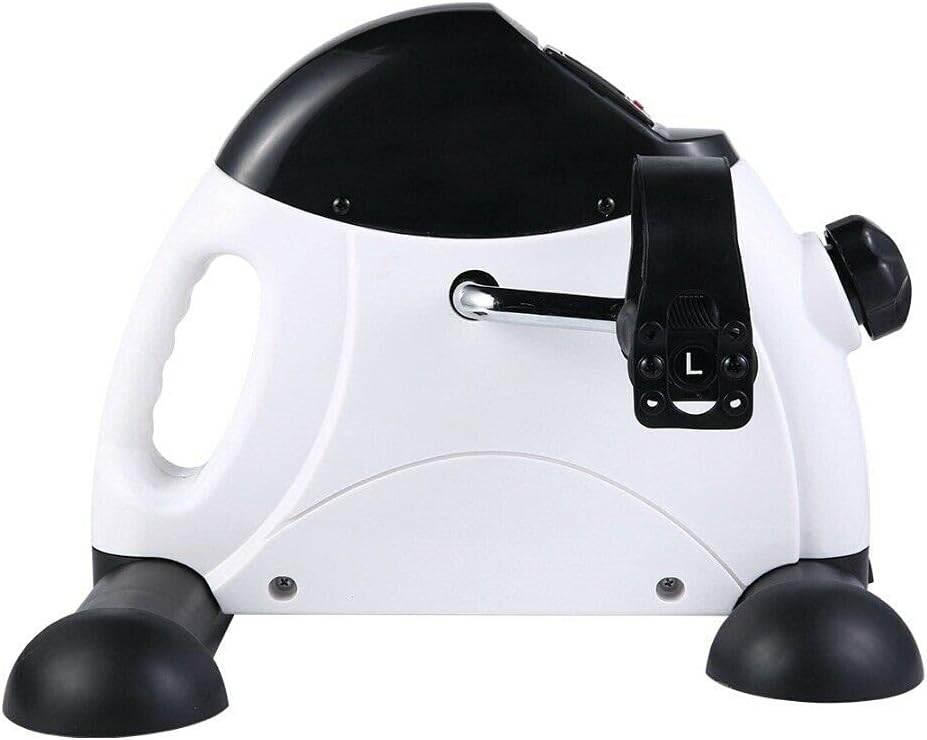
Image: Side view of the exerciser, illustrating the pedal attachment point and the 'L' marking on the left pedal.
Operating Instructions
Using the Pedal Exerciser
- Positioning: Sit comfortably in a chair. For leg exercises, place your feet into the pedal straps. For arm exercises, place your hands into the pedal straps.
- Adjusting Tension: Turn the adjustable tension knob located on the front of the unit clockwise to increase resistance and counter-clockwise to decrease resistance. Start with a low resistance and gradually increase as your strength improves.
- Beginning Exercise: Begin pedaling smoothly. The LCD display will automatically activate and start tracking your workout.

Image: A user demonstrating leg exercise with the pedal exerciser while seated on a sofa.

Image: A user demonstrating arm exercise with the pedal exerciser placed on a table.
Understanding the LCD Display
The LCD monitor tracks various metrics to help you monitor your progress:
- SCAN: Alternates display through all functions.
- TIME: Displays the duration of your current exercise session.
- DIST (Distance): Shows the estimated distance covered.
- COUNT (Cycling Rotations): Displays the number of rotations during the current session.
- TOTAL COUNT: Accumulates the total number of rotations over all sessions.
- CALORIES: Estimates the calories burned during the current session.
To reset the display, press and hold the button (if available) or remove and reinsert the battery.

Image: Close-up views of the LCD display, illustrating the different metrics it tracks: Scan, Time, Distance, Count, Total Count, and Calories Burned.
Maintenance and Care
- Cleaning: Wipe the exerciser with a damp cloth after each use to remove sweat and dust. Do not use abrasive cleaners or solvents.
- Storage: Store the exerciser in a cool, dry place away from direct sunlight and extreme temperatures.
- Battery Replacement: Replace the AAA battery in the LCD display when the screen becomes dim or stops functioning.
- Lubrication: Periodically check for any squeaking noises. If present, a small amount of silicone-based lubricant can be applied to moving parts, avoiding the tension mechanism unless specifically instructed.
- Inspection: Regularly inspect the pedals, straps, and base for any signs of wear or damage. Do not use the exerciser if any parts are damaged.
Troubleshooting
| Problem | Possible Cause | Solution |
|---|---|---|
| LCD display not working | Battery is dead or incorrectly installed. | Replace the AAA battery, ensuring correct polarity. |
| Squeaking noise during operation | Lack of lubrication on moving parts. | Apply a small amount of silicone-based lubricant to the pedal axles or other friction points. |
| Pedals feel loose or wobbly | Pedals are not securely tightened. | Ensure both pedals are fully tightened onto their respective cranks. Remember that the left pedal often tightens counter-clockwise. |
| Resistance not changing | Tension knob mechanism issue. | Check if the tension knob is turning freely. If the issue persists, contact customer support. |
Specifications
| Feature | Detail |
|---|---|
| Model Number | PE520 |
| Brand | Lenoxx |
| Dimensions (L x W x H) | 40 cm x 31 cm x 35 cm (approx.) |
| Weight | 3.2 kg |
| Power Source (LCD) | 1 x AAA Battery (not included) |
| Display Type | LCD |
| Resistance Mechanism | Adjustable Knob |
| Features | Portable, Adjustable Tension, Non-Slip Pedal Grips, Transport Handle |

Image: Detailed views of key features: LCD screen, adjustable tension knob, anti-slip rubber pads on pedals, and the integrated handle design.
Warranty and Support
For warranty information and customer support, please refer to the warranty card included with your product or visit the official Lenoxx website. Keep your purchase receipt as proof of purchase.
For further assistance, you may contact Lenoxx customer service through their official channels. Please have your model number (PE520) and purchase details ready.
Note: Warranty terms and conditions may vary by region and retailer.
Ask a question about this manual
Ask about setup, troubleshooting, compatibility, parts, safety, or missing instructions. Manuals+ will review the question and use this page’s manual context to help answer it.