
1. Important Safety Information
Please read and understand all safety instructions before installing or operating the inverter. Failure to follow these instructions may result in electrical shock, fire, or serious injury.
- Connect inverter to a 12V 200 Ah or above battery with the provided cables.
- DO NOT exceed 1500 Watt total load.
- Do not leave the power inverter in the ON position while your vehicle is off to prevent battery drain.
- Disconnect the positive battery terminal before doing any wiring to the inverter.
- Do not put the inverter into direct sunlight; keep it in a cool and dry environment.
- Do not use the inverter with a product that draws a higher wattage than the inverter can provide, as this may cause damage to the inverter and product.
- Ensure proper ventilation around the inverter to prevent overheating.
- This device is FCC Approved and designed with low EMI technology to reduce noise and interference.
2. Product Overview
The LEESKY 1500W Pure Sine Wave Power Inverter converts DC 12V power from your battery to AC 110V/120V, suitable for various appliances in RVs, cars, vessels, and emergency situations. It features dual GFCI sockets for current leakage protection, a large LCD display for monitoring, and a remote controller for convenience.

Figure 2.1: The LEESKY 1500W Pure Sine Wave Power Inverter shown with its included accessories, including battery cables, remote controller, and earth wire.

Figure 2.2: Examples of the inverter's versatile applications, including powering devices in RVs, boats, and for outdoor activities.
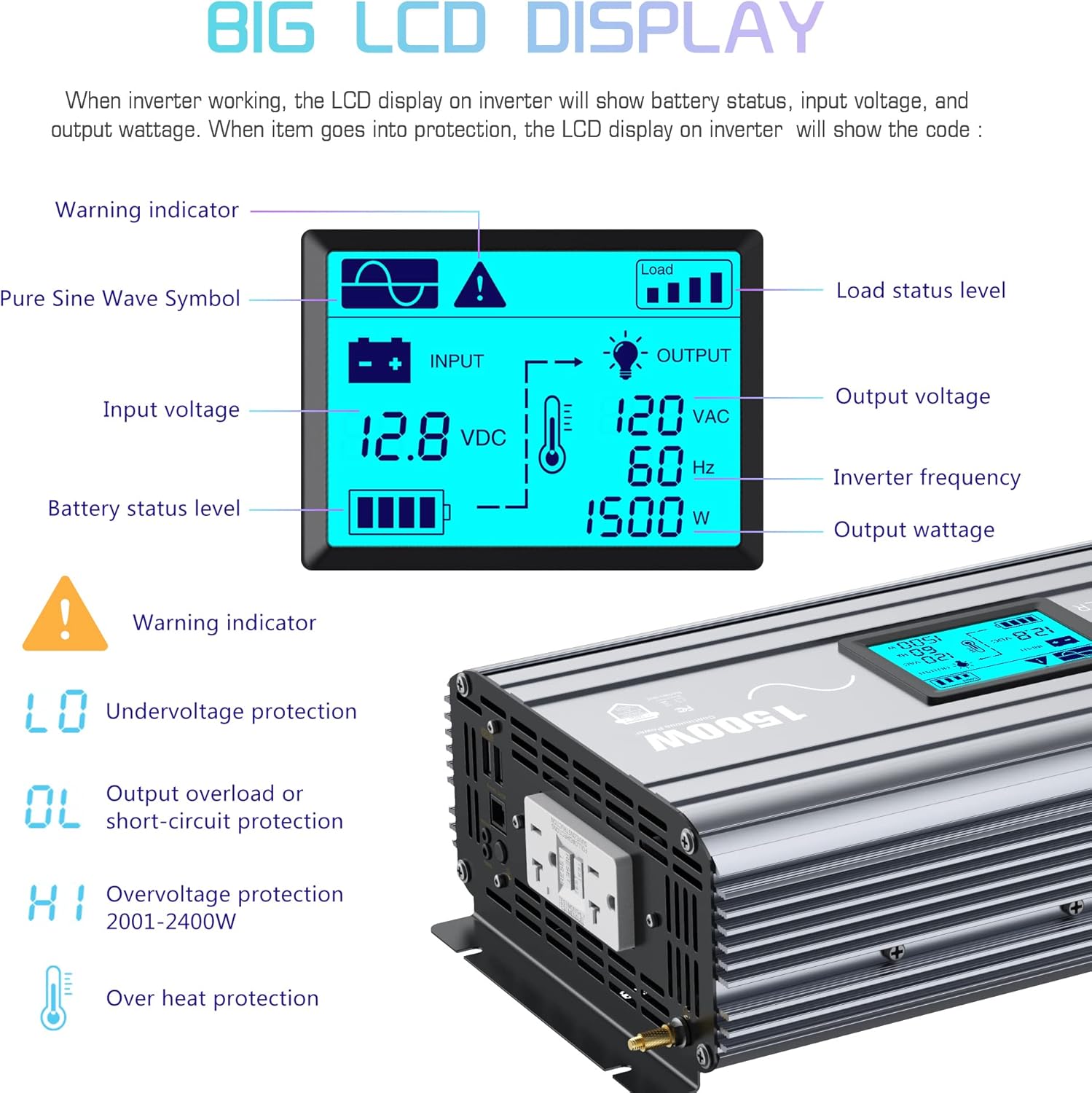
Figure 2.3: The large LCD display provides real-time information on input voltage, output wattage, battery status, and protection codes.
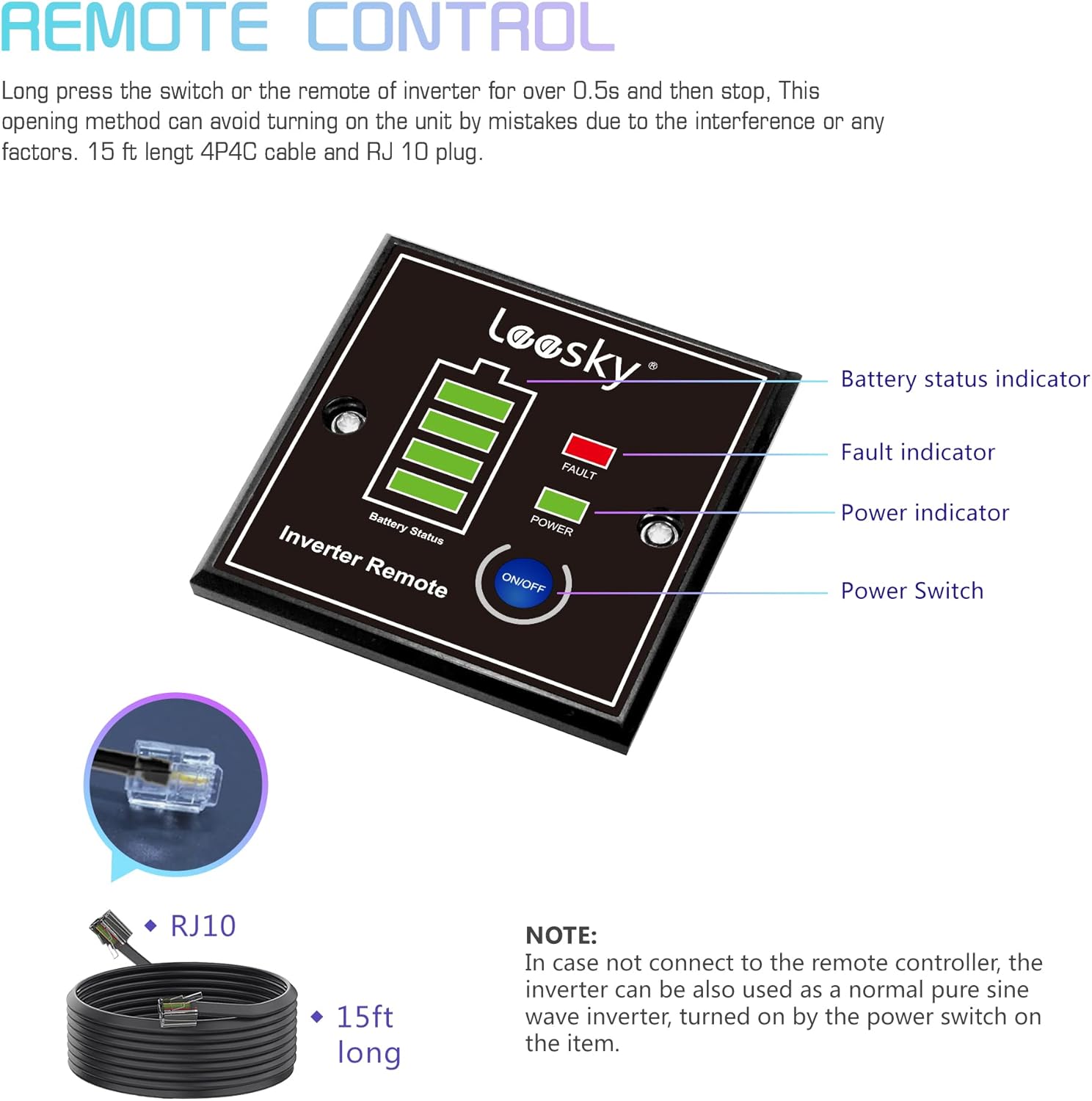
Figure 2.4: The included remote controller with a 15ft cable allows for convenient power management from a distance.

Figure 2.5: View of the inverter's intelligent cooling fans, positive and negative terminals, GFCI sockets, USB ports, and power switch.

Figure 2.6: The inverter is constructed from durable aluminum alloy materials, with dimensions of 17.5 x 8 x 3.3 inches.
Key Features:
- Pure Sine Wave Output: Provides stable and clean power, reducing noise and interference, compatible with all devices, especially motors, pumps, and compressors.
- Dual GFCI Sockets: Offers up to 1500W output per outlet and protects against current leakage.
- High Efficiency: Up to 90% conversion efficiency with Total Harmonic Distortion (THD) lower than 3%.
- LCD Display: Easily monitor input voltage, output wattage, battery status, and protection codes.
- Remote Controller: Includes a 15ft cable for convenient remote operation.
- Low EMI Design & FCC Approved: Reduces electronic device noise and interference, suitable for radio-related appliances.
Video 2.1: A demonstration of the LEESKY 1500W 12V Pure Sine Wave Inverter in use, showcasing its ability to power various tools and appliances. This video highlights the inverter's performance and quiet operation under load.
3. Specifications
| Specification | Value |
|---|---|
| Rated Power (Dual GFCI Sockets) | 1500W |
| Output Waveform | Pure Sine Wave |
| THD | < 3% |
| Input Voltage | 9.8-16VDC |
| Output Voltage | 120 VAC ±10% |
| Idle Current | About 2 amps |
| Efficiency | Up to 90% |
| Over-load Protection | 1500W ~ 1700W |
| Over-temperature Protection | Around 149℉ (65℃) |
| Working Temperature | -22℉ ~ 140℉ (-30℃ ~ 60℃) |
| Over-voltage Shutdown | 16V±0.5VDC |
| Under-voltage Alarm | 9.8V±0.5VDC |
| Under-voltage Shutdown | 9.5V±0.5VDC |
| Product Dimensions | 17.5 x 8 x 3.3 inches |
| Item Weight | 10.5 pounds |
4. Package Contents
The following items are included in your package:
- 1x 1500 watt Pure Sine Wave Power Inverter
- 2x Battery Cables (black and red)
- 1x Remote Controller with 15ft cable
- 1x Earth Wire
- 8x Shockproof Pads
- 1x User Manual (this document)
5. Setup
- Prepare the Battery: Ensure your 12V battery is fully charged and capable of providing sufficient current for your intended load. A battery of 200 Ah or above is recommended.
- Connect Battery Cables: Connect the provided red battery cable to the positive (+) terminal of the inverter and the positive (+) terminal of your 12V battery. Connect the black battery cable to the negative (-) terminal of the inverter and the negative (-) terminal of your 12V battery. Ensure connections are secure and tight.
- Connect Earth Wire: Attach the earth wire to the grounding terminal on the inverter and to a proper ground point (e.g., vehicle chassis, ground rod).
- Mount the Inverter (Optional): Use the provided shockproof pads and mounting hardware to secure the inverter in a well-ventilated, cool, and dry location, away from direct sunlight or heat sources.
- Connect Remote Controller (Optional): Plug the remote controller's RJ10 cable into the designated port on the inverter.
6. Operating Instructions
- Power On: Press and hold the power switch on the inverter for approximately 0.5 seconds until the LCD screen illuminates and the power indicator turns green. If using the remote controller, press and hold its power button similarly.
- Monitor Display: The LCD display will show the input voltage (battery status), output voltage, output frequency (60Hz), and current wattage being drawn by connected devices.
- Connect AC Devices: Plug your AC devices into the dual GFCI outlets on the inverter. Ensure the total wattage of all connected devices does not exceed 1500W. For devices with motors or compressors, utilize the 'Soft Start' function by turning on the appliance first, then powering up the inverter.
- Connect USB Devices: Use the dual 4.8A USB ports to charge compatible USB devices.
- Power Off: To turn off the inverter, press and hold the power switch on the inverter or the remote controller until the LCD screen turns off and the power indicator extinguishes. It is recommended to turn off the inverter when not in use to prevent unnecessary battery drain.
For a practical demonstration of the inverter's operation with various tools, please refer to Video 2.1 in the Product Overview section.
7. Maintenance
Regular maintenance ensures optimal performance and longevity of your LEESKY Power Inverter:
- Cleaning: Keep the inverter clean and free from dust and debris. Use a dry, soft cloth for cleaning. Do not use liquid cleaners.
- Ventilation: Ensure the cooling fans and ventilation openings are not blocked. The intelligent cooling fan will run automatically when the temperature reaches 104℉ (40℃) or the load power is more than 40% of the rated power.
- Connections: Periodically check all cable connections (battery and ground) to ensure they are secure and free from corrosion.
- Storage: If storing the inverter for an extended period, disconnect it from the battery and store it in a cool, dry place.
8. Troubleshooting
The LCD display provides error codes to help diagnose issues:
- LO (Low Voltage Protection): Indicates the input voltage is too low (below 9.5VDC). Recharge or replace the 12V battery.
- OL (Output Overload or Short-circuit Protection): The connected load exceeds the inverter's capacity or there is a short circuit. Reduce the load or check for short circuits.
- HI (Over-voltage Protection): The input voltage is too high (above 16VDC). Check the battery voltage.
- Over Heat Protection: The inverter is overheating (above 149℉/65℃). Reduce the load, ensure proper ventilation, and allow the unit to cool down.
If issues persist after following these steps, please contact customer support.
9. Warranty and Support
The LEESKY 1500W Pure Sine Wave Power Inverter comes with 18 months of maintenance. Product liability insurance is covered by AIG insurance company.
For further assistance, please refer to the official User Manual (PDF) or contact LEESKY customer support.

