
ION Game Day Lights (Red) Limited edition
ION Game Day Lights Portable Bluetooth Party Speaker
Model: Game Day Lights (Red) Limited edition
Product Overview
The ION Game Day Lights is a portable Bluetooth party speaker designed for robust audio performance and dynamic lighting effects. It features a 2-way speaker system with a 6.5-inch woofer and 2-inch tweeter, delivering 50 watts of peak power. The integrated woofer glows in multiple colors with various modes, including beat sync. This unit includes a karaoke microphone, AM/FM radio, and a long-life rechargeable battery, making it suitable for various indoor and outdoor events.
It offers wireless music streaming via Bluetooth, track controls, and Stereo-Link for connecting two units. An auxiliary input is available for non-Bluetooth devices. The rugged composite enclosure includes a convenient one-handed carry handle. A USB port is provided for charging external devices.
What's in the Box
- ION Audio Game Lights Red Speaker
- Red Microphone with cable
- Power Cable (2-pin IEC) (6ft / 183cm)
- 1/8" (3.5mm) Stereo Audio Cable
- Quickstart Guide v1.5
Setup
- Charging the Battery: Before first use, fully charge the Game Day Lights speaker. Connect the included power cable to the speaker's power input and then to a power outlet. The charge indicator light will show charging status. A full charge can take several hours.
- Power On/Off: Press and hold the Power button on the control panel to turn the speaker on or off.
- Microphone Connection: Insert the microphone cable into the MIC input on the control panel. Adjust the MIC Volume knob as needed.
- Auxiliary Input: For non-Bluetooth devices, connect an audio source using the included 1/8" (3.5mm) stereo audio cable to the AUX IN port.

Image: Front view of the ION Game Day Lights speaker in red, with the included wired microphone connected. The speaker's control panel is visible at the top, and the woofer light is illuminated.
Operating Instructions
Bluetooth Pairing
- Ensure the Game Day Lights speaker is powered on.
- On your Bluetooth device (e.g., smartphone, tablet), enable Bluetooth and search for available devices.
- Select "ION Game Day Lights" from the list of devices. The speaker will confirm successful pairing with an audible tone.
- Once paired, you can stream audio wirelessly from your device to the speaker. Use the Play/Pause, Next, and Back buttons on the speaker's control panel to manage playback.
- For NFC-enabled devices, tap your device to the NFC logo on the speaker for quick pairing.
AM/FM Radio
- Press the RADIO button to switch to AM or FM mode.
- Use the Tune/Track buttons (<< and >>) to manually tune to a station or press and hold them to auto-seek the next available station.
- To save a preset, tune to the desired station, then press and hold a Preset button (1-10 for AM, 1-10 for FM) until the display confirms it's saved.
- To recall a preset, simply press the corresponding Preset button.
Light Modes
The Game Day Lights speaker features a multi-color woofer light. Press the LIGHTS button to cycle through different light modes:
- Beat Sync: Lights pulse with the rhythm of the music.
- Cycle Through All Colors: Lights slowly transition through various colors.
- Off: Lights are turned off.

Image: Front view of the ION Game Day Lights speaker, showcasing the woofer illuminated with a green light.

Image: Front view of the ION Game Day Lights speaker, with the woofer illuminated in a vibrant purple color.
Stereo-Link Function
To link two Game Day Lights units wirelessly for stereo sound:
- Ensure both Game Day Lights speakers are powered on and not connected to any Bluetooth device.
- On one speaker, press and hold the LINK button. The speaker will enter linking mode.
- Repeat the process on the second speaker.
- The two speakers will automatically link to each other, indicated by an audible confirmation. One speaker will act as the left channel and the other as the right.
- Once linked, connect your Bluetooth device to one of the speakers as described in the Bluetooth Pairing section. Audio will now play in stereo across both units.
Maintenance
- Cleaning: Use a soft, dry cloth to clean the exterior of the speaker. Do not use abrasive cleaners or solvents.
- Battery Care: To prolong battery life, fully charge the speaker before storing it for extended periods. Avoid completely draining the battery frequently.
- Storage: Store the speaker in a cool, dry place away from extreme temperatures and direct sunlight.
- Water Resistance: This product is not waterproof. Avoid exposure to water or excessive moisture.
Troubleshooting
| Problem | Solution |
|---|---|
| No Sound: |
|
| Bluetooth Not Connecting: |
|
| Poor Radio Reception: |
|
| Lights Not Working: |
|
| Battery Not Holding Charge: |
|
Specifications
| Feature | Detail |
|---|---|
| Model Name | ION Audio Gameday Lights Bluetooth Speaker |
| Speaker Type | Portable, Woofer, Tweeter |
| Speaker Output Power | 50 Watts (Peak) |
| Woofer Diameter | 6.5 Inches |
| Tweeter Diameter | 2 Inches |
| Connectivity Technology | Bluetooth, AM/FM, AUX (3.5mm) |
| Wireless Communication | Bluetooth, AM/FM |
| Battery Life | Up to 50 Hours (at low volume levels) |
| Power Source | Battery Powered |
| Product Dimensions (D x W x H) | 12.25"D x 16.4"W x 15.3"H |
| Item Weight | 15.4 pounds (246.38 Ounces) |
| Color | Red |
| Included Components | Speaker, Microphone with cable, Power Cable, 3.5mm Audio Cable, Quickstart Guide |
| Special Features | Bass Boost, USB Port for Charging, Multi-color Woofer Lights, Stereo-Link, NFC Easy Pair |
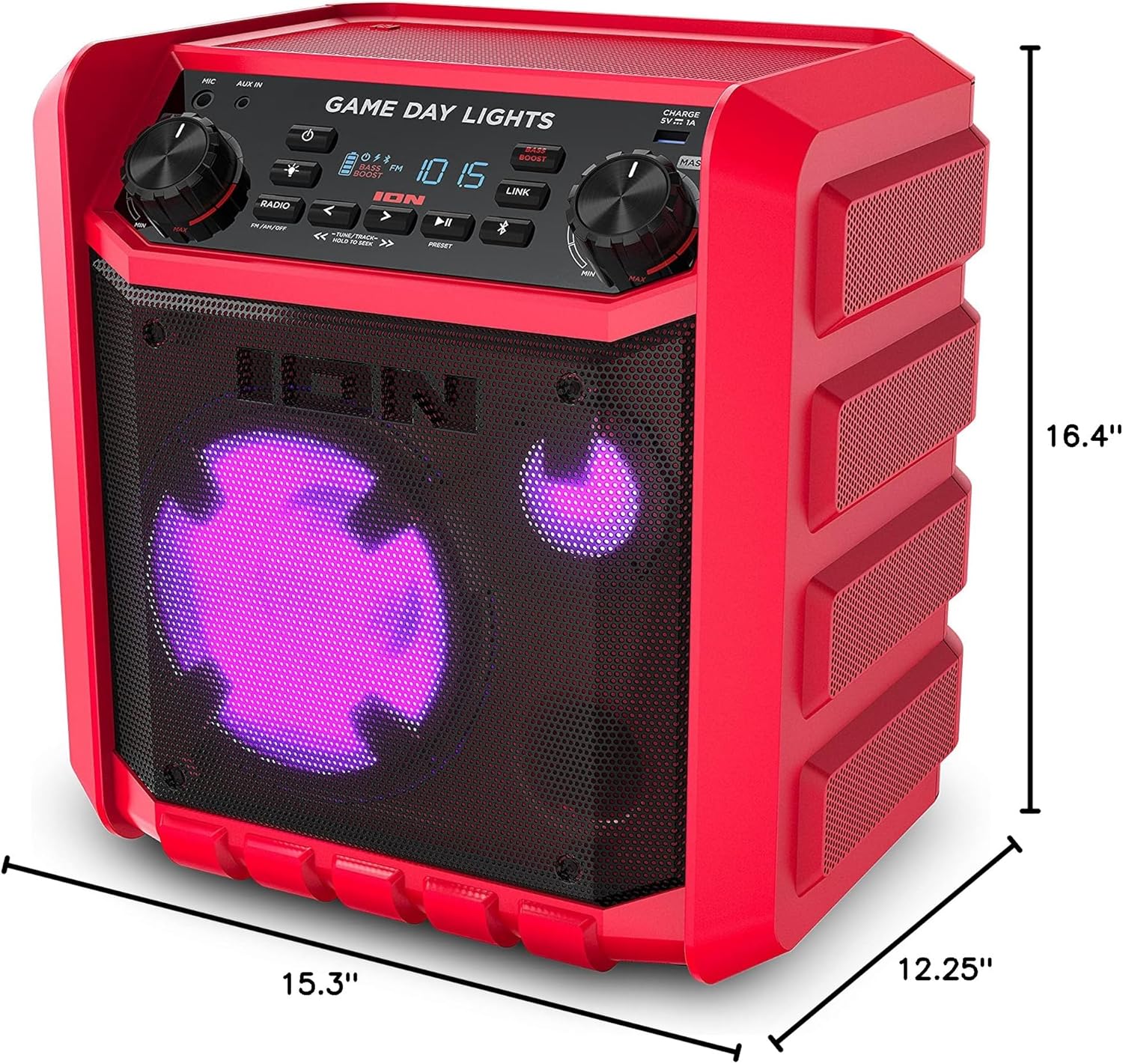
Image: Diagram showing the dimensions of the ION Game Day Lights speaker: 12.25 inches deep, 16.4 inches wide, and 15.3 inches high.
Warranty and Support
The ION Game Day Lights speaker comes with a 1-Year Limited Warranty from the date of original purchase. This warranty covers defects in material and workmanship under normal use.
For technical support, warranty claims, or service inquiries, please visit the official ION Audio website or contact their customer service department. Refer to the Quickstart Guide v1.5 included in your package for specific contact information or visit www.ionaudio.com.
Please have your product model number (Game Day Lights (Red) Limited edition) and proof of purchase ready when contacting support.
Ask a question about this manual
Ask about setup, troubleshooting, compatibility, parts, safety, or missing instructions. Manuals+ will review the question and use this page’s manual context to help answer it.