
CDCASA Charles
CDCASA Charles Electric Power Lift Recliner Chair User Manual
Model: Charles
1. Introduction
This manual provides essential information for the safe and efficient use of your CDCASA Charles Electric Power Lift Recliner Chair. Please read all instructions carefully before assembly and operation. Retain this manual for future reference.
The CDCASA Charles Electric Power Lift Recliner Chair is designed to provide comfort and assistance, featuring power lift, recline, massage, and heating functions, along with convenient amenities like a USB charging port and side pockets.
2. Safety Information
WARNING: To reduce the risk of electric shock, fire, burns, or injury, always follow these precautions:
- Ensure all connections are secure before plugging into a power outlet.
- Keep children and pets away from the chair's moving parts.
- Do not allow children to operate the chair without adult supervision.
- Avoid placing hands or feet near the chair's mechanism during operation.
- Do not use the chair if any part is damaged or if the power cord is frayed. Contact customer service immediately.
- Do not expose the chair to water or excessive moisture.
- Unplug the chair from the power outlet before cleaning or servicing.
- The maximum weight capacity for this chair is 330 lbs (150 kg). Do not exceed this limit.
- Ensure there is adequate clearance around the chair for safe reclining and lifting.
3. Package Contents
Your CDCASA Charles Electric Power Lift Recliner Chair is shipped in two boxes. Please verify that all components are present before beginning assembly.
- Box A: Chair Base, Left Armrest
- Box B: Backrest, Right Armrest
- Power Adapter
- Remote Control
- User Manual (this document)
- Assembly Hardware (if applicable, typically pre-attached or minimal)

Image: Packaging diagram showing the chair components distributed between two boxes (Box A: Chair Base + Left Arm, Box B: Back + Right Arm).
4. Assembly Instructions
Assembly typically takes 10-15 minutes and requires no special tools. Follow these steps carefully:
- Unpack Components: Carefully remove all parts from both boxes (Box A and Box B) and place them on a soft, clean surface to prevent damage.
- Attach Backrest: Slide the backrest onto the metal posts located on the chair base. Ensure it clicks securely into place on both sides.
- Attach Armrests: Connect the left and right armrests to the corresponding sides of the chair base. Align the metal brackets and push down firmly until they lock.
- Connect Wiring: Locate the power cables extending from the backrest and armrests. Connect them to the corresponding cables from the chair base. Ensure all connections are snug.
- Connect Power Adapter: Plug the power adapter into the chair's main power input, then plug the adapter into a wall outlet.
- Test Functions: Use the remote control to test the lift, recline, massage, and heat functions to ensure proper operation.
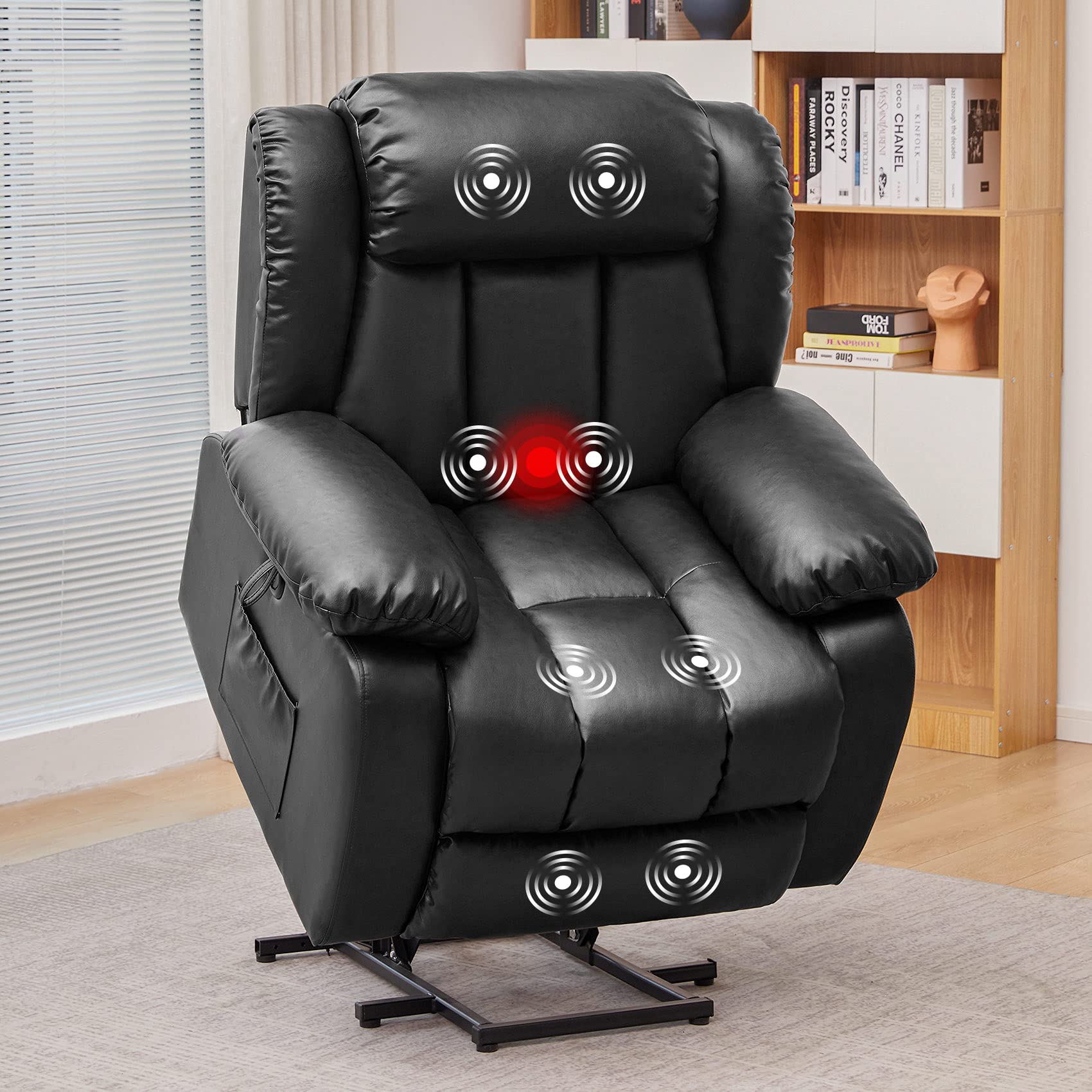
Image: Fully assembled CDCASA Electric Power Lift Recliner Chair.
5. Operating Instructions
Your recliner chair is equipped with a remote control to manage its various functions.
5.1 Power Lift and Recline
- To Lift: Press and hold the 'Lift' button on the remote. The chair will slowly tilt forward and rise, assisting you to a standing position.
- To Recline: Press and hold the 'Recline' button on the remote. The chair will smoothly recline backward up to 160 degrees, and the footrest will extend. Release the button when you reach your desired position.
- To Return to Upright: Press and hold the 'Upright' button (or the opposite of recline) to bring the chair back to its standard seated position.

Image: Illustration of the chair's power lift function assisting a user to stand, and the recline function.
5.2 Massage and Heat Functions
The chair features 8 powerful vibration motors, 4 custom zone settings, 5 massage modes, and a lumbar heating function.
- Activate Massage: Press the 'Massage' button on the remote.
- Select Zone: Use the zone selection buttons (e.g., Back, Lumbar, Thighs, Legs) to target specific areas.
- Choose Mode: Cycle through the 5 massage modes using the 'Mode' button.
- Adjust Intensity: Use the '+' and '-' buttons to increase or decrease massage intensity.
- Set Timer: The remote may include a timer function to set the duration of the massage.
- Activate Heat: Press the 'Heat' button to turn on the lumbar heating function. Press again to turn off.

Image: The recliner chair with indicators for massage points on the back, lumbar, thighs, and legs, alongside the remote control.
5.3 USB Charging Port
A USB charging port is located on the side of the chair for convenient charging of low-power devices.
- Plug your device's USB cable into the port.
- Ensure the chair is plugged into a power outlet for the USB port to function.

Image: Detailed view of the chair's side pockets and the USB charging port.
6. Maintenance
Proper care will extend the life and appearance of your recliner chair.
- Cleaning: Wipe clean with a damp cloth. For faux leather, use a mild, non-abrasive cleaner specifically designed for synthetic leather. Avoid harsh chemicals.
- Spills: Blot spills immediately with a clean, dry cloth.
- Inspection: Periodically check all connections and moving parts for wear or damage. Ensure all screws are tight.
- Power Cord: Inspect the power cord regularly for any signs of damage. If damaged, discontinue use and contact customer service.
7. Troubleshooting
| Problem | Possible Cause | Solution |
|---|---|---|
| Chair does not operate (no lift, recline, massage, or heat) |
|
|
| Massage or heat function not working |
|
|
| USB charging port not working |
|
|
| Unusual noises during operation |
|
|
8. Specifications
| Feature | Detail |
|---|---|
| Brand | CDCASA |
| Model Name | Charles |
| Color | Faux Leather - Black |
| Material | Faux Leather |
| Product Dimensions (D x W x H) | 32" x 36" x 41" (81.3 cm x 91.4 cm x 104.1 cm) |
| Maximum Recline Angle | 160 degrees |
| Maximum Weight Recommendation | 330 lbs (150 kg) |
| Massage Function | 8 vibration motors, 4 custom zone settings, 5 modes |
| Heat Function | Lumbar heating |
| Special Features | Power Lift, USB Charging Port, Side Pockets, Overstuffed Padding |
| Assembly Time | Approx. 10-15 minutes |
| Included Components | User Manual |
Image: Product dimension diagram showing height, width, depth, and recline angles.
9. Warranty and Support
CDCASA provides a 1-year technical support warranty for the lift motor and steel frame of this product. This warranty covers manufacturing defects and malfunctions under normal use.
If you encounter any issues with your chair, or if any shipping damage occurs upon arrival, please contact our customer service team immediately. We are committed to providing the best after-sales service.
For support, please refer to the contact information provided with your purchase documentation or visit the official CDCASA website.
- Warranty Coverage: 1 year for lift motor and steel frame.
- Contact: Refer to purchase documentation or CDCASA official website.
Ask a question about this manual
Ask about setup, troubleshooting, compatibility, parts, safety, or missing instructions. Manuals+ will review the question and use this page’s manual context to help answer it.