
1. Safety Information
Please read and understand all safety instructions before operating the Walfront T-02A Voltage Tester. Failure to follow these instructions may result in electric shock, fire, or serious injury.
- Always assume circuits are live until proven otherwise. Use appropriate personal protective equipment (PPE).
- Do not use the side probe when measuring. This can lead to electric shock hazards. Always use the tip of the tester for non-contact detection.
- Do not use the tester if it appears damaged or is not operating correctly.
- Verify the tester's operation on a known live source before and after use.
- Keep the device dry and clean. Do not expose it to extreme temperatures or humidity.
- This device is designed for AC voltage detection within the specified range (12V-1000V). Do not attempt to measure voltages outside this range.
- Battery replacement should be performed carefully, ensuring correct polarity.
2. Product Overview
The Walfront T-02A is a pen-type non-contact AC voltage tester designed for safe and efficient electrical testing. It features a wide voltage detection range, adjustable sensitivity, an integrated LED flashlight for low-light conditions, and an infrared pointing function for precise targeting. Its compact and lightweight design makes it easy to carry and use in various environments.

Image 2.1: The Walfront T-02A Non-Contact AC Voltage Tester, showcasing its pen-like design with an orange clip and black body, featuring control buttons and a transparent tip.

Image 2.2: The Walfront T-02A tester conveniently clipped to a work uniform pocket, demonstrating its portability and ease of access for professionals.
3. Setup
3.1 Battery Installation
- Unscrew the battery cap located at the bottom of the tester.
- Insert two (2) AAA 1.5V batteries, ensuring correct polarity (+/-) as indicated inside the battery compartment.
- Securely screw the battery cap back into place.
The device will not function without batteries. Ensure fresh batteries are used for optimal performance.

Image 3.1: A close-up view of the Walfront T-02A's battery compartment with the cap removed, showing the internal spring contact for battery insertion.
4. Operating Instructions
4.1 Power On/Off
Press the red power button (usually marked with a power symbol) to turn the tester on. The indicator light will illuminate briefly. To turn off the tester, press and hold the power button, or it will automatically shut down after approximately 5 minutes of inactivity to conserve battery life.
4.2 Non-Contact AC Voltage Detection
- Turn on the tester.
- Hold the tester with the transparent tip pointed towards the wire, outlet, or electrical component you wish to test.
- If AC voltage is detected, the tester's tip will glow red, and an audible alarm will sound. The intensity of the light and frequency of the sound may increase with stronger voltage or closer proximity to the source.
- Important: Do not use the side of the tester for detection; always use the tip.
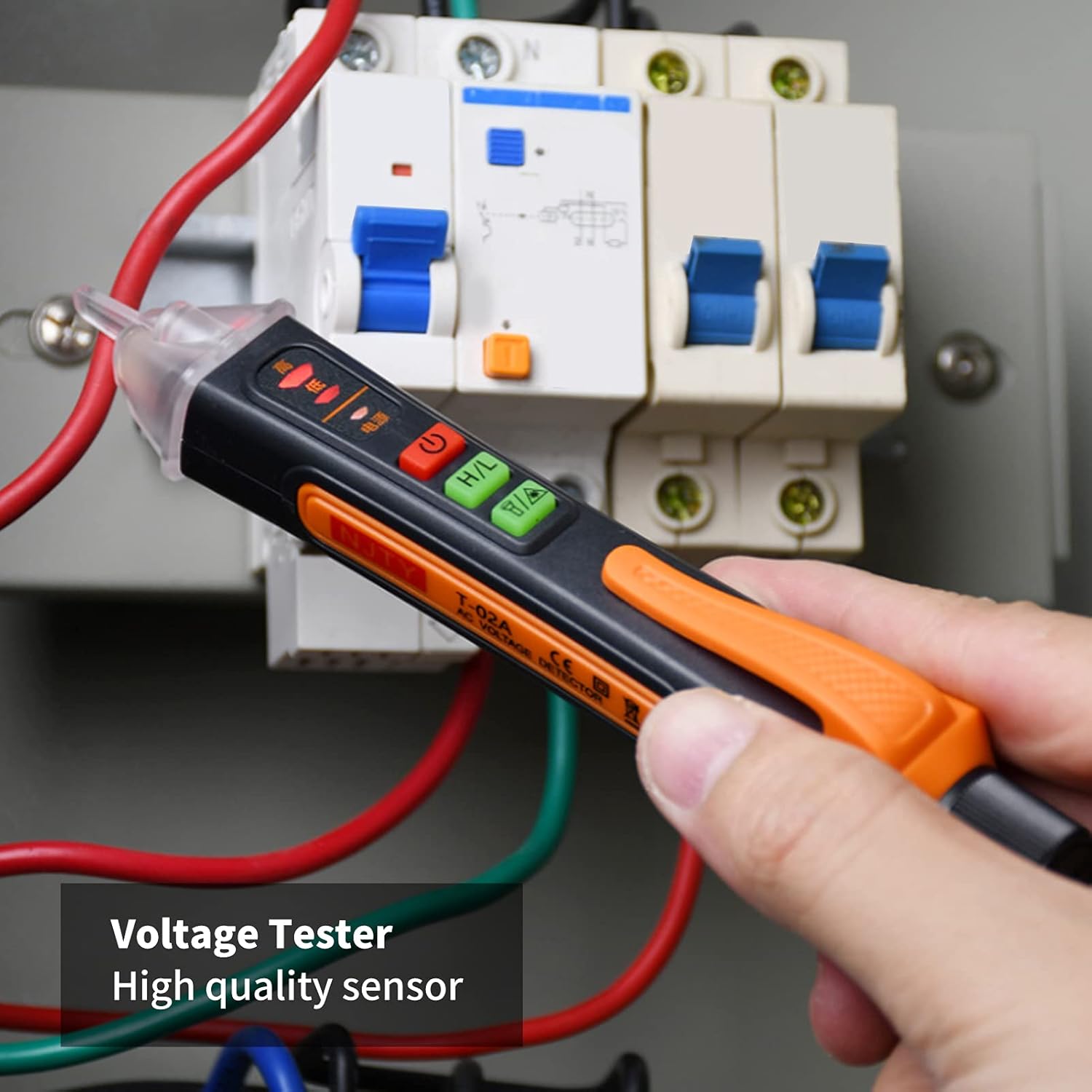
Image 4.1: The Walfront T-02A tester being used to detect voltage near circuit breakers in an electrical panel, demonstrating its non-contact capability.

Image 4.2: The Walfront T-02A performing a non-contact induction test on a red electrical wire, with a visual representation of an electric field being detected.

Image 4.3: The Walfront T-02A being used to test both an electrical wall outlet and a power cable, illustrating its versatility in detecting live AC voltage.
4.3 Sensitivity Adjustment (H/L)
The tester features two sensitivity ranges:
- High Sensitivity (H): 12V ~ 1000V AC. Suitable for detecting lower voltages or detecting voltage from a greater distance.
- Low Sensitivity (L): 48V ~ 1000V AC. Suitable for detecting higher voltages or when more precise localization is needed, reducing false positives from adjacent wires.
Press the 'H/L' button to toggle between high and low sensitivity modes. An indicator light will show the currently selected mode.
4.4 LED Flashlight
Press the flashlight button (often marked with a light bulb symbol) to turn on the integrated LED flashlight. This feature is useful for illuminating dark work areas. Press the button again to turn off the flashlight.

Image 4.4: The Walfront T-02A with its LED flashlight activated, illuminating a dark area around electrical wiring, enhancing visibility during testing.
4.5 Infrared Pointing Function
The tester includes an infrared pointing function for precise targeting. Activate this function by pressing the designated button (often marked with an infrared symbol). A red laser dot will be emitted from the tip, assisting in pinpointing specific areas for testing or inspection.

Image 4.5: The Walfront T-02A demonstrating its infrared pointing function, with a red laser dot visible on an electrical component, aiding in precise targeting.
5. Maintenance
5.1 Cleaning
Wipe the tester with a dry, clean cloth. Do not use abrasive cleaners or solvents, as these may damage the casing or internal components.
5.2 Battery Replacement
When the battery indicator shows low power, or the tester fails to power on, replace the batteries as described in Section 3.1. Always use fresh AAA 1.5V batteries.
5.3 Storage
Store the tester in a cool, dry place, away from direct sunlight and extreme temperatures. If storing for extended periods, remove the batteries to prevent leakage.
6. Troubleshooting
- Tester does not turn on: Check if batteries are installed correctly and are not depleted. Replace batteries if necessary.
- No detection on a known live circuit: Ensure the tester is turned on and the tip is in close proximity to the live conductor. Check battery level. Try switching sensitivity modes (H/L).
- False positives (detects voltage where none is expected): Switch to low sensitivity mode (L). Ensure there are no strong electromagnetic fields nearby that could interfere with the sensor.
7. Specifications
| Feature | Specification |
|---|---|
| Model | T-02A |
| AC Voltage Range | 12V ~ 1000V (High Sensitivity) |
| AC Voltage Range | 48V ~ 1000V (Low Sensitivity) |
| Frequency | 50/60Hz |
| Power Supply | 2 x AAA 1.5V batteries (not included) |
| Automatic Shutdown | After 5 minutes of inactivity |
| Working Temperature | 0°C ~ 40°C (32°F ~ 104°F) |
| Storage Temperature | -10°C ~ 50°C (14°F ~ 122°F) |
| Humidity | ≤95% |
| Altitude | ≤2000 meters |
| Material | ABS |
| Features | Infrared pointing function, LED flashlight |
8. Warranty and Support
Walfront products are manufactured to high-quality standards. For warranty information, technical support, or service inquiries, please refer to the contact information provided with your purchase or visit the official Walfront website. Please retain your proof of purchase for warranty claims.