
Introduction
This manual provides essential instructions for the safe and efficient use of your Tefal GV9810 Pro Express Vision Steam Iron Station. Please read all instructions carefully before first use and keep them for future reference. This appliance is designed to make ironing easier and more effective with its powerful steam output and innovative features.
1. Setup
1.1 Unpacking
Carefully remove all components from the packaging. Ensure all parts are present: the steam iron, the base unit with water tank, and the instruction manual. Retain the packaging for storage or transport.
1.2 Filling the Water Tank
- Ensure the appliance is unplugged from the power outlet.
- Remove the removable water tank from the base unit.
- Fill the tank with clean tap water up to the 'MAX' level indicator. Do not use distilled water, scented water, or water containing additives, as this can damage the appliance.
- Replace the water tank securely into the base unit.
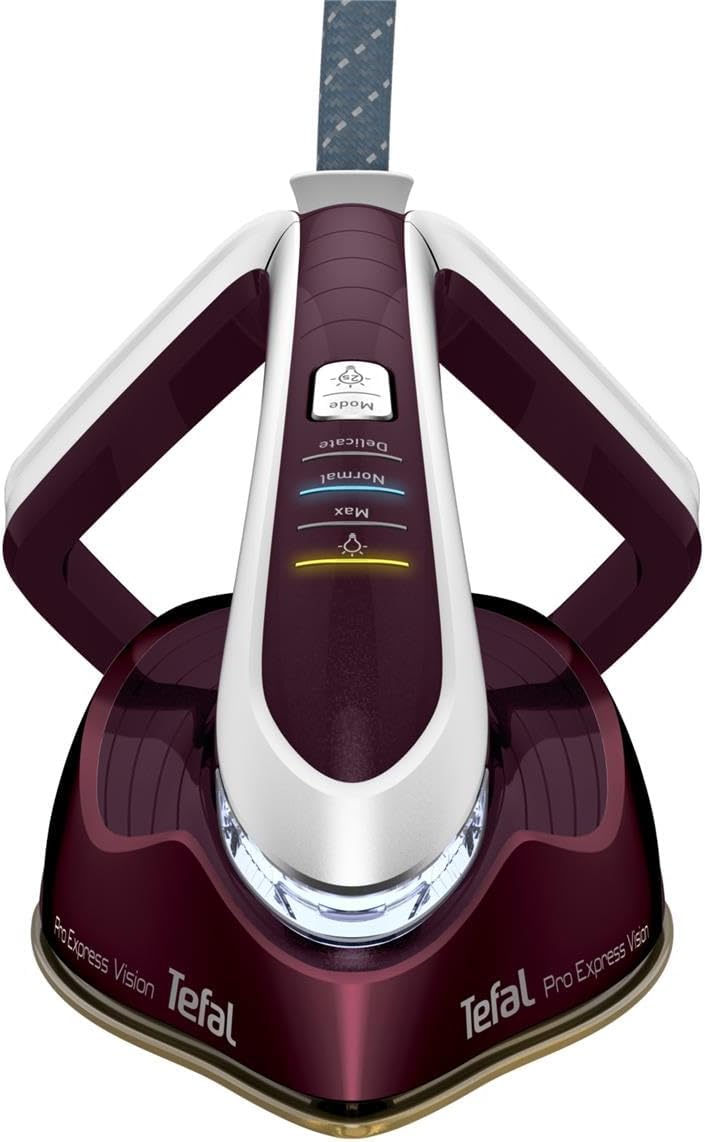
Image: Exploded view illustrating the removable water tank and iron components.
1.3 Initial Use and Heating
- Place the base unit on a stable, heat-resistant surface.
- Connect the power cord to a grounded electrical outlet.
- Press the power button on the base unit. The indicator light will illuminate.
- Wait for the iron to heat up. The 'Ready' indicator light on the iron handle will stop flashing and remain solid when the desired temperature is reached. This typically takes a few minutes.

Image: The Tefal GV9810 Pro Express Vision Steam Iron Station with its iron resting on the base unit.
2. Operating Instructions
2.1 Power On/Off and Mode Selection
- Press the power button on the base unit to turn the appliance on.
- Use the 'Mode' button on the iron handle to select the desired steam and temperature setting: Delicate, Normal, or Max. The Smart LED Vision light will adjust its intensity based on the selected mode.
- For an extra burst of steam, press the 'Boost' button on the base unit or the steam trigger on the iron.
- To turn off, press and hold the power button on the base unit until the indicator lights turn off.

Image: Close-up of the iron's handle displaying the Smart LED Vision and mode selection buttons.
2.2 Ironing Techniques
- Horizontal Ironing: Place the garment flat on an ironing board. Glide the iron smoothly over the fabric, applying steam as needed by pressing the steam trigger. The Durilium AirGlide Autoclean soleplate ensures effortless gliding.
- Vertical Steaming: For delicate fabrics or to refresh hanging garments, hold the iron vertically a few centimeters away from the fabric. Press the steam trigger to release steam.

Image: A user demonstrating horizontal ironing with the Tefal GV9810 steam iron station.

Image: A user demonstrating vertical steaming to remove wrinkles from a hanging garment.
3. Maintenance
3.1 Anti-Calc System (Calc Collector)
The GV9810 is equipped with a patented Calc Collector to maintain long-lasting steam performance. Regular cleaning of the calc collector is essential.
- Ensure the appliance is unplugged and completely cooled down (at least 2 hours).
- Locate the Calc Collector on the side of the base unit.
- Turn the collector counter-clockwise to unlock and pull it out.
- Rinse the collector under running water to remove any accumulated scale.
- Reinsert the clean collector and turn it clockwise to lock it securely in place.

Image: A hand removing the calc collector from the side of the steam iron station's base unit.
3.2 Cleaning the Soleplate
The Durilium AirGlide Autoclean soleplate is designed for easy maintenance. If necessary, wipe the soleplate with a damp cloth after it has cooled down. Do not use abrasive cleaners or metallic scouring pads.
3.3 Storage
After use, ensure the appliance is unplugged and cooled. Empty any remaining water from the tank. Store the iron securely on its base unit in a dry, safe place.
4. Troubleshooting
| Problem | Possible Cause | Solution |
|---|---|---|
| No steam output | Water tank is empty. Appliance not heated sufficiently. Calc collector blocked. | Refill water tank. Wait for 'Ready' light to be solid. Clean the calc collector. |
| Water drips from soleplate | Temperature too low for steam. | Select a higher temperature setting suitable for steam. Wait for the iron to heat up properly. |
| Iron not heating | Appliance not plugged in. Power button not pressed. | Check power connection. Press the power button on the base unit. |
| Steam pressure is weak | Calc collector needs cleaning. | Clean the calc collector as described in section 3.1. |
5. Specifications
- Brand: Tefal
- Model Name: GV9810 Pro Express Vision
- Model Number: GV9810
- Wattage: 3000 W
- Steam Pressure: Up to 8.3 bar
- Continuous Steam Output: 180 g/min
- Steam Boost: 750 g/min
- Water Tank: Removable
- Special Features: Smart LED Vision, Anti-Calc System, Durilium AirGlide Autoclean Soleplate
- Product Dimensions (L x W): 41.5 x 24.5 cm
- Item Weight: 5.34 kg
- Voltage: 230 V
- Frequency: 50 Hz
- Soleplate Material: Ceramic
6. Warranty
Tefal products are designed for durability and ease of repair. This product is supported by a 15-year repairability commitment, ensuring that spare parts are available at a fair price through a network of 6200 recognized repair workshops worldwide. Please refer to your purchase documentation for specific warranty terms and conditions applicable to your region.
7. Support
For further assistance, troubleshooting not covered in this manual, or to inquire about spare parts and repairs, please contact Tefal customer service. Contact details can typically be found on the official Tefal website for your country or on your product packaging.


