
UNITOPSCI A2878
UNITOPSCI A2878 Double Din Car Stereo User Manual
Model: A2878
1. Introduction
This manual provides instructions for the installation, operation, and maintenance of your UNITOPSCI A2878 Double Din Car Stereo. This unit features a 7-inch touchscreen, Apple CarPlay, Android Auto, Bluetooth connectivity, FM radio, support for a backup camera, mirror link functionality, and dual USB ports.
Please read this manual thoroughly before using the product to ensure proper operation and to prevent damage.
2. Package Contents
Verify that all items listed below are included in your package:
- Main Head Unit
- Backup Camera
- External Microphone
- Dual USB Adapter
- Power Cable
- User Manual
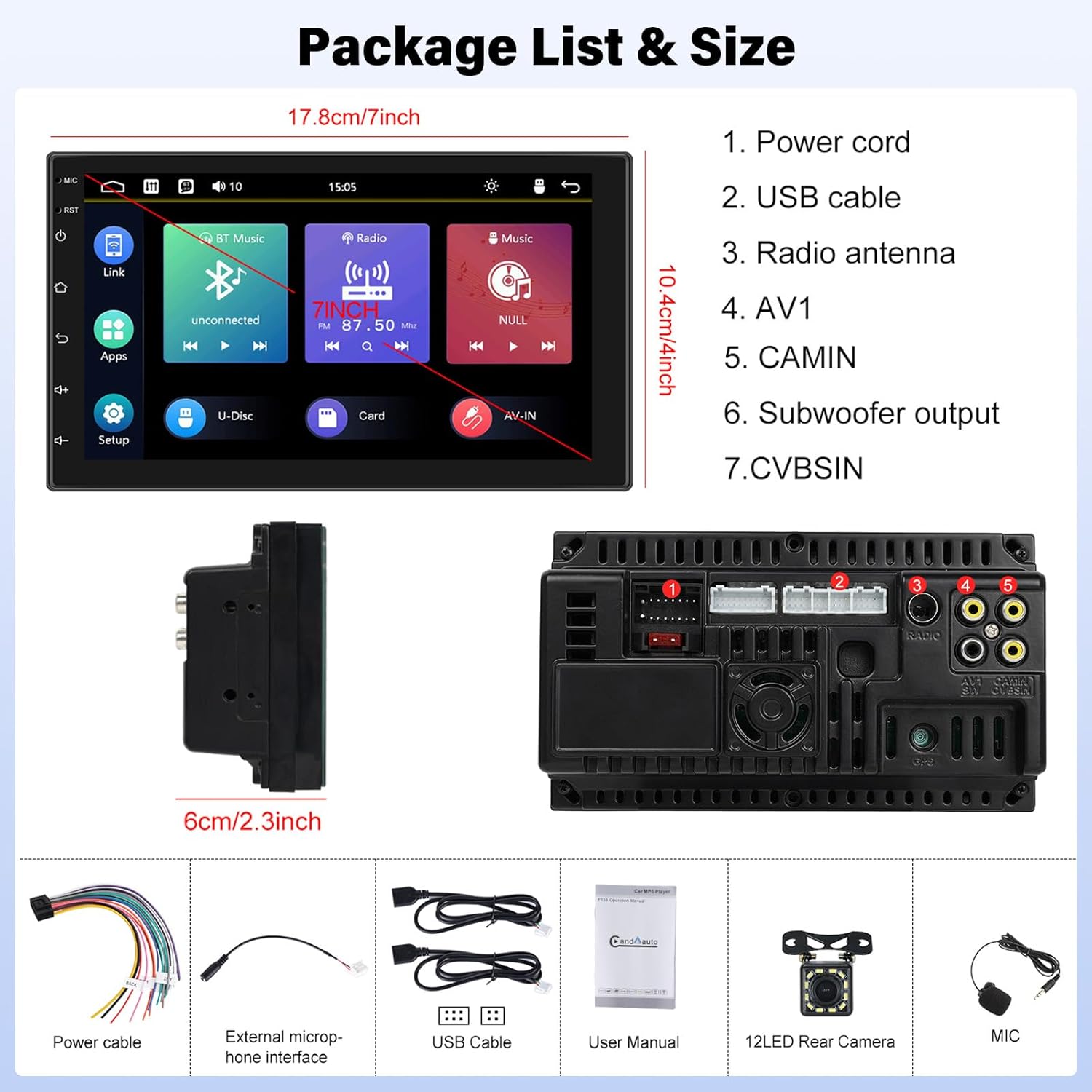
Image: Contents of the UNITOPSCI A2878 package, showing the main unit, wiring, and accessories.
3. Product Overview
The UNITOPSCI A2878 is a double din car stereo featuring a 7-inch high-definition touchscreen. The front panel includes essential controls and the display for various functions. The rear panel provides all necessary connection ports for power, speakers, USB devices, and external accessories like the backup camera.

Image: Front view of the UNITOPSCI A2878 car stereo with its 7-inch touchscreen interface.

Image: Rear panel connections of the UNITOPSCI A2878 head unit, indicating ports for power, USB, radio antenna, AV, camera, subwoofer, and CVBS.
4. Setup and Installation
Proper installation is crucial for the performance and safety of your car stereo. It is recommended that installation be performed by a qualified professional.
4.1 Wiring Connections
Refer to the wiring diagram provided with your unit for specific connections. Key connections include:
- Power Cord: Connect to the vehicle's power supply (constant 12V, accessory 12V, and ground).
- USB Cables: Connect the provided USB cables for CarPlay/Android Auto and media playback.
- Radio Antenna: Connect your vehicle's FM/AM antenna.
- CAMIN (Camera Input): Connect the backup camera video signal.
- Subwoofer Output: For connecting an external subwoofer.
- External Microphone: Connect the external microphone for improved call quality.
4.2 Backup Camera Installation
Install the backup camera at the rear of your vehicle. Connect its video output to the CAMIN port on the head unit and its power to the vehicle's reverse light circuit so it activates automatically when reversing.
5. Operating Instructions
5.1 CarPlay and Android Auto
Connect your smartphone to the stereo via a USB cable to activate Apple CarPlay or Android Auto. This allows access to your phone's navigation, music, calls, and other compatible apps directly on the stereo's screen, controlled by voice or touch.

Image: Wired connection setup for CarPlay and Android Auto.

Image: CarPlay and Android Auto interfaces displayed on the stereo screen.
5.2 Mirror Link
The mirror link function allows you to project your smartphone's screen (both iOS and Android) onto the stereo display via a USB cable. This enables viewing videos, navigation maps, and images from your phone on the larger screen.

Image: Mirror Link functionality with a smartphone connected to the stereo.
5.3 Bluetooth Hands-free & FM Radio
Bluetooth: Pair your smartphone with the stereo via Bluetooth for hands-free calling and wireless audio streaming. The built-in microphone facilitates clear communication. You can access your phone book and dial directly from the stereo.
FM Radio: The unit includes an FM tuner with 18 preset stations. Tune into your favorite radio programs, music, and traffic updates.

Image: FM Radio interface and Bluetooth hands-free call screen.
5.4 Backup Camera Input
When the vehicle is shifted into reverse, the stereo automatically displays the clear image from the connected backup camera, assisting with safe parking maneuvers.
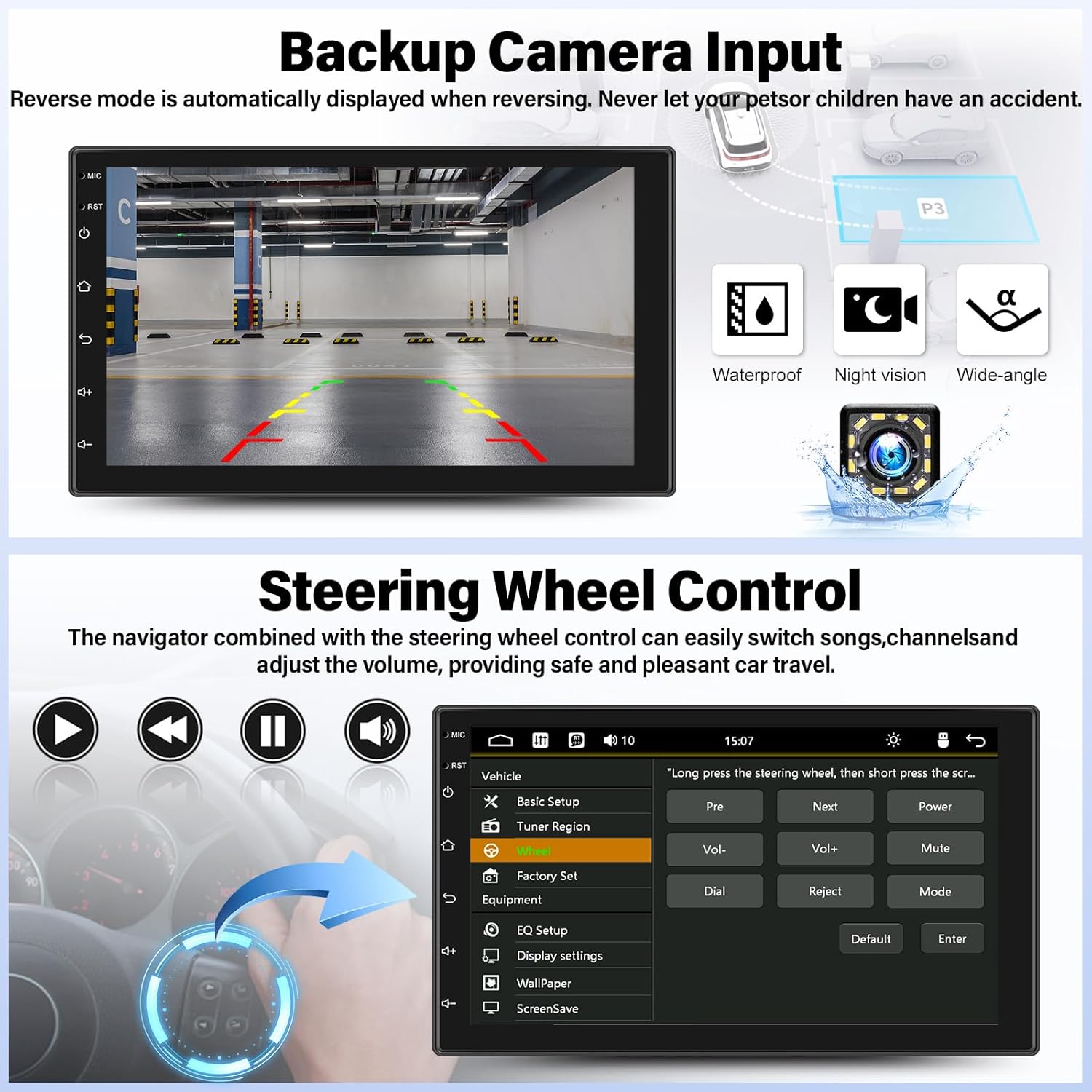
Image: Backup camera display on the stereo screen.
5.5 Steering Wheel Control (SWC)
The unit supports steering wheel control, allowing you to manage functions such as volume adjustment, track skipping, and mode switching directly from your vehicle's steering wheel buttons (if compatible and wired correctly). This enhances convenience and safety while driving.
5.6 USB Playback and Charging
The two USB adapter ports allow for media playback from a USB drive (audio/video files) and charging of compatible devices.

Image: USB media playback and charging capabilities.
5.7 Audio Equalizer (EQ)
Adjust the audio output using the built-in equalizer. You can select from various preset audio styles (e.g., Classic, Pop, Rock, Jazz) or customize settings to match your preferences and vehicle acoustics. The unit also supports subwoofer output for enhanced bass.

Image: Audio Equalizer interface for sound customization.
6. Maintenance
To ensure the longevity and optimal performance of your car stereo, follow these maintenance guidelines:
- Cleaning: Use a soft, dry cloth to clean the touchscreen and unit exterior. Avoid abrasive cleaners or solvents.
- Temperature: Avoid exposing the unit to extreme temperatures, direct sunlight for prolonged periods, or high humidity.
- Connections: Periodically check all wiring connections to ensure they are secure.
7. Troubleshooting
If you encounter issues with your UNITOPSCI A2878 car stereo, refer to the following common problems and solutions:
- No Power: Check the power cable connections (constant 12V, accessory 12V, ground). Ensure the vehicle's fuse for the stereo is not blown.
- No Sound: Verify speaker connections. Check volume levels and audio settings (EQ). Ensure the mute function is not activated.
- CarPlay/Android Auto Not Connecting: Ensure your phone is connected via a compatible USB cable. Try a different USB port or cable. Check phone settings for CarPlay/Android Auto permissions.
- Bluetooth Pairing Issues: Ensure Bluetooth is enabled on both the stereo and your phone. Delete previous pairings and try pairing again.
- Backup Camera Not Displaying: Check the camera's power and video signal connections. Ensure the camera is properly installed and wired to the reverse light trigger.
- Touchscreen Unresponsive: Try resetting the unit using the reset button (if available, typically a small pinhole).
If problems persist, contact customer support for assistance.
8. Specifications
| Feature | Specification |
|---|---|
| Model Number | A2878 |
| Display Size | 7 Inches |
| Display Resolution | 1024x600 |
| Product Dimensions | 7.01 x 1.77 x 4.02 inches |
| Item Weight | 2.4 pounds (1.09 Kilograms) |
| Connectivity Technology | Bluetooth, USB, RCA |
| Controller Type | Android, iOS (via CarPlay/Android Auto) |
| Audio Output Mode | Stereo |
| Surround Sound Channel Configuration | 2.0 |
| Video Encoding Support | H.264, H.263 |
9. Warranty and Support
UNITOPSCI provides comprehensive customer support for its products:
- Replacement: Available within 24 months of purchase.
- Technical Support: Lifetime after-sales consultation and technical support.
- Returns: 60-day return policy.
For any inquiries or support, please contact UNITOPSCI customer service at: UNITOPSCI@126.com
Related documentsA2878


Ask a question about this manual
Ask about setup, troubleshooting, compatibility, parts, safety, or missing instructions. Manuals+ will review the question and use this page’s manual context to help answer it.