
Boean U8
Boean Bluetooth Headphones U8 User Manual
Model: U8
1. Product Overview
The Boean U8 Bluetooth Headphones are designed for sports enthusiasts, offering a stable Bluetooth 5.3 connection, IPX7 waterproof rating, and up to 16 hours of playtime. These in-ear headphones provide stereo sound with powerful bass and feature an ergonomic design for a secure and comfortable fit during physical activity.

Image 1.1: Boean U8 Bluetooth Headphones. These headphones feature a red cable connecting the two earbuds, which are black with red accents and ear hooks.

Image 1.2: Key features of the Boean U8 headphones, highlighting IPX7 waterproofing, rich bass, 15 hours playtime, built-in microphone, various ear cap sizes, battery display, voice assistant support, hands-free controls, soft ear hooks, and Bluetooth 5.3 connectivity.
2. Package Contents
Please verify that all items are present in the package:
- Bluetooth headphones
- Ear caps (multiple sizes)
- Charging Cable (USB-C)
- Cable Clothing Clip
- Organizer bag

Image 2.1: Contents of the Boean U8 headphone package, showing the headphones, different sized ear caps, USB-C charging cable, cable clothing clip, and an organizer bag.
3. Setup and First Use
3.1 Charging the Headphones
Before first use, fully charge the headphones. A full charge takes approximately 2 hours.
- Connect the provided USB-C cable to the charging port on the headphones.
- Connect the other end of the USB-C cable to a USB power adapter (not included) or a computer's USB port.
- The LED indicator on the headphones will show charging status and turn off or change color when fully charged.
3.2 Pairing with a Bluetooth Device
The Boean U8 headphones use Bluetooth 5.3 for a stable connection.
- Ensure the headphones are powered off.
- Press and hold the multi-function button (power button) on the headphones until the LED indicator flashes red and blue, indicating pairing mode.
- On your device (smartphone, tablet, computer), enable Bluetooth and search for available devices.
- Select "Boean U8" or similar from the list of found devices.
- Once connected, the LED indicator will typically flash blue slowly or turn off.
3.3 Achieving a Comfortable and Secure Fit
The ergonomic design with ear hooks ensures a secure fit, especially during sports. Experiment with the included ear caps to find the best seal and comfort.
- Choose the ear caps that provide a snug fit in your ear canal. A good seal enhances sound quality and noise isolation.
- Position the ear hooks over your ears to secure the headphones in place.
- Use the cable clothing clip to manage the cable length and prevent it from bouncing during movement.

Image 3.1: Proper fit and control overview. This image illustrates how to select the correct ear cap size, position the ear hook, and use the cable clip for a secure and comfortable fit. It also shows the location of the control buttons.
4. Operating Instructions
4.1 Button Functions
The headphones feature intuitive controls for media playback and calls.
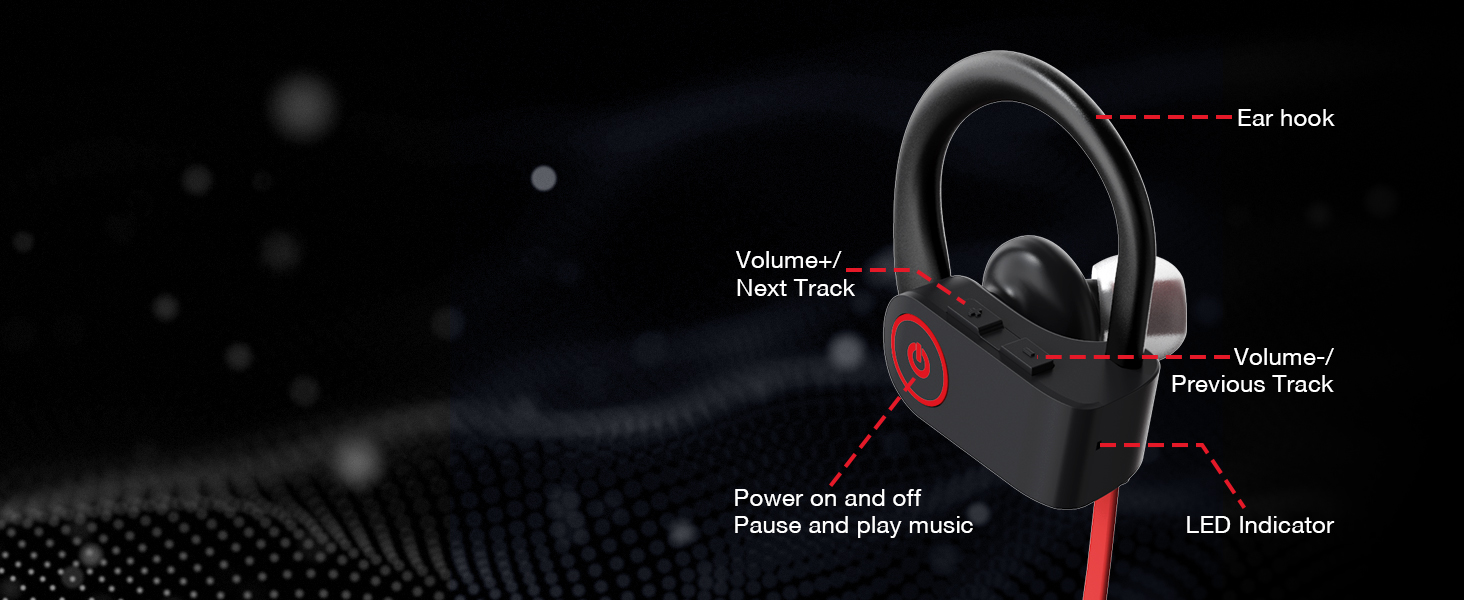
Image 4.1: Control layout of the Boean U8 headphones, detailing the functions of each button for power, playback, volume, track navigation, and the LED indicator.
| Button/Action | Function |
|---|---|
| Power Button (Multi-function) |
|
| Volume + / Next Track Button |
|
| Volume - / Previous Track Button |
|
4.2 Call Management
The built-in microphone allows for clear hands-free calls.
- Answering a Call: Short press the Power Button.
- Ending a Call: Short press the Power Button.
- Rejecting a Call: Press and hold the Power Button.

Image 4.2: Crystal Clear Call feature, indicating the headphones' ability to provide clear audio during phone conversations even in noisy environments.
5. Maintenance and Care
Proper care will extend the lifespan of your Boean U8 headphones.
5.1 Cleaning
- Gently wipe the earbuds and cable with a soft, dry, lint-free cloth.
- Remove ear caps and clean them with mild soap and water if necessary. Ensure they are completely dry before reattaching.
- Do not use harsh chemicals, cleaning solvents, or strong detergents.
5.2 Water Resistance (IPX7)
The Boean U8 headphones are rated IPX7 waterproof, meaning they can withstand sweat, rain, and splashes. They are not designed for swimming or prolonged submersion.
- After exposure to sweat or water, wipe the headphones dry before charging to prevent damage to the charging port.
- Do not intentionally submerge the headphones in water.

Image 5.1: IPX7 Sweatproof feature, showing the headphones with water droplets, indicating their resistance to sweat and splashes during workouts or in rainy conditions.
6. Troubleshooting
If you encounter issues with your headphones, please refer to the following common solutions:
6.1 No Power / Cannot Turn On
- Ensure the headphones are fully charged. Connect them to a power source and allow at least 30 minutes for charging.
- Try a different charging cable or USB port.
6.2 Cannot Pair with Device
- Ensure Bluetooth is enabled on your device and the headphones are in pairing mode (LED flashing red and blue).
- Make sure the headphones are not already connected to another device. Disconnect them from any previously paired devices.
- Move the headphones closer to your device (within 10 meters/30 feet).
- Restart both the headphones and your device.
- Clear the Bluetooth pairing history on your device and try pairing again.
6.3 No Sound or Low Volume
- Check the volume level on both the headphones and your connected device.
- Ensure the headphones are properly connected to your device.
- Try playing different audio files or from different applications.
- Ensure the ear caps are properly seated in your ear for optimal sound.
6.4 Intermittent Connection / Audio Dropouts
- Reduce the distance between the headphones and your device.
- Avoid obstacles between the headphones and your device (e.g., walls, large metal objects).
- Minimize interference from other wireless devices (Wi-Fi routers, other Bluetooth devices).
7. Specifications
Detailed technical specifications for the Boean U8 Bluetooth Headphones:
| Feature | Detail |
|---|---|
| Model Name | U8 |
| Connectivity Technology | Wireless (Bluetooth) |
| Wireless Communication Technology | Bluetooth 5.3 |
| Bluetooth Range | Up to 30 feet (10 meters) in open space |
| Battery Life (Playtime) | Up to 16 Hours |
| Charging Time | Approximately 2 Hours |
| Water Resistance Level | IPX7 (Waterproof) |
| Noise Control | Sound Isolation |
| Audio Driver Type | Dynamic Driver |
| Audio Driver Size | 11 Millimeters |
| Impedance | 8 Ohm |
| Earpiece Shape | In Ear |
| Control Method | Touch / Media Control Buttons |
| Material | Acrylonitrile Butadiene Styrene (ABS) |
| Item Weight | 3.81 ounces (108 Grams) |
| Product Dimensions | 1.4 x 0.57 x 0.58 inches |

Image 7.1: Playtime and Standby Time. The Boean U8 headphones offer up to 16 hours of continuous playtime and 250 hours of standby time.

Image 7.2: HD & Powerful Bass. An illustration of the 11mm large diaphragm speaker and in-ear acoustic structure responsible for surging low-frequency sound and deep, flexible bass.

Image 7.3: Product Dimensions. Detailed measurements of the Boean U8 earbud, including its height, width, and the length of the ear hook.
8. Warranty and Support
Boean is committed to providing high-quality products. For any questions or support needs regarding your Boean U8 headphones, please refer to the following:
- Warranty Information: Please refer to the warranty card included in your product packaging or contact Boean customer service for details on warranty coverage.
- Customer Support: For technical assistance, troubleshooting not covered in this manual, or other inquiries, please visit the official Boean store on Amazon or contact their customer support channels as provided with your purchase.
- Online Resources: Additional information and FAQs may be available on the Boean Store on Amazon.
Related documentsU8


Ask a question about this manual
Ask about setup, troubleshooting, compatibility, parts, safety, or missing instructions. Manuals+ will review the question and use this page’s manual context to help answer it.