
1. Product Overview
The HENEX HC-3208R is a versatile 2D Wireless Barcode Scanner designed for efficient data capture. It offers both 2.4G wireless and USB wired connectivity options, making it suitable for various environments. This device is capable of decoding a wide range of 1D and 2D barcodes, including QR codes, from both paper labels and digital screens.

Figure 1: HENEX HC-3208R Barcode Scanner, showing the scanner unit, USB wireless receiver, and USB charging cable.
2. Key Features
- 2-in-1 Connectivity: Supports both 2.4G wireless and USB 2.0 wired connection modes. Plug and play functionality, no driver installation required. Note: Bluetooth connection is not supported.
- Long Battery Life: Equipped with a built-in 2200mAh battery, providing up to 12 hours of continuous scanning. Fully charges in approximately 3 hours via the included USB charging cable.
- Dual Upload Modes: Features Instant Upload Mode for real-time data transmission and Storage Mode for offline data collection. Storage Mode can store up to 150,000 barcode entries when out of wireless range.
- Advanced Decoding Capability: Capable of scanning most 1D, 2D, and QR barcodes from paper labels or digital screens. This includes common formats like EAN, UPC, Code 39, Code 128, DataMatrix, PDF417, Aztec, Maxicode, Hanxin, and even special barcodes such as color, blurred, or damaged ones.
- Durable Construction: Manufactured with environmentally friendly ABS material and a protective silicone sleeve, designed to withstand drops from up to 2.0 meters (6.56 feet) without affecting functionality.
3. Setup and Connection
3.1 Initial Charging
Before first use, fully charge the scanner using the provided USB charging cable and a 5V/1A power adapter. A low battery is indicated by five short beeps and cessation of scanning.
3.2 Wireless 2.4G Connection
- Insert the USB wireless receiver into an available USB port on your computer (laptop or desktop).
- The scanner will automatically connect to the receiver. No additional drivers are required.

Figure 2: Wireless 2.4G connection setup, illustrating the scanner connecting to a laptop or desktop via the USB receiver. Note: Bluetooth is not supported.
3.3 Wired USB Connection
- Connect the scanner directly to your device using the provided USB charging cable.
- The scanner will function immediately and can operate while charging in this mode.

Figure 3: Wired USB connection and wireless receiver, highlighting the plug-and-play nature of the device.
4. Operating Instructions
4.1 Scanning Barcodes
Point the scanner's window at the barcode you wish to scan. The scanner will emit a light beam to read the code. A successful scan is typically indicated by an audible beep and/or a visual confirmation light.

Figure 4: The scanner in various application settings, demonstrating its use in supermarkets, stores, warehouses, and factories for scanning 1D and 2D QR codes.
4.2 Upload Modes
- Instant Upload Mode: Data is transmitted to the connected device immediately after each successful scan. This is the default mode.
- Storage Mode (Offline Mode): When out of range of the wireless receiver, the scanner will store scanned barcode data internally. This mode can store up to 150,000 barcode entries. To upload stored data, bring the scanner back into range or connect via USB, and then initiate the upload process (refer to advanced configuration settings in the full manual for specific steps).
4.3 Scanning Performance
The scanner features a fast scan rate of 100 scans per second. It has a decoding angle of diversion 30°, angle of elevation 75°, and angle of deviation 80°. The light source is 650-670nm (visible).
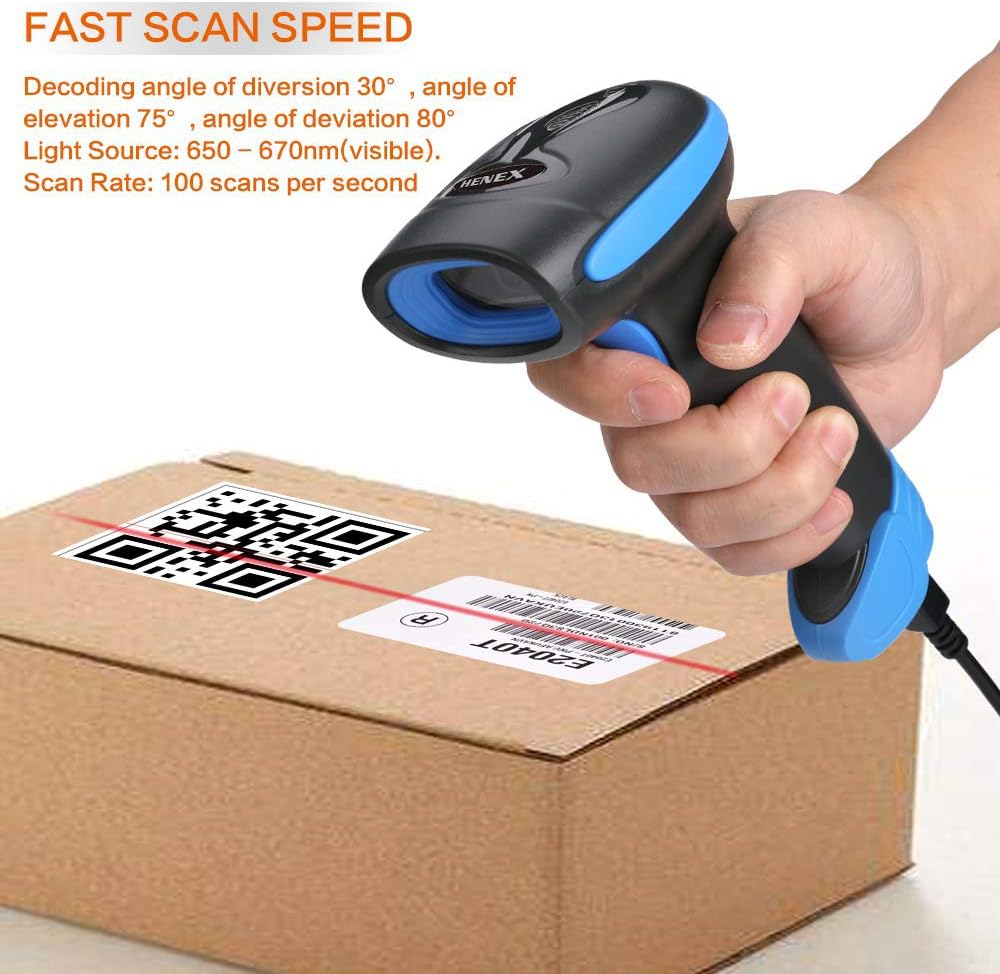
Figure 5: Demonstration of the scanner's fast scan speed and decoding capabilities on a package.
5. Maintenance and Care
5.1 Battery Management
The scanner's 2200mAh battery provides extended operation. When the battery is low, the scanner will emit five short beeps and stop scanning. Connect the USB charging cable to recharge. Avoid prolonged storage with a completely depleted battery.
5.2 Cleaning
Wipe the scanner's exterior with a soft, dry cloth. For the scanning window, use a lint-free cloth lightly dampened with a mild, non-abrasive cleaner. Do not use harsh chemicals or immerse the device in liquids.
5.3 Durability
The HC-3208R is designed with anti-shock shatterproof construction, allowing it to remain functional even after falls from heights up to 2.0 meters (6.56 feet). However, avoid intentional drops or severe impacts to prolong the product's lifespan.

Figure 6: The scanner's anti-shock shatterproof construction, demonstrating its ability to withstand falls.
6. Troubleshooting
- Scanner stops scanning and beeps: This indicates a low battery. Connect the USB charging cable to recharge the device.
- Scanner not connecting wirelessly: Ensure the USB wireless receiver is securely plugged into your computer. Verify the scanner is charged. If issues persist, try re-pairing the scanner with the receiver (refer to the full manual for pairing instructions).
- Unable to scan certain barcodes: Ensure the barcode is clean and not excessively damaged or blurred. Check if the barcode type is supported by the scanner (refer to Section 7. Specifications). Adjust scanning distance and angle.
7. Specifications
| Parameter | Detail |
|---|---|
| Model Number | HC-3208R |
| Dimensions (L x W x H) | 173mm x 67mm x 94mm (6.85 x 2.72 x 3.94 inches) |
| Weight | 190 grams (10.6 ounces) |
| Image Sensor | 640 pixels (H) * 480 pixels (V) |
| Light Source | Aiming: 617 nm LED; Illumination: 6500K LED |
| Decoding Capability (2D) | QR Code, Data Matrix, PDF417, Aztec, Maxicode |
| Decoding Capability (1D) | UPC / EAN / JAN, UPC-A & UPC-E, EAN-8 & EAN-13, JAN-8 & JAN-13, ISBN / ISSN, Code 39 (with full ASCII), Codabar (NW7), Code 128 & EAN 128, Code 93, etc. |
| Scanning Distance | 40-200mm @ UPC / EAN 13mil PCS = 90%; 20-250mm @ QR 20mil PCS = 100% |
| Scanning Angle | 65° elevation / 30° / 55° |
| Reading Accuracy | ≥4mil |
| Battery Capacity | 2200mAh |
| Charging Time | Approx. 5 hours |
| Working Time | Approx. 9-12 hours (continuous scanning) |
| Connectivity | 2.4G Wireless, USB Wired |
| Compatible Devices | Laptop, Desktop |
| Operating Voltage | 5 Volts |
| Manufacturer | HENEX |
| Country of Origin | China |
| First Available Date | August 17, 2021 |
8. Application Areas
The HENEX HC-3208R barcode scanner is widely applicable in various sectors requiring efficient barcode reading. Typical application areas include:
- Supermarkets and Retail Stores
- Shopping Malls
- Makeup Shops
- Postal Industry
- Logistics and Warehousing
- Factory and Manufacturing Environments
- Mobile Payment Systems (scanning screen codes)
9. Warranty and Support
For warranty information and technical support, please contact HENEX customer service. Details can typically be found on the product packaging or the official HENEX website. Please retain your purchase receipt for warranty claims.

