
Introduction
This manual provides detailed instructions for the proper use and care of your Loluka Blue Wireless Over Ear Headphones. These headphones feature Bluetooth 5.1 for stable connectivity, IPX6 waterproofing for durability during activities, and noise-cancelling microphones for clear calls. Please read this manual thoroughly before using your headphones to ensure optimal performance and longevity.
1. Setup
1.1 What's in the Box
Upon unboxing, please verify that all components are present:
- Loluka Wireless Earbuds
- Charging Case
- USB-C Charging Cable
- Multiple Sizes of Silicone Ear Tips (S/M/L)
- Detachable Earhooks (2 pairs)
- Quick Start Guide

Image Description: This image shows all items included in the product package: the Loluka headphones, charging case, USB-C charging cable, multiple sizes of silicone ear tips, detachable earhooks, and a quick start guide.
1.2 Initial Charging
Before first use, fully charge the headphones and charging case. Connect the provided USB-C cable to the charging case and a power source. The indicator lights on the case will show charging status.
- Charging Time for Case: Approximately 1-2 hours.
- Earbud Playtime: Up to 6-7 hours on a single charge.
- Total Playtime with Charging Case: Up to 28 hours.

Image Description: This visual highlights the extended battery life, showing the headphones provide 7 hours of use per charge, with the charging case offering an additional 3 full charges for a total of 28 hours of playback. A USB-C charging cable is also visible.
1.3 Bluetooth Pairing
- Ensure the headphones are charged.
- Open the charging case. The earbuds will automatically power on and enter pairing mode.
- On your device (smartphone, tablet, etc.), enable Bluetooth and search for available devices.
- Select "MS-T20" from the list to connect. Once connected, a voice prompt will confirm successful pairing.

Image Description: The image displays the automatic pairing process, where the headphones (identified as 'MS-T20') connect to a mobile device via Bluetooth, simplifying initial setup.
1.4 Wearing the Headphones
The headphones are designed for comfort and stability, featuring detachable earhooks and various ear tip sizes.
- Ear Tips: Choose the silicone ear tips (S/M/L) that provide the best seal and comfort for your ears. A good seal enhances sound quality and noise isolation.
- Detachable Earhooks: For secure fit during intense activities like sports or workouts, attach the earhooks. For casual listening, the earhooks can be removed.

Image Description: This image illustrates the versatility of the headphones, demonstrating how the detachable earhooks can be used for secure fit during activities like fitness, cycling, and running, or removed for a more casual listening experience.

Image Description: A person is shown wearing the Loluka headphones, illustrating their ergonomic design and comfortable fit around the ear, suitable for extended wear.
2. Operating Instructions
2.1 Power On/Off
- Power On: Open the charging case, and the earbuds will automatically power on. Alternatively, press and hold the touch control area on either earbud for 2 seconds.
- Power Off: Place the earbuds back into the charging case and close the lid. Alternatively, press and hold the touch control area on either earbud for 5 seconds.
2.2 Touch Controls
The headphones feature intuitive touch controls on each earbud. Refer to the diagram below for specific functions:
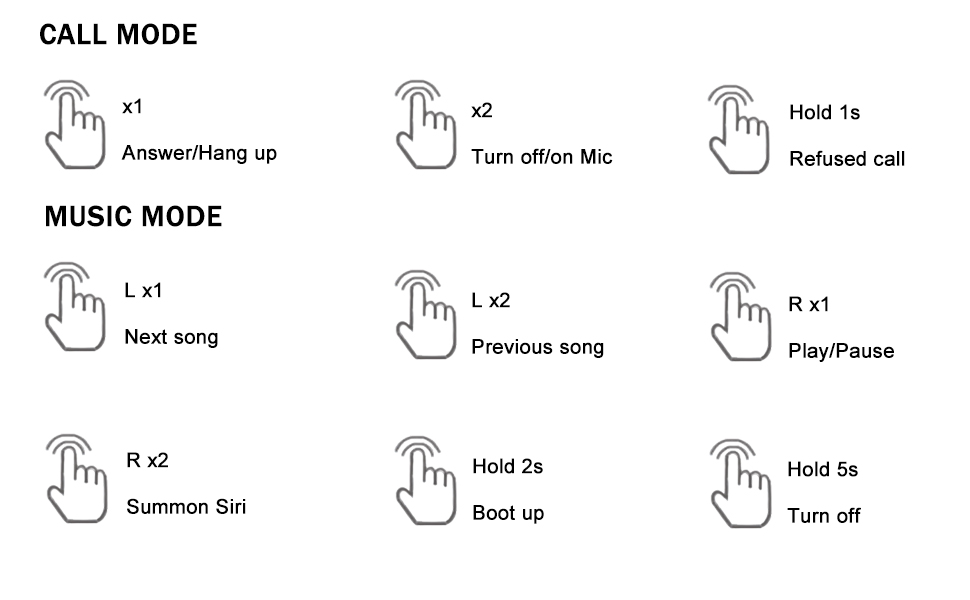
Image Description: A detailed diagram outlining the touch control functions for the headphones, including single, double, and long presses for answering calls, controlling music playback, and activating voice assistants.
- Answer/Hang Up Call: Single tap (x1) on either earbud.
- Refuse Call: Press and hold (1s) on either earbud.
- Turn On/Off Mic: Double tap (x2) on either earbud during a call.
- Play/Pause Music: Single tap (R x1) on the right earbud.
- Next Song: Single tap (L x1) on the left earbud.
- Previous Song: Double tap (L x2) on the left earbud.
- Summon Voice Assistant (Siri, Google Assistant, etc.): Double tap (R x2) on the right earbud.
3. Maintenance
3.1 Cleaning
Regular cleaning helps maintain sound quality and hygiene:
- Gently wipe the earbuds and charging case with a soft, dry, lint-free cloth.
- Remove ear tips and clean them with mild soap and water, then dry thoroughly before reattaching.
- Avoid using abrasive materials, alcohol, or chemical cleaners.
3.2 Water Resistance (IPX6)
The headphones are rated IPX6 waterproof, meaning they are protected against high-pressure water jets from any direction. This makes them suitable for workouts and use in rainy conditions.
- Do not submerge the headphones in water.
- Ensure the charging port is dry before charging.
- The charging case is not waterproof.

Image Description: The image depicts the headphones and case with water splashes, emphasizing their IPX6 waterproof rating, which protects them from sweat and rain.
3.3 Storage
When not in use, store the headphones in their charging case to protect them from dust, damage, and to keep them charged.
4. Troubleshooting
If you encounter issues with your headphones, please refer to the following common solutions:
- No Sound or Connection Issues:
1. Ensure both earbuds are charged.
2. Turn off and then turn on Bluetooth on your device.
3. Delete "MS-T20" from your device's Bluetooth list and re-pair.
4. Ensure the earbuds are within the 10-meter Bluetooth range of your device. - Charging Problems:
1. Verify the USB-C cable is securely connected to both the charging case and the power source.
2. Ensure the charging contacts on the earbuds and inside the case are clean and free of debris.
3. Make sure the charging case itself has power. - Poor Sound Quality:
1. Try different sizes of ear tips to ensure a proper seal in your ear canal.
2. Ensure the earbuds are correctly positioned in your ears.
3. Clean any earwax or debris from the ear tips and speaker mesh. - Buttons Not Responding:
1. Ensure you are pressing the correct touch control area.
2. Apply firm but not excessive pressure for touch commands.
5. Specifications
| Feature | Specification |
|---|---|
| Model Name | Loluka Earbuds with hook |
| Connectivity Technology | Wireless (Bluetooth) |
| Bluetooth Version | 5.1 |
| Bluetooth Range | 10 Meters |
| Water Resistance Level | IPX6 Waterproof |
| Battery Life (Earbuds) | 6-7 Hours |
| Total Battery Life (with Case) | 28 Hours |
| Charging Time (Case) | 1-2 Hours (Type-C) |
| Audio Driver Type | Dynamic Driver |
| Noise Control | Sound Isolation (Environmental Noise Reduction for calls) |
| Control Type | Touch, Voice |
| Compatible Devices | Bluetooth-enabled smartphones, tablets, etc. |
| Item Weight | 2.71 Ounces |
| Product Dimensions | 3.9 x 2.44 x 1.2 inches |
6. Warranty and Support
For warranty information and customer support, please refer to the documentation included with your purchase or contact Loluka customer service through the retailer where the product was purchased. Please retain your proof of purchase for warranty claims.