Introduction
The Splenssy Wireless Remote Control Lock is an advanced security system designed to provide keyless entry and enhanced protection for your property. Featuring an invisible lock-hole design, it eliminates traditional key access points, making it highly resistant to conventional break-in methods. This smart lock operates wirelessly via remote controls, offering convenience and peace of mind.


Safety Information
- Ensure proper battery installation to avoid malfunction.
- Do not expose the lock to extreme temperatures or direct water contact.
- Keep remote controls away from children to prevent accidental locking/unlocking.
- In case of emergency, familiarize yourself with the indoor emergency unlock button.
- Do not attempt to disassemble or repair the unit yourself. Contact qualified personnel for service.
Package Contents
Please check the package carefully to ensure all items are present:
- 1 x Lock Host Machine
- 1 x Lock Body Holder
- 1 x Lock Catch
- 1 x USB Power Cable
- 4 x Remote Keys (Standard)
- 1 x Bag of Mounting Screws
- 1 x User Manual (English)

Product Overview
Host Machine
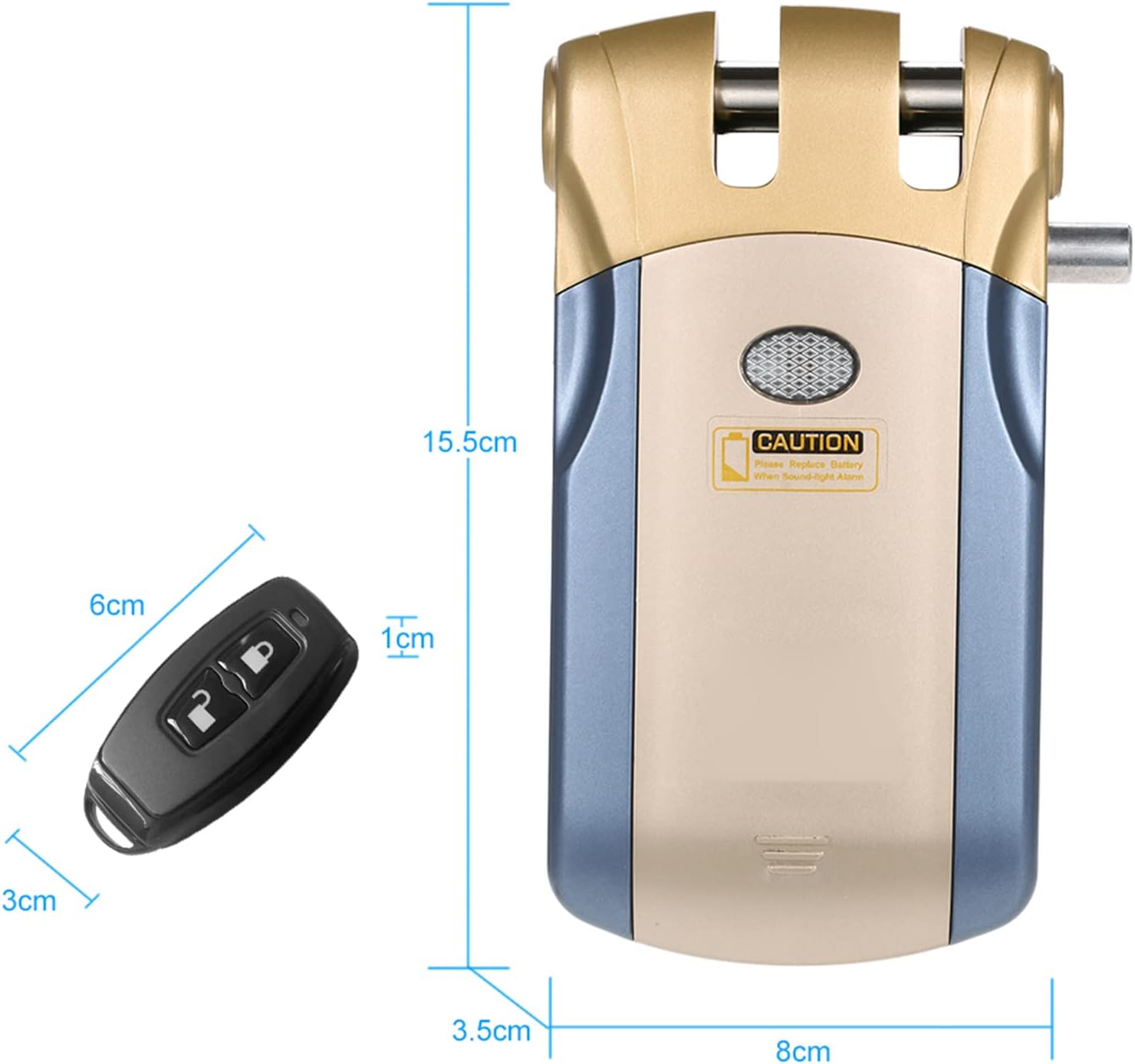
The main lock unit, typically mounted on the door. It contains the locking mechanism, battery compartment, and emergency unlock button.
Remote Control
Compact remote keys used to wirelessly lock and unlock the host machine. Each remote operates on a 433 MHz frequency.
Setup and Installation
1. Mounting the Lock Host Machine
- Choose a suitable location on your door frame or door where the lock can be securely mounted and align with the lock catch.
- Use the provided mounting screws to attach the lock body holder and the lock catch firmly. Ensure the lock mechanism can extend and retract freely without obstruction.
2. Installing Batteries
- The host machine requires 2 x AA batteries (not included). Open the battery compartment on the host machine and insert the batteries, observing polarity.
- Each remote control is powered by a Lithium button battery (included). These are typically pre-installed.
3. Pairing Remote Controls (if necessary)
The remote controls are usually pre-paired with the lock. If you need to add new remotes (up to a maximum of 16 controllers) or re-pair existing ones, refer to the specific pairing instructions in the included printed user manual.
Operating Instructions
Locking and Unlocking with Remote Control
- To lock the door, press the lock button on your remote control. The lock mechanism will extend.
- To unlock the door, press the unlock button on your remote control. The lock mechanism will retract.
- The effective range for remote operation is approximately 15 meters.

Indoor Emergency Unlock
In case of emergency or battery failure, the lock can be manually unlocked from the inside using the emergency button on the host machine.
USB External Power Source Function
The lock features a USB port for external power. If the internal batteries are depleted, you can connect a USB power source (e.g., power bank) via the provided USB cable to temporarily power the lock and unlock it.

Maintenance
Battery Replacement
- When the host machine's batteries are low, the unit may emit a warning sound or light. Replace the 2 x AA batteries promptly.
- Remote control batteries (Lithium button batteries) should be replaced when the remote's indicator light dims or its range decreases.

Cleaning
Wipe the lock and remote controls with a soft, dry cloth. Do not use abrasive cleaners or solvents.
Troubleshooting
| Problem | Possible Cause | Solution |
|---|---|---|
| Lock does not respond to remote. | Low batteries in host machine or remote; remote out of range; remote not paired. | Replace batteries in both units. Move closer to the lock. Re-pair remote if necessary (refer to manual). |
| Lock makes unusual noises. | Obstruction in locking mechanism; loose mounting. | Check for obstructions. Ensure lock and catch are securely mounted. |
| Emergency unlock button not working. | Mechanism jammed. | Ensure no physical obstruction. If issue persists, contact support. |
Specifications
| Component | Specification |
|---|---|
| Host Machine Power Supply | 2 x AA Batteries (not included) |
| Remote Control Power Supply | Lithium Button Battery (included) |
| Transmission Frequency | 433 MHz (± 500 KHz) |
| Operating Range | Within 15m |
| Unlock Mode | Remote control unlock & Indoor emergency button unlock |
| Host Machine Dimensions | 15.5 x 8 x 3.5 cm (approx.) |
| Host Machine Weight (without accessories) | 529g (approx.) |
| Remote Control Dimensions (each) | 6 x 3 x 1 cm (approx.) |
| Remote Control Weight (each) | 25g (approx.) |
| Standard Remote Controls Included | 4 |
| Max. Controller Number | 16 |
Warranty and Support
For warranty information, technical support, or service inquiries, please refer to the contact details provided with your purchase or visit the official Splenssy website. Keep your purchase receipt as proof of purchase.