
Loluka Loluka Earbuds with hook
Loluka Over Ear Wireless Earbuds with Earhooks User Manual
Model: Loluka Earbuds with hook
Brand: Loluka
Introduction
Thank you for choosing the Loluka Over Ear Wireless Earbuds. This manual provides detailed instructions on how to set up, operate, maintain, and troubleshoot your new earbuds. Please read this manual carefully before use to ensure optimal performance and longevity of your device.
What's in the Box
- Charging Case
- USB-C Charging Cable
- Ear Tips (S/M/L sizes)
- Ear Hooks (2 pairs, detachable)
- User Manual

Image: The Loluka Over Ear Wireless Earbuds, white in color, resting inside their open charging case. The case is also white with a black interior, showing the charging contacts for each earbud.
Setup
Charging the Earbuds and Case
Before first use, fully charge the charging case and earbuds. Connect the provided USB-C cable to the charging port on the case and a compatible USB power source. The indicator lights on the case will show the charging status. A full charge for the case typically takes 1-2 hours. The earbuds will charge automatically when placed inside the case.

Image: A smartphone displaying music playback, positioned next to the Loluka earbuds in their charging case, which is connected to a USB-C charging cable. Text indicates 28 hours of hybrid endurance with 7 hours of service time and 3 additional charges from the case.
Initial Pairing
- Open the charging case and take out both earbuds. They will automatically power on and enter pairing mode.
- On your device (smartphone, tablet, etc.), enable Bluetooth and search for available devices.
- Select "MS-T20" or "Loluka" from the list of found devices to connect. Once connected, you will hear a confirmation tone.

Image: A smartphone screen showing Bluetooth settings with "MS-T20" listed as a connected device, next to the Loluka earbuds in their charging case. Text describes the automatic pairing process: take out headset, enter pairing mode, choose MS-T20 to connect.
Operating Instructions
Wearing the Earbuds
The Loluka earbuds are designed for comfort and secure fit, especially during physical activity. They come with detachable earhooks and three sizes of silicone ear tips (S/M/L) to ensure a perfect seal and comfortable wear. Choose the ear tips that best fit your ear canal for optimal sound quality and noise isolation.

Image: A diagram illustrating two ways of wearing the Loluka earbuds: one for casual use (without earhooks) and one for sports (with earhooks). Below, two lifestyle photos show people using the earbuds in casual and fitness settings.

Image: A woman wearing a white Loluka earbud with an earhook, demonstrating the comfortable and ergonomic design. The earbud is securely fitted over her ear.
Controls
The earbuds feature touch controls for easy management of calls and music playback.
| Action | Call Mode | Music Mode |
|---|---|---|
| Single Tap (L or R) | Answer/Hang up | Play/Pause (R), Next Song (L) |
| Double Tap (L or R) | Turn off/on Mic | Previous Song (L), Summon Siri (R) |
| Hold 1s (L or R) | Refuse Call | N/A |
| Hold 2s (L or R) | N/A | Boot up |
| Hold 5s (L or R) | N/A | Turn off |
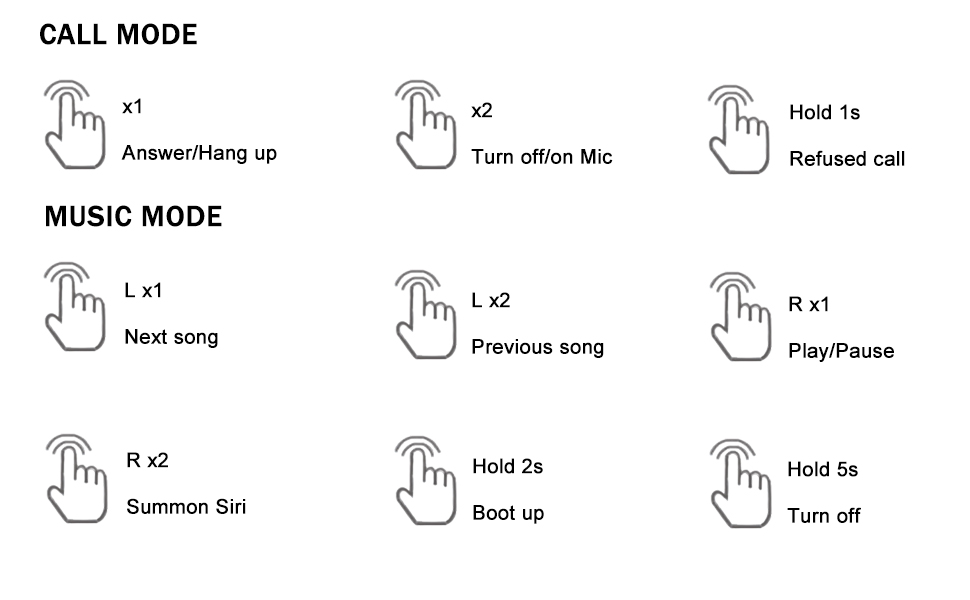
Image: A visual representation of the touch controls for Loluka earbuds, detailing single tap, double tap, and long press actions for both call and music modes.
Bluetooth Connectivity
Equipped with Bluetooth 5.1 technology, these earbuds offer a stable and fast connection with your devices, ensuring minimal audio delay and reliable performance within a 10-meter range.
Call Functionality
The earbuds feature two microphones with environmental noise reduction technology. This system works to minimize background noise, providing clear and crisp voice calls, making communication feel face-to-face even in noisy environments.
Audio Quality
Experience Hi-Fi stereo sound with deep bass and crystal-clear treble, delivered by dynamic drivers. The sound isolation feature further enhances your listening experience by blocking out ambient noise.
Maintenance
Waterproofing
The earbuds are rated IPX6 waterproof, providing protection against sweat and rain. This makes them suitable for intense workouts and outdoor activities. However, they are not designed for submersion in water.

Image: The Loluka earbuds in their charging case, with water droplets around them, illustrating their IPX6 waterproof rating. Icons below represent protection from rain, sweat, and splashes.
Cleaning
Regularly clean the earbuds and charging case to maintain hygiene and performance. Use a soft, dry, lint-free cloth. For ear tips, you may gently wipe them with a damp cloth and mild soap, then dry thoroughly before reattaching. Do not use harsh chemicals or abrasive materials.
Storage
When not in use, store the earbuds in their charging case to protect them from dust, damage, and to keep them charged. Store the case in a cool, dry place away from extreme temperatures.
Troubleshooting
Common Issues and Solutions
- Earbuds not pairing: Ensure both earbuds are out of the case and powered on. Turn off and on Bluetooth on your device. Forget the device from your Bluetooth list and try pairing again. Ensure earbuds are charged.
- Only one earbud working: Place both earbuds back into the charging case, close the lid, wait a few seconds, then take them out again. This often re-syncs them.
- No sound or low volume: Check the volume level on both your device and the earbuds. Ensure earbuds are properly seated in your ears and the correct size ear tips are used.
- Charging issues: Ensure the charging cable is securely connected to both the case and the power source. Check if the charging port is clean and free of debris.
- Poor call quality: Ensure the microphones are not obstructed. Move closer to your connected device to improve signal strength.
Specifications
| Feature | Specification |
|---|---|
| Model Name | Loluka Earbuds with hook |
| Connectivity Technology | Wireless (Bluetooth 5.1) |
| Bluetooth Range | 10 Meters |
| Battery Life (Earbuds) | Up to 7 Hours |
| Total Playtime with Case | Up to 28 Hours |
| Charging Time (Case) | 1-2 Hours (Type-C Fast Charge) |
| Water Resistance Level | IPX6 Waterproof |
| Noise Control | Sound Isolation, Environmental Noise Reduction (for calls) |
| Control Type | Touch, Voice (Siri) |
| Ear Placement | In Ear with Earhook option |
| Item Weight | 2.71 Ounces (total) |
| Included Components | Charging Case, Cable, Ear Tips, Ear Hooks, User Manual |
Warranty Information
Loluka products are manufactured to the highest quality standards. This product is covered by a standard manufacturer's warranty against defects in materials and workmanship from the date of purchase. Please retain your proof of purchase for warranty claims. For specific warranty terms and conditions, refer to the documentation included with your product or contact customer support.
Support
For further assistance, technical support, or warranty inquiries, please contact Loluka customer service. You can typically find contact information on the product packaging or on the official Loluka website. Please have your product model number and purchase details ready when contacting support.
Ask a question about this manual
Ask about setup, troubleshooting, compatibility, parts, safety, or missing instructions. Manuals+ will review the question and use this page’s manual context to help answer it.