
1. Product Overview
This set of three LEXMAN G9 LED bulbs provides efficient and high-quality lighting for various indoor spaces. Designed for compatibility with G9 lamp holders, these bulbs offer a bright 470 lumens output with a low power consumption of 4.2W, equivalent to a traditional 40W incandescent bulb. The 4000K neutral white light provides a dynamic, daylight-like illumination, ensuring optimal visual comfort and clarity. These bulbs are designed for quick illumination, reaching 95% intensity in less than 1 second, and boast a long lifespan of 15,000 hours, contributing to energy savings.

Image 1.1: LEXMAN G9 LED Bulb Set. This image displays the three G9 LED bulbs, highlighting their compact design and the G9 base type.
2. Safety Information
Please read and understand all safety instructions before installing or using the bulbs. Failure to follow these instructions may result in electric shock, fire, or other hazards.
- Turn off power: Always disconnect power to the fixture at the circuit breaker or fuse box before installation, removal, or inspection.
- Proper handling: Do not touch the bulb with wet hands. Avoid touching the glass part of the bulb directly after use, as it may be hot.
- Indoor use only: These bulbs are designed for indoor use in dry locations. Do not expose to water or excessive moisture.
- Compatible fixtures: Use only in fixtures rated for G9 base type and within the specified voltage range (230V).
- Dimmer compatibility: These bulbs are not specified as dimmable. Using them with a dimmer switch may cause flickering or damage.
- Disposal: Dispose of used bulbs according to local regulations.
3. Package Contents
Your LEXMAN G9 LED Bulb Set package includes:
- 3 x LEXMAN G9 LED Bulbs (4.2W, 4000K)

Image 3.1: Packaging of the LEXMAN G9 LED Bulb Set. The image shows the retail packaging containing three G9 LED bulbs, along with key specifications like 4000K color temperature, 470 lumens, and 4.2W power consumption.
4. Installation
Follow these steps to install your LEXMAN G9 LED bulbs:
- Ensure power is off: Before beginning installation, always turn off the power supply to the light fixture at the main circuit breaker or fuse box.
- Allow cooling: If replacing an old bulb, allow it to cool completely before handling.
- Remove old bulb (if applicable): Gently pull the old G9 bulb straight out from its socket. Do not twist.
- Insert new bulb: Align the two pins of the new LEXMAN G9 LED bulb with the holes in the G9 socket. Gently push the bulb straight into the socket until it is firmly seated. Do not force the bulb.
- Restore power: Once the bulb is securely installed, restore power to the fixture at the circuit breaker.
- Test: Turn on the light switch to confirm the bulb is working correctly.

Image 4.1: G9 Bulb Dimensions. This diagram illustrates the physical dimensions of a G9 bulb, showing a width of 16mm and a length of 55.5mm, which is important for ensuring compatibility with your fixture.
5. Operation
Operating your LEXMAN G9 LED bulbs is straightforward:
- Once installed, simply use the light switch connected to your fixture to turn the bulbs on or off.
- These LED bulbs provide instant full brightness (95% intensity in less than 1 second) without any warm-up time.
- The 4000K neutral white light is ideal for areas requiring clear, dynamic illumination similar to natural daylight.
6. Maintenance
LEXMAN G9 LED bulbs require minimal maintenance:
- Cleaning: Ensure the power is off and the bulb is cool before cleaning. Gently wipe the bulb with a soft, dry cloth. Do not use liquid cleaners or abrasive materials.
- Replacement: Due to their long lifespan of 15,000 hours, frequent replacement is not expected. When replacement is necessary, follow the installation steps outlined in Section 4.
7. Troubleshooting
If you encounter issues with your LEXMAN G9 LED bulbs, refer to the following common problems and solutions:
| Problem | Possible Cause | Solution |
|---|---|---|
| Bulb does not light up | No power to the fixture; Bulb not properly seated; Faulty bulb | Check circuit breaker/fuse; Ensure bulb is fully inserted; Try another bulb to confirm fixture functionality. |
| Bulb flickers | Incompatible dimmer switch; Loose connection; Voltage fluctuations | Ensure no dimmer switch is used (unless specified as dimmable); Re-seat the bulb; Consult an electrician for voltage issues. |
| Light is too dim or too bright | Incorrect bulb type for desired brightness | Verify the bulb's luminous flux (470 lm) and color temperature (4000K) meet your lighting needs. |
8. Specifications
| Brand | LEXMAN |
| Manufacturer | ADEO |
| Model Number | 3276007280982 |
| Quantity | 3 bulbs |
| Product Dimensions (L x W x H) | 2 x 16 x 6 cm |
| Weight | 40 grams |
| Style | G9 |
| Voltage | 230 Volts |
| Bulb Type | LED |
| Cap Type | G9 |
| Luminous Flux | 470 lumens (lm) |
| Power Consumption | 4.2 Watts |
| Incandescent Equivalent | 40 Watts |
| Color Temperature | 4000 Kelvin (Neutral White) |
| Average Lifespan | 15,000 hours (approx. 13 years based on 3 hours/day use) |
| Special Features | Instant full brightness |
9. Warranty and Support
LEXMAN products are designed for safety, durability, and intelligence. This product comes with a 5-year guarantee, ensuring reliable performance and peace of mind.
For further assistance or inquiries, please refer to the LEXMAN official website or contact your retailer.
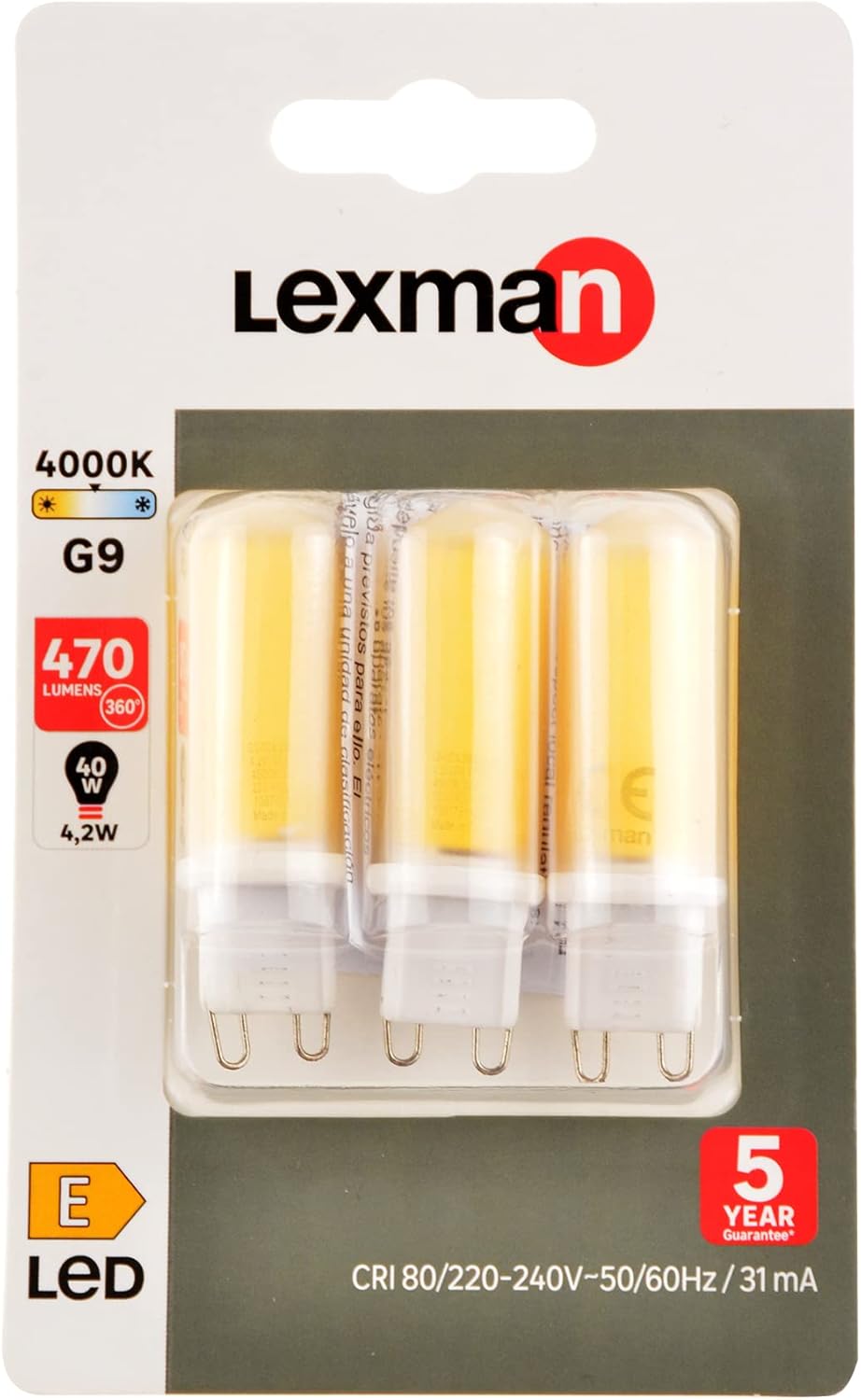
Image 9.1: LEXMAN G9 LED Bulb Set. This image shows the three G9 LED bulbs out of their packaging, highlighting their clear, neutral white light output.