
1. Introduction
The Keystone Energy Star 50-Pint Portable Dehumidifier is designed to efficiently remove excess moisture from the air, creating a more comfortable and healthier indoor environment. This unit is ideal for basements, garages, living rooms, and other extra-large rooms up to 4,500 square feet. Its advanced features, including a built-in pump for continuous draining, auto-shutoff, and an LED display, ensure convenient and reliable operation.

Figure 1.1: Front view of the Keystone 50-Pint Portable Dehumidifier.
2. Safety Information
Please read all safety instructions carefully before operating the dehumidifier to prevent injury or damage. Keep this manual for future reference.
- Electrical Safety: Always plug the unit into a direct, dedicated electrical outlet. Do not use extension cords or adapter plugs. Ensure the power cord is not pinched or damaged.
- Placement: Position the dehumidifier vertically on a stable, level surface. Maintain at least 7.9 inches (20 cm) of clearance on all sides of the unit to ensure proper airflow and prevent overheating.
- Water Tank: Do not drink the collected water. Always empty the water tank when the 'Full Bucket' indicator illuminates to prevent overflow.
- Filter Maintenance: Regularly clean the air filter to maintain optimal performance and air quality.
- Operating Conditions: Do not operate the unit in extremely cold temperatures (below 41°F / 5°C) as it may affect performance.
WARNING: This product contains chemicals known to the State of California to cause cancer and birth defects or other reproductive harm. For more information, please refer to the Proposition 65 warning in the included manual.
3. Product Overview
3.1 Key Features
- High Capacity: Removes up to 50 pints of moisture per day.
- Wide Coverage: Effective in areas up to 4,500 sq.ft.
- Energy Efficient: Energy Star certified for reduced energy consumption.
- Continuous Draining: Features a built-in pump for continuous upward drainage, eliminating the need for manual emptying.
- User-Friendly Controls: Electronic controls with an LED display for easy setting adjustments.
- Safety Features: Auto-shutoff when the water tank is full and auto-restart after a power outage.
- Portability: Equipped with four omni-directional caster wheels for easy movement.
- Quiet Operation: Operates at a low noise level of 55dB.

Figure 3.1: The dehumidifier helps prevent excessive dampness, musty odors, and high humidity.
3.2 Components
- Main Dehumidifier Unit
- Removable Water Tank (1.8-gallon capacity)
- Washable Mesh Filter
- Threaded Adaptor with Small Internal Drain Hose (for pump drainage)
- User Manual

Figure 3.2: Illustration of the removable water tank and built-in pump for continuous drainage.
3.3 Control Panel
The control panel is located on the top of the unit and features an LED display and various buttons for operation.

Figure 3.3: Close-up of the control panel with LED display and function buttons.
- Power Button: Turns the unit On/Off.
- Mode Button: Cycles through Normal, Turbo, and Auto-Defrost settings.
- Timer Button: Sets the 24-hour timer for automatic operation.
- Fan Speed Button: Adjusts fan speed (High/Low).
- Humidity Adjustment Buttons: Increases or decreases the desired humidity level.
- Filter Alert: Illuminates when the filter needs cleaning.
- Full Bucket Alert: Illuminates when the water tank is full.
4. Setup
4.1 Unpacking and Placement
- Carefully remove the dehumidifier from its packaging.
- Place the unit upright on a firm, level floor.
- Ensure there is at least 7.9 inches (20 cm) of clear space around all sides of the unit for proper air circulation.
- Plug the power cord directly into a dedicated 120V AC, 60Hz grounded wall outlet. Do not use an extension cord.

Figure 4.1: Proper placement of the dehumidifier in a room, ensuring adequate clearance.
4.2 Continuous Drainage Setup (with Pump)
This model includes a built-in pump for continuous drainage, allowing you to drain water upwards or to a distant drain without manually emptying the bucket.
- Locate the continuous drain outlet on the back of the unit.
- Attach a standard garden hose (not included) to the threaded adaptor.
- Ensure the hose is securely connected and points towards the desired drain location.
- For optimal pump longevity, a gradual incline for the hose is recommended over a complete vertical incline, though some vertical lift is possible.
Video 4.1: This video demonstrates the unpacking and installation process, including how to set up the continuous drainage feature with the built-in pump.
5. Operating Instructions
5.1 Basic Operation
- Press the Power button to turn the unit on. The LED display will show the current humidity level.
- Use the Humidity Adjustment buttons (up/down arrows) to set your desired humidity level (e.g., 45% for optimal comfort).
- The unit will automatically operate to reach and maintain the set humidity level.
5.2 Mode Settings
Press the Mode button to cycle through the following settings:
- Normal: Standard dehumidification operation.
- Turbo: Increases fan speed for faster moisture removal.
- Auto-Defrost: Automatically activates when frost builds up on the evaporator coils, ensuring efficient operation in cooler environments.
5.3 Timer Function
The 24-hour timer allows you to program the unit to turn on or off automatically.
- To set the auto-off timer: With the unit running, press the Timer button and use the humidity adjustment arrows to select the desired number of hours (1-24) before the unit turns off.
- To set the auto-on timer: With the unit off, press the Timer button and use the humidity adjustment arrows to select the desired number of hours (1-24) before the unit turns on.
Video 5.1: This video highlights the LED display, 24-hour timer, and auto-shutoff features of the dehumidifier.
6. Maintenance
Regular maintenance ensures the longevity and efficient operation of your dehumidifier.
6.1 Emptying the Water Tank
If not using the continuous drain option, the water tank will need to be emptied manually when it is full. The 'Full Bucket' indicator light will illuminate, and the unit will automatically shut off.
- Gently pull out the water tank from the front of the unit.
- Carefully carry the tank to a sink or drain.
- Pour out the collected water.
- Slide the empty water tank back into the unit until it clicks into place. The unit will resume operation.
6.2 Cleaning the Air Filter
The 'Check Filter' alert will remind you to clean the mesh filter regularly (approximately every 250 hours of operation).
- Turn off the dehumidifier and unplug it from the power outlet.
- Remove the air filter from the back of the unit.
- Wash the filter with warm, soapy water.
- Rinse thoroughly and allow it to air dry completely before reinserting.
- Once the filter is reinstalled, plug in the unit and press the 'Filter' button to reset the filter alert.
7. Troubleshooting
If you encounter issues with your dehumidifier, refer to the following common problems and solutions:
| Problem | Possible Cause | Solution |
|---|---|---|
| Unit does not turn on | No power; Power cord unplugged; Water tank full or not properly seated. | Check power connection; Empty and re-seat water tank. |
| No water collected | Humidity level too low; Room temperature too low; Air filter clogged. | Adjust humidity setting; Ensure room temperature is above 41°F (5°C); Clean air filter. |
| Unit runs constantly | Humidity setting too low; Room is too large; Continuous drain hose is kinked or blocked. | Increase humidity setting; Ensure unit is sized correctly for the room; Check continuous drain hose for obstructions. |
| Loud noise during operation | Unit not level; Air filter clogged; Obstruction in fan. | Place unit on a level surface; Clean air filter; Check for and remove any obstructions. |
| 'Check Filter' light on | Air filter needs cleaning. | Clean the air filter and reset the filter alert. |
| 'Full Bucket' light on | Water tank is full or not properly seated. | Empty the water tank and re-seat it correctly. |
For further assistance, please refer to the complete troubleshooting section in the included user manual or contact Keystone customer support.
8. Specifications
| Specification | Detail |
|---|---|
| Brand | Keystone |
| Model Name | Keystone Energy Star 50-Pint Portable Dehumidifier |
| Model Number | KSTAD506PE |
| Dehumidification Capacity | 50 Pints per Day |
| Floor Area Coverage | Up to 4500 Square Feet |
| Water Tank Volume | 1.8 Gallons (7.2 Quarts) |
| Product Dimensions (D x W x H) | 11.1"D x 15.43"W x 24.25"H |
| Item Weight | 42.1 Pounds |
| Color | White |
| Material | Plastic |
| Wattage | 720 watts |
| Number of Speeds | 2 |
| Special Features | Continuous Draining, Automatic Restart, Automatic Defrost, Quiet Operation, Automatic Shutoff |
| Recommended Uses | Residential |
| UPC | 840148702455 |
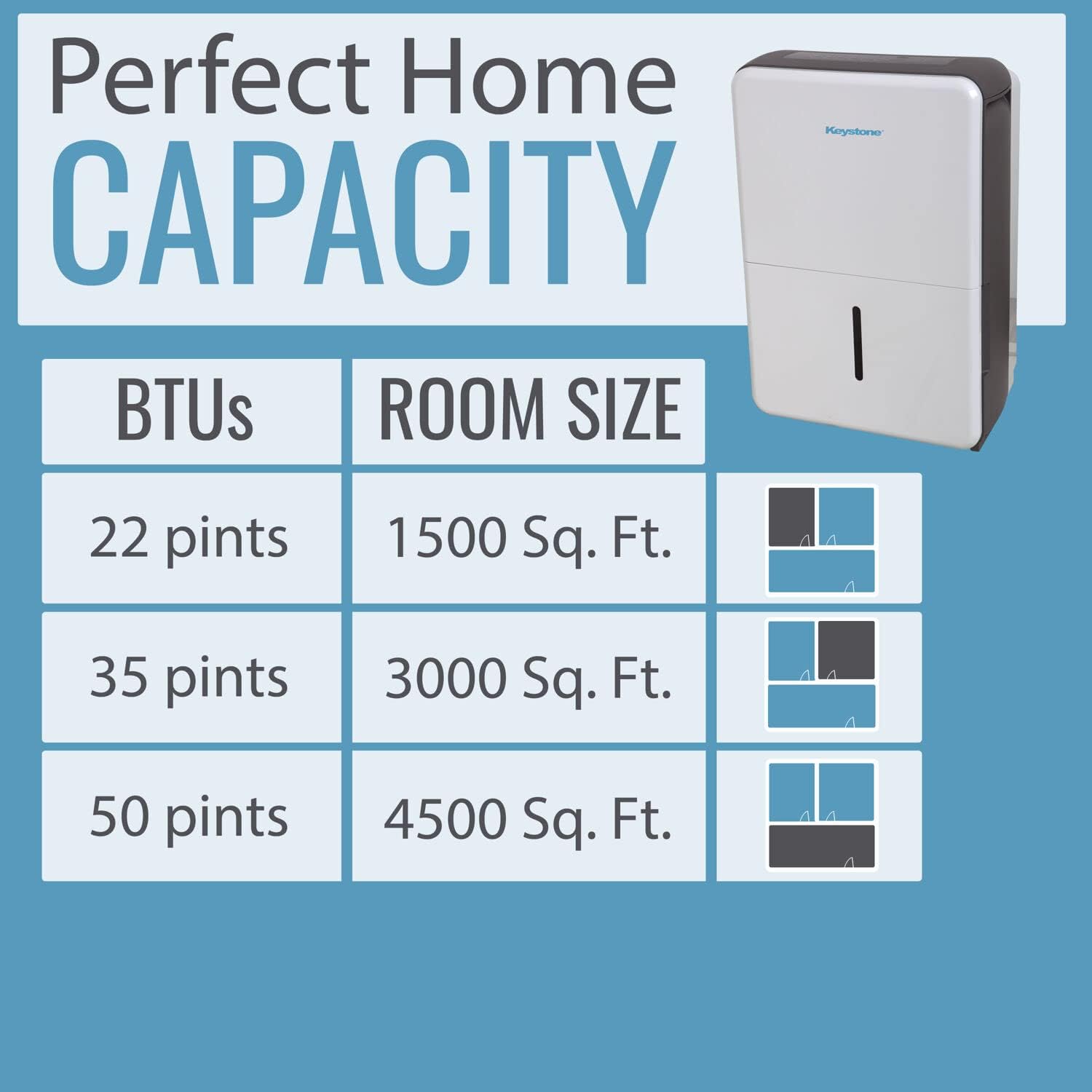
Figure 8.1: Dehumidification capacity based on room size.
9. Warranty and Support
Your Keystone dehumidifier comes with a manufacturer's warranty. For detailed information regarding warranty coverage, terms, and conditions, please refer to the warranty card included in your product packaging or the full user manual. For technical support, troubleshooting assistance, or to inquire about replacement parts, please contact Keystone customer service through the contact information provided in your manual or on the official Keystone website.


