
Hy-Pro Metron 12-in-1 Table Top Game Instruction Manual
Model: HP07900
Introduction
The Hy-Pro Metron 12-in-1 Table Top Game offers a versatile entertainment solution, combining 12 different activities into a single, compact unit. This multi-game table is designed for easy conversion between games, a study desk, and a drawing board. Its unique slim-line design allows for convenient folding and vertical storage when not in use, making it suitable for various living spaces. This manual provides essential information for assembly, operation, maintenance, and troubleshooting to ensure optimal enjoyment of your product.
Safety Information
- Adult Supervision: Always ensure adult supervision, especially when young children are using the table or during game changes.
- Small Parts: This product contains small parts which may pose a choking hazard. Not suitable for children under 3 years.
- Assembly: Ensure all parts are correctly assembled and tightened before use. Regularly check for loose components.
- Stable Surface: Place the game table on a flat, stable, and level surface to prevent tipping or instability during play.
- Weight Limit: Do not sit or stand on the table. It is designed for game play only.
- Cleaning: Use only a damp cloth for cleaning. Avoid harsh chemicals or abrasive cleaners.
- Storage: When folding for storage, ensure all game pieces are secured in the storage tray to prevent loss or damage.
Package Contents
The Hy-Pro Metron 12-in-1 Table Top Game includes the main table frame and various game boards and accessories to facilitate all 12 activities. Please verify that all components are present upon unboxing.
- Main Table Frame with foldable legs
- Interchangeable Game Boards (e.g., Foosball, Air Hockey, Pool, Table Tennis, etc.)
- Foosball players and rods
- Air Hockey pucks and pushers (includes USB chargeable power puck)
- Pool balls, cues, triangle, chalk
- Table Tennis paddles, net, and ball
- Chess and Checkers pieces
- Deck of Cards
- Dominoes set
- Archery bow and suction-cup arrows
- Dart gun and soft darts
- Mini Bowling pins and ball
- Shuffleboard pucks
- Sling Puck pieces
- Whiteboard markers and eraser
- Accessory storage tray
- Assembly hardware and tools (if required)
Assembly and Setup
Assembly of the Hy-Pro Metron 12-in-1 Table Top Game is required. Follow the included graphical instructions carefully for initial setup. The table features an innovative design for quick game changes and compact storage.
Initial Assembly
- Unpack all components and verify against the package contents list.
- Assemble the main table frame and legs according to the detailed instructions provided in the separate assembly guide. Ensure all screws and fasteners are securely tightened.
- Attach the accessory storage tray to the designated location on the table frame.
Changing Game Boards
The table is designed for quick and easy game board changes. To switch games:
- Remove all game pieces from the current game board and store them in the accessory tray.
- Carefully lift the current game board from the table frame.
- Place the desired game board onto the table frame, ensuring it sits securely and flush.
- Set up the corresponding game pieces for the new game.
Adjusting Table Angle and Storage
The table can be adjusted to different angles for various uses or folded for storage.
- Flat Position: For playing most table games, studying, or using as a desk.
- Angled Position: Ideal for using the whiteboard/easel function. Adjust the table to the desired angle using the locking mechanisms on the legs.
- Vertical Storage: To store the table, ensure all game boards and accessories are removed and stored. Fold the legs inward and secure the table in a vertical position. This slim-line design minimizes space requirements.

Image: The Hy-Pro Metron table shown in its vertical storage configuration, demonstrating its space-saving design.
Operating Instructions
1. Work Desk / Study Table
Set the table to a flat, horizontal position. The smooth surface can be used for homework, drawing, or other activities. Ensure the surface is clean before use.

Image: A child utilizing the Hy-Pro Metron table as a flat work desk for drawing and studying.
2. Whiteboard / Easel
Attach the whiteboard surface to the table. Adjust the table to an angled position for comfortable drawing or writing. Use only dry-erase markers and the provided eraser. Clean the whiteboard after each use to prevent staining.

Image: A child drawing on the Hy-Pro Metron table, configured as an angled whiteboard easel.
3. Foosball (Table Football)
Place the foosball game board onto the table frame. Insert the player rods through the designated holes. Position the players on the rods. Place a foosball into the center of the field to begin play. Players control their respective rods to move the players and strike the ball into the opponent's goal.

Image: The Hy-Pro Metron table configured for a game of foosball, showing the player rods and field.
4. Air Hockey (Power Puck Hockey)
Place the air hockey game board on the table. Ensure the power puck is charged (if applicable) and functioning. Players use the pushers to strike the puck across the surface, aiming for the opponent's goal. The low-friction surface allows for fast-paced gameplay.

Image: The Hy-Pro Metron table set up for air hockey, featuring the power puck and pushers.
5. Pool (Billiard)
Place the pool table board onto the frame. Arrange the pool balls in the triangle rack at one end of the table. Use the cue sticks to break and pocket the balls according to standard pool rules. Ensure cues are handled carefully to avoid damage to the table surface.

Image: The Hy-Pro Metron table configured for a game of pool, complete with balls, cues, and triangle.
6. Table Tennis
Place the table tennis board on the frame. Attach the net to the center of the board. Players use paddles to hit the table tennis ball over the net, aiming to make it bounce on the opponent's side. Follow standard table tennis rules for serving and scoring.

Image: The Hy-Pro Metron table set up for table tennis, showing the net, paddles, and ball.
7. Archery
Set the table to a vertical or angled position. Attach the archery target board. Use the provided bow and suction-cup arrows to aim and shoot at the target. Ensure a clear area around the table for safe play.

Image: A child engaging in archery, using the Hy-Pro Metron table as a vertical target board.
8. Dart Gun Target
Similar to archery, set the table to a vertical or angled position and attach the dart gun target board. Use the provided dart gun and soft darts to aim at the target. Always ensure safe play and never aim at people or animals.

Image: A person using a dart gun to aim at the Hy-Pro Metron table, configured as a vertical target.
9. Mini Bowling, Shuffleboard, Puck Sling, Shuffleboard Ultra
These games typically utilize smaller, interchangeable game boards or inserts. Place the desired game board onto the table frame. For Mini Bowling, set up the pins and use the small ball to knock them down. For Shuffleboard and Puck Sling, use the provided pucks or discs to slide across the surface, aiming for scoring zones or targets. Refer to the specific game board for detailed rules and setup.
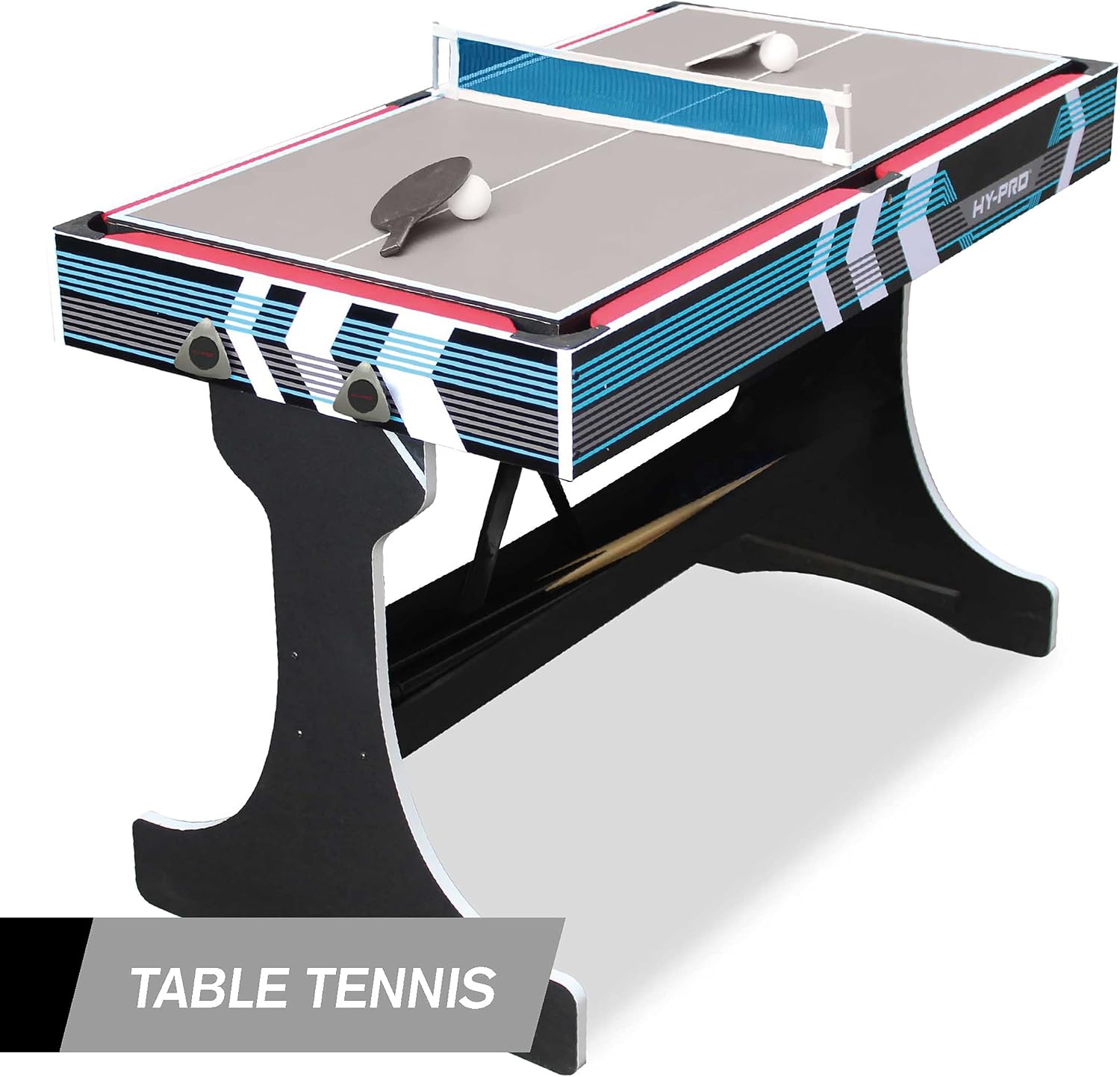
Image: The Hy-Pro Metron table displaying multiple smaller games, including Mini Bowling, Shuffleboard, and Puck Sling.

Image: A detailed view of the Hy-Pro Metron table's interchangeable boards for Puck Sling, Shuffleboard Ultra, Shuffleboard, and Mini Bowling.
10. Chess, 11. Checkers, 12. Cards, 13. Dominoes
For these classic board and card games, place the appropriate game board (for Chess/Checkers) or use the flat table surface (for Cards/Dominoes). Set up the pieces according to the game's standard rules. These games are played directly on the table surface or on a dedicated game board insert.
Maintenance
- Cleaning: Wipe down all surfaces with a soft, damp cloth. For stubborn marks, a mild soap solution can be used, followed by wiping with a clean, damp cloth. Avoid abrasive cleaners or solvents that could damage the finish.
- Storage: When not in use, store all game pieces in the designated storage tray. Fold the table into its vertical storage position to protect the game surfaces and save space. Store in a dry environment away from direct sunlight and extreme temperatures.
- Inspection: Periodically check all screws, bolts, and connections to ensure they are tight. Re-tighten if necessary to maintain stability and safety.
- Game Boards: Handle game boards carefully when changing them to prevent scratches or damage.
Troubleshooting
- Table is Wobbly: Ensure all leg connections and frame screws are securely tightened. Verify the table is placed on a flat, level surface.
- Game Board Does Not Sit Flush: Check for any obstructions or debris on the table frame or the underside of the game board. Ensure the board is correctly aligned with the frame.
- Missing or Damaged Parts: If any parts are missing or damaged upon arrival, please contact Hy-Pro customer support immediately for assistance.
- Air Hockey Puck Not Gliding: Ensure the power puck is fully charged. Check the surface for any dirt or debris that might impede movement.
- Foosball Rods Sticking: Apply a small amount of silicone lubricant (not oil-based) to the rods where they pass through the table frame if they become difficult to move.
Specifications
| Feature | Detail |
|---|---|
| Brand | Hy-Pro |
| Model Number | HP07900 |
| Product Dimensions | 45.7"L x 27.6"W x 5.7"H |
| Item Weight | 64.1 Pounds |
| Material | Plastic |
| Assembly Required | Yes |
| Number of Players | 2-4 players |
| Recommended Age | 5 years and up |
| Included Games | Foosball, Domino, Air Hockey, Billiard, Table Tennis, Checkers, Chess, Cards, Archery, Dart Gun, Mini Bowling, Shuffleboard, Puck Sling, Work Desk, Whiteboard/Easel |
Warranty and Support
Hy-Pro products are manufactured to high-quality standards. For information regarding warranty coverage, product support, or to order replacement parts, please refer to the contact information provided with your purchase documentation or visit the official Hy-Pro website. Please have your model number (HP07900) and purchase date available when contacting support.