
Introduction
The BRIGHT BEACON40® Light Therapy Gamma Lamp is designed to support cognitive wellness through 40Hz gamma wave light stimulation. This device aims to encourage brainwave activity associated with improved sleep, mental clarity, and cognitive sharpness. Its modern design and effortless setup make it a suitable addition to various environments.

Figure 1: The BRIGHT BEACON40® Light Therapy Gamma Lamp.
Setup
The BEACON40® lamp is designed for plug-and-go simplicity. Follow these steps for initial setup:
- Unpack: Carefully remove the BEACON40® lamp and its components from the packaging. Ensure all included components, such as the remote control, are present.
- Placement: Place the lamp on a stable, flat surface in your desired location. The lamp is designed for indoor use, suitable for rooms like an office or living area.
- Power Connection: Connect the provided power cord to the lamp's USB port and then plug it into a standard electrical outlet.
- Initial Power On: The lamp is ready for use once connected to power. You can power it on using the power button on the base or the remote control.

Figure 2: The BEACON40® lamp can be used in various indoor settings.
Operating Instructions
The BEACON40® lamp offers multiple control methods for ease of use, including touch controls on the base, a remote control, and app/voice control via iOS and Android devices.
Controls Overview
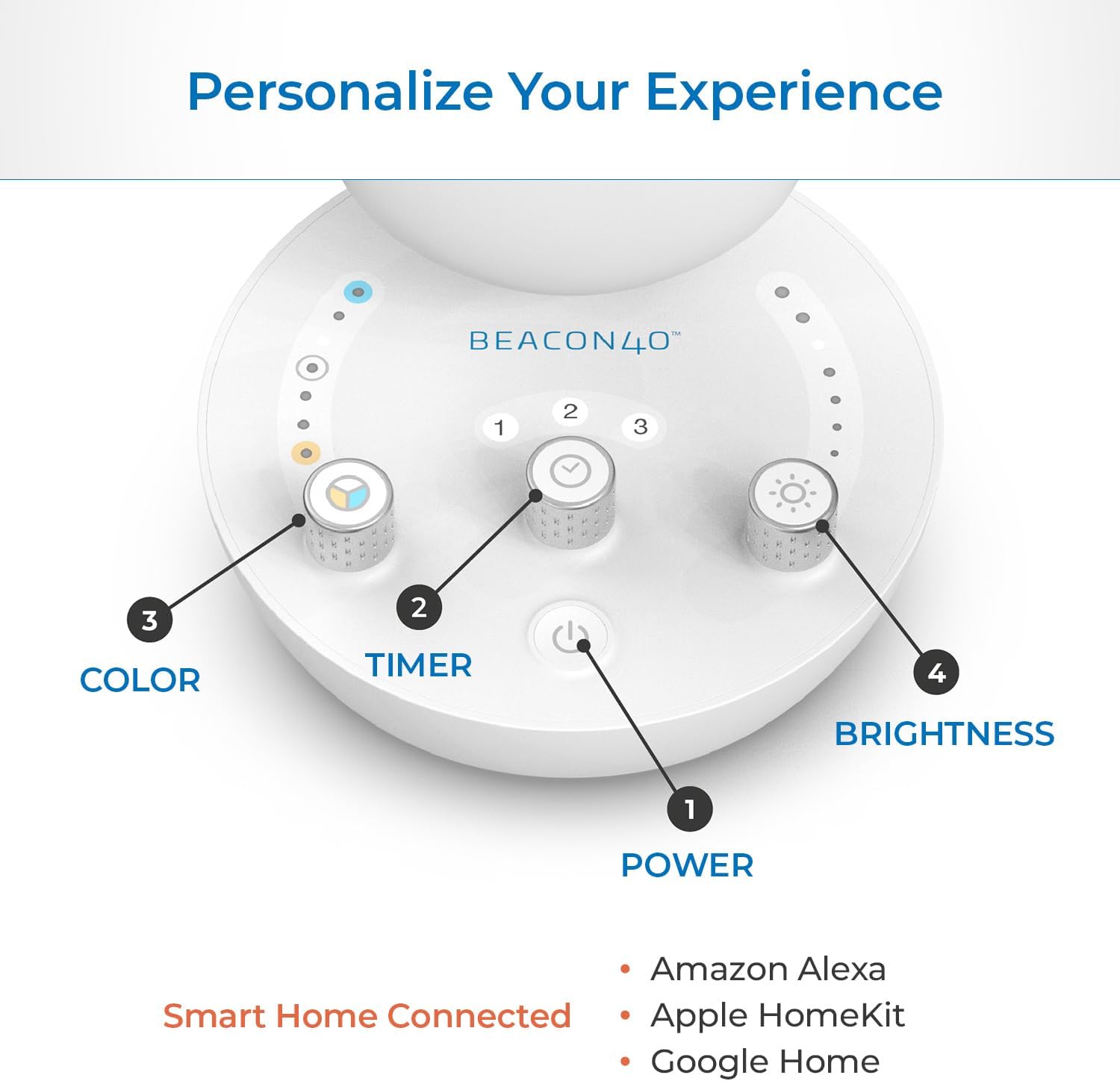
Figure 3: Base controls of the BEACON40® lamp.
- Power Button (1): Located at the center of the base. Press to turn the lamp ON or OFF.
- Timer Control (2): Adjust the session duration. The lamp offers preset timer options.
- Color Control (3): Adjust the light color temperature. The lamp supports various color tones.
- Brightness Control (4): Adjust the light intensity. The lamp is dimmable.
Powering On/Off
To power on the lamp, press the power button on the base or the corresponding button on the remote control. To power off, press the same button again.
Video 1: Demonstrating how to turn the BEACON40® lamp on and off using the power button on the base.
Adjusting Color and Brightness
Use the dedicated color and brightness controls on the lamp's base or remote to customize your light therapy experience. The lamp offers flicker-free illumination and adjustable settings to suit individual preferences.

Figure 4: The BEACON40® lamp features adjustable color and brightness settings.
Maintenance
Proper maintenance ensures the longevity and optimal performance of your BEACON40® lamp.
- Cleaning: Gently wipe the lamp's surface with a soft, dry cloth. Avoid using abrasive cleaners or solvents, as they may damage the finish. The lamp is dust resistant.
- Storage: When not in use for extended periods, store the lamp in a cool, dry place away from direct sunlight and extreme temperatures.
- Handling: Handle the lamp with care to prevent damage. Avoid dropping or subjecting it to strong impacts.
Troubleshooting
If you encounter issues with your BEACON40® lamp, refer to the following common troubleshooting steps:
| Problem | Possible Cause | Solution |
|---|---|---|
| Lamp does not turn on. | No power connection or faulty outlet. | Ensure the power cord is securely plugged into both the lamp and a working electrical outlet. Test the outlet with another device. |
| Light flickers or is inconsistent. | Loose connection or power fluctuation. | Check all connections. If the issue persists, try plugging into a different outlet. The lamp is designed to be flicker-free. |
| Remote control not responding. | Dead batteries or obstruction. | Replace the remote control batteries. Ensure there are no obstructions between the remote and the lamp. |
If these steps do not resolve the issue, please contact customer support for further assistance.
Specifications
| Feature | Detail |
|---|---|
| Brand | BRIGHT |
| Model | Personal |
| Product Dimensions | 5"D x 5"W x 10.5"H (12.7 cm x 12.7 cm x 26.67 cm) |
| Item Weight | 2.29 pounds |
| Material | Plastic, Acrylonitrile Butadiene Styrene |
| Light Source Type | LED |
| Special Features | Dust Resistant, Dimmable, Flicker-Free |
| Power Source | Corded Electric |
| Control Method | App, Touch, Voice |
| Connectivity Technology | USB |
| Included Components | Remote control |
| Country of Origin | China |
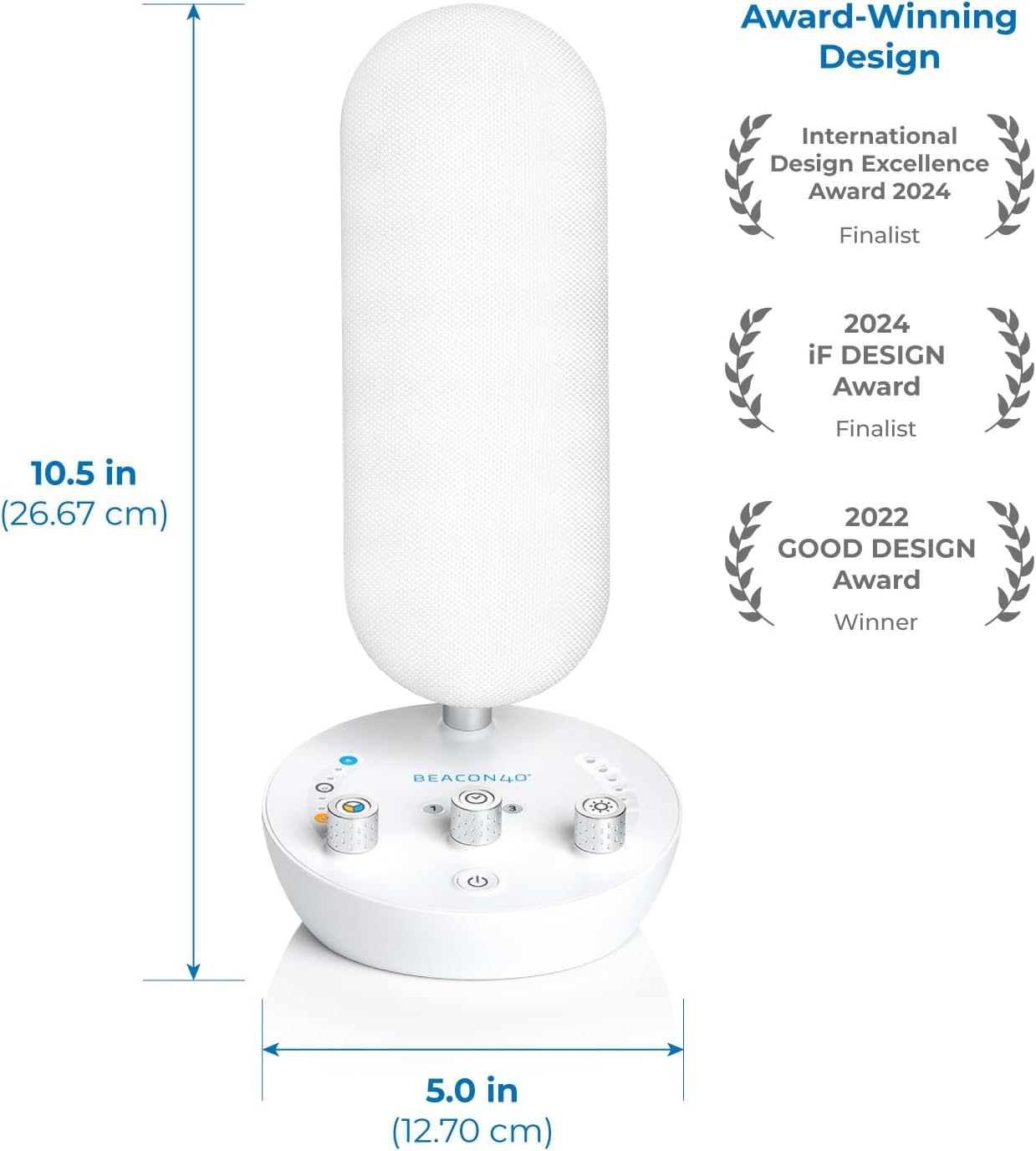
Figure 5: Physical dimensions of the BEACON40® lamp.
Warranty & Support
For detailed warranty information and customer support, please refer to the official BRIGHT website or the documentation provided with your purchase.
- User Manual (PDF): An electronic version of the user manual is available for download: Download PDF User Manual
- Protection Plans: Extended protection plans may be available for purchase. Please check with your retailer for options such as 3-Year or 4-Year Protection Plans.
- Manufacturer Support: For direct assistance, contact BRIGHT Company customer service.


