
Walfront D52-2066
Walfront D52-2066 Single Phase Energy Meter Instruction Manual
Model: D52-2066
Product Overview
The Walfront D52-2066 is a single-phase energy meter designed for monitoring electricity usage in both household and industrial settings. It features a full viewing angle colorful LCD screen that simultaneously displays six key electrical parameters: AC voltage, AC current, active power, power factor, frequency, and electric energy (kWh).
This compact and lightweight device is suitable for DIN rail installation, making it a practical solution for various applications including chemical industry, power plants, automation equipment, and electromechanical systems. Its design allows for easy monitoring of total electricity consumption.

The Walfront D52-2066 Single Phase Energy Meter, showcasing its colorful LCD display and compact design.
Key Features:
- LCD Screen: Full viewing angle colorful LCD screen for clear readability.
- 6 Parameters Display: Simultaneously displays AC voltage, AC current, active power, power factor, frequency, and electric energy.
- Energy Monitoring: Allows for continuous monitoring of household or industrial electricity consumption.
- Wide Application: Suitable for chemical industry, power plants, automation equipment, DOS systems, and electromechanical equipment.
- Compact Design: Small size and lightweight for easy installation and portability.
Specifications
| Parameter | Value |
|---|---|
| Item Type | Watt‑Hour Meter |
| Model | D52-2066 |
| Material | ABS |
| Measurement Accuracy | 1%±2 Words |
| AC Voltage Measuring Range | AC 40.0-300.0V |
| AC Current Measuring Range | AC 0-100.0A |
| Current Display Resolution | 0.01A |
| Power Frequency | 45.0Hz-65.0Hz |
| Power Factor | 0.00-1.00PF |
| Measurement Speed | About 2 times per second |
| Installation Method | Rail Type |
| Package Dimensions | 3.39 x 2.91 x 2.32 inches |
| Item Weight | 4.94 ounces |
Note: The measuring voltage range of this instrument is 40-300V and is only suitable for pure AC 45-65Hz mains power.
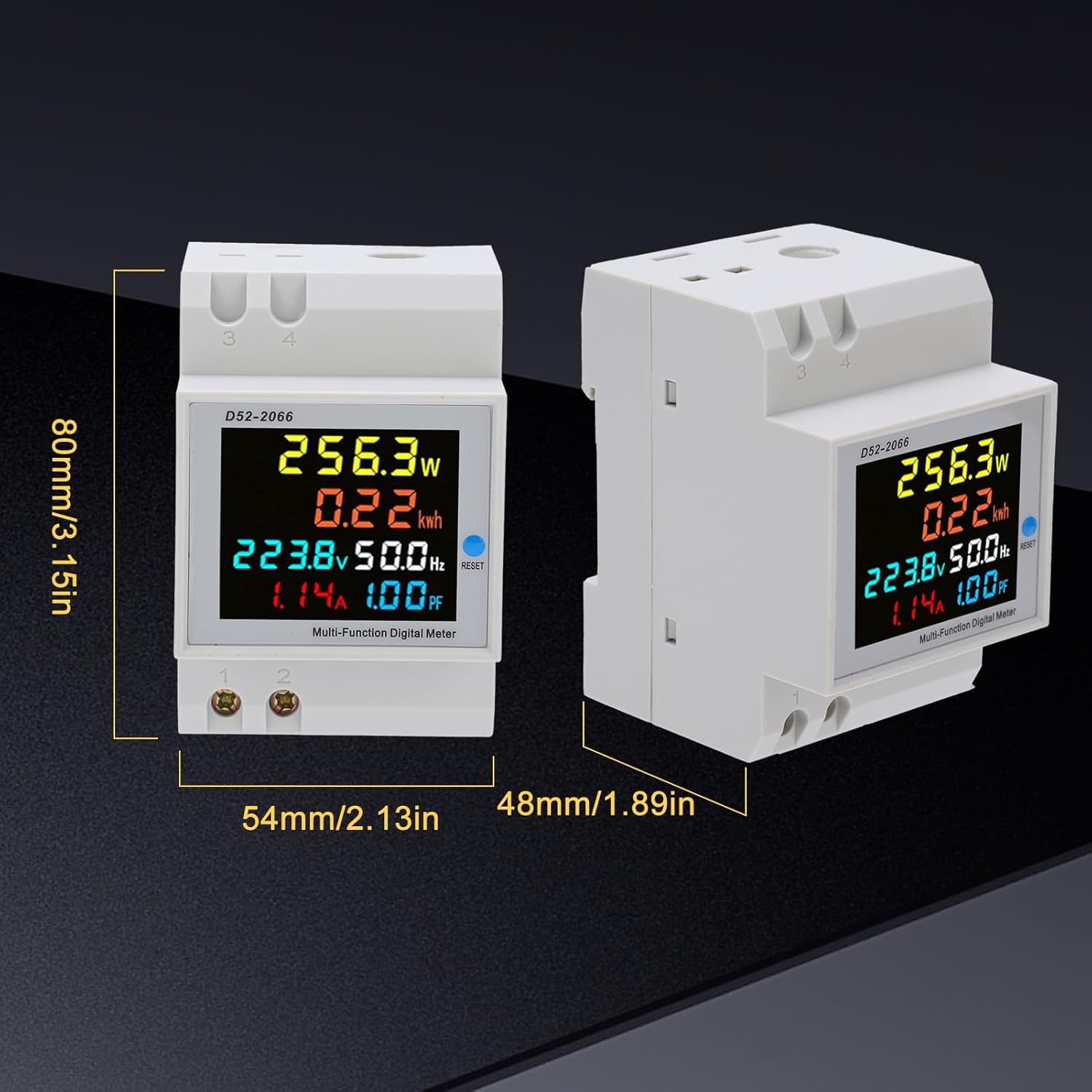
Visual representation of the D52-2066 meter's dimensions: approximately 80mm (3.15in) height, 54mm (2.13in) width, and 48mm (1.89in) depth.
Setup and Installation
The D52-2066 energy meter is designed for easy installation on a DIN rail. Follow the instructions below for proper wiring.
Wiring Instructions:
- Connect Measured Voltage: Connect the AC voltage to be measured to terminals 1 and 2 located on the bottom left of the meter.
- Built-in Transformer Wiring (Figure 2):
For using the built-in transformer, pass the wire of the measurement circuit through the circular hole on the top of the meter and out from the bottom. The penetration direction can be chosen arbitrarily by the user. The 3 and 4 terminals are not used in this configuration.

Figure 2: Wiring diagram for the built-in transformer. This diagram shows how to pass the load wire through the meter's internal current transformer. The AC measurement input connects to terminals 1 and 2. The load electrical appliances are connected in series with the wire passing through the meter's sensing hole.
- External Transformer Wiring (Figure 1):
If using an external current transformer (CT), connect the two wires from the secondary end of the external CT to terminals 3 and 4 on the upper left of the meter. Then, pass the wire of the measurement circuit through the external CT. The load wire passing through the transformer is not polarized; simply pass it through one at a time.
Figure 1: Wiring diagram for an attached (external) transformer. This diagram illustrates connecting an external current transformer (CT) to terminals 3 and 4, with the load wire passing through the external CT. AC measurement input connects to terminals 1 and 2.
After wiring, the meter will display measurement parameters once power is supplied.

An example of a typical wiring setup showing the energy meter connected within a circuit with multiple circuit breakers. This setup allows for clear monitoring of electricity consumption for various household appliances.
Operating Instructions
The D52-2066 meter provides real-time display of various electrical parameters on its colorful LCD screen.
Display Parameters:
The meter simultaneously displays the following six parameters:
- AC Voltage (V)
- AC Current (A)
- Active Power (W)
- Power Factor (PF)
- Frequency (Hz)
- Electric Energy (kWh)

The meter's LCD display showing the six measured parameters: AC Voltage, AC Current, Active Power, Power Factor, Frequency, and Electric Energy (kWh). Each parameter is clearly labeled and displayed with its corresponding unit.
Resetting Energy Measurement (kWh):
To reset the accumulated energy measurement (kWh) to zero, follow these steps:
- Locate the "RESET" button on the right side of the instrument panel.
- Press and hold the "RESET" button for approximately 5 seconds.
- Continue holding until the energy display (kWh) shows "0".
- Release the button. The electrical energy measurement will now start from zero.

A close-up view of the D52-2066 meter highlighting the "RESET" button and the clear LCD screen. This button is used to clear the accumulated energy (kWh) reading.
Maintenance
To ensure the longevity and accurate performance of your D52-2066 energy meter, follow these general maintenance guidelines:
- Cleaning: Use a soft, dry cloth to clean the meter's exterior. Do not use abrasive cleaners or solvents, as they may damage the display or casing.
- Environment: Install the meter in a dry, well-ventilated area, away from direct sunlight, excessive heat, humidity, and corrosive gases.
- Handling: Handle the meter with care to avoid physical damage. Ensure all connections are secure and free from dust or debris.
- Inspection: Periodically inspect the wiring connections for any signs of wear, corrosion, or loosening.
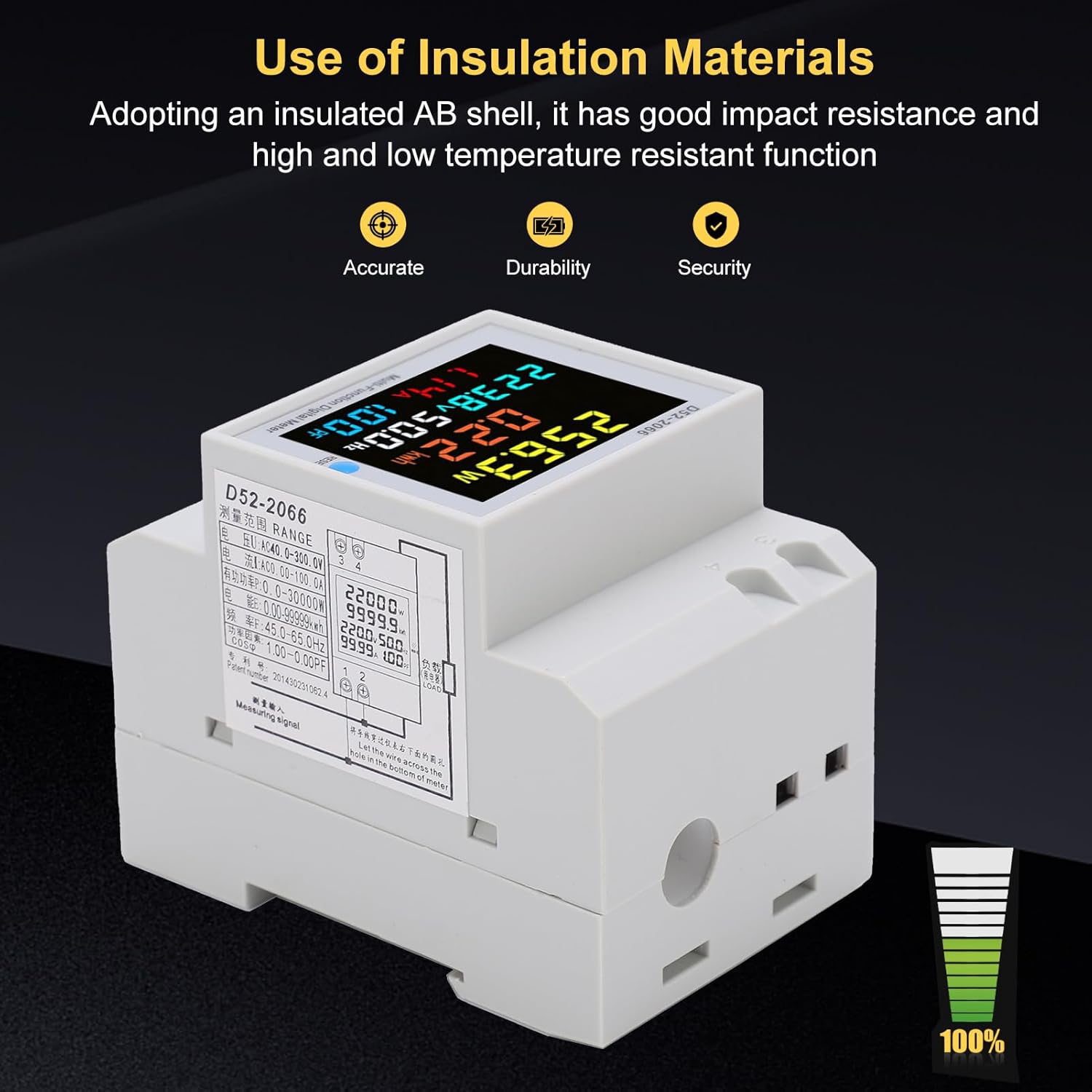
The D52-2066 meter is constructed with insulated ABS shell materials, providing good impact resistance and high/low temperature resistance. This contributes to its accuracy, durability, and security in various operating environments.
Troubleshooting
If you encounter issues with your D52-2066 energy meter, refer to the following common troubleshooting tips:
| Problem | Possible Cause | Solution |
|---|---|---|
| Meter not powering on/displaying | No power supply; incorrect wiring; voltage outside range. |
|
| Inaccurate readings | Incorrect CT connection (for external CT); wire not properly passed through built-in CT; interference. |
|
| kWh reading not resetting | Button not held long enough. | Press and hold the "RESET" button for a full 5 seconds until the display clears to zero. |
| Display flickering or unstable | Unstable power supply; environmental factors. |
|
If the problem persists after attempting these solutions, please contact Walfront customer support for further assistance.
Warranty and Support
Walfront products are manufactured to high-quality standards. For information regarding warranty coverage, please refer to the documentation included with your purchase or visit the official Walfront website.
For technical support, troubleshooting assistance beyond this manual, or inquiries about replacement parts, please contact Walfront customer service. Keep your product model number (D52-2066) and purchase details ready when contacting support.
A detailed manual is included in the product package for comprehensive guidance.
Ask a question about this manual
Ask about setup, troubleshooting, compatibility, parts, safety, or missing instructions. Manuals+ will review the question and use this page’s manual context to help answer it.