1. Introduction
This manual provides detailed instructions for the assembly, operation, maintenance, and troubleshooting of your Oversteel ULTIMET Professional Gaming Chair. Please read this manual thoroughly before assembly and use to ensure proper function and safety.
2. Safety Warnings
- Ensure all components are securely fastened before use.
- Do not stand on the chair.
- Do not use the chair if any parts are damaged or missing. Contact customer support for replacement parts.
- Keep children and pets away during assembly. Small parts may pose a choking hazard.
- Avoid exposing the chair to direct sunlight or extreme temperatures to prevent material degradation.
- The maximum weight capacity for this chair is 120 kg (264 lbs). Do not exceed this limit.
3. Package Contents
Please verify that all parts are present before beginning assembly. If any parts are missing or damaged, please contact customer support.
- Backrest
- Seat Base
- Armrests (2)
- Gas Lift Cylinder (Class 3)
- Gas Lift Cover
- Star Base (Nylon, 350mm)
- Casters (5)
- Tilt Mechanism
- Neck Cushion
- Lumbar Cushion
- Hardware Kit (screws, washers, Allen key)
4. Assembly Instructions
Follow these steps carefully to assemble your Oversteel ULTIMET Gaming Chair.
- Attach Casters to Star Base: Insert each of the five casters into the holes at the end of the star base until they click securely into place.
- Insert Gas Lift: Place the gas lift cylinder into the center hole of the star base. Cover it with the gas lift cover.
- Attach Tilt Mechanism to Seat Base: Align the tilt mechanism with the pre-drilled holes on the underside of the seat base. Ensure the front of the mechanism faces the front of the seat. Secure with screws and washers from the hardware kit.
- Attach Armrests to Seat Base: Secure the armrests to the sides of the seat base using the provided screws. Do not overtighten initially to allow for minor adjustments.
- Attach Backrest to Seat Base: Align the backrest brackets with the mounting points on the seat base and armrests. Secure with screws. Once all screws are in place, tighten all armrest and backrest screws firmly.
- Connect Seat to Gas Lift: Carefully place the assembled seat onto the gas lift cylinder, ensuring the center hole of the tilt mechanism aligns with the top of the gas lift. Apply gentle downward pressure to secure.
- Attach Cushions: Position the neck cushion and lumbar cushion as desired. The lumbar cushion typically attaches with straps around the backrest.

Image: Side view of the chair, illustrating the recline mechanism and armrest attachment points.
5. Operating Instructions
Your Oversteel ULTIMET Gaming Chair offers several adjustment options for personalized comfort.
5.1. Height Adjustment
To adjust the chair's height, locate the lever on the right side, beneath the seat. While seated, pull the lever up to lower the chair. To raise the chair, stand up and pull the lever up. Release the lever at the desired height.
5.2. Backrest Recline
The backrest can recline up to 180 degrees. Locate the recline lever on the right side of the chair, near the seat. Pull the lever up and lean back to recline. Release the lever to lock the backrest in position. To return to an upright position, pull the lever and lean forward.
5.3. Armrest Adjustment (2D)
The armrests are 2D adjustable, meaning they can be adjusted in height and angle.
- Height: Press the button on the side of each armrest and move the armrest up or down. Release the button to lock.
- Angle: Rotate the top of the armrest pad left or right to adjust its angle.
5.4. Tilt Mechanism
The chair features a tilt mechanism at the base. A knob beneath the seat (usually at the front) controls the tension of the tilt. Turn clockwise to increase tension (making it harder to tilt) and counter-clockwise to decrease tension (making it easier to tilt). A separate lever (often the same as the height adjustment lever, pushed inwards) can lock or unlock the tilt function.

Image: Front view of the Oversteel ULTIMET Gaming Chair, highlighting its ergonomic features and adjustable components.
6. Maintenance
Proper care will extend the life of your gaming chair.
- Cleaning: For the breathable fabric, use a soft cloth dampened with mild soap and water. Avoid harsh chemicals or abrasive cleaners. Spot clean as needed.
- Inspection: Periodically check all screws and bolts to ensure they are tight. Retighten if necessary.
- Casters: Clean casters regularly to remove dust and debris that may hinder smooth movement.
- Avoid Overloading: Do not exceed the maximum weight capacity of 120 kg.
7. Troubleshooting
If you encounter issues with your chair, refer to the following common problems and solutions.
- Chair Sinks or Does Not Hold Height:
Possible Cause: Gas lift cylinder malfunction.
Solution: Ensure the height adjustment lever is fully engaged. If the problem persists, the gas lift may need replacement. Contact customer support. - Chair Wobbles:
Possible Cause: Loose screws or uneven assembly.
Solution: Check and tighten all assembly screws, especially those connecting the seat to the backrest and the tilt mechanism. Ensure the chair is on a flat, even surface. - Casters Not Rolling Smoothly:
Possible Cause: Debris in casters or damaged casters.
Solution: Remove any hair or debris from the caster wheels. If casters are damaged, they may need replacement. - Backrest Does Not Recline or Lock:
Possible Cause: Recline mechanism obstruction or malfunction.
Solution: Ensure the recline lever is fully engaged. Check for any obstructions. If the mechanism is faulty, contact customer support.
8. Specifications
| Feature | Detail |
|---|---|
| Brand | Oversteel |
| Model | ULTIMET (NAT-OV-ULTIMET-FBBLACK) |
| Color | Black (Available in other colors: Black-White, Black-Blue, Grey-Grey, Grey-White, Grey-Blue) |
| Material | Premium breathable fabric, High-density foam, Nylon frame |
| Max Weight Capacity | 120 kg (264 lbs) |
| Gas Lift | Class 3 |
| Base | 350mm Nylon Star Base |
| Casters | 50mm |
| Armrests | 2D Adjustable (Height and Angle) |
| Backrest Recline | Up to 180 degrees |
| Included Accessories | Customizable Neck Cushion, Lumbar Cushion |
8.1. Dimensions

Image: Chair dimensions in inches.
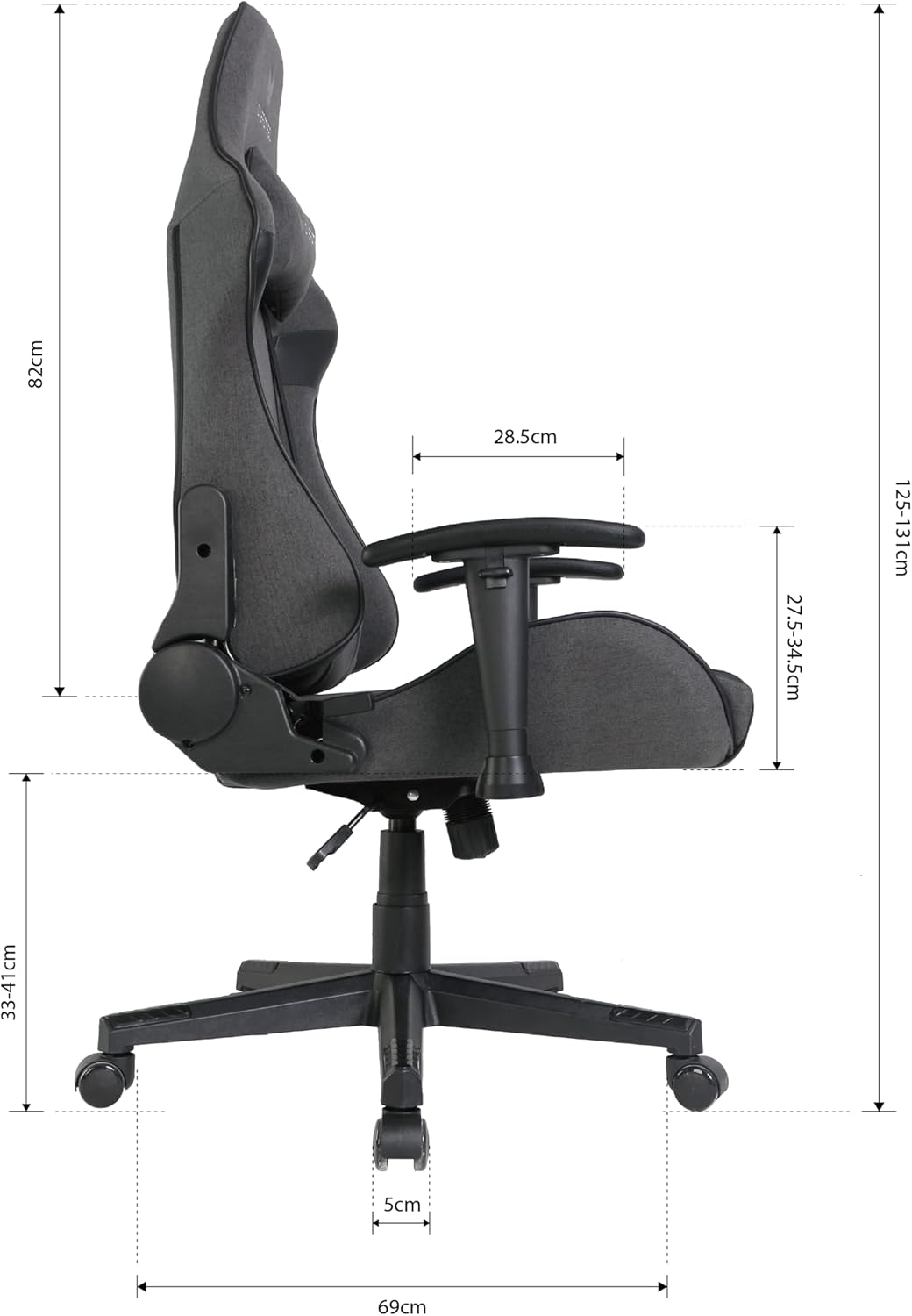
Image: Chair dimensions in centimeters.
- Overall Product Dimensions (approx.): 69 cm (D) x 55.5 cm (W) x 131 cm (H)
- Seat Height Range: 33 cm - 41 cm
- Backrest Height: 82 cm
- Item Weight: 19.5 kg
9. Warranty Information
The Oversteel ULTIMET Professional Gaming Chair comes with a 3-year warranty from the date of purchase. This warranty covers manufacturing defects and material flaws under normal use. It does not cover damage resulting from misuse, accidents, unauthorized modifications, or normal wear and tear. Please retain your proof of purchase for warranty claims.
10. Customer Support
For any questions, assistance with assembly, troubleshooting, or warranty claims, please contact Oversteel customer support through your retailer or the official Oversteel website. Please have your model number (NAT-OV-ULTIMET-FBBLACK) and proof of purchase ready when contacting support.


