
REIGY 5MP Light Kit NO hdd-EU
REIGY 5MP Wireless Outdoor Surveillance System User Manual
Model: 5MP Light Kit NO hdd-EU
Introduction
This manual provides comprehensive instructions for the setup, operation, maintenance, and troubleshooting of your REIGY 5MP Wireless Outdoor Surveillance System. Please read this manual carefully before using the product to ensure proper installation and functionality.

Image: The REIGY 5MP Wireless Outdoor Surveillance System, including the NVR unit and four wireless cameras, with a 2TB HDD icon indicating storage capacity.
Package Contents
Before proceeding with installation, verify that all components are present in your package:

Image: A visual representation of all included accessories: 1x 8CH NVR Recorder, 4x 2-Way Audio Cameras, 1x Ethernet Cable & Mouse, 1x Wifi Extension Antenna, 4x Camera & NVR Adapters, and 4x Screw & Waterproof Joints.
- 1x 8-Channel NVR Recorder (with 2TB HDD pre-installed)
- 4x 5MP Wireless Cameras with Two-Way Audio
- 1x Power Adapter for NVR
- 4x Power Adapters for Cameras
- 1x USB Mouse
- 1x Ethernet Cable
- 1x WiFi Extension Antenna
- Mounting Screws and Waterproof Joints for cameras
Setup Guide
1. Initial NVR Connection
- Connect the NVR to your router using the provided Ethernet cable.
- Connect the NVR to a TV or monitor using an HDMI or VGA cable (not included) to display the main menu.
- Connect the NVR to a power source using its dedicated power adapter.
- Connect each camera to a power source using its dedicated power adapter.
- Once powered on, the cameras will automatically pair with the NVR. You should see live video feeds on your connected monitor within 60 seconds.
- Note: There is no initial password for the NVR. You can proceed directly to the operation page.

Image: Diagram illustrating the connections on the back panel of the NVR, including ports for display, router, mouse, and power supply.
2. Remote Viewing Setup (Mobile App)
To access your surveillance system remotely via your smartphone, tablet, or computer, follow these steps:
- Download the official REIGY surveillance app (e.g., "Eseecloud" or similar, as indicated in product images) from your device's app store.
- Scan the QR code displayed on the NVR's main menu using the app to add your device.
- Ensure your NVR is connected to the internet via your router.
- Follow the in-app instructions to complete the setup and begin remote viewing.
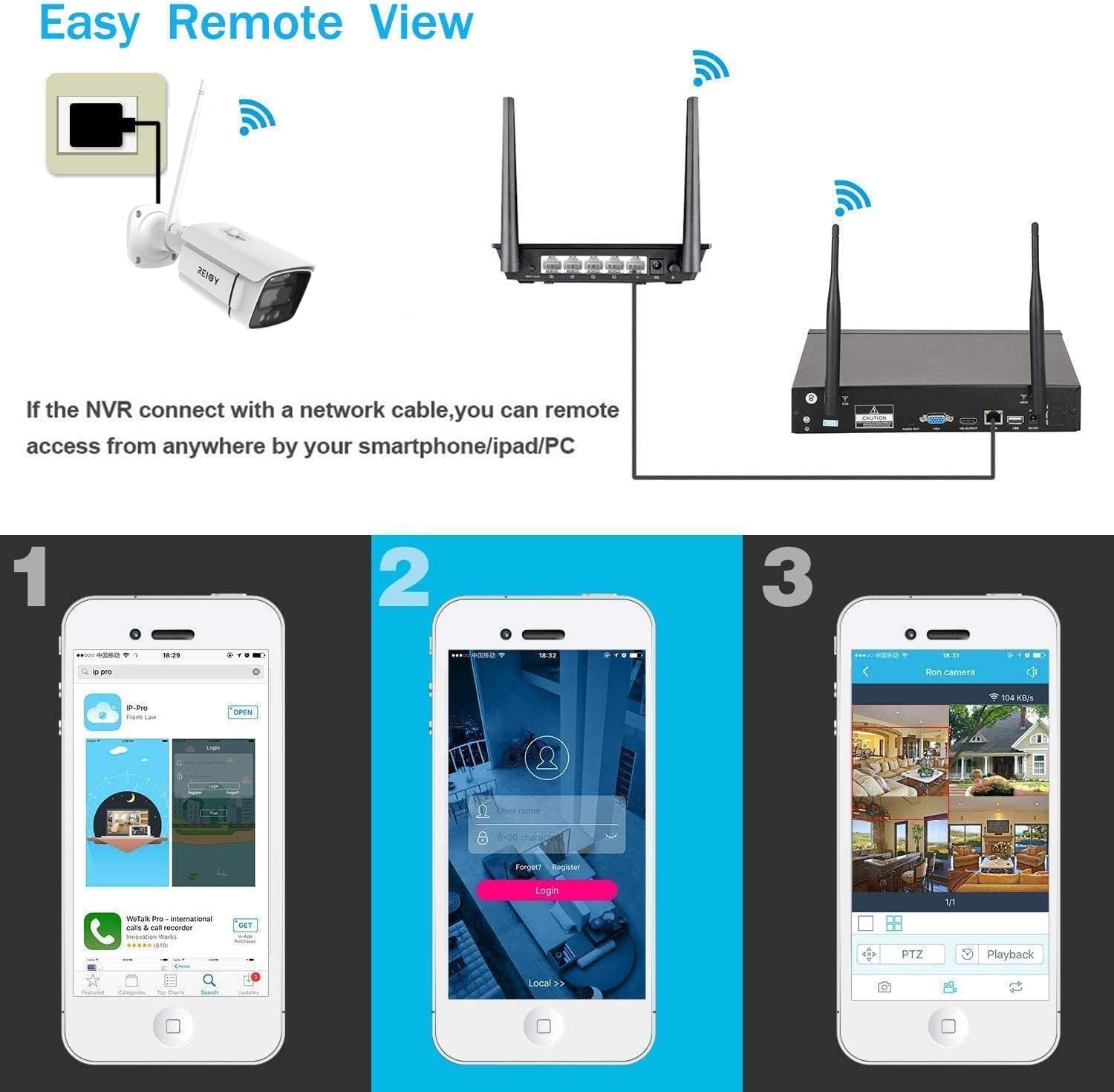
Image: Visual guide showing the process of setting up remote viewing, including downloading the app, logging in, and viewing live camera feeds.

Image: Screenshots demonstrating the mobile application's features, including QR code scanning for Wi-Fi connection, alarm notifications, and one-click sharing for multiple viewers.
Operating Instructions
1. Live View and Playback
From the NVR's main menu or the mobile app, you can view live feeds from all connected cameras simultaneously. You can also access recorded footage for playback.

Image: A visual comparison demonstrating the superior clarity of 5.0MP (2560x1920) resolution compared to 2.0MP (1920x1080) and 1.0MP (1280x720).
2. Two-Way Audio
Each camera is equipped with a built-in speaker and microphone. This feature allows you to communicate with individuals near the camera or deter intruders remotely through the mobile app.

Image: A scenario depicting the two-way audio function, where a user can speak through the camera to a person at the door, and receive audio from the camera.
3. Night Vision Modes
The system offers multiple night vision modes to ensure clear visibility in low-light conditions:
- IR Night Vision: Standard black and white night vision using infrared lights.
- Color Night Vision: Activates built-in spotlights to provide full-color video even in complete darkness. Spotlights automatically turn on when ambient light is low.

Image: A visual comparison showing the difference between standard day vision, black and white infrared night vision, and full-color night vision with spotlights activated.
4. Motion Detection and Alerts
The cameras are equipped with motion sensors. When unexpected movement is detected, the system can send immediate email notifications to your configured address.
5. System Expansion
This 8-channel NVR system comes with 4 cameras and can be expanded by adding up to 4 additional 1920P cameras (compatible models like B0B3JSMSJJ) for a total of 8 surveillance channels.

Image: Diagram illustrating the wireless signal repeater function between cameras and the NVR, and how the system can be expanded from 4 to 8 cameras.
Maintenance
- Regular Cleaning: Periodically clean the camera lenses and NVR unit with a soft, dry cloth to ensure optimal performance and clear image quality.
- Connection Check: Ensure all power and network cables are securely connected to prevent signal loss or power interruptions.
- Firmware Updates: Check the manufacturer's website or app for any available firmware updates to ensure your system has the latest features and security enhancements.
- Storage Management: The system utilizes H.265 video compression, which is more efficient than H.264, allowing for longer recording times on the 2TB HDD. Regularly review recorded footage and back up important events if needed.

Image: A bar chart comparing the memory capacity efficiency of H.265 versus H.264 video compression, showing H.265 requires less storage for the same amount of footage.
Troubleshooting
- No Video Feed:
- Ensure all cameras and the NVR are properly powered on.
- Verify that the NVR is correctly connected to your monitor/TV.
- Check if cameras are within range of the NVR's wireless signal. Consider using the WiFi Extension Antenna if signal is weak.
- Remote Access Issues:
- Confirm the NVR is connected to your router and has internet access.
- Ensure your mobile device has a stable internet connection.
- Verify that the app is updated to the latest version.
- Motion Detection Not Working:
- Check motion detection settings in the NVR menu or app to ensure it's enabled and sensitivity is adjusted correctly.
- Ensure there are no obstructions blocking the camera's view.
- Poor Night Vision:
- Ensure the camera lens is clean.
- Verify that IR lights or spotlights are not obstructed.
- Check settings to ensure night vision mode is enabled or set to auto.
For further assistance, please refer to the Warranty and Support section.
Specifications
| Brand | REIGY |
| Model Number | 5MP Light Kit NO hdd-EU |
| Video Resolution | 5 Megapixels (2560 x 1920P) |
| NVR Channels | 8 Channels (4 included, expandable to 8) |
| Storage Capacity | 2 TB HDD (pre-installed) |
| Connectivity Technology | Wireless |
| Special Features | Two-Way Audio, Color Night Vision, Motion Detection, Waterproof (IP66) |
| Power Source | Corded Electric (12 Volts) |
| Product Dimensions | 30 x 18 x 14 cm; 4.07 kg |
Warranty and Support
Your REIGY surveillance system comes with a one-year manufacturer's warranty and lifetime technical support.
If you encounter any questions or issues with your product or service, please contact REIGY customer support via email or through the Amazon platform where you purchased the product. Please have your model number and purchase details ready for faster service.
For more information, visit the official REIGY store on Amazon: REIGY Store
Ask a question about this manual
Ask about setup, troubleshooting, compatibility, parts, safety, or missing instructions. Manuals+ will review the question and use this page’s manual context to help answer it.