
Introduction
This manual provides instructions for the Redi-Remote replacement remote control, designed specifically for use with JVC units models LP20878-020A and LP20878-020. This is a custom replacement remote and is not an original JVC product. It is engineered to provide full functionality for the specified JVC models without requiring any programming.
The remote features a sliding cover over its lower half, which reveals additional model-specific functions when opened. Please familiarize yourself with the remote's layout and functions as described in this guide.
Setup
1. Battery Installation
The Redi-Remote requires four (4) AAA batteries for operation. Follow these steps to install them:
- Locate the battery compartment on the back of the remote control.
- Slide open the battery compartment cover.
- Insert four new AAA batteries, ensuring the positive (+) and negative (-) terminals align correctly with the markings inside the compartment.
- Close the battery compartment cover securely.
2. Initial Use
This Redi-Remote is designed for immediate use with compatible JVC models LP20878-020A and LP20878-020. No programming is required. Simply install the batteries, point the remote at your JVC unit, and begin operation.
Operating Instructions
The Redi-Remote provides all essential functions for your JVC unit. It operates using infrared technology and has a maximum effective range of 20 feet.
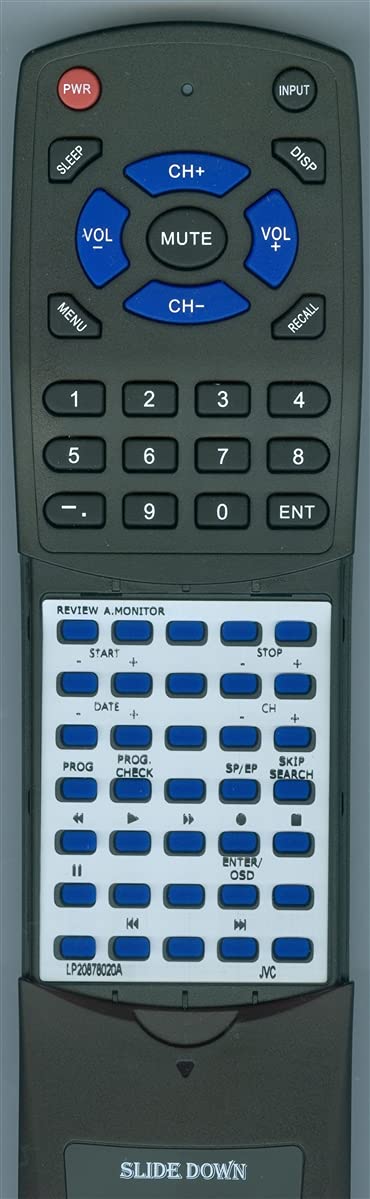
Image of the Redi-Remote replacement remote control, showing its button layout and compact design. Note the sliding cover at the bottom.
Basic Functions
The upper section of the remote typically contains common controls such as Power, Volume Up/Down, Channel Up/Down, Mute, and Input/Source selection. These buttons are clearly labeled.
Advanced Functions (Sliding Cover)
For access to additional model-specific functions, slide down the cover located on the lower half of the remote. This will reveal buttons for menu navigation, playback controls (e.g., Play, Pause, Stop, Rewind, Fast Forward), numerical input, and other advanced settings relevant to your JVC unit.
Important Note: Redi-Remotes are designed to control only the specific unit they are intended for. They cannot be programmed to control any auxiliary devices (e.g., soundbars, DVD players, other TVs).
Maintenance
- Cleaning: To clean the remote, wipe it gently with a soft, dry cloth. Do not use liquid cleaners, aerosols, or abrasive materials, as these can damage the remote's surface or internal components.
- Battery Replacement: Replace all four AAA batteries when the remote's performance degrades or if it stops responding. Always replace with new batteries of the same type. Do not mix old and new batteries, or different types of batteries.
- Storage: If the remote will not be used for an extended period, remove the batteries to prevent leakage, which can cause damage. Store the remote in a cool, dry place.
- Avoid Damage: Do not drop the remote, expose it to extreme temperatures, or immerse it in water.
Troubleshooting
If you encounter issues with your Redi-Remote, please refer to the following common problems and solutions:
- Remote is not responding:
- Check the batteries. Ensure they are inserted correctly with the correct polarity (+/-) and are not depleted. Replace with new AAA batteries if necessary.
- Ensure there is a clear line of sight between the remote's infrared emitter and the JVC unit's IR receiver. Obstructions can block the signal.
- Verify you are within the maximum operating range of 20 feet.
- Certain functions are not working:
- If the function is located under the sliding cover, ensure the cover is fully open to access the button.
- Confirm that the function you are trying to use is supported by your specific JVC model.
- Remember that this remote cannot control auxiliary devices.
- Remote feels sluggish or inconsistent:
- This often indicates low battery power. Replace all batteries.
If these steps do not resolve your issue, please refer to the Support section for further assistance.
Specifications
| Brand | Redi-Remote |
| Model Number | RTLP20878020A |
| Compatible JVC Models | LP20878-020A, LP20878-020 |
| Special Feature | No Programming Required |
| Max Supported Devices | 1 |
| Connectivity Technology | Infrared |
| Button Quantity | 58 |
| Maximum Range | 20 Feet |
| Batteries Required | 4 AAA batteries |
| Item Weight | 5 Ounces |
| Dimensions (L x W x H) | 7 1/2" x 2 1/4" x 3/4" |
Support
If you have any concerns with your Redi-Remote replacement remote control after purchase, or if the troubleshooting steps do not resolve your issue, please contact the seller directly for assistance. They can provide further support and guidance specific to your purchase.
For general inquiries or to learn more about Redi-Remote products, you may visit the Redi-Remote brand page on Amazon.