
Hot Wheels HGV85
Hot Wheels RC Lightyear Spaceship Instruction Manual
Model: HGV85
Introduction
Welcome to the world of intergalactic adventure with your new Hot Wheels RC Lightyear Spaceship! This remote-controlled drone, inspired by Disney and Pixar's Lightyear, allows you to pilot Buzz Lightyear's iconic spaceship with ease. Featuring lights, sounds, and intuitive controls, it's designed for exciting indoor flights. Please read this manual carefully before operation to ensure safe and optimal performance.

The Hot Wheels RC Lightyear Spaceship, its wrist controller, and the included Buzz Lightyear action figure.
What's in the Box
- 1 Hot Wheels Disney and Pixar Lightyear Spaceship
- 1 Wrist Controller
- 1 Buzz Lightyear Action Figure (1.25 inches tall)
- 1 USB Charging Cable
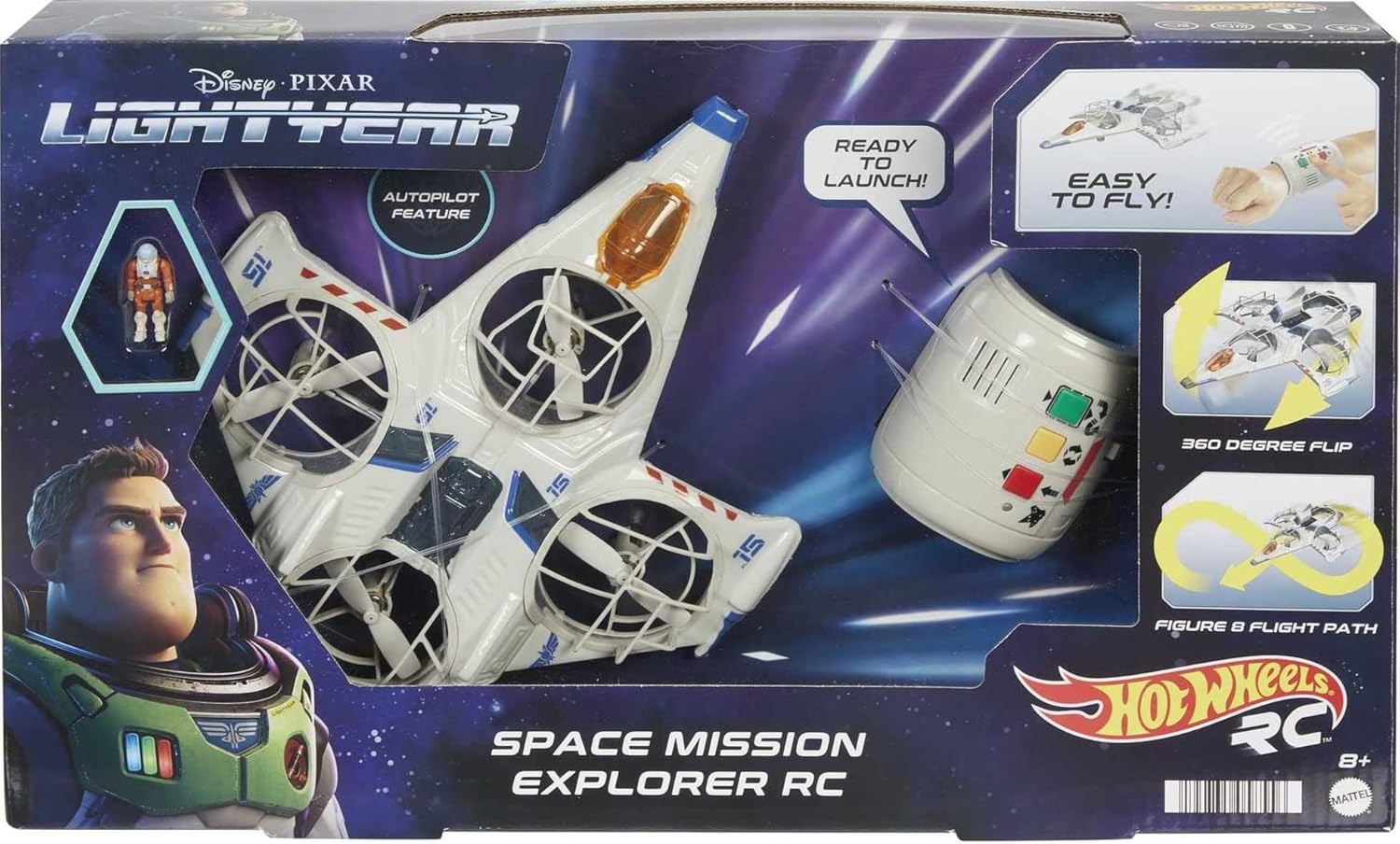
The product packaging, illustrating the main components included in the box.
Setup
1. Charging the Spaceship
The spaceship requires 1 Lithium Polymer battery (included). Use the provided USB charging cable to charge the spaceship. Connect the small end of the USB cable to the charging port on the spaceship and the larger end to a USB power source (e.g., computer USB port, USB wall adapter). The charging indicator light will show the charging status. Allow sufficient time for a full charge before first use.
2. Installing Batteries in the Wrist Controller
The wrist controller requires batteries (not included). Open the battery compartment on the back of the wrist controller. Insert the required number and type of batteries, ensuring correct polarity (+/-). Close the battery compartment securely.
3. Placing Buzz Lightyear Figure
The 1.25-inch Buzz Lightyear action figure fits into the cockpit of the spaceship. Gently open the cockpit canopy and place the figure inside. Close the canopy securely before flight.

A hand carefully placing the Buzz Lightyear action figure into the spaceship's cockpit.

A detailed view of the 1.25-inch Buzz Lightyear action figure.
Operating Instructions
1. Powering On
Ensure both the spaceship and the wrist controller are fully charged/have fresh batteries. Turn on the power switch on the spaceship. Turn on the power switch on the wrist controller. The devices will automatically pair.
2. Wearing the Wrist Controller
Strap the wrist controller to your wrist, similar to how Buzz Lightyear wears his communicator. This allows for intuitive, motion-based control.

The wrist controller worn on a hand, ready for operation.
3. Flight Modes and Controls
The wrist controller is pre-programmed with assorted flight modes. Use the buttons on the controller to select different flight patterns and actions. The spaceship features stabilization and object avoidance, making it easier to fly indoors. Its four propellers ensure steady flight.
- Take-off/Landing Button: Initiates automatic take-off or landing.
- Flight Mode Selection: Cycles through pre-programmed flight sequences (e.g., straight flight, figure-eight, 360-degree flip).
- Emergency Stop: Immediately stops the propellers in case of an emergency.

A child engaging with the RC spaceship using the wrist controller.

The RC spaceship executing a 360-degree flip, demonstrating its maneuverability.

The spaceship's object avoidance feature in action, navigating around furniture.
Maintenance
- Cleaning: Use a soft, dry cloth to wipe down the spaceship and controller. Do not use harsh chemicals or abrasive materials.
- Storage: Store the product in a cool, dry place away from direct sunlight when not in use.
- Battery Care: For long-term storage, ensure the spaceship's battery is partially charged (around 50%) and remove batteries from the wrist controller.
Troubleshooting
| Problem | Possible Cause | Solution |
|---|---|---|
| Spaceship does not respond to controller. | Low battery on spaceship or controller; Not paired. | Charge spaceship battery. Replace controller batteries. Re-pair devices by turning both off and on again. |
| Spaceship does not take off or flies erratically. | Low battery; Obstruction in propellers; Uneven surface for take-off. | Ensure full charge. Check for debris in propellers and clear if necessary. Place on a flat, level surface for take-off. |
| Lights and sounds not working. | Low battery; Feature not activated. | Charge spaceship battery. Refer to controller instructions for activating lights and sounds. |
Specifications
- Product Dimensions: 7.87 x 7.87 x 3.15 inches
- Item Weight: 1.04 pounds
- Item Model Number: HGV85
- Manufacturer Recommended Age: 8 years and up
- Batteries: 1 Lithium Polymer battery required (included for spaceship)
- Manufacturer: Mattel
- Release Date: May 25, 2022
Warranty and Support
For warranty information and customer support, please refer to the contact details provided on the product packaging or visit the official Hot Wheels website. Keep your purchase receipt as proof of purchase for any warranty claims.
Ask a question about this manual
Ask about setup, troubleshooting, compatibility, parts, safety, or missing instructions. Manuals+ will review the question and use this page’s manual context to help answer it.