
Product Overview
The Hot Wheels Monster Trucks Roarin' Wreckers Tiger Shark is a 1:43 scale monster truck designed for interactive play. This model features lights and sounds, including engine noises, crashing sounds, and the vehicle's theme song, activated by pressing a button. The truck also illuminates through its windows, enhancing the play experience. It is part of a collection of Monster Trucks known for their detailed graphics and oversized wheels.

Image: The Hot Wheels Monster Trucks Roarin' Wreckers 1:43 Tiger Shark, showcasing its distinctive tiger-themed design, large wheels, and robust chassis.
Key features include:
- Lights and Sounds: Engine noises, crashing sounds, and theme song activation.
- Illuminated Cab: Lights up through the windows for added realism.
- Scale: 1:43 scale, suitable for handling by younger users.
- Design: Features authentic Hot Wheels Monster Trucks graphics and large, durable wheels.
Package Contents
Verify that all items listed below are present in the package:
- 1 Hot Wheels Monster Trucks Roarin' Wreckers Truck (Tiger Shark model)
- 3 LR44 batteries (pre-installed or included separately)
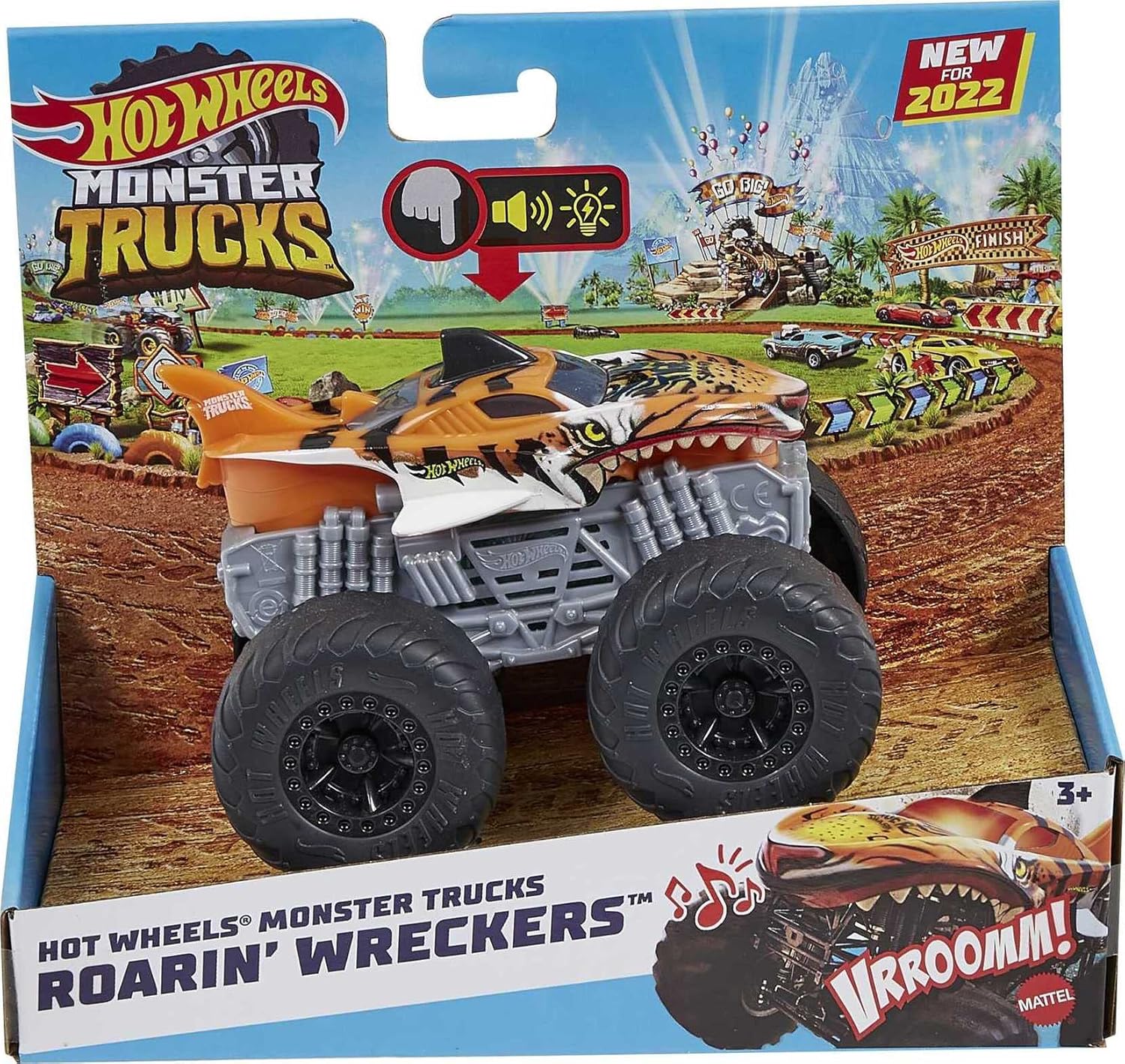
Image: The Hot Wheels Monster Trucks Roarin' Wreckers Tiger Shark in its retail packaging, indicating "NEW FOR 2022" and features like lights and sounds.
Setup
Battery Installation/Replacement
The Hot Wheels Monster Trucks Roarin' Wreckers Tiger Shark requires 3 LR44 button cell batteries. These batteries are typically included and pre-installed. If replacement is necessary, follow these steps:
- Locate the battery compartment on the underside of the truck.
- Using a small Phillips head screwdriver (not included), carefully loosen the screw securing the battery compartment cover.
- Remove the cover.
- Remove the old LR44 batteries and dispose of them properly.
- Insert 3 new LR44 batteries, ensuring the correct polarity (+/-) as indicated inside the compartment.
- Replace the battery compartment cover and tighten the screw securely. Do not overtighten.
Note: Adult supervision is recommended for battery replacement. Keep batteries out of reach of small children.
Operating Instructions
Activating Lights and Sounds
To activate the lights and sounds of your Hot Wheels Monster Trucks Roarin' Wreckers Tiger Shark, locate the activation button on the top of the truck. This button is typically integrated into the design, often resembling a fin or a prominent feature.

Image: A finger pressing down on the top fin of the Tiger Shark monster truck, illustrating the button for activating sounds and lights.
- Press the designated button firmly.
- Upon pressing, the truck will emit engine noises, crashing sounds, and play its unique theme song.
- Simultaneously, the cab of the monster truck will light up, adding a visual effect to the sounds.

Image: A close-up of a hand pressing the activation button on the Tiger Shark monster truck, with overlaid text "PRESS FOR LIGHTS & SOUNDS" to clearly indicate the function.
General Play
The Hot Wheels Monster Trucks are designed for imaginative play. Roll the truck across various surfaces to simulate monster truck action. Combine with other Hot Wheels Monster Trucks (sold separately) for competitive play scenarios.

Image: A child smiling and playing with multiple Hot Wheels monster trucks, including the Tiger Shark, on a white table, demonstrating typical use.
Maintenance
Cleaning
To clean the monster truck, wipe it with a soft, damp cloth. Do not submerge the truck in water or use harsh cleaning agents, as this may damage the electronic components and paint finish.
Storage
Store the truck in a cool, dry place away from direct sunlight when not in use. If storing for an extended period, it is recommended to remove the batteries to prevent leakage.
Troubleshooting
| Problem | Possible Cause | Solution |
|---|---|---|
| No lights or sounds |
|
|
| Sounds are distorted or weak | Low battery power. | Replace batteries. |
| Truck does not roll smoothly | Debris caught in wheels or axles. | Inspect wheels and axles for any obstructions and carefully remove them. |
Specifications
| Feature | Detail |
|---|---|
| Model Number | HDX62 |
| Product Dimensions | 4.61 x 3.23 x 3.39 inches |
| Item Weight | 7.8 ounces |
| Scale | 1:43 |
| Batteries Required | 3 x LR44 (included) |
| Recommended Age | 3 years and up |
| Manufacturer | Mattel |
| Release Date | February 5, 2022 |
Warranty and Support
This product is manufactured by Mattel. For information regarding warranty coverage, product support, or to inquire about replacement parts, please refer to the official Mattel website or contact their customer service department directly. Please retain your proof of purchase for warranty claims.
Disclaimer: Product specifications and features are subject to change without notice. Always refer to the packaging for the most current information.


